හැඳින්වීම
ස්තූතියි, උදව් කළාටasing the DIAFIELD 1byone Ultra-Thin Wireless Keyboard. This manual provides detailed instructions on how to set up, operate, and maintain your new keyboard. Please read this manual thoroughly before use to ensure optimal performance and longevity of your device.
නිෂ්පාදනය අවසන්view
The DIAFIELD 1byone Ultra-Thin Wireless Keyboard is designed for versatility and convenience, featuring a compact design, a multi-function touchpad, and broad compatibility.

Figure 1: DIAFIELD 1byone Wireless Keyboard
ප්රධාන ලක්ෂණ:
- Ultra Portability: Designed for use anywhere, anytime, with your smartphone, tablet, or Smart TV. Its compact design ensures easy transport and quick setup.
- ඒකාබද්ධ ස්පර්ශක පෑඩ්: Features an ultra-thin touchpad that functions as a mouse, supporting various pre-set gestures for convenient navigation. The touchpad can also be disabled if not needed.
- කල් පවතින බැටරි ආයු කාලය: Equipped with a 500 mAh built-in battery, providing up to 4 months of standby time or 90 hours of continuous use on a single charge.
- Spanish QWERTY Layout: Specifically designed for Spanish speakers, including common Spanish symbols and the 'Ñ' key. Ensure your system's keyboard language is set to Spanish for proper functionality.
- බ්ලූටූත් 3.0 සම්බන්ධතාව: Ensures fast and stable connections with tablets and other devices, providing synchronous input without delay. Setup is quick and easy.

Figure 2: Touchpad and Function Keys

Figure 3: Type-C Charging and Battery Life
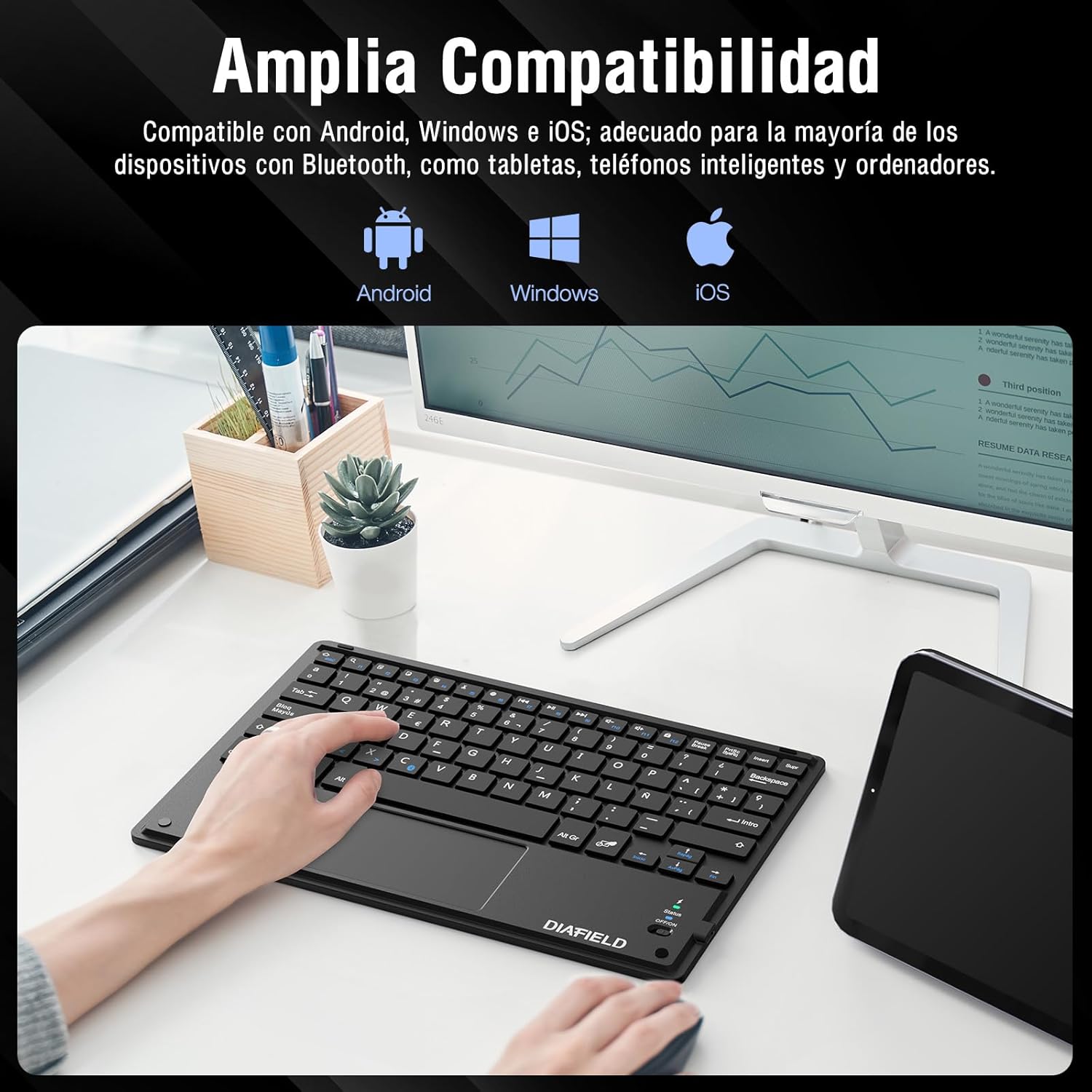
රූපය 4: පුළුල් උපාංග අනුකූලතාව

Figure 5: Scissor-Type Key Mechanism

Figure 6: Compact and Lightweight Design

Figure 7: Multi-touch Gestures

Figure 8: Keyboard in Use with Tablet
සැකසුම් මාර්ගෝපදේශය
1. යතුරු පුවරුව ආරෝපණය කිරීම
Before first use, ensure the keyboard is fully charged. Connect the provided USB-C cable to the keyboard's charging port and the other end to a USB power source (e.g., computer, wall adapter). The charging indicator light will show the charging status.
- Charging time: Less than 4 hours.
- බැටරි ධාරිතාව: 500 mAh.

Figure 9: Charging the Keyboard
2. බ්ලූටූත් යුගලනය
Follow these simple steps to pair your keyboard with your device:
- Turn on the keyboard by sliding the power switch to the "ON" position. The status indicator light will illuminate.
- Activate Bluetooth on your device (tablet, smartphone, computer, Smart TV).
- On your device, search for available Bluetooth devices. The keyboard will appear as "DIAFIELD KEYBOARD" or similar.
- Select the keyboard from the list to initiate pairing. Your device may prompt you to enter a pairing code displayed on the screen. Type this code on the keyboard and press Enter.
- Once paired, the status indicator light on the keyboard will turn off or change color, indicating a successful connection.
The keyboard supports quick connection and pairing with iOS, Android, and Windows systems.

Figure 10: Bluetooth Pairing on a Smartphone
මෙහෙයුම් උපදෙස්
1. ටච් පෑඩ් භාවිතා කිරීම
The integrated touchpad supports various multi-touch gestures to enhance your productivity:
- වම් ක්ලික් කරන්න: Single tap with one finger.
- දකුණු ක්ලික් කරන්න: Tap with two fingers.
- විශාලනය / පිටතට: ඇඟිලි දෙකකින් ඇතුළට හෝ එළියට තද කරන්න.
- Scroll/Explore: Drag two fingers up or down, or left or right.
- වින්ඩෝස් මාරු කරන්න: Swipe three fingers horizontally.
- Open Task Manager (Windows): Swipe three fingers upwards.
Figure 11: Touchpad Multi-touch Gestures
2. ක්රියාකාරී යතුරු
The top row of keys (F1-F12) includes multimedia and shortcut functions. To use these functions, press the Fn අපේක්ෂිත ක්රියාකාරී යතුර සමඟ එකවර යතුර.
| ප්රධාන සංයෝජනය | කාර්යය |
|---|---|
| Fn + Esc | නිවස |
| Fn + F1 | සෙවීම |
| Fn + F2 | පිටපත් කරන්න |
| Fn + F3 | කපනවා |
| Fn + F4 | අලවන්න |
| Fn + F5 | Volume Down |
| Fn + F6 | ශබ්දය වැඩි කරන්න |
| Fn + F7 | පෙර ධාවන පථය |
| Fn + F8 | වාදනය / විරාමය |
| Fn + F9 | ඊළඟ ධාවන පථය |
| Fn + F10 | නිහඬ කරන්න |
| Fn + F11 | සියල්ල තෝරන්න |
| Fn + F12 | තිර අගුල |

Figure 12: Keyboard Function Keys
නඩත්තු කිරීම
Proper maintenance will extend the life of your keyboard:
- පිරිසිදු කිරීම: යතුරුපුවරු මතුපිට පිරිසිදු කිරීම සඳහා මෘදු, වියලි, ලින්ට් රහිත රෙද්දක් භාවිතා කරන්න. මුරණ්ඩු අපිරිසිදුකම සඳහා, තරමක් dampරෙදි කැබැල්ල වතුරෙන් හෝ මෘදු පිරිසිදු කිරීමේ ද්රාවණයකින් පිස දමන්න. අධික තෙතමනය වළක්වා ගන්න.
- ගබඩා: යතුරු පුවරුව සෘජු හිරු එළියෙන් සහ අධික උෂ්ණත්වයන්ගෙන් ඈත්ව සිසිල් වියළි ස්ථානයක ගබඩා කරන්න.
- බැටරි සත්කාර: To preserve battery life, avoid fully discharging the keyboard frequently. If storing for a long period, charge it to about 50% and recharge every few months.
- දියර වලින් වළකින්න: Keep the keyboard away from liquids to prevent damage to internal components.
දෝෂගවේෂණය
පොදු ගැටළු සහ විසඳුම්:
- යතුරුපුවරුව බ්ලූටූත් හරහා සම්බන්ධ නොවේ:
- යතුරුපුවරුව ආරෝපණය කර ක්රියාත්මක කර ඇති බව සහතික කර ගන්න.
- ඔබගේ උපාංගයේ බ්ලූටූත් සබල කර ඇති බවට වග බලා ගන්න.
- ඔබගේ උපාංගයේ බ්ලූටූත් සැකසුම් වලින් යතුරු පුවරුව යුගල ඉවත් කර නැවත යුගල කිරීමට උත්සාහ කරන්න.
- Restart both the keyboard (turn off/on) and your device.
- Characters typed do not match the keys (e.g., @ instead of "):
This often happens when the keyboard layout setting on your device does not match the physical layout of the keyboard (Spanish QWERTY). You need to change your device's keyboard input language to Spanish.
For Android devices, follow these general steps (may vary slightly by device model):
- වෙත යන්න සැකසීම්.
- වෙත සංචාලනය කරන්න සාමාන්ය කළමනාකරණය (or System).
- තෝරන්න භාෂාව සහ ආදානය.
- Under "Physical keyboard" or "Keyboards," find your connected keyboard (e.g., "DIAFIELD KEYBOARD").
- Tap on the keyboard name and then select යතුරුපුවරු පිරිසැලසුම් සකසන්න or Configure keyboard layouts.
- Ensure "Spanish (ES)" is selected or enabled. You might need to disable other languages.
- Alternatively, you can often switch layouts by pressing Ctrl + Spacebar යතුරු පුවරුව මත.

Figure 13: Resolving Keyboard Layout Mismatch
- ස්පර්ශ පෑඩ් ප්රතිචාර නොදක්වයි:
- Ensure the touchpad is not accidentally disabled (check for a function key combination that toggles the touchpad).
- Clean the touchpad surface.
- Reconnect the keyboard via Bluetooth.
පිරිවිතර
| විශේෂාංගය | විස්තර |
|---|---|
| වෙළඳ නාමය | 1 BY ONE |
| නිෂ්පාදකයා | ඩයෆීල්ඩ් |
| ආදර්ශ අංකය | O0000-0713 |
| නිෂ්පාදන මානයන් | 25.8 x 17.2 x 0.4 සෙ.මී |
| බර | 259 ග්රෑම් |
| වර්ණය | කළු |
| බලශක්ති ප්රභවය | බැටරි |
| බැටරි වර්ගය | Integrated Lithium Battery |
| බැටරි වෙළුමtage | වෝල්ට් 4.2 |
| බැටරි ගණන | 1 |
| දෘඪාංග වේදිකාව | Computer, Laptop, Smartphone, Tablet, Television |
| මෙහෙයුම් පද්ධති අනුකූලතාව | iOS, Android, Windows |
| සම්බන්ධතා තාක්ෂණය | බ්ලූටූත් 3.0 |
| යතුරුපුවරු විස්තරය | බහුමාධ්ය |
| නිර්දේශිත භාවිතයන් | දෛනික භාවිතය |
| විශේෂ ලක්ෂණය | ට්රැක්පෑඩ් |
| යතුරු ගණන | 81 |
| Keyboard Backlight Color | තනි වර්ණය |
| පළමු ලබා ගත හැකි දිනය | 24 අගෝස්තු 2015 |
වගකීම් සහ සහාය
For warranty information and technical support, please refer to the contact details provided with your product packaging or visit the official 1 BY ONE webවෙබ් අඩවිය. ඕනෑම වගකීම් හිමිකම් පෑමක් සඳහා මිලදී ගැනීමේ සාක්ෂියක් ලෙස ඔබේ මිලදී ගැනීමේ රිසිට්පත තබා ගන්න.
මෙම අත්පොතෙහි ආවරණය කර නොමැති ගැටළු ඔබට හමු වුවහොත්, කරුණාකර සහාය සඳහා පාරිභෝගික සහාය අමතන්න.


