හැඳින්වීම
The OpenBox V8 Combo is a versatile satellite and terrestrial receiver designed to provide high-definition entertainment. It supports DVB-S2 and DVB-T2 standards, offering a wide range of channels and multimedia capabilities. This manual will guide you through the setup, operation, and maintenance of your device.

රූපය 1: ඉදිරිපස view of the OpenBox V8 Combo receiver.
පැකේජයේ අන්තර්ගතය
සැකසුම සමඟ ඉදිරියට යාමට පෙර, කරුණාකර සියලුම අයිතම පැකේජයේ ඇති බවට වග බලා ගන්න:
- OpenBox V8 Combo Receiver
- Remote Control (Note: Remote control may not be included with all packages, as per product specifications.)
- Power Adapter (Please ensure you have the correct plug type for your region.)
- HDMI කේබලය
- පරිශීලක අත්පොත (මෙම ලේඛනය)
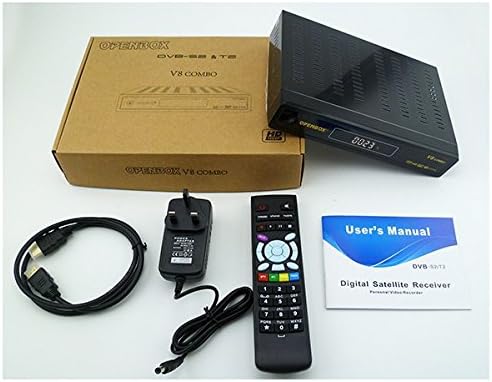
Figure 2: Contents typically included with the OpenBox V8 Combo package, including the receiver, remote, power adapter, HDMI cable, and user manual.
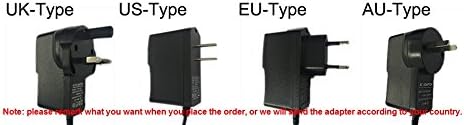
Figure 3: Various power adapter plug types (UK, US, EU, AU) that may be supplied with the device. Ensure you have the correct type for your region.
සැකසුම් මාර්ගෝපදේශය
Follow these steps to set up your OpenBox V8 Combo receiver:
- රූපවාහිනියට සම්බන්ධ වන්න: Use the provided HDMI cable to connect the HDMI OUT port on the receiver to an HDMI IN port on your television.
- Connect to Antenna/Dish:
- For Satellite (DVB-S2): Connect your satellite dish LNB cable to the "LNB IN" port on the receiver.
- For Terrestrial (DVB-T2): Connect your terrestrial antenna cable to the "RF IN" port on the receiver.
- ජාලයට සම්බන්ධ වන්න (විකල්ප):
- රැහැන්ගත සම්බන්ධතාවය: Connect an Ethernet cable from your router to the LAN port on the receiver.
- රැහැන් රහිත සම්බන්ධතාවය: The device supports Wi-Fi. Refer to the "Network Settings" section in Operating Guide for Wi-Fi setup.
- සම්බන්ධක බලය: Plug the power adapter into the DC IN port on the receiver, then plug the adapter into a wall outlet.
- බල ගැන්වීම: Turn on your television and select the correct HDMI input source. The receiver should power on automatically or can be turned on using the power button on the front panel or remote control.

Figure 4: Illustrative diagram showing connections for the OpenBox V8 Combo, including HDMI to TV and network connections.
මෙහෙයුම් මාර්ගෝපදේශය
Initial Setup and Channel Scan
- Upon first power-on, the receiver may guide you through an initial setup wizard. Follow the on-screen prompts.
- Navigate to the "Installation" or "Channel Search" menu using the remote control.
- Select your satellite or terrestrial antenna type and perform an automatic or manual channel scan. The receiver supports automatic, manual, and network search for channels.
- Once the scan is complete, save the channels.
මූලික කාර්යයන්
- නාලිකා සංචලනය: Use the CH+/CH- buttons on the remote to change channels. Enter channel numbers directly using the numeric keypad.
- ශබ්ද පාලනය: Use the VOL+/VOL- buttons to adjust volume.
- මෙනු ප්රවේශය: Press the "MENU" button to access the main menu for settings and features.
- ඉලෙක්ට්රොනික වැඩසටහන් මාර්ගෝපදේශය (EPG): Press the "EPG" button to view program schedules for up to 7 days.
- OSD භාෂාව: The On-Screen Display (OSD) supports multiple languages including English, German, French, Portuguese, Spanish, Italian, Russian, Turkish, Polish, Arabic, and Farsi. Adjust this in the system settings.
බහුමාධ්ය ප්ලේබැක්
The OpenBox V8 Combo features a USB input for playing multimedia files from external storage devices such as USB disks or mobile hard drives. It supports various video and image formats.
- සහාය දක්වන වීඩියෝ ආකෘති: MPEG2/MPEG1, AVS, AVI, MKV, MP4, FLV, F4V, TS, M2TS, MOV, 3GP, MP3, AAC.
- සහාය දක්වන රූප ආකෘති: JPEG, BMP, PNG, GIF.

Figure 5: Visual representation of supported media formats and compatible storage devices like mobile hard disks, USB disks, and SD cards (with adapter).
උසස් විශේෂාංග
- Wi-Fi සම්බන්ධතාවය: Connect to your home network wirelessly for internet-based features.
- DLNA සහාය: Stream media content from compatible devices (e.g., smartphones, tablets) to your TV via the receiver.
- PVR (පුද්ගලික වීඩියෝ පටිගත කරන්නා): Record TV programs to an external USB storage device.
- මාපිය පාලනය: Set up parental controls for channels to restrict access to certain content.
- මෘදුකාංග උත්ශ්රේණි කිරීම: Update the receiver's firmware via USB.
නඩත්තු කිරීම
To ensure the longevity and optimal performance of your OpenBox V8 Combo receiver, follow these maintenance guidelines:
- පිරිසිදු කිරීම: ග්රාහකයේ බාහිර කොටස පිරිසිදු කිරීම සඳහා මෘදු වියළි රෙද්දක් භාවිතා කරන්න. දියර පිරිසිදු කරන්නන් හෝ උල්ෙල්ඛ ද්රව්ය භාවිතා නොකරන්න.
- වාතාශ්රය: Ensure the receiver is placed in a well-ventilated area. Do not block the ventilation openings.
- විදුලිය විසන්ධි කිරීම: If the receiver will not be used for an extended period, disconnect it from the power outlet.
- ස්ථිරාංග යාවත්කාලීන කිරීම්: Periodically check for and install firmware updates via USB to improve performance and add new features.
දෝෂගවේෂණය
If you encounter issues with your OpenBox V8 Combo, refer to the following common problems and solutions:
| ගැටලුව | විය හැකි හේතුව / විසඳුම |
|---|---|
| බලය නැත |
|
| No Signal / No Picture on TV |
|
| දුරස්ථ පාලකය ක්රියා නොකරයි |
|
| Wi-Fi වෙත සම්බන්ධ විය නොහැක. |
|
පිරිවිතර
Key technical specifications for the OpenBox V8 Combo receiver:
| විශේෂාංගය | විස්තර |
|---|---|
| වෙළඳ නාමය | නොදන්නා |
| ගැළපෙන උපාංග | රූපවාහිනිය |
| විශේෂ ලක්ෂණ | HD Compatible, Full HD, Wi-Fi, USB Input |
| සම්බන්ධතා තාක්ෂණය | USB, Ethernet, LAN, HDMI |
| ASIN | B01D8TGI5U |
| UPC | 802483886894 |
| වීඩියෝ විකේතනය | MPEG-2 MP@HL, MPEG4/H.264 BP MP&HP@L4.1, AVS profile@L6.1/4.0/2.0 |
| නාලිකා අංකය | 10000 channels TV and Radio programmable |
| OSD භාෂාව | English, German, French, Portuguese, Spanish, Italian, Russian, Turkish, Polish, Arabic, Farsi |
| ඊ.පී.ජී | Fully support to 7 days Electronic Program Guide(EPG); XML EPG |
| පින්තූර ආකෘතිය | JPEG, BMP, PNG, GIF Supported |
| ටයිමර් | 5 event timers, off/Once/Daily/Weekly Mode |
| උපසිරැසි | උපසිරැසි සහාය |
| ටෙලි ටෙක්ස්ට් | VBI insertion for Teletext, CC and WSS |
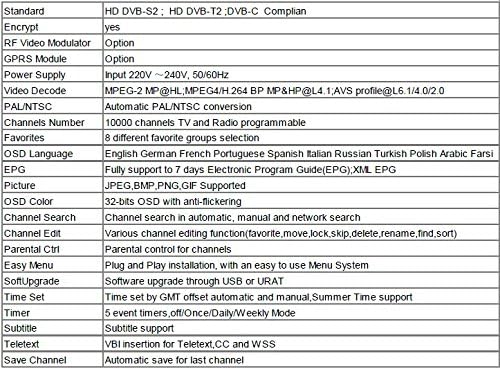
Figure 6: Detailed technical specifications table for the OpenBox V8 Combo receiver.
වගකීම් සහ සහාය
For warranty information, please refer to the documentation provided at the time of purchase or contact your retailer. For technical support, please reach out to the product manufacturer or your point of sale.
This product is designed for reliable operation. Should you require assistance beyond the scope of this manual, professional support is recommended.


