1. හැඳින්වීම
This manual provides detailed instructions for the safe and efficient operation of your Optoma EH416 Full HD 3D DLP Projector. Please read this manual thoroughly before using the projector and retain it for future reference. Proper use and maintenance will ensure optimal performance and longevity of your device.
ආරක්ෂිත තොරතුරු
- l ක්රියාත්මක වන විට ප්රොජෙක්ටර් කාචය දෙස කෙලින්ම නොබලන්න.amp ක්රියාත්මකයි. දැඩි ආලෝකය ඇස්වලට හානි කළ හැකිය.
- ප්රොජෙක්ටරය වටා ප්රමාණවත් වාතාශ්රයක් සහතික කරන්න. වාතාශ්රය විවරයන් අවහිර නොකරන්න.
- Use only the power cord supplied with the projector. Connect to a properly grounded outlet.
- Do not expose the projector to rain, moisture, or excessive humidity.
- සියලුම සේවා සුදුසුකම් ලත් සේවා පුද්ගලයින් වෙත යොමු කරන්න. ප්රොජෙක්ටරය ඔබම විවෘත කිරීමට හෝ අලුත්වැඩියා කිරීමට උත්සාහ නොකරන්න.
2. පෙට්ටියේ ඇති දේ
Please verify that all items listed below are present in your package. If any items are missing or damaged, contact your dealer immediately.
- Optoma EH416 Projector
- විදුලි රැහැන්
- VGA සිට VGA කේබල්
- දුරස්ථ පාලකය
- රැගෙන යන බෑගය
- දුරස්ථ පාලක සඳහා බැටරි
- Multilingual CD-ROM User’s Manual
- ඉක්මන් ආරම්භක කාඩ්පත
- වගකීම් කාඩ්පත
3. නිෂ්පාදන අවසන්view
ප්රධාන ලක්ෂණ
- ඉහළ දීප්තිය: 4200 lumens for clear images in various lighting conditions.
- ඉහළ පරස්පරතාව: 20,000:1 contrast ratio for sharp, luminous images with deep blacks.
- සම්පූර්ණ HD විභේදනය: Native 1080p (1920x1080) resolution, supporting up to WUXGA (1920x1200).
- Advanced Optical Lens: Features a 1.6x zoom and vertical lens shift for flexible installation.
- පුළුල් සම්බන්ධතාවය: Dual HDMI (one with MHL support), dual audio-in, VGA, and more.
- sRGB Color Profile: Enables vibrant and highly accurate colors based on Rec. 709 HDTV specification.
- බිත්ති වර්ණ ගැලපීම: Compensates for brightness loss when projecting on non-white surfaces.
- Edge Mask: Eliminates soft edges and jaggedness on the projection border for a smooth image.
- ඒකාබද්ධ ශ්රව්ය: බිල්ට්-ඉන් 10W ස්පීකරය.
ප්රක්ෂේපක සංරචක
The image below illustrates the main components of the Optoma EH416 projector, including the lens, control panel, and various ports.
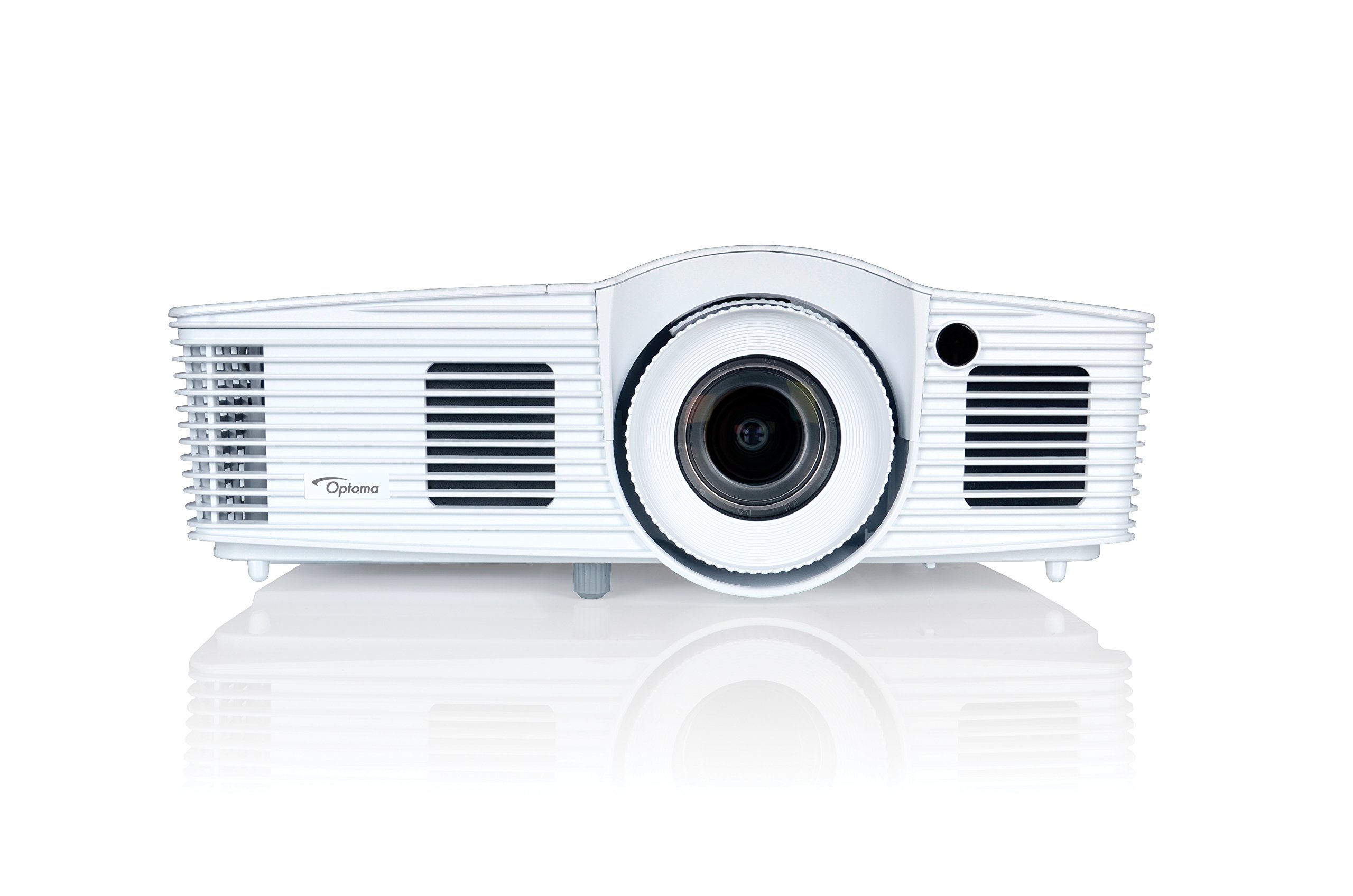
රූපය 1: ඉදිරිපස view of the Optoma EH416 Projector, showing the lens and primary controls.
සම්බන්ධතා වරාය
The Optoma EH416 projector offers a wide range of connectivity options located on the rear panel for versatile integration with various devices.
- HDMI (x2): Digital input for high-definition video and audio. One port supports MHL for mobile devices.
- වීජීඒ (x2): Analog input for computer connections.
- Audio In (x2): 3.5mm stereo jack for analog audio input.
- ශබ්ද විකාශනය: 3.5mm stereo jack for connecting external speakers.
- USB-A: For power output or service.
- ආර්එස් 232: පරිගණකයක් හෝ පාලන පද්ධතියක් හරහා ප්රක්ෂේපක පාලනය සඳහා.
- RJ45 (ඊතර්නෙට්): For network control and management.
4. පිහිටුවීම
ප්රොජෙක්ටර් ස්ථානගත කිරීම
The Optoma EH416 offers flexibility in placement due to its 1.6x zoom and vertical lens shift capabilities. Position the projector on a stable surface or mount it securely. Adjust the distance from the screen to achieve the desired image size. The 1.6x zoom allows for a larger image from a shorter distance or a smaller image from a longer distance without moving the projector.
උපාංග සම්බන්ධ කිරීම
- බල සම්බන්ධතාවය: විදුලි රැහැන ප්රොජෙක්ටරයේ බල ඇතුල්වීමට සම්බන්ධ කර පසුව භූගත විදුලි අලෙවිසැලකට සම්බන්ධ කරන්න.
- වීඩියෝ මූලාශ්රය:
- For HDMI devices (e.g., Blu-ray player, laptop): Connect an HDMI cable from your device to one of the HDMI ports on the projector.
- For VGA devices (e.g., older laptops): Connect a VGA cable from your device to a VGA port on the projector. If audio is also required, connect a separate 3.5mm audio cable from your device to an Audio In port on the projector.
- For MHL compatible mobile devices: Connect an MHL cable to the designated HDMI/MHL port.
- ශ්රව්ය ප්රතිදානය (විකල්ප): If using external speakers, connect an audio cable from the projector's Audio Out port to your sound system.
බල ගැන්වීම / අක්රිය කිරීම
- බල ගැන්වීමට: Press the power button on the projector's control panel or the remote control. The power indicator light will turn blue.
- බලය අක්රිය කිරීමට: Press the power button twice. The projector will enter a cooling down cycle before completely shutting off. Do not unplug the projector during the cooling cycle.
5. ප්රොජෙක්ටරය ක්රියාත්මක කිරීම
මූලික මෙහෙයුම
- මූලාශ්ර තේරීම: Use the 'Source' button on the remote or control panel to cycle through available input sources (HDMI1, HDMI2/MHL, VGA1, VGA2).
- මෙනු සංචාලනය: Press the 'Menu' button to access the On-Screen Display (OSD). Use the arrow keys to navigate and 'Enter' to select options.
- ශබ්ද පාලනය: Use the volume buttons on the remote control to adjust the audio output from the built-in speaker or Audio Out port.
රූප ගැලපීම්
- අවධානය සහ විශාලනය: Rotate the focus and zoom rings on the projector lens to achieve a sharp and appropriately sized image.
- යතුරු ගල් නිවැරදි කිරීම: If the image appears trapezoidal, use the 'Keystone' function in the OSD menu or the dedicated button on the remote to correct the image shape. The EH416 supports ±40° vertical keystone correction.
- සිරස් කාච මාරුව: This feature allows you to physically move the image up or down without tilting the projector, minimizing keystone distortion. Adjust the lens shift dial located near the lens.
- බිත්ති වර්ණ ගැලපීම: Access this feature in the OSD menu to compensate for the color of your projection surface (e.g., blackboard, light yellow wall). This helps maintain accurate color reproduction even on non-white walls.
- sRGB Color Profile: For the most accurate and vibrant colors, especially when connecting to a PC, Mac, or sRGB compatible source, select the sRGB picture mode in the OSD. This profile adheres to the Rec. 709 HDTV specification.
- Edge Mask: This function, found in the OSD, helps to refine the edges of the projected image, eliminating any soft or jagged appearance on the border.
6. නඩත්තු කිරීම
ප්රොජෙක්ටරය පිරිසිදු කිරීම
- කාච: දෘශ්ය කාච සඳහා විශේෂයෙන් නිර්මාණය කර ඇති මෘදු, ලින්ට් රහිත රෙද්දක් භාවිතා කරන්න. උල්ෙල්ඛ පිරිසිදු කරන්නන් භාවිතා නොකරන්න.
- Casing: ප්රොජෙක්ටරය පිස දමන්න casinමෘදු වියළි රෙද්දකින් g පිස දමන්න. මුරණ්ඩු අපිරිසිදුකම සඳහා, තරමක් d භාවිතා කරන්න.amp මෘදු ඩිටර්ජන්ට් එකකින් රෙදි සෝදන්න, ඉන්පසු වියළා ගන්න.
- වායු වාතාශ්රය: Regularly check and clean the air vents to prevent dust buildup, which can lead to overheating. Use a soft brush or compressed air.
Lamp රැකවරණය
ප්රක්ෂේපක එල්amp සීමිත ආයු කාලයක් ඇත. l විටamp life is nearing its end, a warning message may appear on the screen. Refer to the full user manual on the included CD-ROM for detailed instructions on lamp replacement. Always use genuine Optoma replacement lampප්රශස්ත කාර්ය සාධනය සහ ආරක්ෂාව සහතික කිරීම සඳහා.
7. දෝශ නිරාකරණය
This section addresses common issues you might encounter. For more detailed troubleshooting, refer to the comprehensive user manual on the included CD-ROM.
- තිරයේ රූපයක් නැත:
- Check if the projector is powered on and the lamp දැල්වී ඇත.
- Verify that the video source device is powered on and functioning correctly.
- Ensure the video cable (HDMI, VGA) is securely connected to both the projector and the source device.
- Select the correct input source using the 'Source' button on the remote or projector.
- නොපැහැදිලි හෝ විකෘති රූපය:
- ප්රොජෙක්ටර් කාචයේ නාභිගත වළල්ල සකසන්න.
- If the image is trapezoidal, use the keystone correction function.
- Ensure the projector is perpendicular to the screen or use vertical lens shift.
- ශබ්දයක් නැත:
- ප්රොජෙක්ටරයේ සහ ප්රභව උපාංගයේ ශබ්ද මට්ටම පරීක්ෂා කරන්න.
- If using an analog VGA connection, ensure a separate audio cable is connected.
- Verify that the audio output is not muted.
- දුරස්ථ පාලකය ක්රියා නොකරයි:
- බැටරි පරීක්ෂා කර ප්රතිස්ථාපනය කරන්න.
- දුරස්ථ පාලකය සහ ප්රොජෙක්ටරයේ IR ග්රාහකය අතර කිසිදු බාධාවක් නොමැති බවට වග බලා ගන්න.
8. පිරිවිතර
| විශේෂාංගය | විස්තර |
|---|---|
| ආදර්ශ අංකය | EH416 |
| සංදර්ශක විභේදනය | 1920 x 1080 (සම්පූර්ණ HD) |
| දීප්තිය | 4200 Lumens |
| පරස්පර අනුපාතය | 20,000:1 |
| සම්බන්ධතා තාක්ෂණය | Wireless, HDMI, MHL, VGA |
| නිෂ්පාදන මානයන් | අඟල් 8.81 x 12.36 x 4.48 |
| අයිතමයේ බර | රාත්තල් 6.6 කි |
| නිර්දේශිත භාවිතයන් | ව්යාපාරික, අධ්යාපනය |
| නිෂ්පාදකයා | OPTOMA TECHNOLOGY |
| පළමු දිනය තිබේ | අප්රේල් 5, 2016 |
9. වගකීම් සහ සහාය
Your Optoma EH416 projector comes with a manufacturer's warranty. Please refer to the included warranty card for specific terms, conditions, and registration information. For technical support, product registration, or to download the latest drivers and firmware, please visit the official Optoma website or contact Optoma customer service.


