1. හැඳින්වීම
ස්තූතියි, උදව් කළාටasing the Blaupunkt BB 1000 Speaker. This portable boombox is designed to provide a versatile audio experience with multiple playback options, including Bluetooth, CD, USB, FM radio, and auxiliary input. It also features inputs for a microphone and guitar, allowing for enhanced entertainment. Please read this manual carefully before using the device to ensure proper operation and to maximize its lifespan.
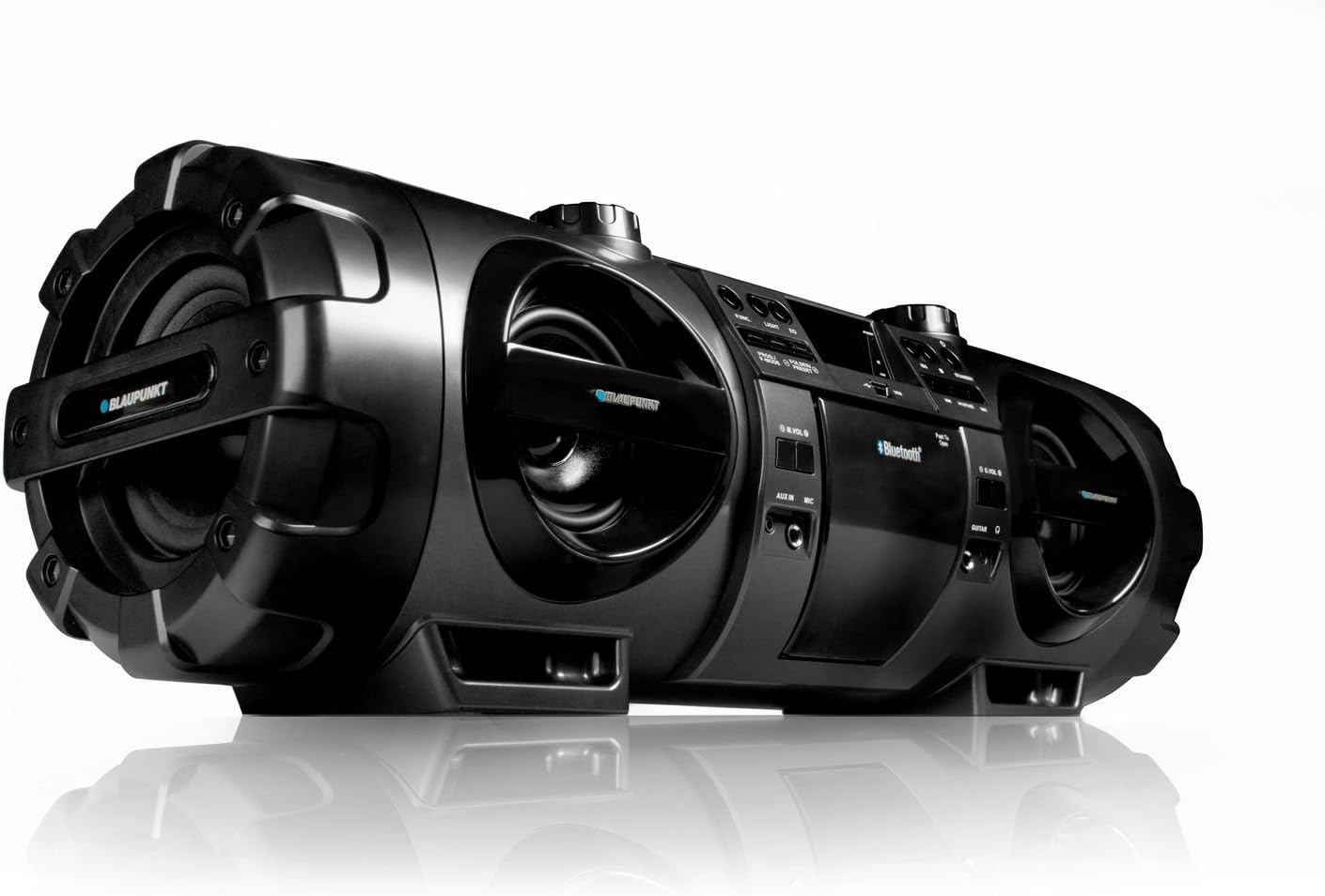
Figure 1.1: Blaupunkt BB 1000 Speaker, showcasing its robust design and speaker configuration.
2 ආරක්ෂිත තොරතුරු
ආරක්ෂිත ක්රියාකාරිත්වය සහතික කිරීමට සහ හානි වැළැක්වීමට, කරුණාකර පහත ආරක්ෂක පියවරයන් නිරීක්ෂණය කරන්න:
- ඒකකය වර්ෂාව, තෙතමනය හෝ අධික උෂ්ණත්වයන්ට නිරාවරණය නොකරන්න.
- රේඩියේටර්, උදුන් හෝ වෙනත් තාප නිපදවන උපකරණ වැනි තාප ප්රභවයන් අසල ඒකකය තැබීමෙන් වළකින්න.
- ඒකකය වටා ප්රමාණවත් වාතාශ්රයක් සහතික කරන්න. වාතාශ්රය විවරයන් අවහිර නොකරන්න.
- Use only the power adapter supplied with the unit or one specified by the manufacturer.
- c එක අරින්න එපාasing. සියලුම සේවා සුදුසුකම් ලත් සේවා පුද්ගලයින් වෙත යොමු කරන්න.
- When using batteries, ensure correct polarity. Do not mix old and new batteries, or different types of batteries. Remove batteries if the unit will not be used for an extended period.
- ඒකකය ශක්තිමත් චුම්බක ක්ෂේත්ර වලින් ඈත් කරන්න.
3. පැකේජ අන්තර්ගතය
කරුණාකර සියලුම අයිතම පැකේජයේ තිබේදැයි පරීක්ෂා කරන්න:
- Blaupunkt BB 1000 Speaker Unit
- දුරස්ථ පාලකය
- රැගෙන යන පටිය
- AC බල කේබලය
- පරිශීලක අත්පොත (මෙම ලේඛනය)
4. නිෂ්පාදන අවසන්view
The Blaupunkt BB 1000 features a comprehensive control panel and various input/output ports for versatile audio playback.
4.1 Front and Top Panel

රූපය 4.1: ඉහළ view of the Blaupunkt BB 1000, highlighting the CD player, USB port, and main controls.
- සීඩී මැදිරිය: ශ්රව්ය සංයුක්ත තැටි වාදනය කිරීම සඳහා.
- USB Port: Connect USB storage devices for MP3 playback.
- සංදර්ශකය: Digital negative LCD for status and track information.
- පාලන බොත්තම්: Power, Mode, Play/Pause, Skip/Search, Volume, EQ.
- කථිකයන්: Two 10W speakers and a 30W subwoofer for powerful sound.
4.2 පැති සහ පසුපස පැනලය
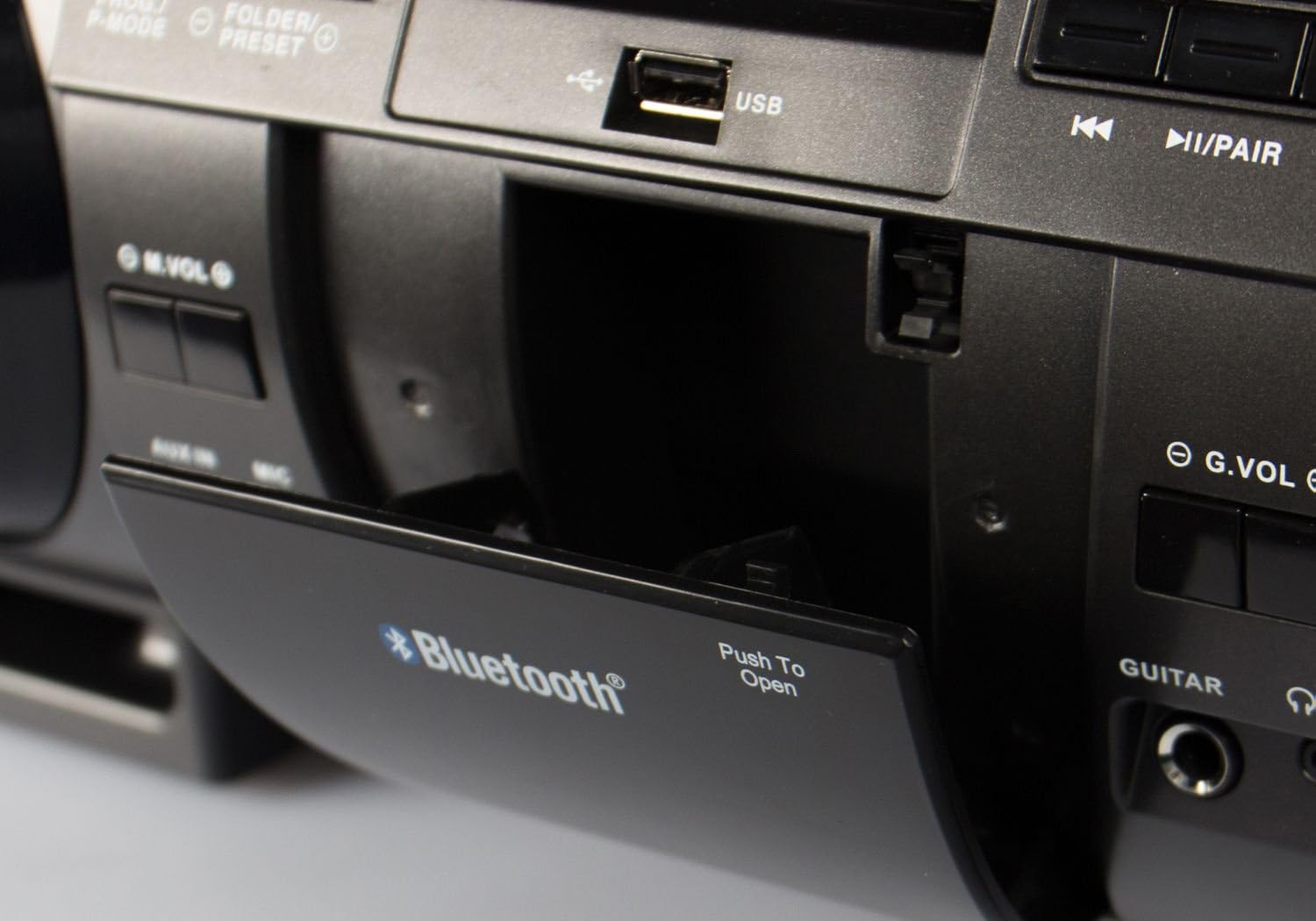
Figure 4.2: Close-up of the Blaupunkt BB 1000's USB port and Bluetooth indicator, located within a protective compartment.
- සාමාන්යය: බාහිර ශ්රව්ය උපාංග සම්බන්ධ කිරීම සඳහා 3.5mm ආදානය.
- මයික්රෆෝන ආදානය: 6.3mm input for connecting a microphone.
- ගිටාර් ආදානය: 6.3mm input for connecting an electric guitar.
- හෙඩ්ෆෝන් ප්රතිදානය: පුද්ගලික සවන්දීම සඳහා 3.5mm ප්රතිදානය.
- AC බල ආදානය: විදුලි රැහැන සම්බන්ධ කිරීම සඳහා.
- බැටරි මැදිරිය: Located on the underside, for 10 x D-size batteries.
5. පිහිටුවීම
5.1 ඒකකය බල ගැන්වීම
The Blaupunkt BB 1000 can be powered by AC mains or batteries.
AC බලය
- Connect the supplied AC power cable to the AC input on the unit.
- විදුලි රැහැනේ අනෙක් කෙළවර සම්මත බිත්ති අලෙවිසැලකට සම්බන්ධ කරන්න.
බැටරි බලය
For portable use, the unit requires 10 x D-size (mono) batteries (not included).
- ඒකකයේ යටි පැත්තේ බැටරි මැදිරිය සොයා ගන්න.
- බැටරි මැදිරි කවරය විවෘත කරන්න.
- මැදිරිය තුළ දක්වා ඇති පරිදි නිවැරදි ධ්රැවීයතාව (+/-) සහතික කරමින්, D-ප්රමාණයේ බැටරි 10ක් ඇතුළු කරන්න.
- බැටරි මැදිරි කවරය ආරක්ෂිතව වසා දමන්න.
5.2 රැගෙන යන පටිය සවි කිරීම
Attach the carrying strap to the designated loops on the sides of the unit for easy portability.
6. මෙහෙයුම් උපදෙස්
6.1 මූලික පාලන
- බල බොත්තම: ඒකකය සක්රිය හෝ අක්රිය කිරීමට ඔබන්න.
- මාදිලි බොත්තම: Press to cycle through input sources: CD, USB, Bluetooth, FM Radio, AUX.
- වෙළුම් බොත්තම්: Rotate to adjust the master volume. Separate volume controls may be available for microphone/guitar inputs.
6.2 බ්ලූටූත් සම්බන්ධතාවය
The BB 1000 can wirelessly connect to Bluetooth-enabled devices.
- Turn on the BB 1000 and press the Mode button until "Bluetooth" is selected on the display. The unit will enter pairing mode, indicated by a flashing Bluetooth icon or voice prompt.
- ඔබගේ ජංගම උපාංගයේ (ස්මාර්ට්ෆෝන්, ටැබ්ලටය), බ්ලූටූත් සක්රීය කර පවතින උපාංග සොයන්න.
- Select "BB 1000" from the list of devices.
- Once connected, the Bluetooth indicator will stop flashing, and a confirmation sound may be heard. You can now play audio from your device through the BB 1000.
- බ්ලූටූත් පරාසය ආසන්න වශයෙන් මීටර් 15 (අඩි 49) කි.
6.3 සීඩී නැවත ධාවනය
- Press the Mode button to select "CD" mode.
- සීඩී මැදිරි කවරය විවෘත කරන්න.
- Place an audio CD onto the spindle with the label side facing up.
- Close the CD compartment cover. The unit will begin reading the CD and playback will start automatically.
- Use the Play/Pause, Skip/Search buttons to control playback.
6.4 USB නැවත ධාවනය
- Press the Mode button to select "USB" mode.
- Insert a USB flash drive (up to 128GB, formatted as FAT32) containing MP3 audio fileUSB පෝට් එකට s.
- The unit will automatically detect the USB drive and begin playing MP3 files.
- Use the Play/Pause, Skip/Search, and Folder/Preset buttons to navigate and control playback.
6.5 FM PLL Radio
- Press the Mode button to select "FM Radio" mode.
- ප්රශස්ත පිළිගැනීමක් සඳහා දුරේක්ෂ ඇන්ටෙනාව දිගු කරන්න.
- ස්වයං ස්කෑන්: Press and hold the Scan button to automatically search and store available FM stations (up to 30 presets).
- අත්පොත සුසර කිරීම: Use the Skip/Search buttons to manually tune to desired frequencies.
- නැවත කැඳවීමේ පෙරසිටුවීම්: Use the Folder/Preset buttons to cycle through stored stations.
6.6 AUX ආදානය
- Press the Mode button to select "AUX" mode.
- Connect an external audio device (e.g., MP3 player, smartphone) to the AUX IN port using a 3.5mm audio cable (not included).
- Play audio from your external device. The sound will be output through the BB 1000.
6.7 මයික්රෆෝනය සහ ගිටාර් ආදාන
- Connect a microphone or electric guitar to the respective 6.3mm input jacks.
- Adjust the microphone/guitar volume using the dedicated volume controls (G.VOL, M.VOL) if available, or the main volume knob.
- The audio from the microphone/guitar will be mixed with the selected audio source (CD, USB, Bluetooth, AUX).
6.8 හෙඩ්ෆෝන් ප්රතිදානය
For private listening, connect 3.5mm headphones to the Headphone Output jack. The main speakers will be muted automatically.
6.9 දුරස්ථ පාලනය
The included remote control allows for convenient operation of the BB 1000 from a distance. Ensure the remote control's battery is inserted correctly and that there are no obstructions between the remote and the unit's IR sensor.
6.10 ශබ්ද සැකසුම් (සමකරනය)
The unit features an equalizer to adjust the sound profile. Press the EQ button to cycle through preset modes: Flat, Rock, Pop, Jazz, and 3D. The 3D mode amplifies the sound for a more immersive experience.
7. නඩත්තු කිරීම
7.1 පිරිසිදු කිරීම
- මෘදු, වියළි රෙද්දකින් ඒකකයේ පිටත කොටස පිස දමන්න.
- උල්ෙල්ඛ පිරිසිදු කරන්නන්, ඉටි හෝ ද්රාවක භාවිතා නොකරන්න, මන්ද ඒවා නිමාවට හානි කළ හැකිය.
- අවශ්ය නම්, CD කාචය සඳහා විශේෂිත CD කාච පිරිසිදු කරන්නෙකු භාවිතා කරන්න.
7.2 බැටරි ප්රතිස්ථාපනය
If using battery power, replace all 10 D-size batteries when the unit's performance diminishes or it fails to power on. Always replace all batteries at once with new ones of the same type.
7.3 ගබඩා කිරීම
If storing the unit for an extended period, remove all batteries to prevent leakage and damage. Store in a cool, dry place away from direct sunlight.
8. දෝශ නිරාකරණය
If you encounter issues with your Blaupunkt BB 1000, refer to the following table for common problems and solutions.
| ගැටලුව | විය හැකි හේතුව | විසඳුම |
|---|---|---|
| ඒකකය බලය සක්රිය නොවේ. | No power connection or dead batteries. | Ensure AC cable is securely plugged in or replace batteries. |
| ශබ්දයක් නැත. | Volume too low, incorrect mode, or headphones connected. | Increase volume, select correct input mode, or disconnect headphones. |
| බ්ලූටූත් සම්බන්ධතාවය අසාර්ථකයි. | Device not in pairing mode, out of range, or already connected to another device. | Ensure BB 1000 is in Bluetooth pairing mode, move device closer, or disconnect from other devices. |
| CD/USB not playing. | Disc dirty/scratched, incorrect file format, or USB drive unsupported. | Clean CD, ensure USB files are MP3, check USB drive compatibility (FAT32, max 128GB). |
| දුර්වල ගුවන්විදුලි පිළිගැනීම. | ඇන්ටෙනාව දිගු වී නැත හෝ දුර්වල සංඥාවක්. | Fully extend the telescopic antenna and reposition the unit for better reception. |
| විකෘති ශබ්දය. | Volume too high, audio source issue, or unit requires break-in. | Reduce volume, check audio source quality. Note that some units may benefit from a 'break-in' period for optimal speaker performance. |
9. පිරිවිතර
Detailed technical specifications for the Blaupunkt BB 1000 Speaker:
| විශේෂාංගය | පිරිවිතර |
|---|---|
| ආකෘතිය | BB 1000 |
| වෙළඳ නාමය | Blaupunkt |
| සම්බන්ධතා තාක්ෂණය | බ්ලූටූත් |
| ස්පීකර් වර්ගය | Stereo with Subwoofer |
| ශ්රව්ය ප්රතිදාන ප්රකාරය | Mono (for specific outputs) |
| කථිකයන් නාමික ප්රතිදාන බලය | 2 x 10 Watts + 30 Watts (Subwoofer) |
| සම්පූර්ණ ප්රතිදාන වොට්tage | වොට් 50 |
| සහාය දක්වන ශ්රව්ය ආකෘති | MP3 |
| ඔප්ටිකල් ඩ්රයිව් වර්ගය | සීඩි ධාවකය |
| USB Port | USB 2.0 (max. 128GB storage) |
| රේඩියෝ සංගීත කණ්ඩායම් සහය දක්වයි | FM, PLL (30 station memory) |
| යෙදවුම් | AUX IN (3.5mm), Microphone (6.3mm), Electric Guitar (6.3mm) |
| ප්රතිදානය | හෙඩ්ෆෝන් (මි.මී. 3.5) |
| සංදර්ශක තාක්ෂණය | ඩිජිටල් සෘණ LCD |
| බලශක්ති ප්රභවය | AC Power / Battery Powered (10 x D-size batteries) |
| මානයන් (L x W x H) | 66.5 x 23 x 22.5 සෙ.මී |
| බර | කිලෝ ග්රෑම් 6 කි |
| දුරස්ථය ඇතුළත් වේ | ඔව් |
10. වගකීම් සහ සහාය
Blaupunkt products are manufactured to high-quality standards. For information regarding warranty coverage, please refer to the warranty card included with your purchase or contact your retailer. For technical support or service inquiries, please visit the official Blaupunkt webවෙබ් අඩවිය හෝ ඔවුන්ගේ පාරිභෝගික සේවා දෙපාර්තමේන්තුව අමතන්න.


