හැඳින්වීම
This manual provides detailed instructions for the Neoteck DAC04 4K HDMI Audio Extractor Converter. This device allows you to extract audio from an HDMI signal and output it to SPDIF (optical) and analog RCA (L/R) while passing the video signal through to an HDMI display. It supports resolutions up to 4K@30Hz and various audio formats, making it ideal for integrating modern HDMI sources with older audio systems.
නිෂ්පාදන විශේෂාංග
- 4K HDMI Audio Extraction: Converts HDMI input to HDMI output with additional SPDIF and R/L analog audio outputs. Supports HDCP 1.4 and 3D.
- අධි විභේදන සහාය: Input resolution up to Ultra HD 4K@30Hz. Compatible with 1080p@60/50Hz, 1080i, 720p, 576i, 480p, and 480i. Note: Does not support 4K@60Hz.
- Versatile Audio Modes: Offers PASS, 2.0CH, and 5.1CH audio output options. Analog RCA output supports 2-channel PCM stereo audio. SPDIF output supports 2-channel PCM, Dolby Digital, and DTS (Dolby Digital Plus is not supported). HDMI output supports up to 7.1CH audio.
- LED දර්ශක: A red LED illuminates for power status, and a green LED illuminates for HDMI connection status.
- කල් පවතින ඉදිකිරීම්: Features an aluminum alloy casing for enhanced durability and heat dissipation.
- පුළුල් අනුකූලතාව: Suitable for various HDMI source devices including Blu-ray/DVD players, game consoles (PS3, PS4, Xbox), streaming devices (Roku, Chromecast, Amazon Fire TV, Apple TV), PCs, laptops, HD cameras, and HD DVRs.
පැකේජයේ අන්තර්ගතය
කරුණාකර ඇසුරුම් අන්තර්ගතය ඉවත් කිරීමේදී පරීක්ෂා කරන්න:
- 1 x Neoteck DAC04 HDMI Audio Extractor Converter
- 1 x USB බල කේබලය
- 1 x පරිශීලක අත්පොත
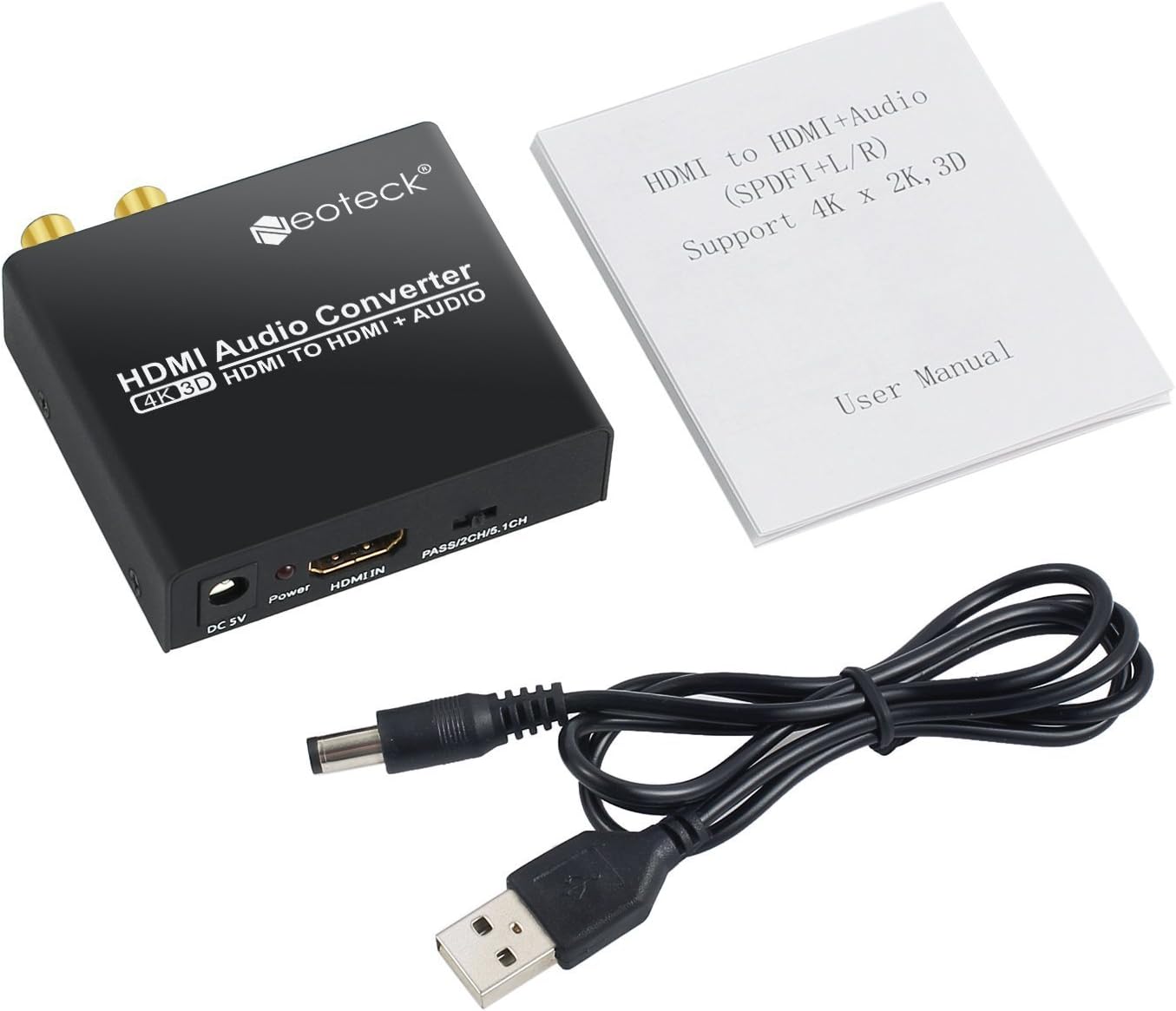
Image: Neoteck DAC04 HDMI Audio Extractor, USB power cable, and user manual included in the package.
නිෂ්පාදන රූප සටහන
ඉදිරිපස සහ පසුපස පුවරු
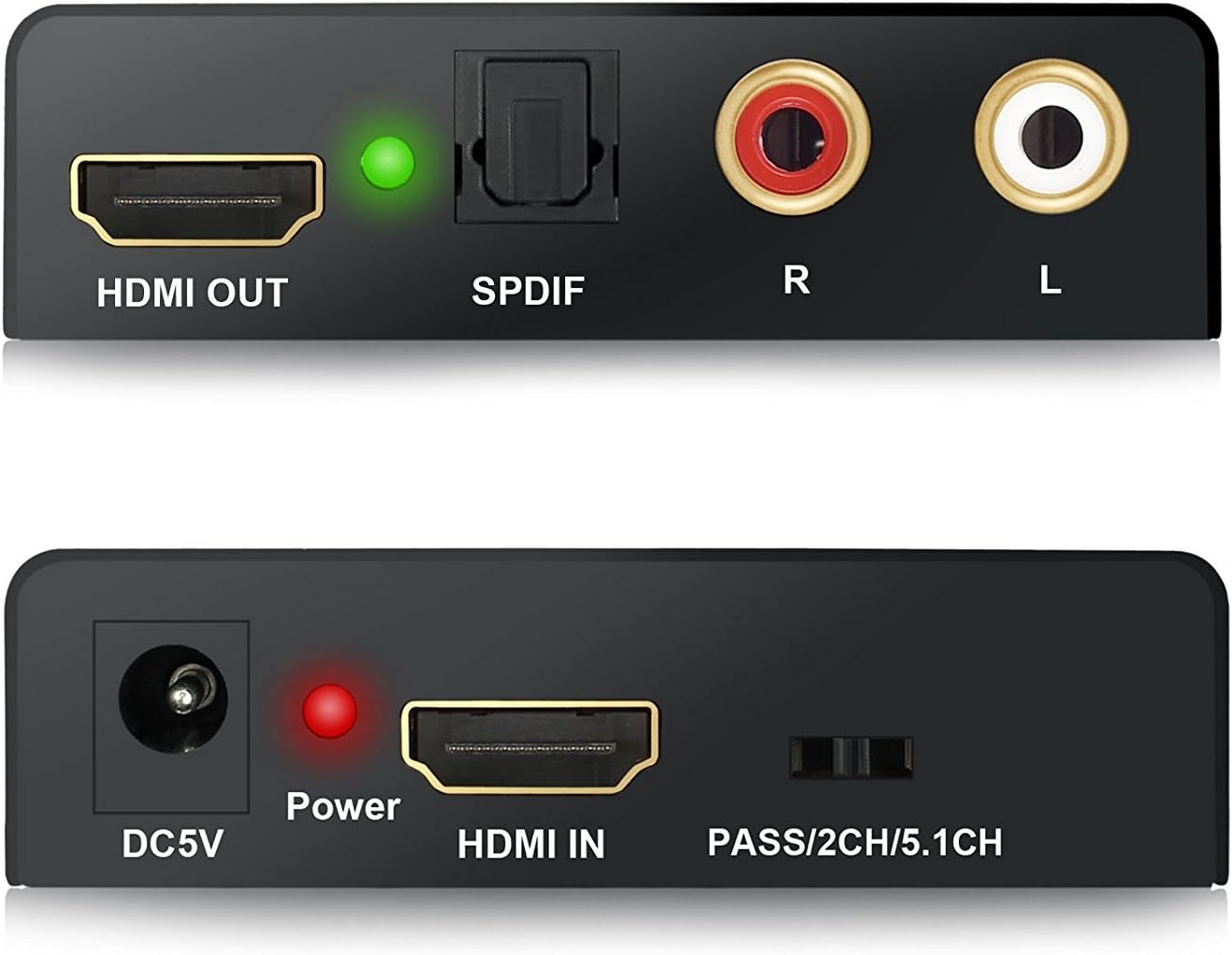
රූපය: සමීප රූපය view of the Neoteck DAC04 converter's front panel (DC5V, Power LED, HDMI IN, Audio Mode Switch) and rear panel (HDMI OUT, SPDIF, R/L RCA, HDMI LED).
- DC5V: බල ආදාන වරාය.
- බල LED: Red indicator for power status.
- HDMI තුළ: HDMI input port for source devices.
- PASS/2CH/5.1CH Switch: Audio mode selection switch.
- HDMI පිටත: HDMI output port for display devices.
- SPDIF: දෘශ්ය ශ්රව්ය ප්රතිදාන වරාය.
- R/L: Analog RCA stereo audio output ports (Red for Right, White for Left).
- HDMI LED: Green indicator for HDMI connection status.
සාමාන්ය සම්බන්ධතා රූප සටහන

Image: Diagram illustrating how to connect a Blu-ray DVD player (HDMI In) to the Neoteck converter, then HDMI Out to an HDTV and Optical Out/RCA Out to an ampජීවිතාරක්ෂකයා.
සැකසුම් උපදෙස්
- Connect your HDMI source device (e.g., Blu-ray player, PS4) to the "HDMI IN" port of the Neoteck converter using an HDMI cable.
- Connect your HDMI display (e.g., TV, projector) to the "HDMI OUT" port of the Neoteck converter using an HDMI cable.
- For audio output:
- To use optical audio, connect an optical cable from the "SPDIF" port of the converter to your audio receiver or soundbar.
- To use analog stereo audio, connect RCA cables from the "R/L" ports of the converter to your stereo ampලයිෆයර් හෝ කථිකයන්.
- Connect the provided USB power cable to the "DC5V" port on the converter and then to a USB power source (e.g., a USB port on your TV, a USB wall adapter). The red Power LED will illuminate.
- Ensure all connected devices (source, display, audio system) are powered on. The green HDMI LED will illuminate when a stable HDMI connection is established.
මෙහෙයුම් උපදෙස්
The Neoteck DAC04 features a switch on the front panel to select the desired audio output mode: PASS, 2.0CH, or 5.1CH.

Image: The audio mode switch on the Neoteck DAC04 with labels for PASS, 2CH, and 5.1CH, and corresponding explanations.
- PASS Mode: In this mode, the SPDIF audio output format depends on the EDID (Extended Display Identification Data) of the connected TV or display. The audio signal is passed through without modification.
- 2.0CH මාදිලිය: සකසන විට "2.0CH", the SPDIF output audio format will be LPCM 2-channel stereo. This is suitable for stereo audio systems.
- 5.1CH මාදිලිය: සකසන විට "5.1CH", the SPDIF output audio format will be 5.1-channel. For this mode to function correctly, the source audio must also be 5.1CH. This mode supports Dolby Digital and DTS 5.1-channel audio.
දෝෂගවේෂණය
- වීඩියෝ ප්රතිදානය නැත:
- සියලුම HDMI කේබල් ආරක්ෂිතව සම්බන්ධ කර ඇති බවට වග බලා ගන්න.
- Verify that the HDMI source device and display are powered on and functioning correctly.
- Check if the converter's red Power LED is illuminated. If not, ensure the USB power cable is connected to a working power source.
- Confirm that your display supports the input resolution (up to 4K@30Hz). This converter does not support 4K@60Hz.
- ශ්රව්ය ප්රතිදානය නැත:
- Check all audio cables (SPDIF, RCA) for secure connections.
- Ensure your audio receiver/amplifier is powered on and set to the correct input.
- Verify the audio mode switch on the converter is set appropriately (PASS, 2.0CH, or 5.1CH) for your audio system and source content.
- If using 5.1CH mode, confirm that the source audio is indeed 5.1CH.
- Note that Dolby Digital Plus is not supported by the SPDIF output.
- If using PASS mode, the SPDIF output format depends on the TV's EDID. Try 2.0CH or 5.1CH mode if you experience issues.
- දුර්වල ශ්රව්ය ගුණාත්මකභාවය:
- Ensure all cables are high quality and not damaged.
- වෙනත් ඉලෙක්ට්රොනික උපාංගවලින් බාධා ඇත්දැයි පරීක්ෂා කරන්න.
- Adjust audio settings on your source device and audio receiver.
පිරිවිතර
| වෙළඳ නාමය | නියෝටෙක් |
| ආදර්ශ අංකය | DAC04 |
| ආදාන වරාය | 1 x HDMI |
| ප්රතිදාන වරායන් | 1 x HDMI, 1 x SPDIF (Optical), 1 x RCA L/R |
| HDMI විභේදනය | Up to 4K@30Hz, 1080p@60/50Hz, 1080i, 720p, 576i, 480p, 480i |
| HDCP අනුවාදය | HDCP 1.4 |
| ත්රිමාණ සහාය | ඔව් |
| ශ්රව්ය ප්රතිදාන ක්රම | PASS, 2.0CH, 5.1CH |
| SPDIF ශ්රව්ය ආකෘති | PCM 2CH, Dolby Digital, DTS (Dolby Digital Plus not supported) |
| RCA L/R Audio Formats | PCM 2CH Stereo |
| HDMI ශ්රව්ය ආකෘති | 7.1CH දක්වා |
| බල සැපයුම | DC 5V (USB හරහා) |
| Casing ද්රව්ය | ඇලුමිනියම් මිශ්ර ලෝහය |
| නිෂ්පාදකයා | නියෝටෙක් |
නඩත්තු කිරීම
- උපාංගය වියළි, හොඳින් වාතාශ්රය ඇති ප්රදේශයක තබා ගන්න.
- උපාංගය අධික උෂ්ණත්වයට, ආර්ද්රතාවයට හෝ සෘජු හිරු එළියට නිරාවරණය කිරීමෙන් වළකින්න.
- මෘදු වියළි රෙද්දකින් උපාංගය පිරිසිදු කරන්න. දියර පිරිසිදු කරන්නන් හෝ එයරෙසෝල් භාවිතා නොකරන්න.
- උනුසුම් වීම වැළැක්වීම සඳහා උපාංගය වටා නිසි වාතාශ්රය සහතික කරන්න.
වගකීම් සහ සහාය
For warranty information or technical support, please refer to the contact details provided with your purchase or visit the official Neoteck webඅඩවිය. වගකීම් හිමිකම් සඳහා ඔබේ මිලදී ගැනීමේ රිසිට්පත තබා ගන්න.


