1. හැඳින්වීම
This manual provides essential information for the proper use, setup, operation, and maintenance of the SCS 718 Static Sensor. The SCS 718 is a handheld device designed for measuring electrostatic charge voltage. It features a red LED lamp for accurate measurement distance guidance and can be used with the 718A Charger (Part No: 718CH) to perform ionizer function checks. This sensor is specifically designed for measuring charged potential.
2. නිෂ්පාදන අවසන්view
The SCS 718 Static Sensor is a compact and portable instrument used to detect and measure static electricity. Its primary function is to identify and quantify electrostatic charges on surfaces, which is crucial in environments where static discharge can cause damage or interference.
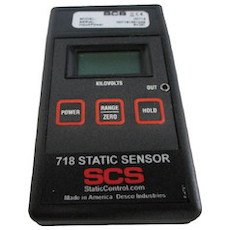
Figure 1: SCS 718 Static Sensor. This image displays the SCS 718 Static Sensor, a handheld device. The front panel features a digital display at the top, below which are three rectangular buttons: 'POWER' on the left, 'RANGE/ZERO' in the center, and 'HOLD' on the right. The device is labeled '718 STATIC SENSOR' with the 'SCS' logo and 'StaticControl.com Made in America Desco Industries' at the bottom.
3. විශේෂාංග
- Electrostatic measurement capability.
- රතු LED lamp for accurate measurement distance guidance.
- Compatibility with 718A Charger (Part No: 718CH) for ionizer function checks.
- Measures charged potential.
4 ආරක්ෂිත තොරතුරු
උපාංගය ක්රියාත්මක කිරීමට පෙර කරුණාකර සියලු ආරක්ෂක උපදෙස් කියවා තේරුම් ගන්න. එසේ කිරීමට අපොහොසත් වීමෙන් නිෂ්පාදනයට තුවාල හෝ හානි සිදුවිය හැකිය.
- උපාංගය අධික උෂ්ණත්වයට, ආර්ද්රතාවයට හෝ සෘජු හිරු එළියට නිරාවරණය නොකරන්න.
- උපාංගය අතහැර දැමීමෙන් හෝ එය දැඩි බලපෑම්වලට ලක් කිරීමෙන් වළකින්න.
- උපාංගය විවෘත කිරීමට හෝ වෙනස් කිරීමට උත්සාහ නොකරන්න. සියලුම සේවා සුදුසුකම් ලත් පුද්ගලයින් වෙත යොමු කරන්න.
- Keep the device away from liquids and corrosive materials.
- Ensure the measurement area is clear of obstructions and potential hazards.
5. පිහිටුවීම
The SCS 718 Static Sensor is designed for immediate use. No battery installation is required as the device does not use batteries.
- ඇසිරීම: Carefully remove the sensor from its packaging and inspect for any signs of damage.
- මූලික පරීක්ෂාව: ඔබන්න බලය button to turn on the device. The display should illuminate.
- ශුන්ය කිරීම: Before each measurement, ensure the device is zeroed. Point the sensor away from any charged objects and press the RANGE/ZERO button to reset the reading to zero.
6. මෙහෙයුම් උපදෙස්
Follow these steps to accurately measure electrostatic charges:
- බල ගැන්වීම: ඔබන්න බලය button to activate the sensor.
- Zero the Sensor: Hold the sensor in free air, away from any charged surfaces. Press the RANGE/ZERO button until the display reads "0.00" or close to zero. This calibrates the sensor for accurate readings.
- Positioning for Measurement: Point the sensor towards the object or surface you wish to measure. The red LED lamp on the sensor acts as a distance guide. Position the sensor so that the red LED light is focused on the target surface, typically indicating the optimal measurement distance (e.g., 1 inch or 2.5 cm).
- සංදර්ශකය කියවන්න: The display will show the electrostatic charge in kilovolts (kV).
- කියවීම අල්ලාගෙන සිටින්න: To freeze the current reading on the display, press the අල්ලා ගන්න button. Press it again to release the hold and resume live readings.
- Ionizer Function Check (with 718A Charger):
- Connect the SCS 718 Static Sensor to the 718A Charger (Part No: 718CH).
- Follow the instructions provided with the 718A Charger to perform ionizer function checks. This typically involves measuring the decay time of a charge.
- විදුලිය විසන්ධි කිරීම: ඔබන්න බලය button again to turn off the device when not in use.
7. නඩත්තු කිරීම
Proper maintenance ensures the longevity and accuracy of your SCS 718 Static Sensor.
- පිරිසිදු කිරීම: Use a soft, dry, lint-free cloth to clean the exterior of the sensor. Do not use abrasive cleaners, solvents, or liquids.
- ගබඩා: Store the sensor in a cool, dry place, away from direct sunlight and extreme temperatures. Keep it in its original packaging or a protective case when not in use to prevent dust accumulation and physical damage.
- ක්රමාංකනය: Regular calibration is recommended to maintain measurement accuracy. Refer to DESCO's official website or contact their support for calibration services.
8. දෝශ නිරාකරණය
| ගැටලුව | විය හැකි හේතුව | විසඳුම |
|---|---|---|
| උපාංගය බලගන්වන්නේ නැත. | Internal power issue. | Ensure the power button is pressed firmly. If still unresponsive, contact customer support. |
| වැරදි කියවීම්. | Sensor not zeroed; environmental interference; dirty sensor. | Zero the sensor before each use. Ensure no strong electromagnetic fields are nearby. Clean the sensor surface. Consider professional calibration. |
| Red LED not illuminating. | LED අක්රියතාව. | අළුත්වැඩියා කිරීම හෝ ප්රතිස්ථාපනය කිරීම සඳහා පාරිභෝගික සහාය අමතන්න. |
9. පිරිවිතර
| ගුණාංගය | වටිනාකම |
|---|---|
| නිෂ්පාදකයා | ඩෙස්කෝ |
| කොටස අංකය | 718 |
| නිෂ්පාදන බර | ග්රෑම් 130 (කිලෝග්රෑම් 0.13) |
| පැකේජ මානයන් | 26 x 19 x 8 සෙ.මී |
| බැටරි භාවිතය | නැත |
| ASIN | B01KMB21LM |
| පළමු ලබා ගත හැකි දිනය | 18 අගෝස්තු 2016 |
10. වගකීම් සහ සහාය
For information regarding product warranty, please refer to the warranty card included with your purchase or visit the official DESCO website. For technical support, troubleshooting assistance, or service inquiries, please contact DESCO customer service through their official channels.
නිෂ්පාදකයා: ඩෙස්කෝ
Webඅඩවිය: www.desco.com (උදාampසබැඳිය, සැබෑ සබැඳිය වෙනස් විය හැක)


