හැඳින්වීම
This manual provides detailed instructions for the setup, operation, and maintenance of your Axess CKRD3803 Digital AM/FM Clock Radio. Please read this manual thoroughly before using the device to ensure proper function and to maximize your user experience.
නිෂ්පාදනය අවසන්view
The Axess CKRD3803 is a versatile clock radio featuring a 1.2-inch red LED display, digital AM/FM radio, dual alarm settings, and a calendar function. It includes an Aux input jack for external audio devices and a battery backup system to maintain settings during power interruptions.
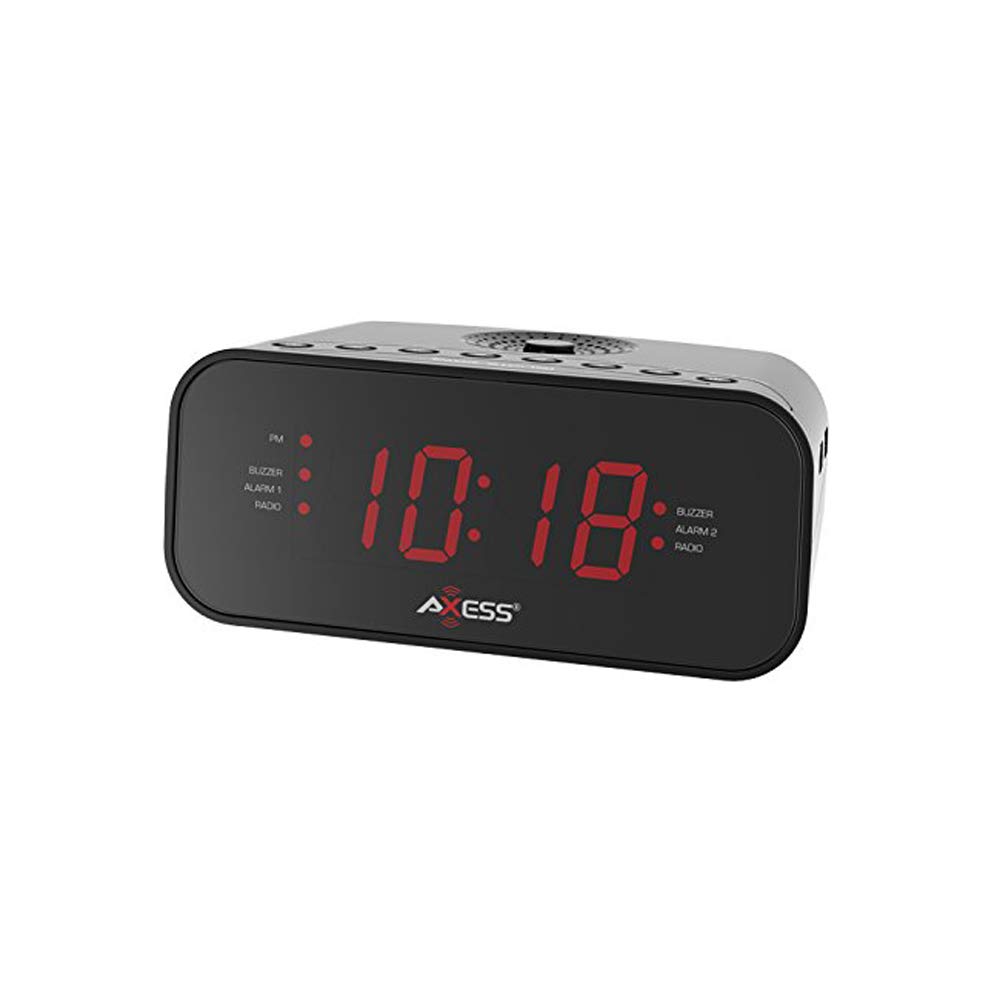
රූපය: ඉදිරිපස view of the Axess CKRD3803 Digital AM/FM Clock Radio. The device is black with a large red LED display showing '10:18'. Indicators for PM, Buzzer, Alarm 1, Radio, and Alarm 2 are visible on either side of the time display.
ප්රධාන ලක්ෂණ:
- Large 1.2-inch Red LED Display with two-step dimmer.
- Digital AM/FM Radio.
- Dual Alarm with Buzzer or Radio options.
- Sleep and Snooze Functions.
- Calendar Function.
- Auxiliary Input Jack.
- Battery Backup (2 x AAA batteries, not included) for power outages.
සැලසුම
බල සම්බන්ධතාවය:
- Uncoil the built-in power cord (pigtail antenna).
- Plug the power cord into a standard AC wall outlet (120V, 60Hz).
- ඒකකයට බලය ලැබෙන බව දක්වමින් LED සංදර්ශකය දැල්වෙනු ඇත.
බැටරි උපස්ථ ස්ථාපනය:
For uninterrupted timekeeping during power outages, උපස්ථ බැටරි ස්ථාපනය කරන්න.
- ඒකකයේ පතුලේ බැටරි මැදිරිය සොයා ගන්න.
- බැටරි මැදිරි කවරය විවෘත කරන්න.
- Insert two (2) AAA batteries (not included), observing the correct polarity (+ and -) as indicated inside the compartment.
- බැටරි මැදිරි කවරය ආරක්ෂිතව වසා දමන්න.
Note: Batteries are for backup only and will not power the display or radio functions during a power outage. They only preserve time and alarm settings.
මෙහෙයුම් උපදෙස්
වේලාව සැකසීම:
- ඔබා අල්ලාගෙන සිටින්න ටයිම් සෙට් පැය ඉලක්කම් දැල්වීමට පටන් ගන්නා තෙක් බොත්තම ඔබාගෙන සිටින්න.
- ඔබන්න පැය button repeatedly to adjust the hour. Observe the 'PM' indicator for correct AM/PM setting.
- ඔබන්න මිනිත්තුව මිනිත්තු සකස් කිරීමට නැවත නැවතත් බොත්තම ඔබන්න.
- To switch between 12-hour and 24-hour (military) time format, press the 12/24H button while the time is flashing.
- ඔබන්න ටයිම් සෙට් තහවුරු කිරීමට සහ කාල සැකසුම් මාදිලියෙන් පිටවීමට නැවත බොත්තම ඔබන්න.
Setting the Alarm (Alarm 1 and Alarm 2):
The CKRD3803 features two independent alarms.
- ඔබා අල්ලාගෙන සිටින්න එලාම 1 කට්ටලය (හෝ එලාම 2 කට්ටලය) අනතුරු ඇඟවීමේ පැය ඉලක්කම් දැල්වීමට පටන් ගන්නා තෙක් බොත්තම.
- ඔබන්න පැය button to adjust the alarm hour. Observe the 'PM' indicator.
- ඔබන්න මිනිත්තුව අනතුරු ඇඟවීමේ මිනිත්තු සකස් කිරීමට බොත්තම.
- ඔබන්න එලාම 1 කට්ටලය (හෝ එලාම 2 කට්ටලය) button again to confirm the time.
- Immediately after confirming the time, press the අනතුරු ඇඟවීම 1 මාදිලිය (හෝ අනතුරු ඇඟවීම 2 මාදිලිය) button repeatedly to select the alarm source: BUZZER or රේඩියෝව. අනුරූප දර්ශක ආලෝකය දැල්වෙනු ඇත.
- අනතුරු ඇඟවීමක් සක්රිය කිරීමට හෝ අක්රිය කිරීමට, ඔබන්න එලාම 1 ක්රියාත්මක/අක්රිය (හෝ එලාම 2 ක්රියාත්මක/අක්රිය) button. The alarm indicator will light up when active.
ගුවන්විදුලි මෙහෙයුම:
- ඔබන්න රේඩියෝව සක්රිය / අක්රිය රේඩියෝව සක්රිය කිරීමට බොත්තම.
- ඔබන්න AM/FM AM සහ FM කලාප අතර මාරු වීමට බොත්තම.
- ඔබන්න TUNE + or ටියුන් - අපේක්ෂිත සංඛ්යාතයකට අතින් සුසර කිරීමට බොත්තම්.
- ඔබන්න TUNE + or ටියුන් - ස්වයංක්රීය ස්ථාන පරිලෝකනය සඳහා.
- භාවිතා කරමින් පරිමාව සකසන්න වෙළුම + or වෙළුම - බොත්තම්.
- To improve FM reception, extend the pigtail antenna fully. For AM reception, rotate the unit for best signal.
- ඔබන්න රේඩියෝව සක්රිය / අක්රිය රේඩියෝව ක්රියා විරහිත කිරීමට නැවත බොත්තම ඔබන්න.
මඳක් නිදි කිරීමේ කාර්යය:
අනතුරු ඇඟවීමක් ඇසෙන විට, ඔබන්න ස්නූස් කරන්න ආසන්න වශයෙන් මිනිත්තු 9 ක් සඳහා අනතුරු ඇඟවීම තාවකාලිකව නිශ්ශබ්ද කිරීමට බොත්තම. මෙම කාල සීමාවෙන් පසු අනතුරු ඇඟවීම නැවත නාද වනු ඇත.
නින්දේ කාර්යය:
ගුවන් විදුලියට නින්ද යාමට, ඔබන්න නිදාගන්න button while the radio is playing. Repeatedly press the නිදාගන්න button to cycle through sleep timer options (e.g., 90, 60, 30, 15 minutes, or OFF). The radio will automatically turn off after the selected time.
ඩිමර් සංදර්ශකය:
ඔබන්න ඩිමර් button to adjust the brightness of the LED display between two levels (bright and dim).
සහායක ආදානය:
බාහිර ශ්රව්ය උපාංගයක් (උදා: MP3 වාදකය, ස්මාර්ට් ජංගම දුරකථනය) සම්බන්ධ කරන්න AUX IN jack on the unit using a 3.5mm audio cable (not included). The audio from the external device will play through the clock radio's speaker.
නඩත්තු කිරීම
To ensure the longevity and optimal performance of your Axess CKRD3803, follow these simple maintenance guidelines:
- පිරිසිදු කිරීම: Wipe the unit with a soft, dry cloth. Do not use abrasive cleaners, waxes, or solvents as they may damage the finish.
- විදුලි රැහැන්: Regularly check the power cord for any signs of damage. If damaged, discontinue use and seek professional repair.
- බැටරි ආදේශනය: Replace backup batteries annually or when the unit is stored for extended periods to prevent leakage.
- ස්ථානගත කිරීම: ඒකකය සෘජු හිරු එළියේ, තාප ප්රභවයන් අසල හෝ අධික ආර්ද්රතාවය හෝ දූවිලි ඇති ප්රදේශවල තැබීමෙන් වළකින්න.
දෝෂගවේෂණය
If you encounter issues with your Axess CKRD3803, please refer to the following common problems and solutions:
| ගැටලුව | විය හැකි හේතුව | විසඳුම |
|---|---|---|
| සංදර්ශනය හිස් ය. | No AC power; Dimmer set to lowest setting. | Ensure power cord is securely plugged in. Press the ඩිමර් දීප්තිය වැඩි කිරීමට බොත්තම. |
| වේලාව/එලාම් සැකසිය නොහැක. | Buttons not pressed correctly or in sequence. | Refer to the "Setting the Time" and "Setting the Alarm" sections for precise steps. Ensure you press and hold the SET button until digits flash. |
| එලාම් එක නාද වෙන්නේ නැහැ. | Alarm not activated; Volume too low (for radio alarm). | Ensure the alarm is set and the alarm indicator light is on. For radio alarm, increase radio volume. |
| දුර්වල ගුවන්විදුලි පිළිගැනීම. | Antenna not positioned correctly; Weak signal. | Fully extend the pigtail antenna for FM. Rotate the unit for optimal AM reception. Try a different location. |
| බලය ලැබීමෙන් පසු කාලය/සැකසුම් නැති වියtage. | උපස්ථ බැටරි ස්ථාපනය කර හෝ ක්ෂය වී නොමැත. | බැටරි මැදිරියේ නැවුම් AAA බැටරි සවි කරන්න. |
| Stuck in 24-hour (military) time. | 12/24H setting not adjusted during time setup. | Enter time setting mode (press and hold ටයිම් සෙට්). While digits are flashing, press the 12/24H button to toggle between formats. |
පිරිවිතර
- ආකෘතිය: CKRD3803
- සංදර්ශකය: 1.2-inch Red LED
- බලශක්ති ප්රභවය: AC 120V ~ 60Hz
- බැටරි උපස්ථ: 2 x AAA බැටරි (ඇතුළත් කර නැත)
- ගුවන්විදුලි සංගීත කණ්ඩායම්: AM/FM
- මානයන්: 2.95 x 6.89 x 4.21 අඟල් (H x W x D)
- බර: රාත්තල් 1ක්
- ද්රව්ය: ඇක්රිලෝනිට්රයිල් බුටැඩීන් ස්ටයිරීන්
- විශේෂ ලක්ෂණ: Dual Alarm, Calendar Function, Aux-in, Sleep/Snooze, Dimmer
වගකීම් සහ සහාය
For warranty information or technical support, please refer to the documentation included with your purchase or visit the official Axess webවෙබ් අඩවිය. ඕනෑම වගකීම් හිමිකම් පෑමක් සඳහා මිලදී ගැනීමේ සාක්ෂියක් ලෙස ඔබේ මිලදී ගැනීමේ රිසිට්පත තබා ගන්න.


