1. හැඳින්වීම
The iHome iBT232 is a versatile Bluetooth dual alarm FM clock radio designed to enhance your daily routine. It features wireless audio streaming, a built-in speakerphone with echo noise cancellation, dual alarms, FM radio with presets, and a convenient USB charging port. This manual provides detailed instructions for setting up and operating your device to ensure optimal performance.
2. වැදගත් ආරක්ෂක උපදෙස්
- මෙම උපදෙස් හොඳින් කියවන්න.
- අනාගත යොමුව සඳහා මෙම උපදෙස් තබා ගන්න.
- සියලුම අනතුරු ඇඟවීම්වලට අවනත වන්න.
- සියලුම උපදෙස් අනුගමනය කරන්න.
- ජලය අසල මෙම උපකරණය භාවිතා නොකරන්න.
- වියළි රෙද්දකින් පමණක් පිරිසිදු කරන්න.
- කිසිදු වාතාශ්රය විවරයක් අවහිර නොකරන්න. නිෂ්පාදකයාගේ උපදෙස් අනුව ස්ථාපනය කරන්න.
- රේඩියේටර්, තාප රෙජිස්ටර්, ලිප, හෝ වෙනත් උපකරණ (ඇතුළුව) වැනි තාප ප්රභවයන් අසල ස්ථාපනය නොකරන්න. ampලිෆයර්) තාපය නිපදවන.
- නිෂ්පාදකයා විසින් නිශ්චිතව දක්වා ඇති ඇමුණුම්/උපාංග පමණක් භාවිතා කරන්න.
- සියලුම සේවා සුදුසුකම් ලත් සේවා පුද්ගලයින් වෙත යොමු කරන්න. බල සැපයුම් ලණුවකට හෝ ප්ලග් එකට හානි වූ විට, දියර කාන්දු වී ඇති විට හෝ උපකරණයට වස්තූන් වැටී ඇති විට, උපකරණය වර්ෂාවට හෝ තෙතමනයට නිරාවරණය වී ඇති විට, සාමාන්යයෙන් ක්රියා නොකරන විට, උපකරණයට යම් ආකාරයකින් හානි වී ඇති විට, සේවා සැපයීම අවශ්ය වේ. , හෝ අතහැර දමා ඇත.
3. පැකේජ අන්තර්ගතය
කරුණාකර ඔබේ පැකේජයේ අන්තර්ගතය ප්රවේශමෙන් පරීක්ෂා කරන්න. කිසියම් අයිතමයක් අස්ථානගත වී හෝ හානි වී ඇත්නම්, වහාම ඔබේ සිල්ලර වෙළෙන්දා අමතන්න.
- iHome iBT232 Unit
- විශ්ව AC ඇඩැප්ටරය
- FM ඇන්ටෙනා වයර්
4. පාලන සහ දර්ශක
Familiarize yourself with the buttons and ports on your iBT232 unit.
ඉහළ පැනල් පාලනය

Top panel controls of the iHome iBT232 unit, showing power, Bluetooth, FM presets, Aux, Sleep, Alarm 1, Alarm 2, volume, call, voice assistant, and snooze/dimmer buttons.
- බල බොත්තම: ඒකකය ක්රියාත්මක/අක්රිය කරන්න.
- බ්ලූටූත් බොත්තම: බ්ලූටූත් යුගල කිරීමේ ප්රකාරය ආරම්භ කරයි.
- FM Presets Button: Cycles through saved FM radio stations.
- Aux Button: Selects Aux-in audio source.
- නින්ද බොත්තම: Activates sleep timer.
- Alarm 1 & 2 Buttons: එලාම් 1 සහ එලාම් 2 සකසා සක්රිය කරයි.
- Volume -/+ Buttons: ශබ්ද මට්ටම් සීරුමාරු කරයි.
- Call Answer/End Buttons: Manages phone calls.
- Voice Assistant/Play/Pause Button: Activates voice assistant or controls media playback.
- ස්නූස්/ඩිමර් බොත්තම: Snoozes active alarm or adjusts display brightness.
පසුපස පැනල් වරාය

Rear panel of the iHome iBT232, displaying the Aux-in port, DST switch, Time Set button, USB charging port, and DC power input.
- Aux-in Jack: බාහිර ශ්රව්ය උපාංග සම්බන්ධ කරයි.
- ඩීඑස්ටී මාරුව: දිවා ආලෝකය ඉතිරි කිරීමේ කාලය ටොගල් කරයි.
- කාල සැකසුම් බොත්තම: Used for manual time adjustment.
- USB ආරෝපණ වරාය: Provides power for charging external devices.
- DC බල ආදානය: Connects the AC adapter for main power.
5. පිහිටුවීම
5.1 බල සම්බන්ධතාවය
- Plug the supplied AC adapter into the DC power input jack on the back of the iBT232 unit.
- Plug the other end of the AC adapter into a working wall outlet.
- ඒකකය ක්රියාත්මක වන අතර සංදර්ශකය ආලෝකමත් වේ.
5.2 බැටරි උපස්ථ ස්ථාපනය
The iBT232 includes a battery backup system to maintain time and alarm settings during a power outage.
- ඒකකයේ පතුලේ ඇති බැටරි මැදිරි කවරය විවෘත කරන්න.
- Insert 2 'AA' batteries (not included) into the compartment, ensuring correct polarity (+/-).
- බැටරි මැදිරි කවරය ආරක්ෂිතව වසා දමන්න.
5.3 කාලය නියම කිරීම
- ඔබා අල්ලාගෙන සිටින්න කාල නියමය button located on the rear panel until the time display flashes.
- භාවිතා කරන්න වෙළුම -/+ buttons on the top panel to adjust the hours. Press කාල නියමය තහවුරු කිරීමට නැවතත්.
- භාවිතා කරන්න වෙළුම -/+ buttons to adjust the minutes. Press කාල නියමය කාල සැකසුම් මාදිලිය තහවුරු කර පිටවීමට නැවතත්.
5.4 Daylight Saving Time (DST) Switch
ස්ලයිඩ් කරන්න DST switch on the rear panel to adjust the time for Daylight Saving Time. Set to +1 for DST or -1 for standard time.
6. මෙහෙයුම් උපදෙස්
6.1 FM රේඩියෝ ක්රියාකාරිත්වය

The iHome iBT232 unit showcasing its FM Radio capability with digital tuning and 6 station presets.
- Extend the FM antenna wire for optimal reception.
- ඔබන්න බලය ඒකකය සක්රිය කිරීමට බොත්තම.
- ඔබන්න එෆ්එම් පෙර සැකසුම් FM රේඩියෝ මාදිලියට ඇතුළු වීමට බොත්තම.
- භාවිතා කරන්න වෙළුම -/+ buttons to manually tune to a desired station or press and hold to auto-scan for the next available station.
- පෙරසිටුවක් සුරැකීමට, ඔබා අල්ලාගෙන සිටින්න එෆ්එම් පෙර සැකසුම් පෙර සැකසූ අංකය දැල්වෙන තුරු බොත්තම. භාවිතා කරන්න වෙළුම -/+ buttons to select a preset number (1-6) and press එෆ්එම් පෙර සැකසුම් තහවුරු කිරීමට නැවතත්.
6.2 බ්ලූටූත් යුගල කිරීම

A person using a smartphone to stream audio wirelessly to the iHome iBT232 Bluetooth Dual Alarm FM Clock Radio.
- ඔබන්න බලය ඒකකය සක්රිය කිරීමට බොත්තම.
- ඔබා අල්ලාගෙන සිටින්න බ්ලූටූත් button until the Bluetooth indicator on the display flashes, indicating pairing mode.
- On your Bluetooth-enabled device, enable Bluetooth and select 'iHome iBT232' from the list of available devices.
- යුගලනය කළ පසු, බ්ලූටූත් දර්ශකය ඝන ලෙස දිලිසෙනු ඇති අතර, ඔබට රැහැන් රහිතව ශ්රව්ය ප්රවාහ කළ හැකිය.
6.3 Aux-in මාදිලිය
Connect an external audio device (e.g., MP3 player) using a 3.5mm audio cable (not included) to the Aux-in jack on the rear of the unit. Press the Ax button on the top panel to switch to Aux-in mode.
6.4 අනතුරු ඇඟවීමේ සැකසුම
The iBT232 features two independent alarms.
- එක්කෝ ඔබන්න එලාම් 1 or එලාම් 2 අනතුරු ඇඟවීමේ වේලාව දැල්වෙන තුරු බොත්තම ඔබාගෙන සිටින්න.
- භාවිතා කරන්න වෙළුම -/+ අනතුරු ඇඟවීමේ වේලාව සකස් කිරීමට බොත්තම්, පසුව අදාළ එක ඔබන්න අනතුරු ඇඟවීම තහවුරු කිරීමට බොත්තම.
- මිනිත්තු කිහිපයක් නැවත කරන්න.
- Select your desired alarm source (Bluetooth, FM Radio, or Tone) using the වෙළුම -/+ බොත්තම්, පසුව ඔබන්න අනතුරු ඇඟවීම තහවුරු කිරීමට බොත්තම.
- භාවිතයෙන් අනතුරු ඇඟවීමේ ශබ්දය සකසන්න වෙළුම -/+ බොත්තම්, පසුව ඔබන්න අනතුරු ඇඟවීම button to confirm and activate the alarm. The alarm indicator will appear on the display.
6.5 Snooze and Dimmer Function
අනතුරු ඇඟවීමක් ඇසෙන විට, ඔබන්න Snooze/Dimmer button to temporarily silence it for a preset duration. When no alarm is active, press the Snooze/Dimmer button repeatedly to cycle through display brightness levels (High, Medium, Low, Off).
6.6 ස්පීකර්ෆෝන් ක්රියාකාරීත්වය

The iHome iBT232 Bluetooth Dual Alarm FM Clock Radio in a home setting, illustrating its use as a speakerphone.
When your phone is paired via Bluetooth, you can use the iBT232 as a speakerphone.
- ඇමතුමකට පිළිතුරු දීම: ඔබන්න ඇමතුම් පිළිතුර ඇමතුමක් එන විට බොත්තම.
- ඇමතුමක් අවසන් කිරීම: ඔබන්න ඇමතුම අවසන් කරන්න button to disconnect a call.
- The built-in microphone and echo noise cancellation ensure clear communication.
6.7 USB ආරෝපණ වරාය
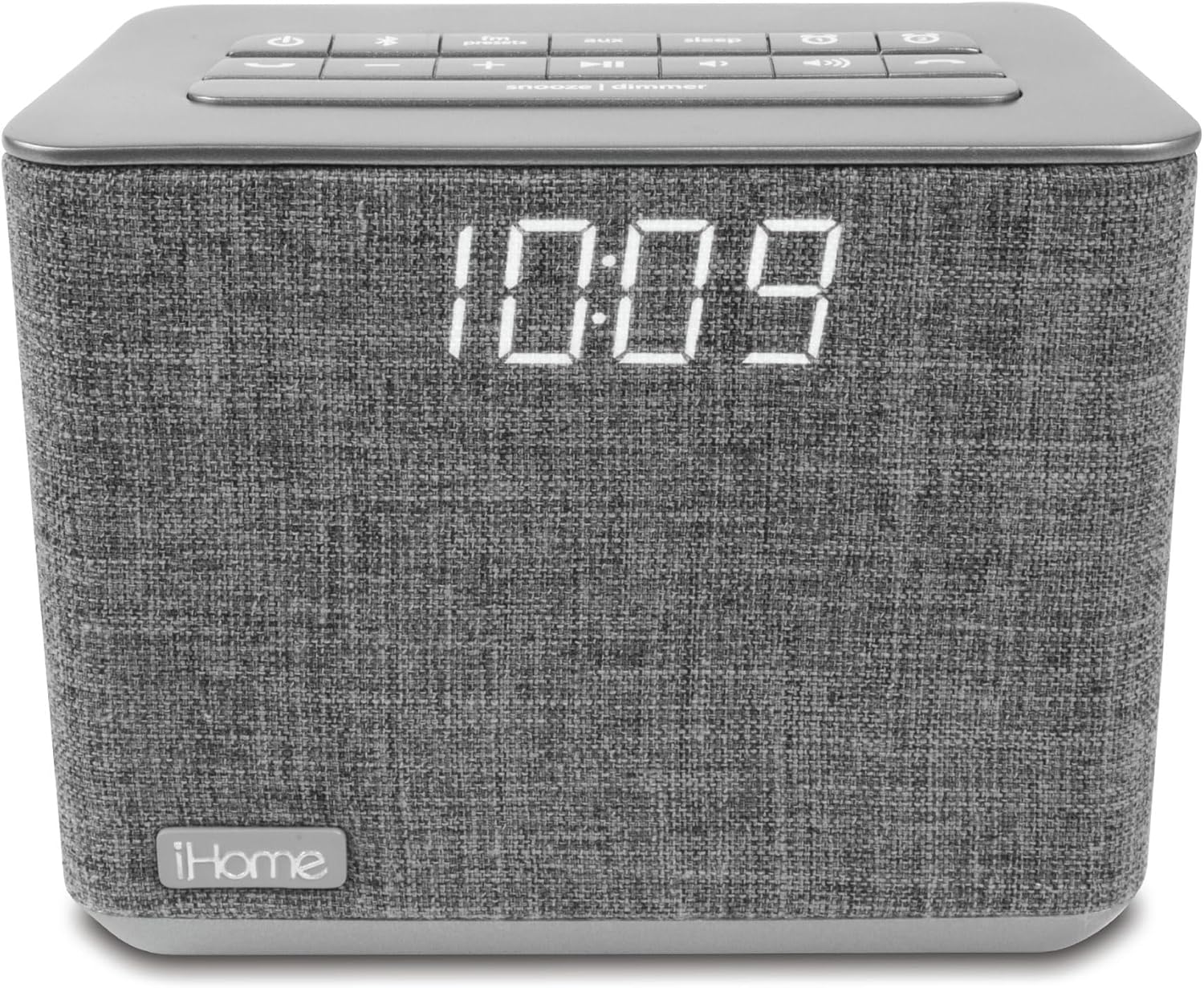
ඉදිරිපස view of the iHome iBT232 Bluetooth Dual Alarm FM Clock Radio in gray, displaying the time and connected to a smartphone for USB charging.
Connect your USB charging cable (not included) to the USB charging port on the rear of the unit to charge your smartphone or other USB-powered devices.
6.8 හඬ පාලනය (සිරි/ගූගල් සහායක)

A person interacting with the iHome iBT232 using voice commands for Siri or Google Assistant.
When your Bluetooth-paired device is connected, press the හඬ සහායක button to activate Siri or Google Assistant. You can then use voice commands for various functions like making calls, listening to music, setting reminders, and checking the weather.
7. නඩත්තු කිරීම
To keep your iBT232 in optimal condition:
- Clean the unit with a soft, dry cloth. Do not use liquid cleaners or abrasive materials.
- Keep the unit away from direct sunlight, excessive heat, or moisture.
- කිසිදු විවරයක් අවහිර නොකිරීමෙන් නිසි වාතාශ්රය සහතික කරන්න.
8. දෝශ නිරාකරණය
If you encounter issues with your iBT232, refer to the following common problems and solutions:
- ඒකකය ක්රියාත්මක නොවේ: Ensure the AC adapter is securely connected to both the unit and a working wall outlet. Check if the outlet has power.
- Clock display is not visible: ඔබන්න Snooze/Dimmer button to adjust the display brightness. Ensure the unit is powered on.
- Bluetooth pairing fails: Make sure the unit is in Bluetooth pairing mode (flashing indicator). Ensure your device's Bluetooth is enabled and within range. Try unpairing and re-pairing the device.
- No audio from FM radio: Extend the FM antenna wire fully. Try tuning to different stations. Adjust the volume.
- අනතුරු ඇඟවීමේ ශබ්දය ඇසෙන්නේ නැත: Verify that the alarm is set and activated (alarm indicator visible). Check the alarm volume. Ensure the alarm time is correctly set.
ප්රයෝජනවත් වීඩියෝ
Every Feature on the iHome Bluetooth Alarm Clock
මෙම වීඩියෝව පුළුල් විස්තරයක් සපයයිview of all features available on the iHome iBT232 Bluetooth Alarm Clock, including its various buttons and functionalities.
Top Features You Need to See!
A concise video highlighting the most important and useful features of the iHome iBT232, demonstrating its practical applications.
නිෂ්පාදන රීview and Demo After Years of Use
This video offers a long-term review and demonstration of the iHome iBT232, providing insights into its durability and performance after extended use.
අවංක රීview of Bluetooth USB Dual Alarm Clock
An unbiased review of the iHome iBT232 Bluetooth USB Dual Alarm Clock, discussing its strengths and weaknesses from a user's perspective.
9. පිරිවිතර
| වෙළඳ නාමය | iHome |
| ආදර්ශ අංකය | iBT232 |
| වර්ණය | අළු |
| සංදර්ශක වර්ගය | ඩිජිටල් |
| නිෂ්පාදන මානයන් | 5.39"W x 4.88"H |
| බලශක්ති ප්රභවය | රැහැන්ගත විදුලි |
| ද්රව්ය | ප්ලාස්ටික්, රෙදි |
| අයිතමයේ බර | රාත්තල් 1.1 (කිලෝග්රෑම් 0.5) |
| බැටරි ගණන | 2 AA batteries required (for backup) |
| එලාම් ඔරලෝසුව | Yes (Dual Alarms) |
| සම්බන්ධතා තාක්ෂණය | බ්ලූටූත්, USB |
| නිෂ්පාදකයා | අයිහෝම් |
| පළමු ලබා ගත හැකි දිනය | අප්රේල් 29, 2017 |
10. වගකීම් සහ සහාය
iHome products are manufactured to the highest quality standards. For specific warranty information and customer support, please refer to the warranty card included with your product or visit the official iHome webවෙබ් අඩවිය. වගකීම් හිමිකම් සඳහා මිලදී ගැනීමේ සාක්ෂියක් ලෙස ඔබේ මිලදී ගැනීමේ රිසිට්පත තබා ගන්න.


