1. හැඳින්වීම
The WeMo F7C059 Dimmer Wi-Fi Light Switch allows you to control and dim your lights from anywhere using the WeMo app, voice commands, or directly from the wall switch. This device integrates with your existing Wi-Fi network, eliminating the need for a separate hub. It is compatible with Amazon Alexa, Google Assistant, and Apple HomeKit, offering flexible control options for your smart home lighting.

රූපය: ඉදිරිපස view of the WeMo F7C059 Dimmer Wi-Fi Light Switch, showing its sleek white design with a vertical dimming strip and a circular power button.
2. වැදගත් ආරක්ෂක තොරතුරු
Please read and understand all safety instructions before installation and use. Failure to follow these instructions may result in electric shock, fire, or property damage.
- විදුලි කම්පන අවදානම: ස්විචය ස්ථාපනය කිරීමට හෝ සේවා කිරීමට පෙර සෑම විටම පරිපථ කඩනයේ විදුලිය විසන්ධි කරන්න.
- උදාසීන වයරය අවශ්ය වේ: This device requires a neutral wire for operation. If your existing switch box does not have a neutral wire (typically white), this dimmer is not compatible.
- Single-Pole Installation Only: This dimmer is designed for single-pole light switches only. It is not compatible with 3-way (multi-location control) switches.
- Avoid Metal Faceplates: Not recommended for use with metal faceplates, as this may interfere with Wi-Fi signal.
- ගෘහස්ථ භාවිතය පමණි: This device is intended for indoor use in dry locations.
- උපරිම වොට්tage: නිශ්චිත උපරිම වොට් වලට අනුගත වන්නtage: 400W Incandescent (single-gang), 250W Incandescent (multi-gang), 150W CFL/LED (single or multi-gang).
3. පැකේජ අන්තර්ගතය
ඔබගේ පැකේජයේ සියලුම අයිතම ඇති බව තහවුරු කරගන්න:
- WeMo Wi-Fi Smart Dimmer (F7C059)
- ඉක්මන් ආරම්භක මාර්ගෝපදේශය (මෙම ඩිජිටල් අත්පොතෙහි ඇතුළත් නොවේ)
- Wire Nuts (typically included for installation)
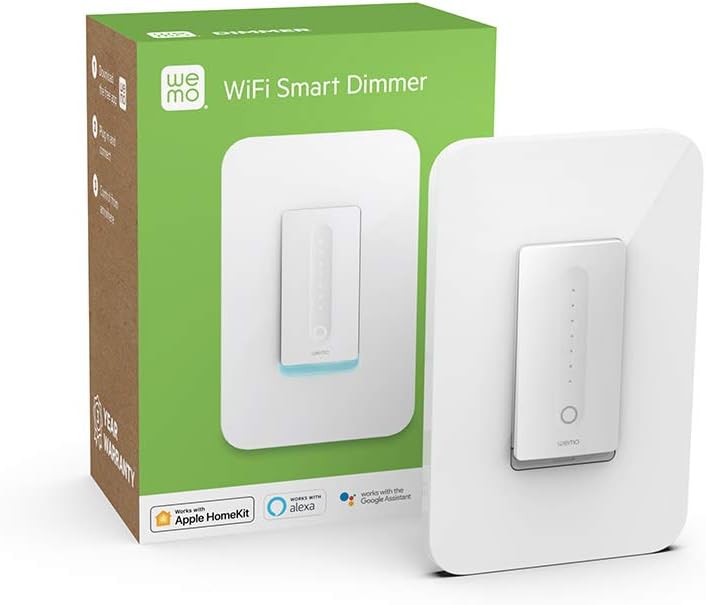
Image: The WeMo Wi-Fi Smart Dimmer shown alongside its retail packaging, highlighting the product and its box.
4. ස්ථාපනය (සැකසුම)
This section guides you through the physical installation of your WeMo Dimmer. If you are unsure about any steps, consult a qualified electrician.
4.1 පූර්ව ස්ථාපන චෙක්පත්
- ගැළපුම තහවුරු කරන්න: Ensure your existing switch is a single-pole switch (controls lights from one location) and that a neutral wire is present in the electrical box.
- අවශ්ය මෙවලම්: You will need a screwdriver, wire strippers, and electrical tape.
4.2 රැහැන් උපදෙස්
- බලය අක්රිය කරන්න: Locate your circuit breaker panel and turn off the power to the light switch you are replacing. Verify the power is off by attempting to turn on the light.
- පැරණි ස්විචය ඉවත් කරන්න: Carefully remove the existing wall plate and unscrew the old switch from the electrical box. Disconnect the wires, noting their connections.
- වයර් හඳුනා ගන්න:
- Line (Hot) Wire: සාමාන්යයෙන් කළු පැහැයෙන් යුක්ත වන අතර, පරිපථ කඩනයෙන් බලය ගෙන එයි.
- පැටවුම් වයර්: Typically black, sends power to the light fixture.
- උදාසීන වයර්: Typically white, required for the WeMo Dimmer.
- බිම් රැහැන්: සාමාන්යයෙන් කොළ පැහැති හෝ හිස් තඹ.
- Connect WeMo Dimmer:
- Connect the WeMo Dimmer's කළු වයර් to the electrical box's Line (Hot) wire.
- Connect the WeMo Dimmer's රතු වයර් to the electrical box's වයර් පැටවීම.
- Connect the WeMo Dimmer's සුදු කම්බි to the electrical box's උදාසීන වයර්.
- Connect the WeMo Dimmer's කොළ පැහැති වයර් to the electrical box's බිම් කම්බි.
- ඩිමර් සවි කරන්න: Carefully push the wired dimmer into the electrical box. Screw the dimmer into place.
- බිත්ති තහඩුව ස්ථාපනය කරන්න: Attach your existing or a new standard rocker-style wall plate.
- බලය ප්රතිස්ථාපනය කරන්න: Return to your circuit breaker panel and turn the power back on.
රූපය: සමීප ඡායාරූපයක් view of the WeMo Dimmer with its wires (black, red, white, green) extending, ready for electrical connection. This illustrates the wiring process.
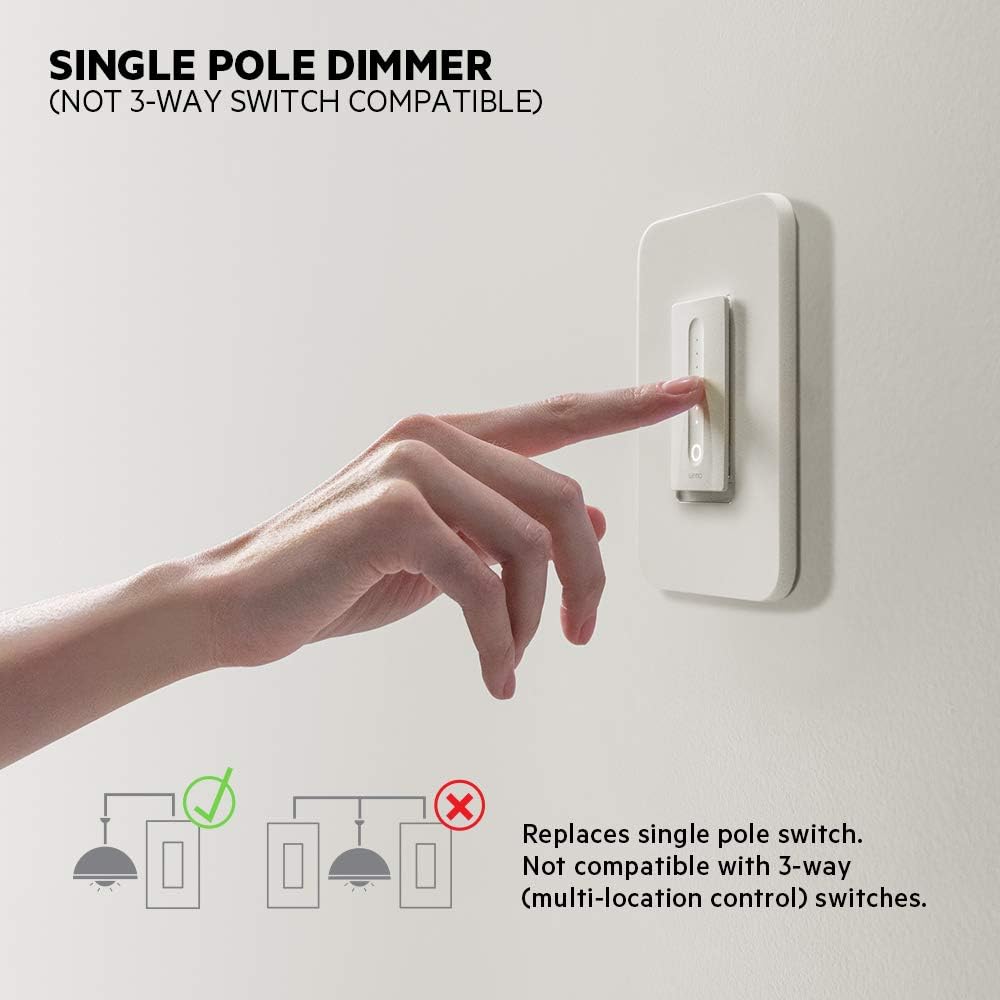
Image: Diagram illustrating that the WeMo Dimmer is compatible with single-pole switches (one switch controlling one light) and not with 3-way switches (multiple switches controlling one light).
5. WeMo App Setup
After physical installation, set up your WeMo Dimmer using the WeMo app to enable smart features.
- Download the WeMo App: Download the free WeMo app from the Apple App Store (for iOS) or Google Play Store (for Android).
- Launch App and Add Device: Open the WeMo app and follow the on-screen instructions to add a new device.
- Connect to WeMo Wi-Fi: Your phone will temporarily connect to the WeMo Dimmer's Wi-Fi network during setup.
- Connect to Home Wi-Fi: Select your home 2.4GHz Wi-Fi network and enter the password when prompted.
- Name Your Dimmer: Give your dimmer a descriptive name (e.g., "Living Room Lights").
- Calibrate Dimmer: The app will guide you through a calibration process to optimize dimming for your specific bulbs (incandescent, CFL, or LED) and prevent flickering.

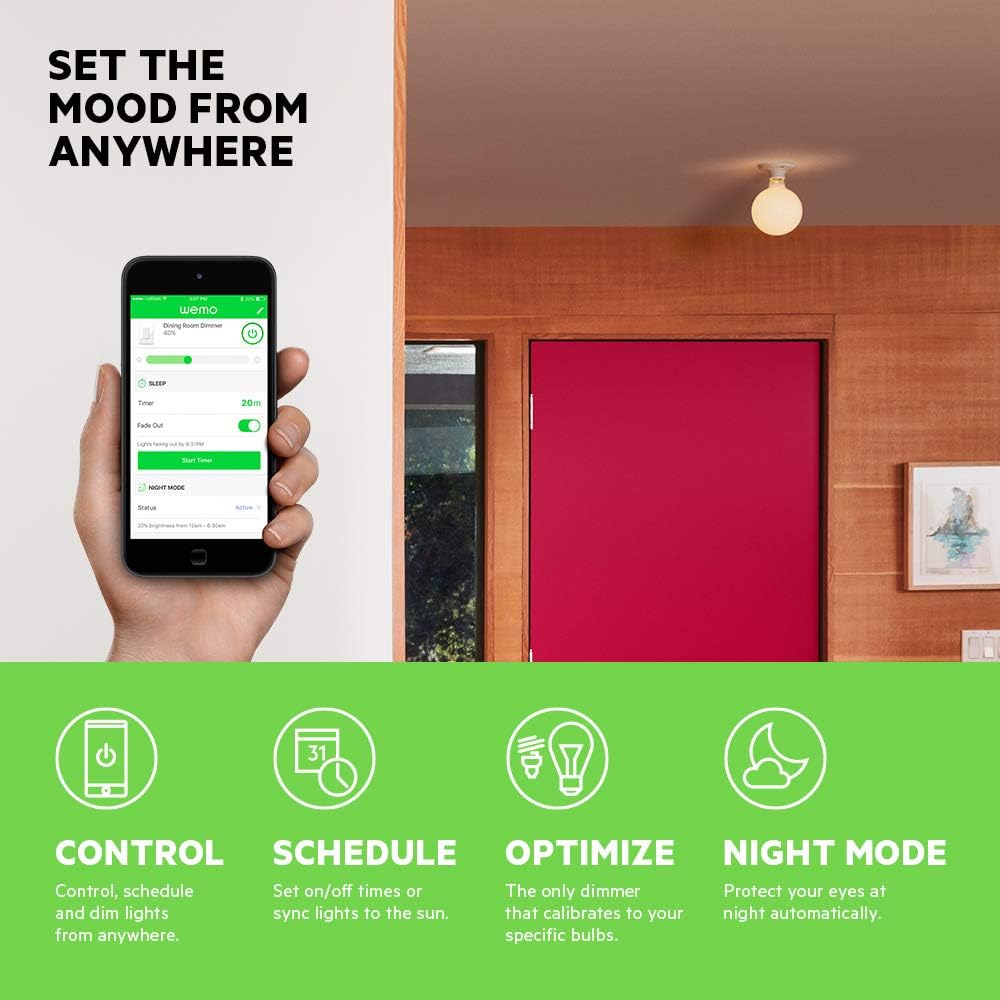
Image: A smartphone displaying the WeMo app interface, showing controls for dimming, scheduling, and night mode settings for a connected light switch.
6. මෙහෙයුම
Control your lights using the physical switch, the WeMo app, or voice commands.
6.1 අතින් පාලනය
- සක්රිය/අක්රිය: Press the main circular button to turn the lights on or off.
- අඳුරු වීම: Slide your finger along the vertical touch-sensitive strip to adjust brightness levels.
6.2 යෙදුම් පාලනය
The WeMo app provides advanced control features:
- දුරස්ථ පාලක: Turn lights on/off and adjust brightness from anywhere with an internet connection.
- Schedules and Timers: Set custom schedules for lights to turn on/off or dim at specific times, or sync with sunrise/sunset.
- රාත්රී ප්රකාරය: Configure a low-light setting for specific hours to protect your eyes from bright lights during the night.

Image: A couple relaxing on a couch, watching television, with the text "Set the mood from anywhere" suggesting remote control of lighting.
7. හඬ පාලන ඒකාබද්ධ කිරීම
Integrate your WeMo Dimmer with popular voice assistants for hands-free control.
- ඇමසන් ඇලෙක්සා: Enable the WeMo skill in the Alexa app and discover devices. You can then say commands like, "Alexa, dim the living room lights to 50%."
- Google සහායක: Link your WeMo account in the Google Home app. Use commands such as, "Hey Google, turn off the bedroom light."
- Apple HomeKit: While advertised as compatible, some users may experience issues with HomeKit setup. Ensure your WeMo Dimmer firmware is up to date. If a HomeKit code is not present on the device or packaging, direct integration may not be immediately available.
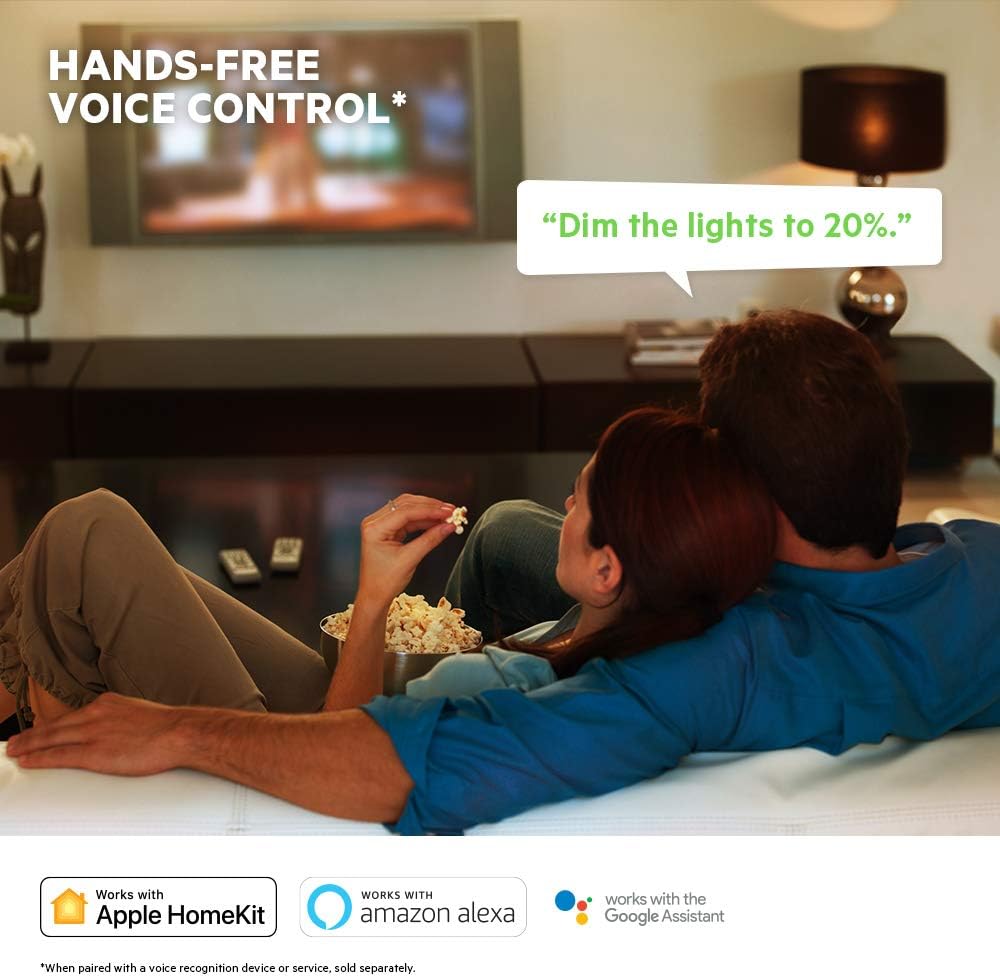
Image: A visual representation of voice control, showing a speech bubble with "Dim the lights to 20%." and logos for Apple HomeKit, Amazon Alexa, and Google Assistant.
8. නඩත්තු කිරීම
To ensure optimal performance and longevity of your WeMo Dimmer:
- පිරිසිදු කිරීම: Wipe the dimmer and wall plate with a soft, dry cloth. Do not use abrasive cleaners or solvents.
- ස්ථිරාංග යාවත්කාලීන කිරීම්: Regularly check the WeMo app for available firmware updates. These updates can improve performance, add features, and enhance security.
- බල පාපැදි: If the dimmer becomes unresponsive, try turning off the power at the circuit breaker for 10 seconds, then turning it back on.
9. දෝශ නිරාකරණය
If you encounter issues with your WeMo Dimmer, refer to the following common problems and solutions:
| ගැටලුව | විය හැකි හේතුව / විසඳුම |
|---|---|
| Dimmer does not turn on/off or dim. |
|
| Cannot connect to WeMo app or Wi-Fi. |
|
| Lights flicker or dimming range is poor. |
|
| හඬ පාලනය ක්රියා නොකරයි. |
|
10. පිරිවිතර
| විශේෂාංගය | විස්තර |
|---|---|
| ආදර්ශ අංකය | F7C059 |
| වෙළඳ නාමය | WeMo |
| මෙහෙයුම් වෙළුමtage | 120 VAC |
| මැක්ස් වොට්tage (තාපදීප්ත) | 400W (single-gang), 250W (multi-gang) |
| මැක්ස් වොට්tage (CFL/LED) | 150W (single or multi-gang) |
| සම්බන්ධතා ප්රොටෝකෝලය | Wi-Fi (2.4GHz 802.11b/g/n) |
| පාලන ක්රමය | App, Voice, Manual |
| පාලක වර්ගය | Amazon Alexa, Google Assistant, HomeKit, WeMo App |
| පරිපථ වර්ගය | 1-way (Single-Pole) |
| උදාසීන වයර් | අවශ්යයි |
| නිෂ්පාදන මානයන් | අඟල් 3.3 x 1.7 x 5 |
| අයිතමයේ බර | අවුන්ස 8 කි |
| වර්ණය | සුදු |
11. වගකීම් සහ සහාය
For warranty information, technical support, or further assistance, please visit the official WeMo support website or contact their customer service. Details are typically available on the product packaging or the WeMo webඅඩවිය.
මාර්ගගත සහාය: www.wemo.com/support (උදාampසබැඳිය, සැබෑ සබැඳිය වෙනස් විය හැක)


