1. පිහිටුවීම
1.1 බැටරි ස්ථාපනය
The Insignia NS-RC03A-13 remote control requires two AAA batteries for operation. Follow these steps to install them:
- දුරස්ථ පාලකයේ පිටුපස බැටරි මැදිරි කවරය සොයා ගන්න.
- කවරය පහළට ලිස්සන්න හෝ එය විවෘත කිරීමට අගුල ඔබන්න.
- ධනාත්මක (+) සහ සෘණ (-) පර්යන්ත මැදිරිය තුළ ඇති සලකුණු සමඟ නිවැරදිව පෙළගස්වන බව සහතික කර ගනිමින් AAA බැටරි දෙකක් ඇතුළු කරන්න.
- බැටරි මැදිරි කවරය ආරක්ෂිතව ක්ලික් කරන තුරු එය නැවත එම ස්ථානයට තල්ලු කරන්න.
රූපය: පසුපස view of the Insignia NS-RC03A-13 remote control, showing the battery compartment open with two AAA batteries inserted. The remote is black with gray buttons.
2. මෙහෙයුම් උපදෙස්
This section details the primary functions and usage of your Insignia NS-RC03A-13 remote control.
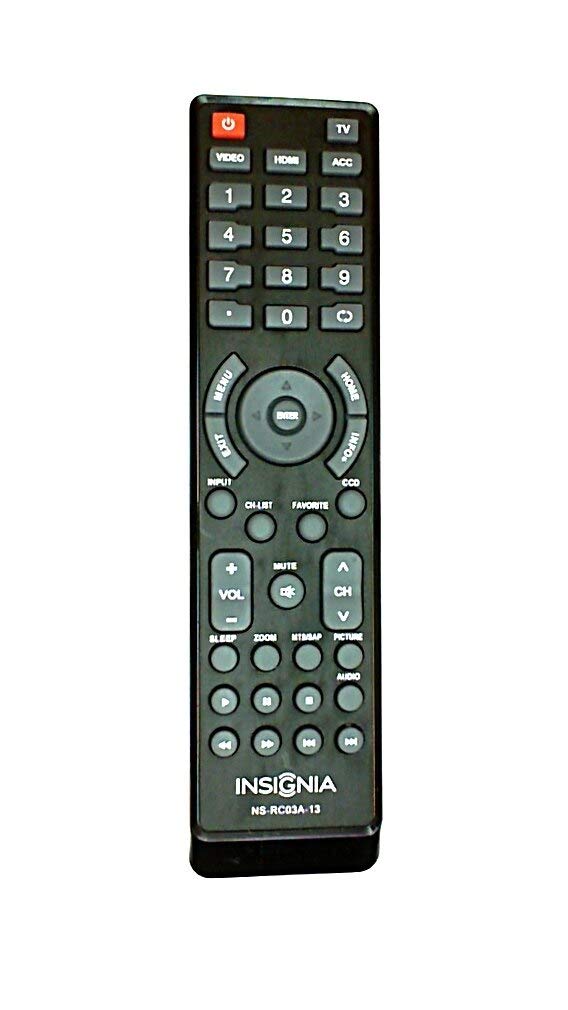
රූපය: ඉදිරිපස view of the Insignia NS-RC03A-13 remote control, displaying all buttons and their labels. The remote is black with gray buttons and white text.
2.1 බලය සක්රිය / අක්රිය
ඔබන්න බලය button (usually located at the top left) to turn your television on or off.
2.2 ආදාන තේරීම
To switch between different video sources (e.g., HDMI 1, HDMI 2, Video), press the ආදානය button. Continue pressing to cycle through available inputs until your desired source is selected.
2.3 නාලිකා සහ ශබ්ද පාලනය
- පරිමාව: භාවිතා කරන්න VOL+ සහ වෙළුම - buttons to increase or decrease the audio volume.
- නිශ්ශබ්ද කරන්න: ඔබන්න නිශ්ශබ්ද කරන්න button to instantly silence the television audio. Press it again to restore sound.
- නාලිකා: භාවිතා කරන්න CH + සහ සීඑච් - buttons to navigate through television channels.
- අංක පෑඩ්: Directly enter channel numbers using the numeric keypad (0-9).
2.4 මෙනු සංචලනය
Use the directional arrow buttons (Up, Down, Left, Right) around the ඇතුල් කරන්න button to navigate through on-screen menus. Press ඇතුල් කරන්න to confirm a selection. The මෙනුව button typically opens the main menu, and පිටවීම එය වසා දමයි.
3. නඩත්තු කිරීම
නිසි සැලකිල්ල ඔබේ දුරස්ථ පාලකයේ දීර්ඝ ආයු කාලය සහ ප්රශස්ත ක්රියාකාරිත්වය සහතික කරයි.
- පිරිසිදු කිරීම: Wipe the remote control with a soft, dry cloth. Avoid using liquid cleaners, abrasive materials, or chemical solvents, as these can damage the surface or internal components.
- බැටරි ආදේශනය: දුරස්ථ පාලකයේ ප්රතිචාරාත්මක බව අඩු වූ විට බැටරි ප්රතිස්ථාපනය කරන්න. සෑම විටම බැටරි දෙකම එකම අවස්ථාවේදීම එකම වර්ගයේ (AAA) නව ඒවා සමඟ ප්රතිස්ථාපනය කරන්න.
- ගබඩා: දුරස්ථ පාලකය වියළි ස්ථානයක ගබඩා කරන්න, සෘජු හිරු එළිය, අධික උෂ්ණත්වයන් සහ අධික ආර්ද්රතාවයෙන් ඈත්ව සිටින්න.
- බිංදු වළකින්න: බිංදු අභ්යන්තර පරිපථයට හානි කළ හැකි බැවින්, භෞතික බලපෑමෙන් දුරස්ථ පාලකය ආරක්ෂා කරන්න.
4. දෝශ නිරාකරණය
ඔබගේ දුරස්ථ පාලකය සමඟ ගැටළු ඇති වුවහොත්, පහත විසඳුම් උත්සාහ කරන්න:
- දුරස්ථ පාලකය ප්රතිචාර නොදක්වයි:
- නිසි ධ්රැවීයතාව සහිතව බැටරි නිවැරදිව ඇතුළත් කර ඇත්දැයි පරීක්ෂා කරන්න.
- පැරණි බැටරි නව AAA බැටරි සමඟ ප්රතිස්ථාපනය කරන්න.
- Ensure there are no obstructions between the remote control and the TV's infrared (IR) receiver.
- Point the remote directly at the TV's IR receiver.
- නිශ්චිත බොත්තම් ක්රියා නොකරයි:
- Clean around the unresponsive buttons with a soft, slightly damp cloth to remove any debris or stickiness.
- If cleaning does not resolve the issue, the button mechanism may be faulty, and the remote might require replacement.
- TV not responding to input changes:
- Ensure the remote is correctly paired or compatible with your Insignia TV model.
- ඔබන්න උත්සාහ කරන්න ආදානය button multiple times to cycle through all available sources.
5. පිරිවිතර
| ආදර්ශ අංකය | NS-RC03A-13 |
| වෙළඳ නාමය | ඉංජිනියාව |
| ගැළපෙන උපාංග | රූපවාහිනිය |
| උපරිම සහාය දක්වන උපාංග ගණන | 1 |
| අවශ්ය බැටරි | 2 AAA බැටරි |
| වර්ණය | කළු |
| විශේෂ ලක්ෂණය | Ergonomic |
| අයිතමයේ බර | අවුන්ස 2.39 කි |
| පැකේජ මානයන් | අඟල් 7 x 2 x 1 |
6. වගකීම් සහ සහාය
For detailed warranty information, product registration, or technical support, please visit the official Insignia webවෙබ් අඩවියට හෝ ඔවුන්ගේ පාරිභෝගික සේවා දෙපාර්තමේන්තුවට සම්බන්ධ වන්න. ඕනෑම වගකීම් හිමිකම් සඳහා මිලදී ගැනීමේ සාක්ෂියක් ලෙස ඔබේ මිලදී ගැනීමේ රිසිට්පත තබා ගන්න.
මාර්ගගත සහාය: www.insigniaproducts.com
සටහන: නිශ්චිත වගකීම් නියමයන් කලාපය සහ සිල්ලර වෙළෙන්දා අනුව වෙනස් විය හැකිය.


