හැඳින්වීම
ස්තූතියි, උදව් කළාටasing the Wireless Bluetooth Headset. This manual provides essential information for the proper use, setup, and maintenance of your new headset. Please read it thoroughly before use to ensure optimal performance and longevity of the product.
පැකේජයේ අන්තර්ගතය
පහත ලැයිස්තුගත කර ඇති සියලුම අයිතම ඔබේ පැකේජයට ඇතුළත් කර ඇති බව කරුණාකර සත්යාපනය කරන්න:
- Wireless Bluetooth Headset (2 units)
- USB Charging Cable (2 units)
- පරිශීලක අත්පොත

Image: Contents of the headset package, showing one black headset and a white USB charging cable.
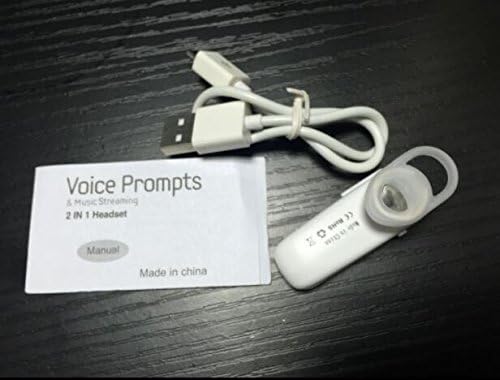
Image: Contents of the headset package, showing one white headset, a white USB charging cable, and the printed user manual.
නිෂ්පාදනය අවසන්view
The Wireless Bluetooth Headset is designed for convenience and portability, ideal for sports, driving, and daily use. It features a super mini design and supports voice prompts and music streaming.

රූපය: ඉදිරිපස view of the product packaging, displaying the black wireless Bluetooth headset inside its clear plastic casing.
පිරිවිතර
| විශේෂාංගය | විස්තරය |
|---|---|
| බ්ලූටූත් අනුවාදය | V3.0 + EDR |
| සහාය ප්රෝfiles | Headset, Handsfree, A2DP |
| Talk Time/Playing Time | පැය 5 දක්වා |
| පොරොත්තු කාලය | පැය 80 දක්වා |
| බලශක්ති ප්රභවය | නැවත ආරෝපණය කළ හැකි Li-ion බැටරිය |
| සම්බන්ධතා තාක්ෂණය | රැහැන් රහිත |
| ආකෘති සාධකය | කනේ |
| අයිතමයේ බර | 15.8 ounces (for 2 units) |
| පැකේජ මානයන් | අඟල් 1.97 x 1.57 x 1.18 |
| ආදර්ශ අංකය | Yu- TLXgo-2201 |

Image: Back of the product packaging, displaying a list of product specifications including Bluetooth version, talk time, and power source.
සැලසුම
හෙඩ්සෙට් එක ආරෝපණය කිරීම
- USB ආරෝපණ කේබලයේ කුඩා කෙළවර හෙඩ්සෙට් එකේ ආරෝපණ තොටට සම්බන්ධ කරන්න.
- USB ආරෝපණ කේබලයේ විශාල කෙළවර USB බල ප්රභවයකට සම්බන්ධ කරන්න (උදා: පරිගණක USB පෝට් එක, USB බිත්ති ඇඩැප්ටරය).
- The indicator light on the headset will illuminate during charging. It will change color or turn off once fully charged.
- සම්පූර්ණ ආරෝපණයක් සාමාන්යයෙන් පැය 1-2 ක් පමණ ගතවේ.
බ්ලූටූත් උපාංගයක් සමඟ යුගල කිරීම
- Ensure the headset is fully charged before initial pairing.
- With the headset turned off, press and hold the Multi-function Button (MFB) for approximately 5-7 seconds until the indicator light flashes red and blue alternately. This indicates the headset is in pairing mode.
- On your Bluetooth-enabled device (smartphone, tablet, etc.), go to the Bluetooth settings and ensure Bluetooth is enabled.
- ඒ සඳහා සොයන්න available devices. The headset should appear in the list, typically named "MBT2013" or similar.
- Select the headset from the list to connect. If prompted for a password, enter "0000" (four zeros).
- Once successfully paired, the indicator light will stop flashing and may show a steady blue light, and you may hear a voice prompt confirming the connection.
- The headset will automatically connect to the last paired device when turned on, if the device's Bluetooth is active and within range.
මෙහෙයුම් උපදෙස්
බලය සක්රිය / අක්රිය
- බල ගැන්වීම: Press and hold the Multi-function Button (MFB) for about 3 seconds until the blue indicator light flashes and you hear a voice prompt.
- විදුලිය විසන්ධි කිරීම: Press and hold the MFB for about 3-4 seconds until the red indicator light flashes and you hear a voice prompt.
ඇමතුම් කළමනාකරණය
- පිළිතුරු ඇමතුම: MFB එක වරක් ඔබන්න.
- ඇමතුම අවසන් කරන්න: Press the MFB once during a call.
- ඇමතුම ප්රතික්ෂේප කරන්න: Press and hold the MFB for about 2 seconds during an incoming call.
- අවසාන අංකය නැවත අමතන්න: Double-press the MFB when not on a call.
සංගීත වාදනය
- වාදනය/විරාමය: Press the MFB once during music playback.
Note: Volume control may be managed directly from your connected device.
නඩත්තු කිරීම
- පිරිසිදු කිරීම: හෙඩ්සෙට් එක පිරිසිදු කිරීමට මෘදු වියළි රෙද්දක් භාවිතා කරන්න. සැර රසායනික ද්රව්ය හෝ උල්ෙල්ඛ ද්රව්ය භාවිතා නොකරන්න.
- ගබඩා: හෙඩ්සෙට් එක සෘජු හිරු එළියෙන් සහ අධික උෂ්ණත්වයන්ගෙන් ඈත්ව සිසිල් වියළි ස්ථානයක ගබඩා කරන්න.
- බැටරි සත්කාර: To prolong battery life, charge the headset regularly, even if not in frequent use. Avoid fully discharging the battery for extended periods.
- ජල ප්රතිරෝධය: This headset is not waterproof. Avoid exposure to water or excessive moisture.
දෝෂගවේෂණය
- Headset does not power on:
- Ensure the headset is fully charged. Connect it to a power source and try again.
- උපාංගය සමඟ යුගල කළ නොහැක:
- Ensure the headset is in pairing mode (red and blue lights flashing alternately). Make sure Bluetooth is enabled on your device and it is within range (typically 10 meters). Try restarting both the headset and your device.
- ශබ්දයක් නොමැතිකම හෝ දුර්වල ශබ්ද ගුණාත්මකභාවය:
- Check the volume levels on both the headset and your connected device. Ensure the headset is properly connected to your device. Move closer to your device to avoid interference.
- හෙඩ්සෙට් එක නිතර විසන්ධි වේ:
- Ensure the headset is within range of your device. Check for potential interference from other wireless devices. Try re-pairing the headset.
ආරක්ෂිත තොරතුරු
- Do not disassemble, repair, or modify the headset. This may cause fire, electronic breakdown, or complete damage to the product.
- Keep the headset away from extreme temperatures, humidity, and corrosive substances.
- හෙඩ්සෙට් එක බිම හෙළීමෙන් හෝ දැඩි බලපෑම්වලට ලක් කිරීමෙන් වළකින්න.
- Do not expose the headset to open flames or dispose of it in fire.
- දේශීය රෙගුලාසිවලට අනුව නිෂ්පාදනය සහ එහි බැටරිය වගකීමෙන් යුතුව බැහැර කරන්න.
වගකීම් සහ සහාය
වගකීම් තොරතුරු හෝ තාක්ෂණික සහාය සඳහා, කරුණාකර ඔබේ සිල්ලර වෙළෙන්දා හෝ නිෂ්පාදකයාගේ නිලධාරියා විසින් සපයන ලද සම්බන්ධතා තොරතුරු වෙත යොමු වන්න. webවෙබ් අඩවිය. වගකීම් හිමිකම් සඳහා කරුණාකර ඔබේ මිලදී ගැනීමේ සාක්ෂි තබා ගන්න.


