1. හැඳින්වීම
ස්තූතියි, උදව් කළාටasing the Genius GX Wired Gaming Keyboard, Scorpion K220. This manual provides detailed instructions for setting up, operating, and maintaining your new gaming keyboard. Designed for PC gaming, the Scorpion K220 features a sleek design, compact construction, and vibrant backlighting for an enhanced gaming experience.

රූපය 1.1: ඉදිරිපස view of the Genius GX Wired Gaming Keyboard Scorpion K220, showcasing its design and colorful backlighting.
2 ආරක්ෂිත තොරතුරු
Please read the following safety precautions carefully before using the device to ensure optimal performance and prevent damage.
- යතුරු පුවරුව ජලයට හෝ වෙනත් ද්රවවලට නිරාවරණය නොකරන්න.
- Avoid extreme temperatures (hot or cold) and high humidity.
- යතුරු පුවරුව විසුරුවා හැරීමට හෝ වෙනස් කිරීමට උත්සාහ නොකරන්න. මෙය වගකීම් අවලංගු කරයි.
- Keep the keyboard away from strong magnetic fields.
- Use only a dry, soft cloth for cleaning.
- Ensure the USB cable is not pinched or damaged during setup and use.
3. පැකේජ අන්තර්ගතය
සියලුම අයිතම පැකේජයේ ඇති බව තහවුරු කරගන්න:
- Genius GX Wired Gaming Keyboard (Scorpion K220)
- පරිශීලක අත්පොත (මෙම ලේඛනය)
4. පිහිටුවීම
4.1 යතුරු පුවරුව සම්බන්ධ කිරීම
The Scorpion K220 keyboard uses a standard USB connection for compatibility with PCs and Laptops. No additional drivers are typically required for basic functionality.
- ඔබේ පරිගණකයේ (පරිගණකය හෝ ලැප්ටොප් පරිගණකය) ඇති USB පෝට් එක සොයා ගන්න.
- Carefully insert the USB connector of the Scorpion K220 keyboard into the USB port.
- ඔබගේ මෙහෙයුම් පද්ධතිය අවශ්ය ධාවක ස්වයංක්රීයව හඳුනාගෙන ස්ථාපනය කළ යුතුය. මෙම ක්රියාවලියට මිනිත්තු කිහිපයක් ගතවනු ඇත.
- Once installation is complete, the keyboard will be ready for use. The backlighting should illuminate.

Figure 4.1: The Genius GX Wired Gaming Keyboard Scorpion K220, ready for connection to a PC or laptop via its integrated USB cable.
5. මෙහෙයුම් උපදෙස්
5.1 මූලික යතුරුපුවරු කාර්යයන්
The Scorpion K220 functions as a standard QWERTY keyboard. All standard keys (alphanumeric, function keys, navigation keys, and numeric keypad) operate as expected.
5.2 Backlight Control
The Scorpion K220 features vibrant backlighting to enhance your gaming and typing experience. The backlighting is always on when the keyboard is connected and powered.
- දීප්තිය ගැලපීම: Look for dedicated keys or key combinations (often Fn + Scroll Lock or similar) to adjust backlight brightness. Refer to the keyboard's key legends for specific controls.
- ආලෝකකරණ මාදිලි: Some models may offer different lighting effects or static color modes. Experiment with function key combinations (e.g., Fn + F1-F12 or dedicated lighting keys) to cycle through available modes.
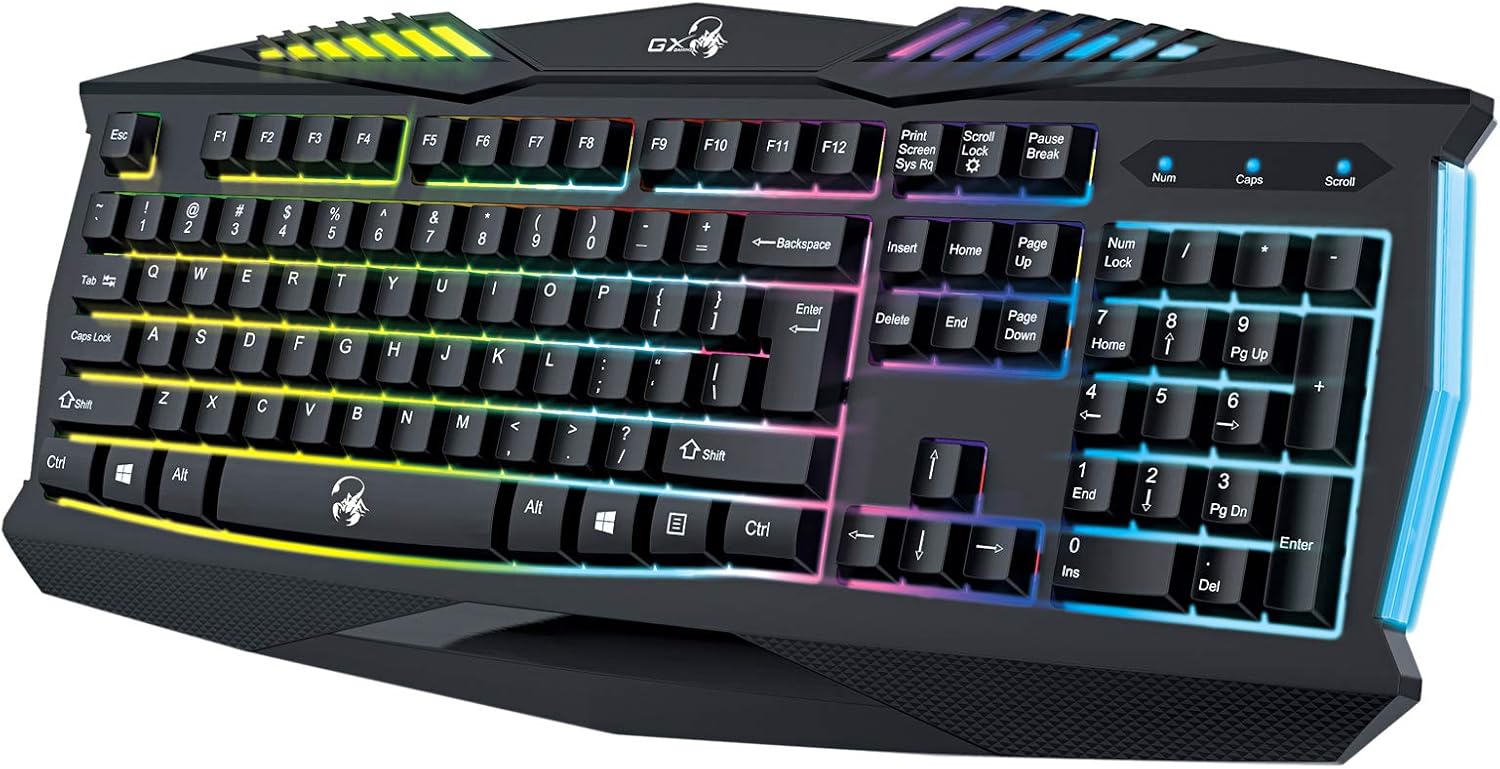
රූපය 5.1: සමීප රූපය view of the Genius GX Wired Gaming Keyboard Scorpion K220, highlighting the illuminated keys and vibrant backlighting.
5.3 ක්රීඩා විශේෂාංග
The Scorpion K220 is designed for gaming with a responsive membrane switch type and a comfortable layout. While it does not feature programmable macro keys, its robust design and anti-ghosting capabilities (where applicable) ensure reliable performance during intense gaming sessions.
6. නඩත්තු කිරීම
නිසි නඩත්තුව ඔබේ යතුරුපුවරුවේ ආයු කාලය සහ ප්රශස්ත ක්රියාකාරිත්වය සහතික කරයි.
- පිරිසිදු කිරීම:
- පිරිසිදු කිරීමට පෙර ඔබේ පරිගණකයෙන් යතුරු පුවරුව විසන්ධි කරන්න.
- Use a soft, dry, lint-free cloth to wipe down the surface of the keyboard.
- යතුරු අතර දූවිලි හා සුන්බුන් සඳහා, සම්පීඩිත වාතය භාවිතා කරන්න.
- සැර රසායනික ද්රව්ය, උල්ෙල්ඛ පිරිසිදු කරන්නන් හෝ ද්රාවක භාවිතා නොකරන්න.
- ගබඩා: දීර්ඝ කාලයක් තිස්සේ භාවිතයේ නොමැති විට සෘජු හිරු එළියෙන් සහ අධික උෂ්ණත්වයන්ගෙන් ඈත්ව සිසිල් වියළි ස්ථානයක යතුරු පුවරුව ගබඩා කරන්න.
7. දෝශ නිරාකරණය
If you encounter issues with your Scorpion K220 keyboard, refer to the table below for common problems and solutions.
| ගැටලුව | විය හැකි හේතුව | විසඳුම |
|---|---|---|
| යතුරු පුවරුව ප්රතිචාර නොදක්වයි | ලිහිල් USB සම්බන්ධතාවය, දෝෂ සහිත USB පෝට් එක, ධාවක ගැටළුව. |
|
| පසුබිම් ආලෝකය ක්රියා නොකරයි | Keyboard not powered, specific lighting mode selected. |
|
| යතුරු ඇලෙන සුළු හෝ ප්රතිචාර නොදක්වයි. | Dirt or debris under the keys. |
|
8. පිරිවිතර
Detailed technical specifications for the Genius GX Wired Gaming Keyboard Scorpion K220:
| විශේෂාංගය | විස්තර |
|---|---|
| වෙළඳ නාමය | දක්ෂයි |
| ආදර්ශ අංකය | K220 |
| නිෂ්පාදන මානයන් | 23 x 49 x 4 සෙ.මී |
| අයිතමයේ බර | 980 ග්රෑම් |
| නිෂ්පාදකයා | දක්ෂයි |
| බලශක්ති ප්රභවය | රැහැන්ගත විදුලි |
| බැටරි ඇතුළත් | නැත |
| ගැළපෙන උපාංග | PC, ලැප්ටොප් |
| සම්බන්ධතා තාක්ෂණය | USB |
| යතුරුපුවරු විස්තරය | ක්රීඩා කිරීම |
| විශේෂ ලක්ෂණ | බැක්ලයිට් |
| ද්රව්ය | මිශ්ර ද්රව්ය |
| මාරු වර්ගය | පටලය |
| යතුරුපුවරු පිරිසැලසුම | QWERTY |
| අත් දිශානතිය | උභයජීවී |
9. වගකීම් සහ සහාය
Genius products are manufactured to the highest quality standards. For information regarding warranty coverage, technical support, or service, please refer to the warranty card included with your product or visit the official Genius webඅඩවිය.
For further assistance, you may contact Genius customer support through their official channels. Please have your product model number (K220) and purchase details ready when contacting support.
නිල Webඅඩවිය: www.geniusnet.com


