1. හැඳින්වීම
This manual provides instructions for the Apple TV (32GB, 4th Generation), a digital media player developed by Apple Inc. It allows users to access digital content from various sources, including streaming services, apps, and AirPlay from Apple devices. This guide covers setup, operation, maintenance, and troubleshooting to ensure optimal use of your device.
පෙට්ටියේ ඇති දේ
- Apple TV (32GB, 4th generation)
- Siri Remote
- විදුලි රැහැන්
- Lightning to USB Cable (for remote charging)
An HDMI cable (sold separately) is required to connect the Apple TV to your television.
2. පිහිටුවීම
2.1 Connecting Your Apple TV
- සම්බන්ධක බලය: Plug one end of the power cord into the power port on the back of the Apple TV and the other end into a power outlet.
- රූපවාහිනියට සම්බන්ධ වන්න: Use an HDMI cable (not included) to connect the HDMI port on the back of the Apple TV to an HDMI input on your television. Note: Ensure the HDMI cable is fully engaged to prevent signal issues.
- ජාලයට සම්බන්ධ වන්න (විකල්ප): For a wired internet connection, connect an Ethernet cable from your router to the Ethernet port on the back of the Apple TV. For Wi-Fi, you will configure this during the on-screen setup.
- බල ගැන්වීම: Turn on your television and select the correct HDMI input. The Apple TV should power on automatically.

රූපය 2.1: පසුපස view of the Apple TV showing the power, USB-C, HDMI, and Ethernet ports for connections.
2.2 Initial Setup with Siri Remote
- Pair Siri Remote: If the Siri Remote does not automatically pair, press and hold the මෙනුව සහ ශබ්දය වැඩි කරන්න තත්පර 5 සඳහා බොත්තම්.
- භාෂාව සහ කලාපය: ඔබේ භාෂාව සහ කලාපය තේරීමට තිරයේ ඇති උපදෙස් අනුගමනය කරන්න.
- Quick Setup with iOS Device: If you have an iPhone or iPad, bring it close to the Apple TV when prompted. Your device will offer to transfer Wi-Fi settings and Apple ID information automatically.
- අතින් සැකසුම: If not using an iOS device, manually select your Wi-Fi network and enter your Apple ID credentials using the Siri Remote.
- සම්පූර්ණ සැකසුම: Continue following the on-screen prompts to enable location services, Siri, and other preferences.
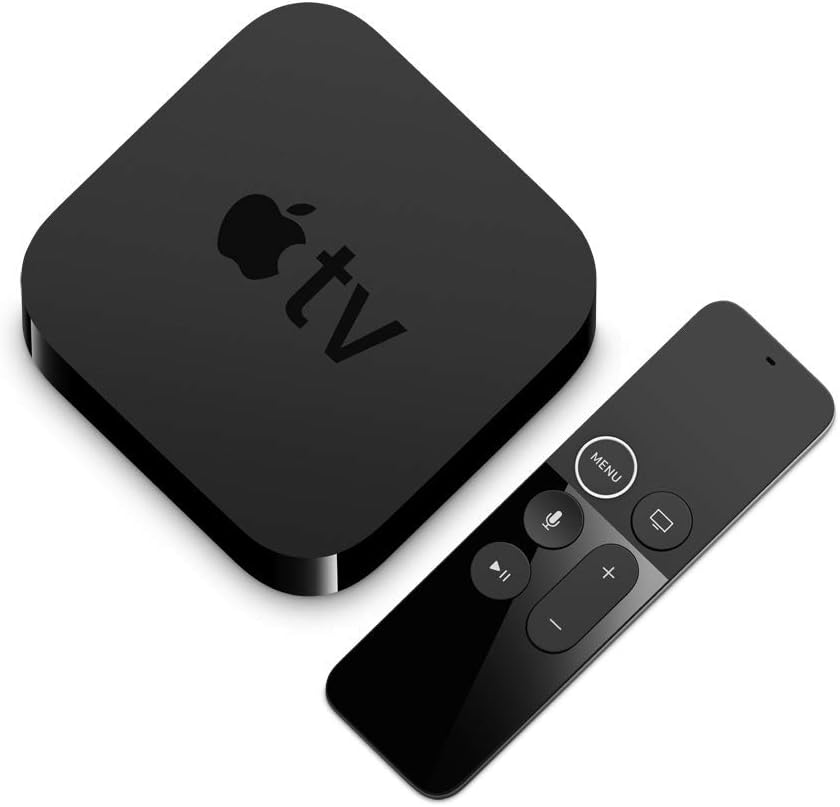
රූපය 2.2: The Apple TV unit and its accompanying Siri Remote, used for navigation and control.
3. Operating Your Apple TV
3.1 Siri Remote Functions
The Siri Remote features a touch surface for navigation and dedicated buttons for various functions:
- ස්පර්ශ මතුපිට: Swipe to navigate, click to select.
- මෙනු බොත්තම: Go back to the previous screen or return to the Home screen (hold).
- TV/Home Button: Go to the TV app or Home screen (single press), open App Switcher (double press), or activate Control Center (hold).
- සිරි බොත්තම: Press and hold to activate Siri for voice commands and search.
- වාදනය/විරාම බොත්තම: මාධ්ය නැවත ධාවනය පාලනය කරන්න.
- වෙළුම් බොත්තම්: Control your TV's volume (requires TV setup).
3.2 ප්රධාන ලක්ෂණ
- 1080p HD වීඩියෝව: Enjoy high-quality video content.
- Dolby Digital Plus 7.1 Surround Sound: Experience immersive audio.
- Apple TV+ Access: Watch original stories from Apple TV+.
- ඇපල් ආකේඩ්: Play groundbreaking games.
- AirPlay: Stream photos and videos from your iPhone or iPad to your TV.
- Siri Voice Control: ඒ සඳහා සොයන්න movies, shows, and games using voice commands.
4. නඩත්තු කිරීම
4.1 Cleaning Your Apple TV and Siri Remote
- Unplug the Apple TV from the power outlet before cleaning.
- Use a soft, lint-free cloth to wipe the exterior of the Apple TV and Siri Remote.
- Avoid using abrasive cleaners, solvents, or aerosol sprays, as these can damage the finish.
- Do not allow moisture to get into any openings.
4.2 Siri Remote Battery
The Siri Remote contains a rechargeable lithium-ion battery. To charge, connect the remote to a power source using the included Lightning to USB cable.
5. දෝශ නිරාකරණය
5.1 No Picture or Signal
- Ensure the Apple TV is properly connected to power and turned on.
- Verify the HDMI cable is securely connected to both the Apple TV and your television. Try a different HDMI port on your TV or a different HDMI cable.
- ඔබගේ රූපවාහිනිය නිවැරදි HDMI ආදාන මූලාශ්රයට සකසා ඇති බව තහවුරු කරන්න.
- Restart your Apple TV by unplugging it from power for 30 seconds, then plugging it back in.
5.2 Siri Remote Not Responding
- Ensure the remote is charged. Connect it to power using the Lightning to USB cable.
- Point the remote at the Apple TV and press any button.
- If the remote is still unresponsive, try re-pairing it by holding the මෙනුව සහ ශබ්දය වැඩි කරන්න තත්පර 5 සඳහා බොත්තම්.
- Restart the Apple TV (unplug and replug power).
5.3 ජාල සම්බන්ධතා ගැටළු
- Check your router and modem to ensure they are working correctly.
- For Wi-Fi, go to සැකසීම් > ජාලය on your Apple TV to verify your connection and re-enter Wi-Fi password if necessary.
- For Ethernet, ensure the cable is securely connected.
- Restart your router, modem, and Apple TV.
6. පිරිවිතර
| ආදර්ශ අංකය | MR912LL/A |
| ගබඩා ධාරිතාව | 32GB |
| මානයන් (H x W x D) | අඟල් 1.4 x 3.9 අඟල් x 3.9 අඟල් (35mm x 98mm x 98mm) |
| බර | රාත්තල් 0.94 (ග්රෑම් 425) |
| වීඩියෝ ප්රතිදානය | HDMI 1.4 |
| වීඩියෝ විභේදනය | 1080p දක්වා |
| ශ්රව්ය ප්රතිදානය | Dolby Digital Plus 7.1 surround sound |
| සම්බන්ධතාවය | 802.11ac Wi-Fi with MIMO, Ethernet, Bluetooth 4.0 |
| වරායන් | HDMI, Ethernet, USB-C (for service and support) |
| Siri Remote Battery | නැවත ආරෝපණය කළ හැකි ලිතියම්-අයන |
සටහන: දැනුම්දීමකින් තොරව පිරිවිතර වෙනස් වේ.
7. වගකීම් තොරතුරු
Your Apple TV (32GB, 4th Generation) is covered by a one-year limited warranty from the date of original retail purchase. This warranty covers manufacturing defects in materials and workmanship. It does not cover damage caused by accidents, misuse, unauthorized modifications, or normal wear and tear.
For complete details regarding the warranty terms and conditions, please refer to the official Apple warranty documentation included with your product or visit the Apple Support webඅඩවිය.
8. සහාය
For additional assistance, technical support, or service, please contact Apple Support through the following resources:
- මාර්ගගත සහාය: නිල ඇපල් සහාය වෙත පිවිසෙන්න webඅඩවිය: support.apple.com
- ප්රජා සංසද: Engage with other Apple users and experts: discussions.apple.com
- ඇපල් වෙළඳසැල: Visit an authorized Apple Store for in-person assistance.
Please have your product's serial number ready when contacting support. The serial number can be found on the bottom of your Apple TV device or in the Settings menu on the device itself.


