1. හැඳින්වීම
The Godox XPro-C TTL Wireless Flash Trigger is designed for Canon EOS cameras, offering advanced control over various flash units. This trigger utilizes the Godox 2.4G wireless X system, enabling multi-channel triggering and stable signal transmission up to 100 meters. It supports E-TTL II autoflash, high-speed sync (HSS) up to 1/8000s, multi-flash, and manual flash modes.
Key features include a large LCD panel, five dedicated group buttons, and four function buttons for intuitive operation. The XPro-C also incorporates a TCM (TTL-Convert-Manual) transform function, magnification function, one-shoot & multi-shoot settings, group modeling lamp control, and group zooming. Firmware upgrades are supported via a Type-C USB port.
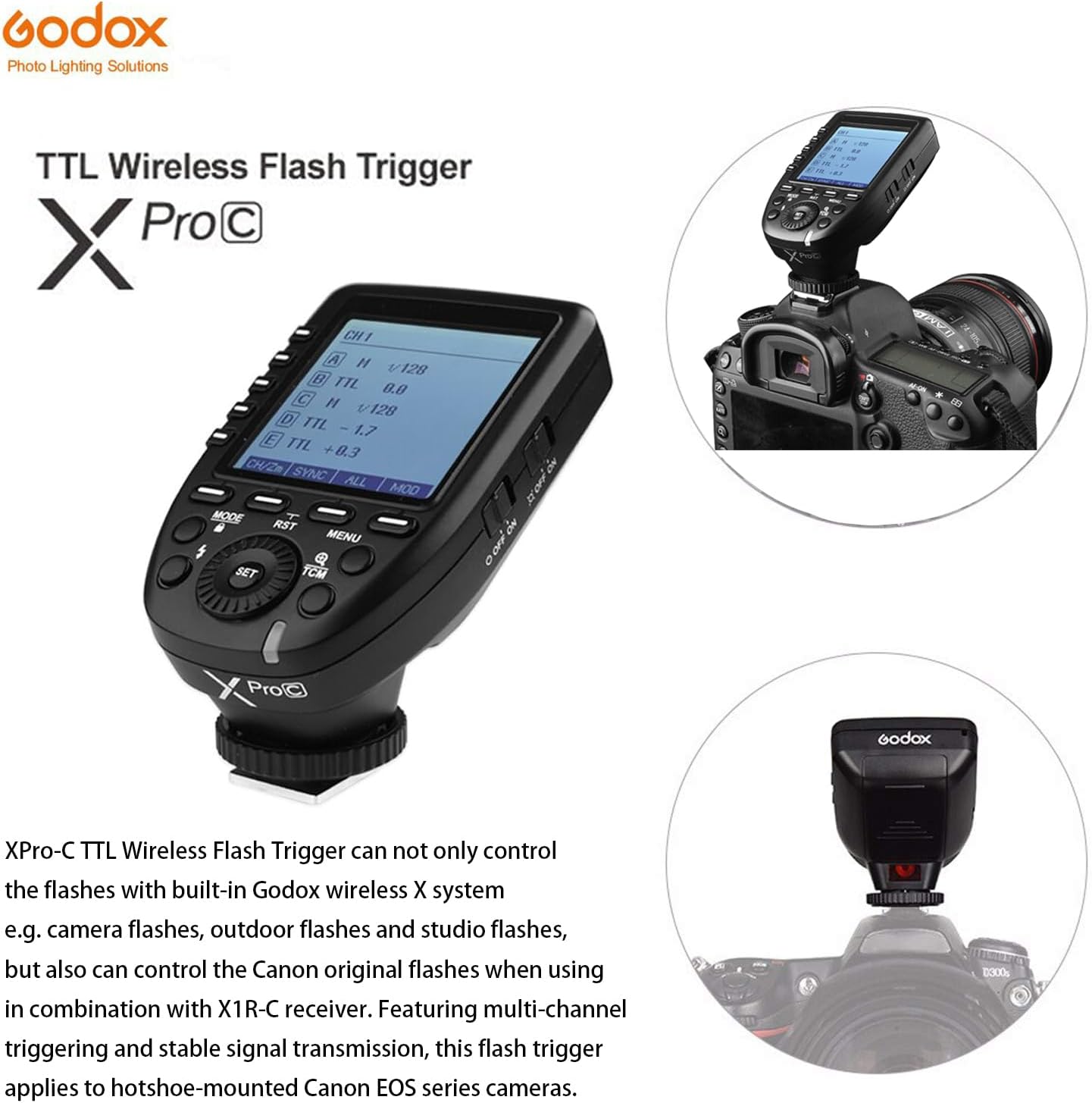
Figure 1.1: Godox XPro-C TTL Wireless Flash Trigger mounted on a Canon camera, showcasing එහි නිර්මාණය සහ ඒකාබද්ධ කිරීම.
2. පිහිටුවීම
2.1 බැටරි ස්ථාපනය
The XPro-C requires two AA batteries for power. To install:
- Locate the battery compartment cover on the side of the unit.
- කවරය විවෘත කරන්න.
- නිවැරදි ධ්රැවීයතාව (+/-) සහතික කරමින් AA බැටරි දෙකක් ඇතුළු කරන්න.
- බැටරි මැදිරි කවරය ආරක්ෂිතව වසා දමන්න.

රූපය 2.1: පැත්ත view of the Godox XPro-C, highlighting the battery compartment and Type-C USB port.
2.2 කැමරාව මත සවි කිරීම
To mount the XPro-C on your Canon camera:
- Slide the XPro-C's hotshoe foot into your camera's hotshoe.
- Rotate the locking ring clockwise until it is securely tightened.
2.3 බල ගැන්වීම සක්රිය / අක්රිය කිරීම
Use the power switch located on the side of the unit to turn the XPro-C ON or OFF.
Video 2.1: Detailed operation and setup guide for the Godox XPro-C, demonstrating physical features and basic controls.
3. මෙහෙයුම් උපදෙස්
3.1 අතුරු මුහුණත අවසන්view
The XPro-C features an extra-large LCD panel for clear display of settings. On the left side are five group selection buttons (A-E), and below the screen are four function buttons (MODE, RST, MENU, TCM) and a central SET button with a rotary dial.

රූපය 3.1: ඉදිරිපස view of the Godox XPro-C, illustrating the extra-large LCD panel, group buttons, and function buttons.
3.2 Group and Mode Selection
To control flash groups and modes:
- කණ්ඩායම තෝරන්න: Press one of the dedicated group buttons (A-E) on the left side to select a specific flash group.
- මාදිලිය තෝරන්න: After selecting a group, press the මාදිලිය button to cycle through available flash modes: TTL, Manual (M), and OFF.
- Adjust Output/Compensation: Turn the rotary dial to adjust the flash output power (in Manual mode) or Flash Exposure Compensation (FEC) (in TTL mode). Press the සකසන්න තහවුරු කිරීමට බොත්තම.
3.3 TCM Transform Function
The TCM (TTL-Convert-Manual) function allows you to quickly convert a TTL flash value into a manual power output. This is useful for maintaining consistent lighting when switching from TTL to manual mode.
- Activate TCM: දිගු ඔබන්න TCM button for 2 seconds. The current TTL flash value will be transformed and displayed as a manual power output.
3.4 Zoom Setting
To adjust the flash zoom value:
- Enter Zoom Setting: Long press the function button 1 (CH/ZM) for 1-2 seconds.
- විශාලනය සකසන්න: Use the rotary dial to change the zoom value (e.g., AUTO, 24mm, 50mm, 80mm, 200mm). Press සකසන්න තහවුරු කිරීමට.
3.5 Channel and Wireless ID Settings
The XPro-C supports 16 groups and 32 channels for wireless control. Additionally, 01 to 99 wireless ID settings can be used to prevent signal interference.
- නාලිකාව සකසන්න: Short press function button 1 (CH/ZM) to enter channel selection. Use the rotary dial to select a channel (1-32) and press සකසන්න තහවුරු කිරීමට.
- Set Wireless ID: Access the custom function settings (C.Fn) via the මෙනුව button. Navigate to the ID setting and use the rotary dial to select an ID (1-99) or turn it OFF.
3.6 Sync Modes
The XPro-C supports High-Speed Sync (HSS) and Second Curtain Sync.
- Select Sync Mode: Short press function button 2 (SYNC) to cycle through available sync modes.
3.7 ආකෘති නිර්මාණය එල්amp පාලනය කරන්න
You can control the modeling lamps of compatible flashes directly from the XPro-C.
- Toggle All Modeling Lamps: Short press function button 4 (MOD) to turn all modeling lamps ON or OFF.
- Toggle Individual Group Modeling Lamps: Select a specific group (A-E) and then short press function button 4 (MOD) to toggle its modeling lamp.
3.8 තිර අගුල
To prevent accidental changes to settings, you can lock the screen.
- අගුළු තිරය: දිගු ඔබන්න මාදිලිය තත්පර 2 සඳහා බොත්තම.
- අගුළු ඇරීමේ තිරය: දිගු ඔබන්න මාදිලිය තත්පර 2 ක් නැවත බොත්තම.
වීඩියෝ 3.1: අවසන්view of the Godox XPro-C's features and basic operation, including button functions and screen display.
4. නඩත්තු කිරීම
4.1 ස්ථිරාංග උත්ශ්රේණි කිරීම
The XPro-C supports firmware upgrades via its Type-C USB port. This allows for improved functionality and compatibility updates.
- Connect the XPro-C to a computer using a Type-C USB cable.
- නිල ගොඩොක්ස් වෙත පිවිසෙන්න website to download the latest firmware and update instructions.
4.2 සාමාන්ය රැකවරණය
To ensure the longevity of your XPro-C:
- Keep the unit dry and clean. Avoid exposure to water or excessive humidity.
- Use a soft, dry cloth (like the included LETWING cloth) to clean the unit.
- භාවිතයේ නොමැති විට සිසිල් වියළි ස්ථානයක ගබඩා කරන්න.
- කාන්දු වීම වැළැක්වීම සඳහා දිගු කාලයක් ගබඩා කරන්නේ නම් බැටරි ඉවත් කරන්න.
5. දෝශ නිරාකරණය
5.1 කර්මාන්තශාලා යළි පිහිටුවීම
If you encounter persistent issues or wish to revert all settings to their default values:
- Long press the function buttons simultaneously for 2-3 seconds to restore factory defaults.
5.2 පොදු ගැටළු
- Flash not triggering: Ensure the XPro-C is securely mounted, batteries are charged, and the flash unit is powered on and set to a compatible wireless mode (e.g., Godox X system slave mode). Verify channel and ID settings match between the trigger and flash.
- Inconsistent triggering: Check for environmental interference. Ensure the trigger and flash are within the effective transmission range (0-100m).
- තිරය ප්රතිචාර නොදක්වයි: Try locking and unlocking the screen (long press MODE button). If unresponsive, remove and reinsert batteries.
6. පිරිවිතර
| විශේෂාංගය | විස්තර |
|---|---|
| නිෂ්පාදන මානයන් | අඟල් 4.8 x 4.8 x 2.44 |
| අයිතමයේ බර | අවුන්ස 6.4 කි |
| බල සැපයුම | 2 * AA බැටරි (ඇතුළත් කර නැත) |
| රැහැන් රහිත පද්ධතිය | ගොඩොක්ස් 2.4G රැහැන් රහිත X පද්ධතිය |
| සම්ප්රේෂණ පරාසය | Approx. 0-100m |
| ෆ්ලෑෂ් සමමුහුර්ත වේගය | 1/8000s දක්වා (HSS) |
| ෆ්ලෑෂ් මාදිලි | TTL ස්වයංක්රීය ෆ්ලෑෂ්, අතින් ෆ්ලෑෂ්, බහු ෆ්ලෑෂ් |
| ෆ්ලෑෂ් නිරාවරණ වන්දි | 1/3 නැවතුම් වර්ධක වලින් ±3 නැවතුම් |
| කණ්ඩායම් | 16 Groups (A-F, 0-9) or 5 Groups (A-E) |
| නාලිකා | නාලිකා 32 ක් |
| රැහැන් රහිත හැඳුනුම් සැකසුම් | 01-99 (for newer flashes) |
| ස්ථිරාංග උත්ශ්රේණි කිරීම | Type-C USB port |
| සමමුහුර්ත කෝඩ් ජැක් | 2.5 මි.මී |
7. ගැළපුම
7.1 Compatible Canon Camera Models
The Godox XPro-C is compatible with Canon EOS cameras that support E-TTL II autoflash and have a PC sync socket. Tested models include, but are not limited to:
- 1Dx Mark II, 1Dx, 5Ds/5Dsr, 5DIV, 5D Mark III, 5D Mark II, 5D
- 7D Mark II, 7D, 6D, 80D, 70D, 60D, 50D
- 500D, 450D, 400D Digital, 350D DIGITAL, 100D, 1200D, 1000D, 1100D
- M5, M3
For other Canon camera models, self-testing is recommended to confirm compatibility.
7.2 Compatible Godox Flashes and Receivers
The XPro-C can control flashes with built-in Godox wireless X system (e.g., camera flashes, outdoor flashes, studio flashes). It can also control Canon original flashes when used with an X1R-C receiver.
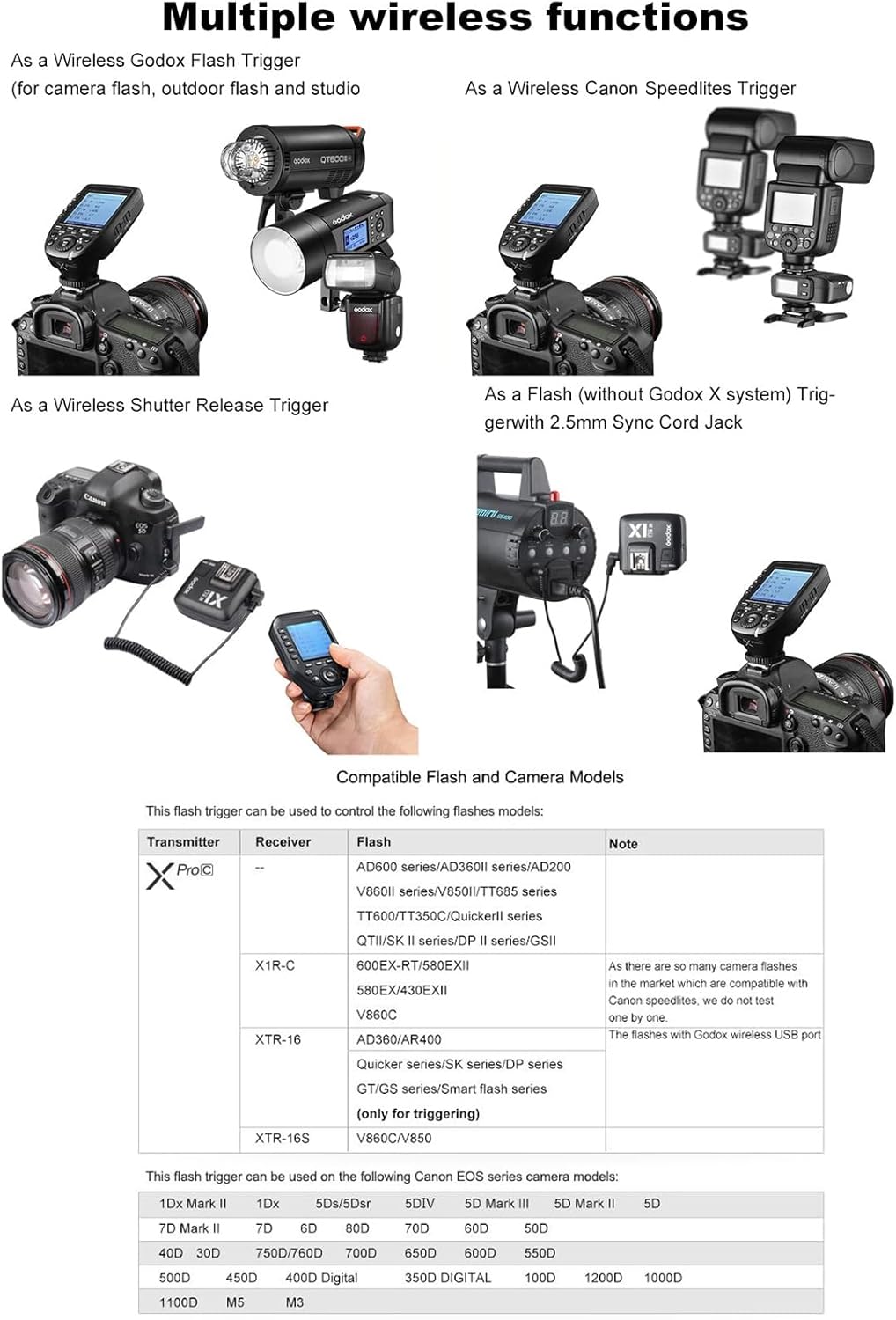
Figure 7.1: The Godox XPro-C trigger shown in a setup controlling multiple Godox flash units, demonstrating its versatility.
8. වගකීම් සහ සහාය
8.1 වගකීම් තොරතුරු
Please refer to the warranty card included with your product for detailed warranty terms and conditions. Warranty coverage typically includes manufacturing defects for a specified period from the date of purchase.
8.2 පාරිභෝගික සහාය
For technical assistance, troubleshooting, or service inquiries, please contact Godox customer support through their official website or the contact information provided in your product packaging. Keep your purchase receipt and product serial number handy for faster service.


