1. නිෂ්පාදන අවසන්view
The Digoo DG-HOSA Smart Home Security Alarm System is a comprehensive security solution designed to protect your home. This system supports Wi-Fi, GSM, 2G, and 3G networks, offering flexible connectivity options. It features an intuitive control panel with a keypad and display, along with various wireless sensors for motion detection and door/window monitoring. The system can be controlled remotely via the "Easy security" mobile application, providing real-time alerts and management capabilities.
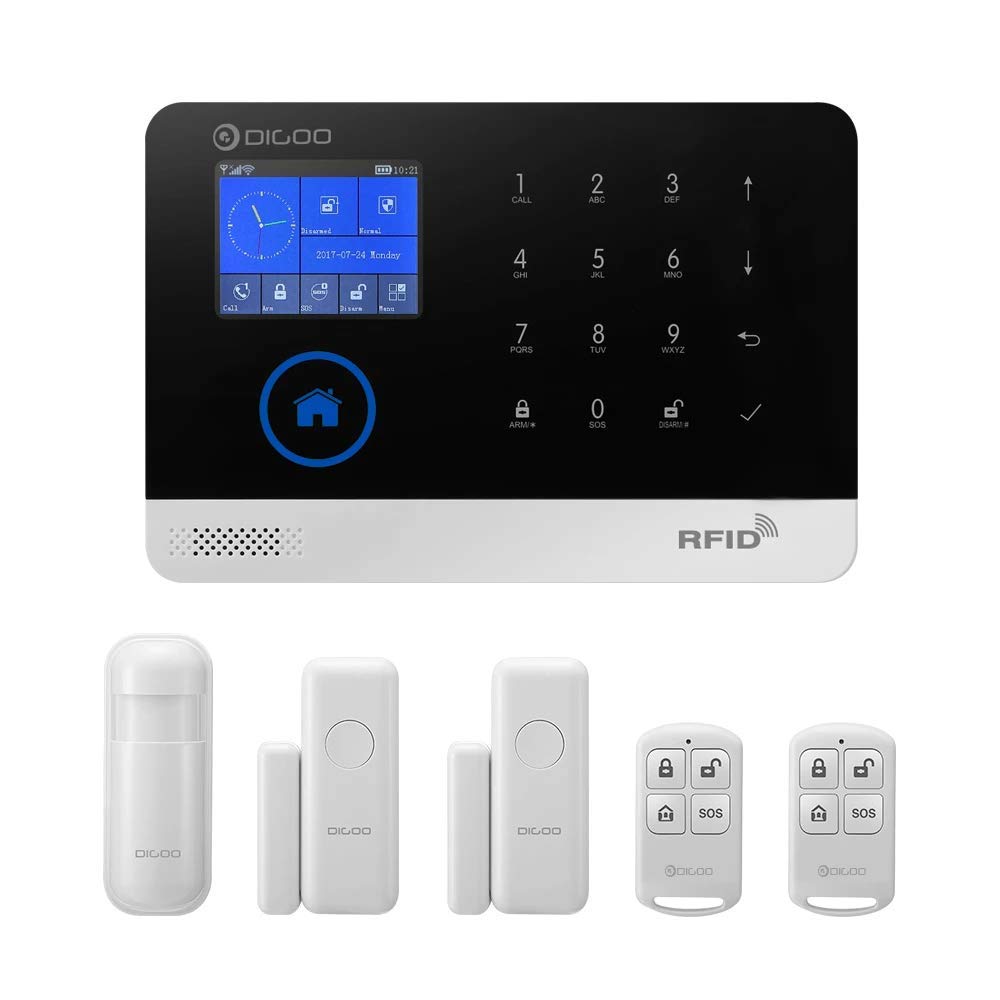
Figure 1.1: Complete Digoo DG-HOSA Smart Home Security Alarm System kit, including the main control panel, PIR motion detector, door/window sensors, and remote controllers.
2. පෙට්ටියේ ඇති දේ
පැකේජය විවෘත කිරීමෙන් පසු, පහත සඳහන් සියලුම සංරචක ඇතුළත් කර ඇති බවට වග බලා ගන්න:
- 1 x Digoo DG-HOSA Home Security Alarm Host (Main Control Panel)
- 1 x Wireless PIR Detector (Passive Infrared Motion Sensor)
- 2 x දුරස්ථ පාලක
- 2 x Door/Window Sensors
- 4 x Assist Installation Screws
- 4 x Wall-in Fixed Rubber Blocks
- 1 x 1M USB Power Cable (for 5V power supply)

Figure 2.1: Main control panel shown with a PIR motion detector, a door/window sensor, and a remote controller, representing key components of the system.
3. සැකසුම් මාර්ගෝපදේශය
3.1 මූලික බල-අප් සහ ජාල සම්බන්ධතාවය
- සම්බන්ධක බලය: Use the provided USB power cable to connect the alarm host to a 5V power source.
- SIM කාඩ්පත් ස්ථාපනය (විකල්ප): If using GSM/3G network, insert a compatible SIM card into the designated slot on the side of the control panel.
- Wi-Fi වින්යාසය:
- Download the "Easy security" app from your smartphone's app store.
- Ensure your smartphone and the alarm host are connected to the same Wi-Fi network during the initial setup.
- Follow the in-app instructions to pair the alarm host with your Wi-Fi network.

රූපය 3.1: පැත්ත view of the Digoo DG-HOSA control panel, highlighting the USB power port, SIM card slot, and reset button for initial setup and connectivity.
3.2 සංවේදක ස්ථාපනය සහ යුගලනය
The system supports up to 99 sensors. Each sensor needs to be installed and paired with the main control panel.
- PIR Motion Detector:
- Install the PIR detector in a corner or on a wall where it can cover the desired area, avoiding direct sunlight or heat sources.
- Ensure the detector is at an appropriate height (typically 2-2.2 meters) for optimal coverage.
- Pair the detector with the alarm host via the "Easy security" app or directly through the control panel's menu.
- දොර/කවුළු සංවේදක:
- Mount the two parts of the door/window sensor (magnet and main unit) on the door/window frame and the moving part, ensuring they are aligned and within 1 cm of each other when closed.
- Pair the sensors with the alarm host using the same method as the PIR detector.
- දුරස්ථ පාලක:
- The remote controllers are typically pre-paired. If not, follow the pairing instructions in the app or manual.


Figure 3.2: Individual components: Wireless PIR Motion Detector (left) and Wireless Door/Window Sensor (right), essential for comprehensive home security coverage.
4. මෙහෙයුම් උපදෙස්
4.1 පාලන පැනලය භාවිතා කිරීම
The main control panel features a touchscreen display and a numeric keypad for direct interaction.
- සන්නද්ධ කිරීම: Press the "ARM" button or enter your passcode followed by "ARM" to activate the alarm system.
- නිරායුධ කිරීම: Press the "DISARM" button or enter your passcode followed by "DISARM" to deactivate the alarm system.
- SOS ක්රියාකාරිත්වය: In an emergency, press the "SOS" button on the panel or remote controller to trigger an immediate alarm and send alerts to pre-programmed contacts.
- සැකසීම්: Navigate through the menu using the touchscreen to adjust system settings, add/remove sensors, set up alarm zones, and configure network preferences.

රූපය 4.1: ඉදිරිපස view of the Digoo DG-HOSA control panel, displaying the touchscreen interface, numeric keypad, and function buttons for system control.
4.2 Mobile App Control ("Easy security")
The "Easy security" app provides full remote control and monitoring capabilities for your alarm system.
- Remote Arm/Disarm: Activate or deactivate the system from anywhere with an internet connection.
- තත්ය කාලීන දැනුම්දීම්: Receive instant push notifications for alarm events, low battery alerts, and system status changes.
- සංවේදක කළමනාකරණය: Add, remove, or configure individual sensors and their respective defense zones.
- Call and Message Settings: Set up emergency contacts to receive calls and SMS alerts during an alarm.
- පද්ධති තත්ත්වය: View the current status of your alarm system and connected sensors.
5. නඩත්තු කිරීම
- බැටරි ආදේශනය: Replace batteries in wireless sensors and remote controllers as indicated by low battery alerts on the control panel or app.
- පිරිසිදු කිරීම: Gently wipe the control panel and sensors with a soft, dry cloth. Avoid using abrasive cleaners or solvents.
- ස්ථිරාංග යාවත්කාලීන කිරීම්: Periodically check for firmware updates via the "Easy security" app to ensure optimal performance and security.
- ජාල ස්ථාවරත්වය: Ensure a stable Wi-Fi and cellular network connection for reliable operation and remote access.
6. දෝශ නිරාකරණය
| ගැටලුව | විය හැකි හේතුව | විසඳුම |
|---|---|---|
| පද්ධතිය Wi-Fi වෙත සම්බන්ධ නොවේ | Incorrect Wi-Fi password; Host and phone not on same network during setup; Weak Wi-Fi signal. | Verify password; Ensure both devices are on the same 2.4GHz Wi-Fi network; Move host closer to router. |
| Sensors not triggering alarm | Sensor not paired; Low sensor battery; Sensor placed incorrectly. | Re-pair sensor; Replace sensor battery; Adjust sensor position according to installation guidelines. |
| තල්ලු දැනුම්දීම් නැත | App notification settings disabled; Network issues; App not running in background. | Enable notifications in app and phone settings; Check internet connection; Ensure app is allowed to run in background. |
| SOS function not calling contacts | No SIM card; Invalid SIM card; Emergency contacts not programmed correctly. | Install active SIM card; Verify SIM card balance/plan; Program emergency contacts via app or control panel. |
7. පිරිවිතර
| විශේෂාංගය | විස්තර |
|---|---|
| වෙළඳ නාමය | DIGOO |
| ආකෘතිය | DIGOOWolifui253 (DG-HOSA) |
| සම්බන්ධතා තාක්ෂණය | Wireless (Wi-Fi, GSM, 2G, 3G) |
| බලශක්ති ප්රභවය | Battery Powered (5V USB Power Cable included) |
| පාලන ක්රමය | App ("Easy security"), Control Panel, Remote Control |
| ගැළපෙන උපාංග | ස්මාර්ට් ජංගම දුරකථනය |
| ඇඟවීම් වර්ගය | Audio Only, Motion Only (configurable) |
| උපරිම සංවේදක සහාය දක්වයි | 99 |
| නිෂ්පාදන මානයන් (L x W x H) | 15 x 7 x 21 සෙ.මී |
| අයිතමයේ බර | ග්රෑම් 408 (රාත්තල් 0.9) |
| අවශ්ය බැටරි | 1 Lithium Polymer battery (for host, typically internal/rechargeable) |
| ස්ථාපන වර්ගය | Screw-In (for mounting) |
8. වගකීම් සහ සහාය
For warranty information and technical support, please refer to the official DIGOO webවෙබ් අඩවියට හෝ ඔවුන්ගේ පාරිභෝගික සේවය අමතන්න. වගකීම් හිමිකම් සඳහා මිලදී ගැනීමේ සාක්ෂියක් ලෙස ඔබේ මිලදී ගැනීමේ රිසිට්පත තබා ගන්න.
සබැඳි සම්පත්:
- Official DIGOO Webඅඩවිය: www.digoo.cc (සටහන: මෙය ස්ථාන දරණුවකි URL, please refer to actual product documentation for correct support links.)
- "Easy security" App Support: Check the app's 'Help' or 'About' section for in-app support options.


