1. හැඳින්වීම
This manual provides essential information for the safe and efficient operation of your AXESS SPBT1074 Portable Bluetooth Media Speaker. Please read this manual thoroughly before using the device and retain it for future reference. The AXESS SPBT1074 is designed for portable audio playback, featuring Bluetooth connectivity, FM radio, USB and Micro SD card support, and an AUX input. Its built-in rechargeable battery allows for extended use in various indoor and outdoor environments.
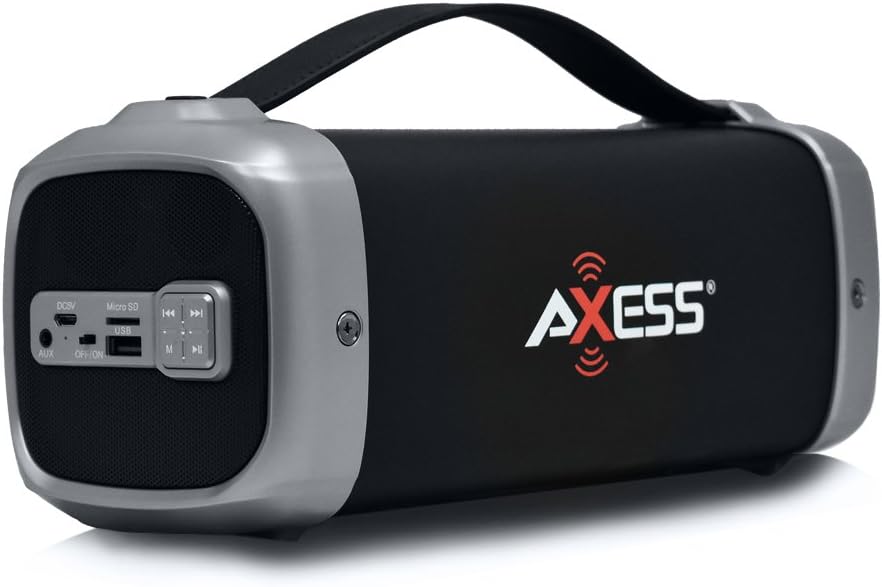
Image 1.1: The AXESS SPBT1074 Portable Bluetooth Media Speaker in silver.
2 ආරක්ෂිත තොරතුරු
- උපාංගය අධික උෂ්ණත්වයන්ට, සෘජු හිරු එළියට හෝ අධික ආර්ද්රතාවයට නිරාවරණය නොකරන්න.
- කථිකයා ප්රබල බලපෑම්වලට වැටීමෙන් හෝ යටත් කිරීමෙන් වළකින්න.
- උපාංගය ඔබම විසුරුවා හැරීම හෝ අලුත්වැඩියා කිරීමට උත්සාහ නොකරන්න. සියලුම සේවා සුදුසුකම් ලත් පුද්ගලයින් වෙත යොමු කරන්න.
- ස්පීකරය ජලයෙන් සහ අනෙකුත් ද්රව වලින් ඈත් කර තබන්න. මෙම නිෂ්පාදනය ජල ආරක්ෂිත නොවේ.
- Use only the specified charging cable and power adapter (if applicable) to prevent damage.
- මෘදු වියළි රෙද්දකින් උපාංගය පිරිසිදු කරන්න. උල්ෙල්ඛ පිරිසිදු කරන්නන් හෝ ද්රාවක භාවිතා නොකරන්න.
- දේශීය රෙගුලාසි වලට අනුව බැටරිය සහ උපාංගය බැහැර කරන්න.
3. පැකේජ අන්තර්ගතය
ඇසුරුම් ඉවත් කිරීමෙන් පසු, පහත ලැයිස්තුගත කර ඇති සියලුම අයිතම පවතින බවත් හොඳ තත්ත්වයේ පවතින බවත් සහතික කර ගන්න:
- AXESS SPBT1074 Portable Bluetooth Media Speaker
- USB ආරෝපණ ලණුව
- පරිශීලක අත්පොත (මෙම ලේඛනය)
4. නිෂ්පාදන අවසන්view සහ පාලන
Familiarize yourself with the various parts and controls of your AXESS SPBT1074 speaker.

රූපය 4.1: විස්තරාත්මක view of the SPBT1074 control panel and ports.
- DC5V Charging Port: Connect the USB charge cord here to recharge the speaker.
- මයික්රෝ එස්ඩී ස්ලොට්: සෘජු ශ්රව්ය නැවත ධාවනය සඳහා මයික්රෝ SD කාඩ්පතක් ඇතුළු කරන්න.
- USB Port: සෘජු ශ්රව්ය නැවත ධාවනය සඳහා USB ෆ්ලෑෂ් ධාවකයක් ඇතුළු කරන්න.
- AUX වරාය: 3.5mm ශ්රව්ය කේබලයක් භාවිතයෙන් බාහිර ශ්රව්ය උපාංග සම්බන්ධ කරන්න.
- මාරු/ක්රියාත්මක: ස්පීකරය සක්රිය හෝ අක්රිය කරයි.
- මාදිලි බොත්තම (M): Switches between Bluetooth, FM Radio, USB, Micro SD, and AUX input modes.
- වාදනය/විරාම බොත්තම (►▮▮): Plays or pauses audio playback. In FM mode, press and hold to auto-scan and save stations.
- Rewind/Previous Track Button (◀◀): පෙර ධාවන පථය/ස්ථානය සඳහා කෙටි ඔබන්න. ශබ්දය අඩු කිරීමට දිගු ඔබන්න.
- Fast-Forward/Next Track Button (►►): ඊළඟ ධාවන පථය/ස්ථානය සඳහා කෙටි ඔබන්න. ශබ්දය වැඩි කිරීමට දිගු ඔබන්න.

Image 4.2: Close-up of the speaker's control panel.
5. පිහිටුවීම
5.1. කථානායකවරයාට චෝදනා කිරීම
Before initial use, fully charge the speaker for approximately 3-4 hours.
- Connect the supplied USB charge cord to the DC5V charging port on the speaker.
- Connect the other end of the USB charge cord to a USB power adapter (not included) or a computer's USB port.
- The charging indicator light (if present) will illuminate during charging and turn off when fully charged.
5.2. බල ගැන්වීම / අක්රිය කිරීම
To power on the speaker, slide the ON/OFF switch to the "ON" position. To power off, slide it to the "OFF" position.
6. මෙහෙයුම් උපදෙස්
6.1. බ්ලූටූත් ප්රකාරය
- Power on the speaker. It will automatically enter Bluetooth pairing mode, indicated by a flashing LED light (if present) and an audible prompt.
- ඔබගේ ජංගම උපාංගයේ (ස්මාර්ට්ෆෝන්, ටැබ්ලටය, ආදිය) බ්ලූටූත් සක්රීය කරන්න.
- ඒ සඳහා සොයන්න available Bluetooth devices and select "AXESS SPBT1074" from the list.
- යුගලනය වූ පසු, ස්පීකරය ශ්රව්ය තහවුරු කිරීමක් නිකුත් කරන අතර, LED ආලෝකය දැල්වීම නවත්වනු ඇත.
- You can now play audio from your device through the speaker. Use the speaker's controls or your device's controls to adjust volume and navigate tracks.
6.2. FM රේඩියෝ මාදිලිය
- ස්පීකරය ක්රියාත්මක කරන්න. මාදිලිය (M) ඔබට FM රේඩියෝ විමසුම ඇසෙන තුරු නැවත නැවතත් බොත්තම ඔබන්න.
- ලබා ගත හැකි FM මධ්යස්ථාන ස්වයංක්රීයව පරිලෝකනය කර සුරැකීමට, Play/Pause (►▮▮) බොත්තම. ස්පීකරය ස්වයංක්රීයව ස්ථාන පරිලෝකනය කර ගබඩා කරයි.
- ස්කෑන් කිරීම අවසන් වූ පසු, භාවිතා කරන්න පෙර (◀◀) සහ Next (►►) සුරකින ලද ස්ථාන අතර සැරිසැරීමට බොත්තම්.
- Adjust volume using the long press function of the පෙර (◀◀) සහ Next (►►) බොත්තම්.
6.3. USB / Micro SD Card Playback
- කථිකයාට බලය.
- USB ෆ්ලෑෂ් ඩ්රයිව් එකක් USB පෝට් එකට හෝ මයික්රෝ SD කාඩ්පතක් මයික්රෝ SD ස්ලොට් එකට ඇතුළු කරන්න.
- The speaker will automatically detect the storage device and begin playing audio files. එසේ නොවේ නම්, ඔබන්න මාදිලිය (M) button to switch to the correct input.
- භාවිතා කරන්න Play/Pause (►▮▮), පෙර (◀◀), සහ Next (►►) නැවත ධාවනය පාලනය කිරීමට බොත්තම්.
6.4. AUX ආදාන මාදිලිය
- කථිකයාට බලය.
- 3.5mm ශ්රව්ය කේබලයක එක් කෙළවරක් (ඇතුළත් කර නැත) ස්පීකරයේ AUX තොටට සම්බන්ධ කරන්න.
- ශ්රව්ය කේබලයේ අනෙක් කෙළවර ඔබේ බාහිර උපාංගයේ හෙඩ්ෆෝන් ජැක් එකට හෝ ශ්රව්ය ප්රතිදානයට සම්බන්ධ කරන්න.
- ඔබන්න මාදිලිය (M) button repeatedly until you hear the AUX input prompt.
- Control audio playback from your external device. Volume can be adjusted on both the speaker and the external device.
7. නඩත්තු කිරීම
- පිරිසිදු කිරීම: Wipe the speaker's exterior with a soft, dry, lint-free cloth. Do not use liquid cleaners or sprays.
- ගබඩා: දිගු කාලයක් භාවිතයේ නොමැති විට, ස්පීකරය සෘජු හිරු එළියෙන් ඈත්ව සිසිල් වියළි ස්ථානයක ගබඩා කරන්න.
- බැටරි සත්කාර: To prolong battery life, avoid fully discharging the battery frequently. Recharge the speaker regularly, even if not in use, to maintain battery health.
8. දෝශ නිරාකරණය
| ගැටලුව | විය හැකි හේතුව | විසඳුම |
|---|---|---|
| ස්පීකරය ක්රියාත්මක නොවේ. | බැටරිය විසර්ජනය වේ. | සපයන ලද USB කේබලය භාවිතයෙන් ස්පීකරය ආරෝපණය කරන්න. |
| කථිකයාගෙන් ශබ්දයක් නැත. | ශබ්දය ඉතා අඩුයි; වැරදි මාදිලිය තෝරා ඇත; උපාංගය නිසි ලෙස සම්බන්ධ වී නැත. | Increase volume on both the speaker and the connected device. Ensure the correct input mode (Bluetooth, FM, USB, Micro SD, AUX) is selected. Reconnect the device. |
| බ්ලූටූත් යුගලනය අසමත් වේ. | ස්පීකරය යුගල කිරීමේ මාදිලියේ නැත; උපාංගය ඕනෑවට වඩා දුරයි; බාධාව. | Ensure the speaker is in Bluetooth mode and flashing. Move your device closer to the speaker. Turn off other Bluetooth devices to reduce interference. |
| FM රේඩියෝ පිළිගැනීම දුර්වලයි. | දුර්වල සංඥාව; පාරිසරික බාධා. | Relocate the speaker to an area with better reception. Perform an auto-scan again. |
9. පිරිවිතර
| විශේෂාංගය | විස්තර |
|---|---|
| ආදර්ශ අංකය | SPBT1074SL |
| සම්බන්ධතාවය | බ්ලූටූත්, USB, මයික්රෝ SD, AUX |
| විශේෂ ලක්ෂණ | Portable, Built-in FM Radio |
| සබ් වූෆර් විෂ්කම්භය | අඟල් 3 |
| අං ප්රතිදානය | වොට් 2 x 1 |
| සබ් වූෆර් ප්රතිදානය | වොට් 8 |
| Total Speaker Output | වොට් 10 (ආර්එම්එස්) |
| බ්ලූටූත් පරාසය | අඩි 30 (මීටර් 9) දක්වා |
| බැටරි වර්ගය | 1500 mAh Lithium Rechargeable Battery |
| සෙල්ලම් කාලය | පැය 4-6 (ආසන්න) |
| ආරෝපණ කාලය | පැය 3-4 (ආසන්න) |
| නිෂ්පාදන මානයන් | 10.3 x 3.8 x 3.5 අඟල් (26.16 x 9.65 x 8.89 cm) |
| අයිතමයේ බර | රාත්තල් 1.4 (කිලෝ ග්රෑම් 0.64) |
| ඇතුළත් සංරචක | Speaker, USB charge cord |
10. වගකීම් සහ සහාය
For warranty information and technical support, please refer to the documentation provided with your purchase or visit the official Axess webවෙබ් අඩවිය. වගකීම් හිමිකම් සඳහා ඔබේ මිලදී ගැනීමේ සාක්ෂි තබා ගන්න.
අක්ෂය Webඅඩවිය: www.axessproducts.com


