1. හැඳින්වීම
This user manual provides comprehensive instructions for the installation, operation, and maintenance of the Secukey SK4-W Standalone Access Control System. Please read this manual carefully before installation and use to ensure proper functionality and safety.
The Secukey SK4-W is a robust, IP66-rated access control device designed for outdoor use, featuring RFID card and PIN code access. It is an ideal solution for securing doors, gates, and other entry points.
2. නිෂ්පාදන අවසන්view
2.1 ප්රධාන ලක්ෂණ
- IP66 Waterproof and Anti-Vandal Design: Suitable for harsh outdoor environments.
- බහු ප්රවේශ මාතයන්: Supports RFID card only, PIN code only, or Card + PIN for enhanced security.
- ඉහළ පරිශීලක ධාරිතාව: Manages up to 1000 users.
- ඒකාබද්ධ රිලේ: Built-in NO, NC, Com relay for direct door lock control.
- Adjustable Output Times: Programmable lock output time (1-99 seconds) and alarm output time (1-3 minutes).
- Wiegand 26-bit Interface: Supports external Wiegand readers, exit buttons, and alarms.
- Latch Mode: Allows the door or gate to remain open.
- පුළුල් වෙළුමtagඊ පරාසය: Operates on 12~28V AC/DC.
- Backlit Keypad: අඩු ආලෝක තත්ත්වයන් යටතේ දෘශ්යතාව සහතික කරයි.
- කල් පවතින ඉදිකිරීම්: Zinc alloy casing with powder coating.
2.2 ඇතුළත් සංරචක
- 1 x Secukey SK4-W Standalone Access Control Device (RFID/PIN)
- 1 x Master Add Card
- 1 x Master Delete Card
- 1 x පරිශීලක අත්පොත
2.3 නිෂ්පාදනය Views

රූපය 1: ඉදිරිපස view of the SK4-W unit, highlighting the keypad and Secukey branding.

රූපය 2: කෝණික view of the SK4-W, providing a perspective of its slim profile.

රූපය 3: පැත්ත view of the SK4-W unit.
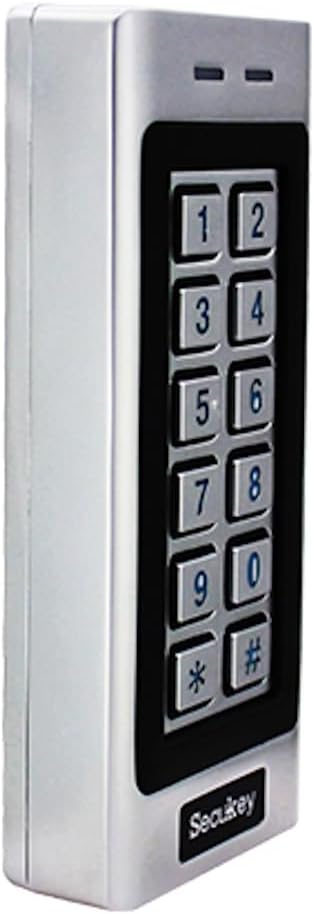
රූපය 4: තවත් පැත්තක් view of the SK4-W unit.

රූපය 5: ආපසු view of the SK4-W unit, displaying the integrated wiring for installation.
3. පිහිටුවීම සහ ස්ථාපනය
3.1 උපාංගය සවි කිරීම
The SK4-W is designed for surface mounting. Choose a secure location near the door or gate, ensuring it is within reach for users and protected from direct impact. Use appropriate screws and wall plugs for the mounting surface.
3.2 රැහැන් සටහන
The device requires a 12~28V AC/DC power supply (not included). Connect the wires according to the diagram provided in the full manual. Ensure all connections are secure and insulated to prevent short circuits.
- බල ආදානය: Connect to 12~28V AC/DC power source.
- Lock Output (NO/NC/COM): Connect to your electric lock.
- අනතුරු ඇඟවීමේ ප්රතිදානය: Connect to an external alarm system (if applicable).
- Wiegand In/Out: For connecting external Wiegand readers or other Wiegand devices.
- පිටවීමේ බොත්තම: Connect a push-to-exit button for convenient egress.
For detailed wiring schematics, please refer to the comprehensive wiring diagram included in the product packaging.
4. මෙහෙයුම් උපදෙස්
4.1 Initial Setup and Master Cards
Upon first power-up, the device will be in factory default mode. Use the included Master Add Card and Master Delete Card to manage user access.
- පරිශීලකයින් එකතු කිරීම: Present the Master Add Card, then present the new user's RFID card or enter their PIN.
- පරිශීලකයන් මකා දැමීම: Present the Master Delete Card, then present the user's RFID card or enter their PIN to be deleted.
4.2 Access Modes
The SK4-W supports three primary access modes:
- Card Only Mode: Users gain access by presenting a valid RFID card.
- PIN Only Mode: Users gain access by entering a valid 4-6 digit PIN code.
- Card + PIN Mode: Users must present a valid RFID card and then enter their corresponding PIN code for access. This mode offers the highest security.
Refer to the full programming guide for instructions on how to switch between access modes and manage user PINs.
4.3 Visitor PINs
The SK4-W supports up to 10 visitor PINs, which can be set to be valid for 1 to 10 uses. This feature is useful for temporary access for guests or service personnel.

Figure 6: The SK4-W supports visitor PINs and is IP66 waterproof, suitable for outdoor installation.
4.4 Latch Mode
The latch mode allows the door or gate to remain unlocked for an extended period, which can be useful during peak hours or for maintenance. Consult the programming manual for activation and deactivation procedures.
5. නඩත්තු කිරීම
The Secukey SK4-W is designed for minimal maintenance due to its robust construction and IP66 rating. However, regular checks can prolong its lifespan and ensure optimal performance.
- පිරිසිදු කිරීම: Wipe the keypad and casinමෘදු, d සහිත gamp රෙදි. උල්ෙල්ඛ පිරිසිදු කරන්නන් හෝ ද්රාවක වලින් වළකින්න.
- සම්බන්ධතා පරීක්ෂාව: Periodically inspect wiring connections for any signs of wear, corrosion, or loosening.
- ස්ථිරාංග යාවත්කාලීන කිරීම්: නිෂ්පාදකයා පරීක්ෂා කරන්න webඕනෑම පවතින ස්ථිරාංග යාවත්කාලීන සඳහා අඩවිය.

Figure 7: The SK4-W is designed to withstand extreme operating temperatures, from -40°C to 60°C.
6. දෝශ නිරාකරණය
| ගැටලුව | විය හැකි හේතුව | විසඳුම |
|---|---|---|
| උපාංගය ක්රියාත්මක නොවේ. | බල සැපයුමක් නැත; වැරදි පරිමාවක්tage; ලිහිල් රැහැන් ඇදීම. | Check power connections and ensure correct 12~28V AC/DC supply. Verify wiring. |
| RFID කාඩ්පත හඳුනාගෙන නොමැත. | Card not enrolled; incorrect card type (not 125 KHz EM); damaged card. | Ensure the card is properly enrolled. Verify it is a 125 KHz EM card. Try another card. |
| PIN කේතය ක්රියා නොකරයි. | Incorrect PIN; PIN not enrolled; device in card-only mode. | Double-check the PIN. Ensure the PIN is enrolled. Verify the access mode setting. |
| Door lock not activating. | Incorrect lock wiring (NO/NC); lock power issue; relay output time too short. | Check lock wiring and power. Adjust the lock output time in settings. |
| Wiegand output issues. | Incorrect Wiegand wiring; incompatible Wiegand device. | Verify Wiegand 26-bit wiring. Ensure external device compatibility. |
If the problem persists, please contact Secukey technical support for assistance.

Figure 8: Wiegand 26-bit input and output signal timing diagram.
7. පිරිවිතර
| ගුණාංගය | වටිනාකම |
|---|---|
| ආදර්ශ අංකය | SK4-W |
| වෙළඳ නාමය | Secukey |
| මානයන් (L x W x H) | 13.0 x 5.6 x 2.3 සෙ.මී |
| බර | ග්රෑම් 500 කි |
| වර්ණය | රිදී |
| බල සැපයුම | 12~28V AC/DC |
| ඇතුල්වීමේ ආරක්ෂණ (IP) ශ්රේණිගත කිරීම | IP66 (Waterproof, Anti-Vandal) |
| පරිශීලක ධාරිතාව | පරිශීලකයින් 1000 දක්වා |
| PIN කේතයේ දිග | ඉලක්කම් 4 සිට 6 දක්වා |
| කාඩ්පත් වර්ගය | 125 KHz EM Card |
| වයිගන්ඩ් අතුරුමුහුණත | Wiegand 26-bit Input & Output |
| ප්රතිදාන පැටවීම අගුළු දමන්න | 3A උපරිම |
| අනතුරු ඇඟවීමේ ප්රතිදාන පැටවීම | 3A උපරිම |
| මෙහෙයුම් උෂ්ණත්වය | -40 °C සිට 60 °C (-40 F සිට 140 F) |
| මෙහෙයුම් ආර්ද්රතාවය | 10% සිට 90% දක්වා (ඝනීභවනය නොවන) |
| Casing ද්රව්ය | Zinc Alloy with Powder Coating |
8. වගකීම් සහ සහාය
Secukey products are manufactured to high quality standards. For warranty information and technical support, please refer to the warranty card included with your product or visit the official Secukey webඅඩවිය.
සබඳතා තොරතුරු:
- නිෂ්පාදකයා: Secukey
- Webඅඩවිය: www.secukey.com (උදාampසබැඳිය, සැබෑ සබැඳිය වෙනස් විය හැක)
- පාරිභෝගික සේවාව: නිෂ්පාදන ඇසුරුම්කරණය හෝ බලන්න webකලාපීය සහාය සම්බන්ධතා සඳහා අඩවිය.
වගකීම් හිමිකම් සඳහා කරුණාකර ඔබගේ මිලදී ගැනීමේ සාක්ෂි තබා ගන්න.


