1. හැඳින්වීම
ස්තූතියි, උදව් කළාටasing the Capello Play it All Bluetooth Wireless Home Stereo Speaker CI302. This device offers versatile audio playback options including Bluetooth wireless streaming, CD player functionality, and FM digital radio. This manual provides detailed instructions for setup, operation, maintenance, and troubleshooting to ensure optimal performance and longevity of your speaker system.
2. වැදගත් ආරක්ෂක තොරතුරු
- උපාංගය ක්රියාත්මක කිරීමට පෙර සියලු උපදෙස් කියවන්න.
- අනාගත යොමුව සඳහා මෙම අත්පොත තබා ගන්න.
- ගින්න හෝ කම්පන උවදුරු වැලැක්වීම සඳහා ඒකකය වැසි හෝ තෙතමනය නිරාවරණය නොකරන්න.
- නිසි වාතාශ්රය සහතික කරන්න; කිසිදු වාතාශ්රය විවරයක් අවහිර නොකරන්න.
- ඒකකය ස්ථාවර, පැතලි මතුපිටක් මත තබන්න.
- නිෂ්පාදකයා විසින් නිශ්චිතව දක්වා ඇති ඇමුණුම්/උපාංග පමණක් භාවිතා කරන්න.
- අකුණු කුණාටු වලදී හෝ දිගු කාලයක් භාවිතා නොකළ විට ඒකකය විසන්ධි කරන්න.
- සියලුම සේවා සුදුසුකම් ලත් සේවා පුද්ගලයින් වෙත යොමු කරන්න.
3. පැකේජ අන්තර්ගතය
කරුණාකර සියලුම අයිතම තිබේදැයි පරීක්ෂා කරන්න:
- Capello Play it All Bluetooth Wireless Home Stereo Speaker CI302
- දුරස්ථ පාලකය
- AC බල ඇඩැප්ටරය
- පරිශීලක අත්පොත (මෙම ලේඛනය)
4. නිෂ්පාදන අවසන්view
Familiarize yourself with the main components and controls of your Capello Play it All speaker.
ඉදිරිපස View

රූපය 4.1: ඉදිරිපස view of the Capello Play it All speaker, showing the speaker grille, digital clock display, and subtle branding.
ඉහළ පැනල් පාලනය

රූපය 4.2: Top panel of the Capello Play it All speaker, illustrating the CD compartment, 'capello' logo, and various control buttons including PRESET, MODE, PAIRING, PROGRAM/CLOCK SET, SKIP, PLAY/PAUSE, STOP, REPEAT, and VOLUME.
- PRESET +/-: Navigate through saved FM radio stations.
- උපදෙස්: Switch between Bluetooth, CD, FM Radio, and Line-In modes.
- පේරින්: බ්ලූටූත් යුගල කිරීමේ ප්රකාරය ආරම්භ කරන්න.
- PROGRAM/CLOCK SET: Program CD tracks or set the clock.
- SKIP ◀◀ / ▶▶: Skip tracks on CD or adjust FM frequency.
- PLAY/PAUSE ▶▶: Play or pause CD playback.
- STOP ■: Stop CD playback.
- නැවත කරන්න: Repeat current track or all tracks on CD.
- VOL +/-: පරිමාව මට්ටම සකසන්න.
- විවෘත සමීප: Open or close the CD compartment.
- සුදානමින් සිටීම: Power on/off the unit.
Rear Panel (Typical)
The rear panel typically includes the AC power input, FM antenna connection, and Line-In jack.
5. පිහිටුවීම
5.1 බල සම්බන්ධතාවය
- Connect the AC power adapter to the DC IN jack on the rear of the speaker.
- ඇඩප්ටරයේ අනෙක් කෙළවර සම්මත බිත්ති අලෙවිසැලකට සම්බන්ධ කරන්න.
- The unit will enter standby mode, and the digital clock display will illuminate.
5.2 FM ඇන්ටෙනා සැකසුම
For optimal FM radio reception, extend the FM wire antenna fully and position it for the best signal. Avoid placing it near other electronic devices that may cause interference.
5.3 ඔරලෝසුව සැකසීම
- පොරොත්තු මාදිලියේදී, ඔබා අල්ලාගෙන සිටින්න PROGRAM/CLOCK SET බොත්තම.
- The hour digits will begin to flash. Use the SKIP ◀◀ / ▶▶ පැය සකස් කිරීමට බොත්තම්.
- ඔබන්න PROGRAM/CLOCK SET පැය තහවුරු කිරීමට නැවතත්.
- The minute digits will flash. Use the SKIP ◀◀ / ▶▶ මිනිත්තු සකස් කිරීමට බොත්තම්.
- ඔබන්න PROGRAM/CLOCK SET one last time to save the setting.
6. මෙහෙයුම් උපදෙස්
6.1 බලය සක්රිය/අක්රිය කිරීම සහ මාදිලි තේරීම
- ඔබන්න සුදානමින් සිටීම button on the unit or the remote control to turn the speaker on or off.
- ඔබන්න මාදිලිය button repeatedly to cycle through available modes: Bluetooth, CD, FM Radio, and Line-In.
6.2 Bluetooth Wireless Streaming
- ස්පීකරය ක්රියාත්මක කර බ්ලූටූත් මාදිලිය තෝරන්න මාදිලිය button. The display will show 'BT' and flash, indicating it's in pairing mode.
- ඔබගේ බ්ලූටූත් සක්රීය උපාංගයේ (ස්මාර්ට්ෆෝන්, ටැබ්ලටය, පරිගණකය), බ්ලූටූත් සක්රීය කර පවතින උපාංග සොයන්න.
- Select 'Capello CI302' (or similar) from the list of devices.
- Once paired, the speaker will emit a confirmation tone, and 'BT' on the display will stop flashing.
- You can now play audio from your device through the speaker. Use your device or the speaker's controls for volume and track navigation.
6.3 සීඩී නැවත ධාවනය
- ඔබන්න විවෘත / වසා දමන්න සීඩී මැදිරිය විවෘත කිරීමට බොත්තම.
- Carefully place an audio CD (CD, CD-R/-RW) with the label side facing up into the compartment.
- Close the CD compartment. The unit will read the disc.
- If not already in CD mode, press the මාදිලිය සීඩී ප්රකාරය තෝරා ගැනීමට බොත්තම.
- ඔබන්න වාදනය / විරාමය නැවත ධාවනය ආරම්භ කිරීමට බොත්තම.
- භාවිතා කරන්න SKIP ◀◀ / ▶▶ to skip tracks, නවත්වන්න to stop, and නැවත නැවත කරන්න to cycle through repeat options.
6.4 FM Digital Radio
- ඔබන්න මාදිලිය button to select FM radio mode. The current frequency will be displayed.
- ස්වයං ස්කෑන්: ඔබා අල්ලාගෙන සිටින්න වාදනය / විරාමය button to automatically scan and save available FM stations as presets.
- අත්පොත සුසර කිරීම: ඔබන්න SKIP ◀◀ / ▶▶ briefly to fine-tune the frequency. Press and hold to scan for the next strong station.
- Accessing Presets: භාවිතා කරන්න පෙර සැකසුම +/- සුරකින ලද ස්ථාන හරහා චක්රීය කිරීමට බොත්තම්.
6.5 Line-In Operation
- Connect an audio cable (not included) from the headphone jack or line-out of an external audio device to the ලයින්-ඉන් jack on the speaker.
- ඔබන්න මාදිලිය button to select Line-In mode.
- Play audio from your connected device. Volume can be controlled via the speaker or the external device.
6.6 USB ආරෝපණය
The speaker features a USB port for charging compatible devices (e.g., smartphones, tablets). Connect your device's USB charging cable (not included) to the USB port on the speaker. The speaker does not need to be in a specific mode for USB charging to function.
6.7 දුරස්ථ පාලක භාවිතය
The included remote control provides convenient access to all functions. Ensure the remote has working batteries and is pointed towards the front of the speaker.
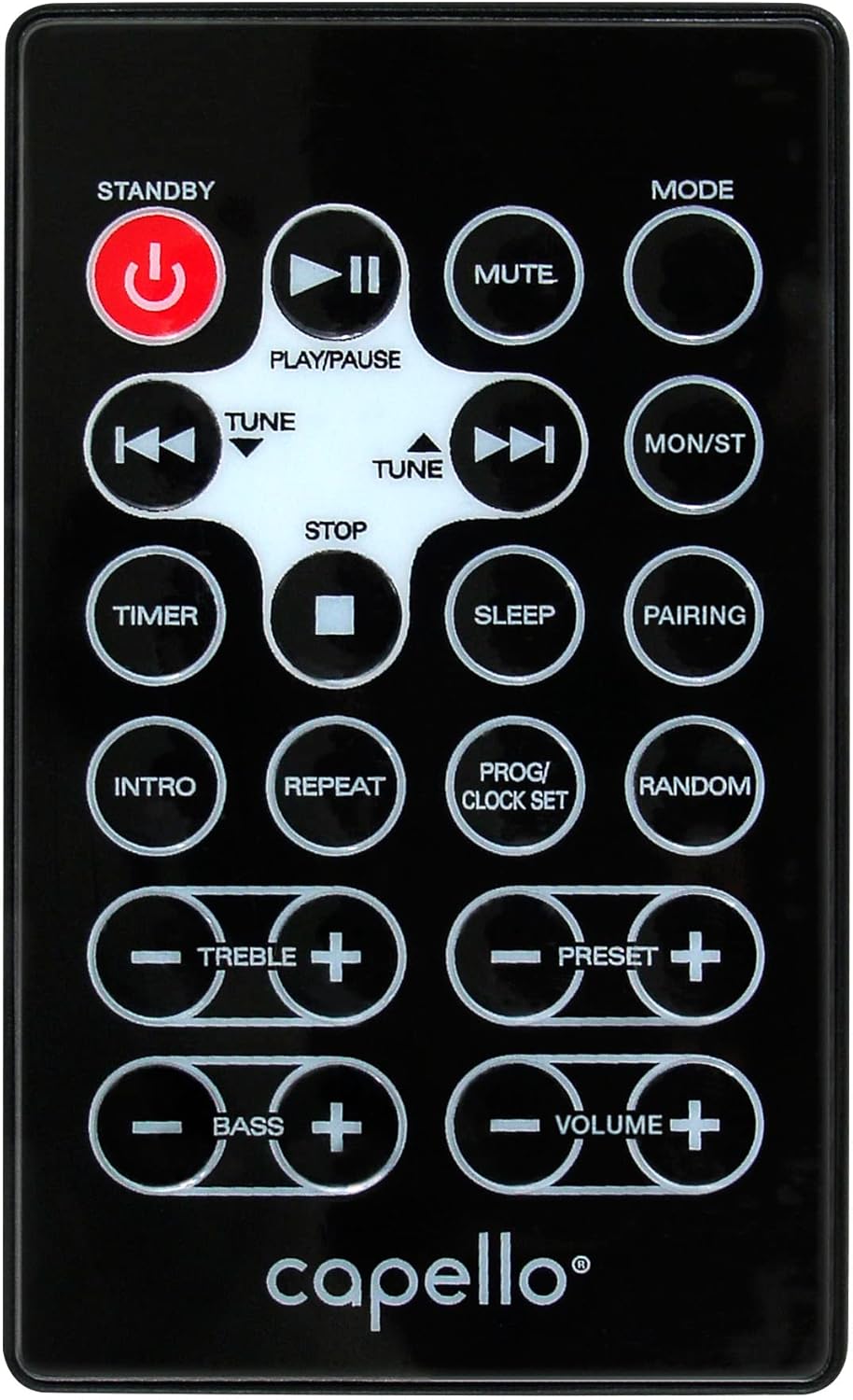
රූපය 6.1: Layout of the remote control for the Capello Play it All speaker, showing buttons for Standby, Play/Pause, Mute, Mode, Skip/Tune, Stop, Timer, Sleep, Pairing, Intro, Repeat, Program/Clock Set, Random, Treble, Bass, and Volume controls.
- සුදානමින් සිටීම: බලය සක්රිය / අක්රිය.
- වාදනය/විරාමය: ශ්රව්ය වාදනය කරන්න හෝ විරාම කරන්න.
- නිශ්ශබ්දතාව: ශ්රව්ය නිශ්ශබ්ද කරන්න හෝ නිශ්ශබ්ද කරන්න.
- උපදෙස්: Cycle through input modes.
- SKIP/TUNE ◀◀ / ▶▶: Skip tracks or tune radio frequency.
- නවත්වන්න: නැවත ධාවනය නවත්වන්න.
- ටයිමර්: නින්ද ටයිමරය සකසන්න.
- නින්ද: Activate sleep function.
- පේරින්: බ්ලූටූත් යුගලනය ආරම්භ කරන්න.
- හැඳින්වීම: Play the first few seconds of each CD track.
- නැවත කරන්න: වත්මන් ධාවන පථය හෝ සියලුම ධාවන පථ නැවත කරන්න.
- PROG/CLOCK SET: Program CD tracks or set clock.
- අහඹු: Play CD tracks in random order.
- ට්රිබල් +/-: ත්රිත්ව මට්ටම් සකසන්න.
- BASS +/-: බාස් මට්ටම් සකසන්න.
- වෙළුම +/-: සමස්ත පරිමාව සකසන්න.
7. නඩත්තු කිරීම
7.1 පිරිසිදු කිරීම
- පිරිසිදු කිරීමට පෙර සෑම විටම විදුලිබලාගාරයෙන් ඒකකය විසන්ධි කරන්න.
- බාහිර පෘෂ්ඨයන් පිස දැමීමට මෘදු වියළි රෙද්දක් භාවිතා කරන්න.
- උල්ෙල්ඛ පිරිසිදු කරන්නන්, ඉටි හෝ ද්රාවක භාවිතා නොකරන්න, මන්ද ඒවා නිමාවට හානි කළ හැකිය.
- CD කාචය සඳහා, විශේෂිත CD කාච පිරිසිදු කිරීමේ තැටියක් භාවිතා කරන්න.
7.2 ගබඩා කිරීම
If storing the unit for an extended period, unplug it from the power source and store it in a cool, dry place away from direct sunlight and extreme temperatures.
8. දෝශ නිරාකරණය
| ගැටලුව | විය හැකි හේතුව | විසඳුම |
|---|---|---|
| බලය නැත | විදුලි රැහැන සම්බන්ධ වී නැත; පිටවන ස්ථානය සක්රිය නොවේ. | විදුලි රැහැන ආරක්ෂිතව සම්බන්ධ කර ඇති බවට වග බලා ගන්න; වෙනත් අලෙවිසැලක් උත්සාහ කරන්න. |
| ශබ්දයක් නැත | Volume too low; incorrect mode selected; external device muted. | Increase volume; select correct input mode; check external device volume/mute. |
| සීඩී එක මඟ හැරෙනවා හෝ වාදනය වෙන්නේ නැහැ | Dirty or scratched CD; CD inserted incorrectly; dirty CD lens. | Clean or replace CD; insert CD label-side up; use a CD lens cleaner. |
| බ්ලූටූත් යුගල කිරීම අසාර්ථකයි | Device too far; Bluetooth not enabled on device; speaker not in pairing mode. | Move device closer; enable Bluetooth; ensure speaker is in BT pairing mode. |
| දුර්වල එෆ්එම් පිළිගැනීම | ඇන්ටනාව දිගු කර නැත; බාධා කිරීම්. | Fully extend and reposition FM antenna; move away from other electronics. |
| දුරස්ථ පාලකය ක්රියා නොකරයි | Batteries depleted; obstruction; not pointed at sensor. | Replace batteries; remove obstructions; point remote directly at the unit. |
9. පිරිවිතර
| විශේෂාංගය | පිරිවිතර |
|---|---|
| වෙළඳ නාමය | කැපෙලෝ |
| ආදර්ශ අංකය | CI302 |
| සම්බන්ධතා තාක්ෂණය | බ්ලූටූත් |
| ස්පීකර් වර්ගය | ස්ටීරියෝ |
| ශ්රව්ය ප්රතිදාන ප්රකාරය | ස්ටීරියෝ |
| සහාය දක්වන ශ්රව්ය ආකෘති | CD, MP3 |
| කථිකයන් නාමික ප්රතිදාන බලය | වොට් 10 |
| ස්පීකර් උපරිම නිමැවුම් බලය | වොට් 10 |
| ස්පීකර් සරවුන්ඩ් ශබ්ද නාලිකා වින්යාසය | 2.0 |
| බලශක්ති මූලාශ්ර වර්ගය | රැහැන්ගත විදුලි |
| ගැළපෙන උපාංග | ලැප්ටොප්, ස්මාර්ට්ෆෝන්, ටැබ්ලටය |
| විශේෂ ලක්ෂණ | Digital Display, Portable, USB Port |
| ද්රව්ය වර්ගය | ප්ලාස්ටික් |
| සවිකිරීමේ වර්ගය | මේසය උඩ |
| අයිතමයේ බර | කිලෝ ග්රෑම් 2.57 යි |
| පැකේජ මානයන් | 38.3 x 24.2 x 18.5 සෙ.මී |
| බැටරි ඇතුළත් | නැත |
| අවශ්ය බැටරි | නැත |
10. වගකීම් සහ සහාය
This product is covered by a limited warranty. Please refer to the warranty card included in your package for specific terms and conditions. For technical support or customer service inquiries, please contact Capello customer support through their official webවෙබ් අඩවිය හෝ ඔබේ මිලදී ගැනීමේ ලියකියවිලි සමඟ සපයා ඇති සම්බන්ධතා තොරතුරු.


