හැඳින්වීම
This manual provides detailed instructions for the TECWARE Phantom 87 Key RGB Mechanical Gaming Keyboard. Please read this manual thoroughly before using the product to ensure proper operation and to maximize your experience.
ආරක්ෂිත තොරතුරු
- යතුරුපුවරුව දියර හෝ අධික තෙතමනයට නිරාවරණය නොකරන්න.
- අධික උෂ්ණත්වයෙන් වළකින්න.
- Do not attempt to disassemble or modify the keyboard. This may void your warranty.
- දරුවන්ට ළඟා විය නොහැකි ලෙස තබා ගන්න.
- අනුකූල උපාංග සහ බල ප්රභවයන් සමඟ පමණක් භාවිතා කරන්න.
පැකේජයේ අන්තර්ගතය
ඔබගේ පැකේජයේ සියලුම අයිතම ඇති බව තහවුරු කරගන්න:
- TECWARE Phantom 87 Key RGB Mechanical Gaming Keyboard
- 4x Spare Mechanical Switches (Outemu Red)
- 1x Switch Puller
- 1x Keycap Puller
- 1x පරිශීලක අත්පොත

Figure 1: TECWARE Phantom 87 Key RGB Mechanical Gaming Keyboard with key features such as low latency, 16.8M RGB colors, gaming-oriented design, full N-key rollover, and durable fiberglass PCB.
සැලසුම
1. යතුරු පුවරුව සම්බන්ධ කිරීම
- Locate the USB-A cable attached to your TECWARE Phantom keyboard.
- Plug the USB-A connector into an available USB port on your computer.
- The keyboard will automatically be detected and drivers will install (Windows/macOS).
2. මෘදුකාංග ස්ථාපනය (විකල්ප)
For advanced customization, including per-key RGB lighting, macro recording, and user profiles, download the TECWARE software from the official TECWARE webඅඩවිය. ස්ථාපනය සඳහා තිරයේ ඇති උපදෙස් අනුගමනය කරන්න.

Figure 2: The TECWARE software allows for custom per-key RGB lighting, 18 lighting effects control, macro recording and assignment, and up to 3 user profiles, along with brightness and speed adjustments.
මෙහෙයුම් උපදෙස්
මූලික කාර්යයන්
- ටයිප් කිරීම: The keyboard features Outemu Red linear switches for a smooth and quiet typing experience.
- එන්-යතුරු පෙරළීම: All key presses are registered simultaneously, preventing ghosting during rapid input.
- වින්ඩෝස් අගුල: Use the dedicated Windows Lock key (often Fn + Win key) to disable the Windows key during gaming to prevent accidental interruptions.
ආර්ජීබී ආලෝකකරණ පාලනය
The Phantom keyboard offers 16.8 million RGB colors and 18 pre-set lighting effects. These can be controlled directly on the keyboard or through the TECWARE software.
- ආලෝකකරණ මාදිලි වෙනස් කිරීම: Use the Fn key combined with specific function keys (refer to your keyboard's keycaps for symbols) to cycle through the 18 pre-set lighting modes.
- Adjusting Brightness/Speed: Use Fn + Arrow keys (or other designated keys) to adjust the brightness and speed of the lighting effects.
- අභිරුචිකරණය: For per-key lighting and advanced effects, use the TECWARE software.
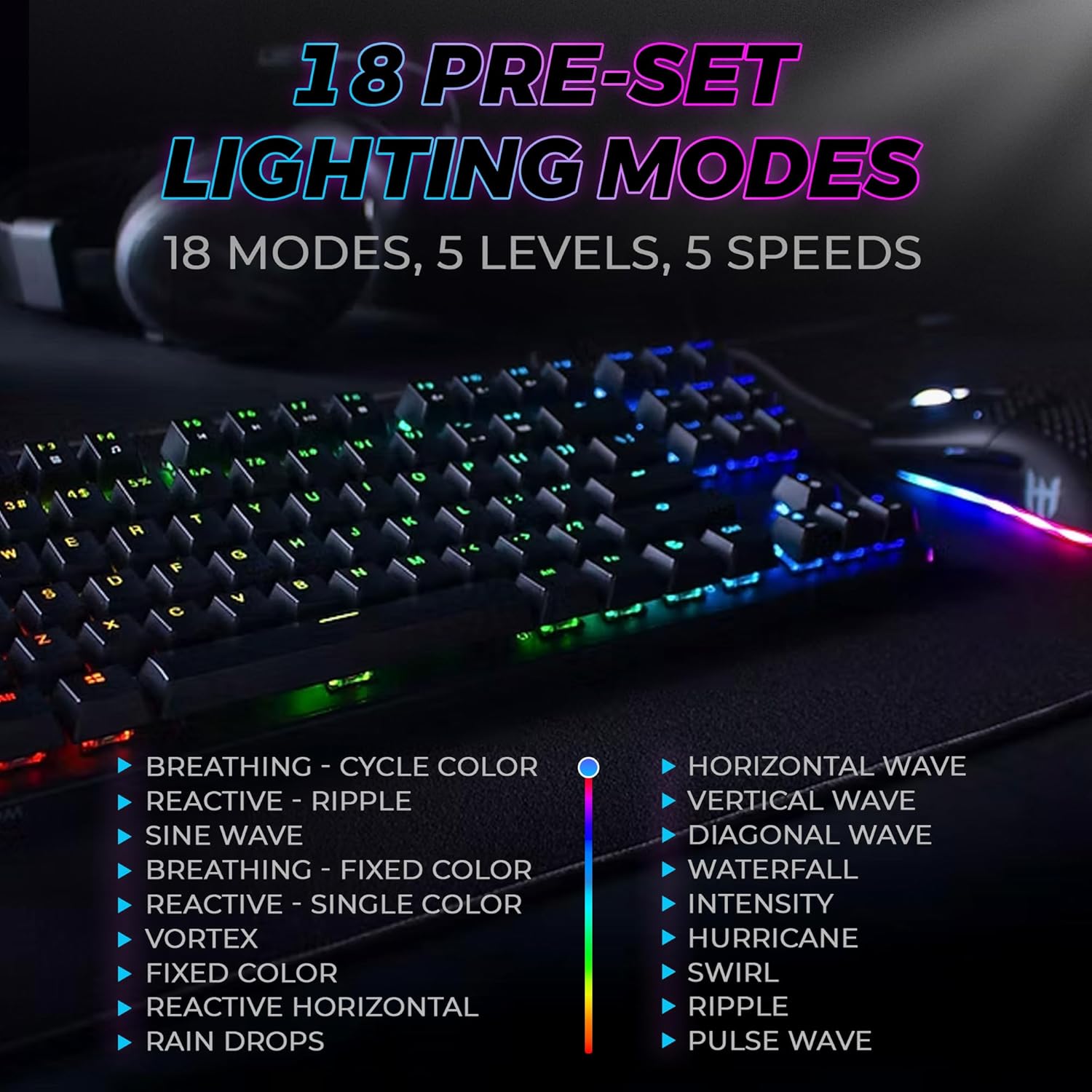
Figure 3: The keyboard features 18 pre-set lighting modes with 5 levels of brightness and 5 levels of speed, including effects like Breathing, Ripple, Sine Wave, Vortex, Waterfall, and Pulse Wave.
බහුමාධ්ය යතුරු
Access multimedia controls by pressing the Fn key in combination with the F-keys (F1-F12). The specific functions are typically indicated by icons on the keycaps.
- Exampලෙ: Fn + F7 (Play/Pause), Fn + F8 (Stop), Fn + F9 (Mute).
Video 1: Official TECWARE branded video showcasing various products, including the Phantom keyboard, highlighting its features and design philosophy.
නඩත්තු කිරීම
පිරිසිදු කිරීම
- පිරිසිදු කිරීමට පෙර ඔබේ පරිගණකයෙන් යතුරු පුවරුව විසන්ධි කරන්න.
- Use a soft, dry cloth to wipe down the keycaps and chassis.
- For deeper cleaning, use the provided keycap puller to remove keycaps and compressed air to clear debris from under the keys.
ස්විචය ආදේශ කිරීම
The TECWARE Phantom keyboard features hot-swappable Outemu mechanical switches, allowing for easy replacement without soldering.
- Using the provided keycap puller, gently remove the desired keycap.
- Use the provided switch puller to carefully grip the switch and pull it straight up to remove it.
- නව ස්විචයේ අල්ෙපෙනති PCB හි සිදුරු සමඟ පෙළගස්වන්න.
- නව ස්විචය ආරක්ෂිතව ක්ලික් වන තුරු මෘදු ලෙස ඔබන්න.
- යතුරු කැප් එක නැවත අමුණන්න.
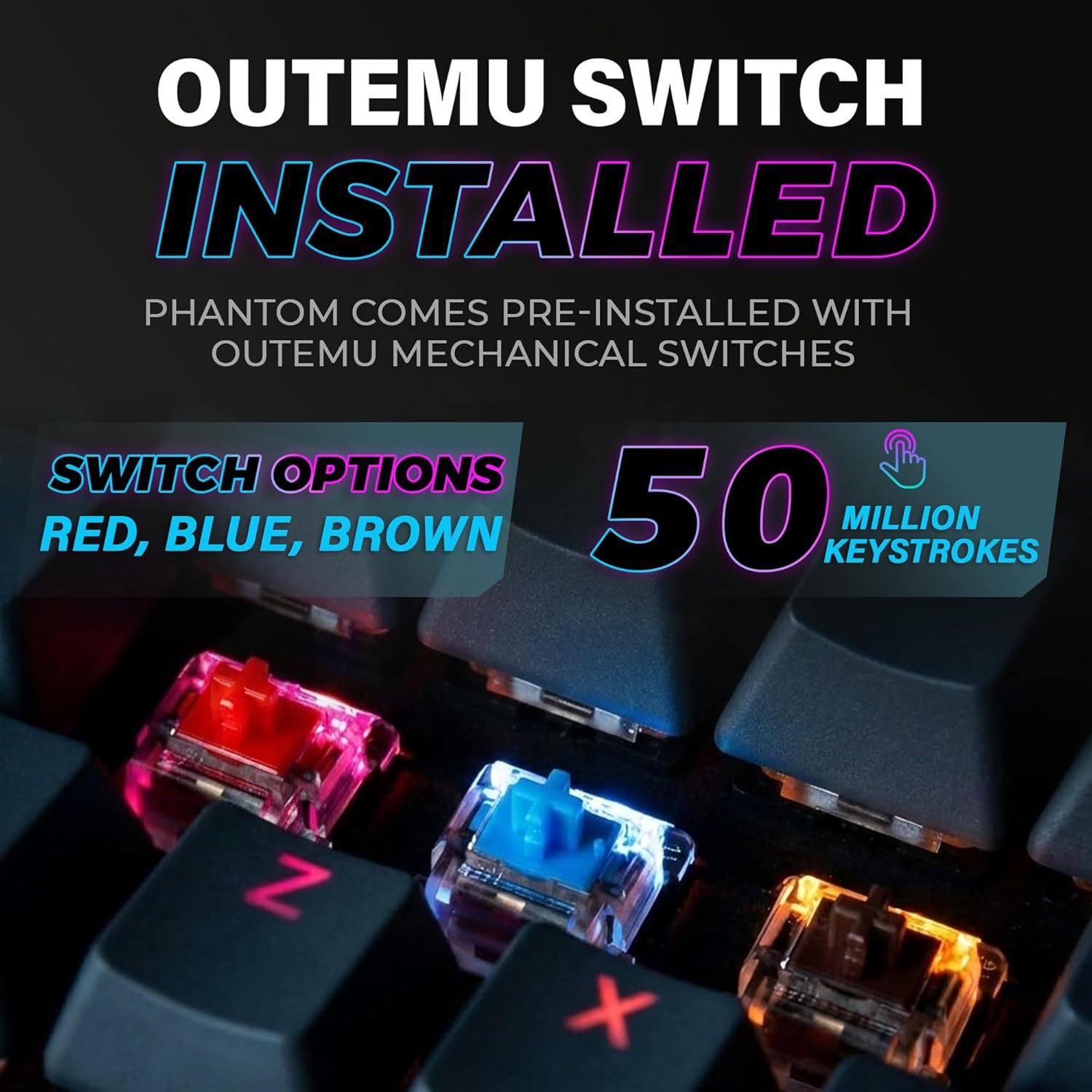
Figure 4: The keyboard comes with pre-installed Outemu switches, available in Red, Blue, and Brown options, rated for 50 million keystrokes.

Figure 5: An Outemu Red linear switch, detailing its pre-travel of 2.00mm, operating force of 45 gf/CN, and total travel of 4.00mm.
දෝෂගවේෂණය
| කලාපය | හැකි විසඳුම |
|---|---|
| යතුරු පුවරුව ප්රතිචාර නොදක්වයි | Ensure the USB cable is securely connected to both the keyboard and the computer. Try a different USB port or computer. |
| RGB ආලෝකය ක්රියා නොකරයි | Check if the lighting is turned off or set to minimum brightness using the Fn key combinations. Reinstall the TECWARE software if using custom profiles. |
| නිශ්චිත යතුරු ක්රියා නොකරයි | If you have hot-swappable switches, try replacing the faulty switch with one of the spare switches provided. Ensure the switch is properly seated. |
| Keys feel inconsistent | Ensure keycaps are fully pressed down. Clean under the keycaps for any debris. |
Video 2: Official TECWARE Phantom video demonstrating various features and functionalities of the keyboard.
පිරිවිතර
| විශේෂාංගය | විස්තර |
|---|---|
| ආදර්ශ අංකය | TWKB-P87ZORD |
| මාරු වර්ගය | Outemu Red Mechanical (Linear) |
| යතුරු ගණන | යතුරු 87 |
| RGB ආලෝකකරණය | 16.8 Million Colors, 18 Pre-set Modes |
| ඡන්ද අනුපාතය | 1000Hz |
| එන්-යතුරු පෙරළීම | සම්පූර්ණ N-යතුරු පෙරළීම |
| සම්බන්ධතාවය | රැහැන්ගත USB-A |
| PCB | Dual-layer Fiberglass PCB |
| මානයන් (L x W x H) | අඟල් 14.21 x 5.24 x 1.61 |
| බර | රාත්තල් 2.53 කි |
වගකීම් සහ සහාය
TECWARE products are designed for durability and performance. For warranty information, technical support, or to download the latest software and drivers, please visit the official TECWARE webවෙබ් අඩවියට හෝ ඔවුන්ගේ පාරිභෝගික සේවය අමතන්න. වගකීම් හිමිකම් සඳහා මිලදී ගැනීමේ සාක්ෂියක් ලෙස ඔබේ මිලදී ගැනීමේ රිසිට්පත තබා ගන්න.
සබැඳි සම්පත්:
- Official TECWARE Webඅඩවිය: www.tecware.co
- නිෂ්පාදන සහාය පිටුව: TECWARE Amazon Store


