1. හැඳින්වීම
Welcome to the user manual for your Xfinity XR15 Voice Control Remote. This remote is designed to enhance your Xfinity X1 experience by providing intuitive control over your entertainment system. With its advanced voice command capabilities and user-friendly design, navigating your TV content has never been easier.

රූපය 1: ඉදිරිපස view of the Xfinity XR15 Voice Control Remote.
2 ප්රධාන ලක්ෂණ
- හඬ පාලනය: Find content, change channels, and control your DVR using simple voice commands.
- Backlit Keypad: Buttons illuminate automatically when the remote is moved, ideal for low-light environments.
- Aim Anywhere Feature: Operates without needing to be pointed directly at your TV Box.
- ස්වයංක්රීය යුගලනය: Simplifies the setup process with compatible Xfinity equipment.
- ප්රවේශ්යතා විශේෂාංග: Easy access to Closed Captioning, video description, and voice guidance.
- TV Input Control: Manage your TV's input source directly from the remote.
3. සැකසුම සහ යුගලනය
3.1. බැටරි ස්ථාපනය
The Xfinity XR15 remote requires two AAA batteries. To install:
- දුරස්ථ පාලකයේ පිටුපස බැටරි මැදිරිය සොයා ගන්න.
- බැටරි කවරය පහළට සහ අක්රිය කරන්න.
- නිවැරදි ධ්රැවීයතාව (+ සහ -) සහතික කරමින් AAA බැටරි දෙකක් ඇතුළු කරන්න.
- එය ආරක්ෂිතව ක්ලික් කරන තෙක් බැටරි කවරය නැවත එම ස්ථානයට තල්ලු කරන්න.

රූපය 2: බැටරි මැදිරියේ පිහිටීම.
3.2. ස්වයංක්රීය යුගලනය
The XR15 remote is designed for automatic pairing with Xfinity X1 TV Boxes (Xi6, Xi5, XG2, X1). Simply ensure your TV Box is powered on and follow these general steps:
- Point the remote at your TV Box.
- ඔබා අල්ලාගෙන සිටින්න Xfinity button (located below the directional pad) for 3-5 seconds.
- Follow any on-screen prompts that appear on your television.
- If prompted for a 3-digit pairing number, enter it even if it doesn't appear on screen.
The remote should automatically pair within a few minutes. If pairing is unsuccessful, ensure the remote is close to the TV and TV Box, and try again.
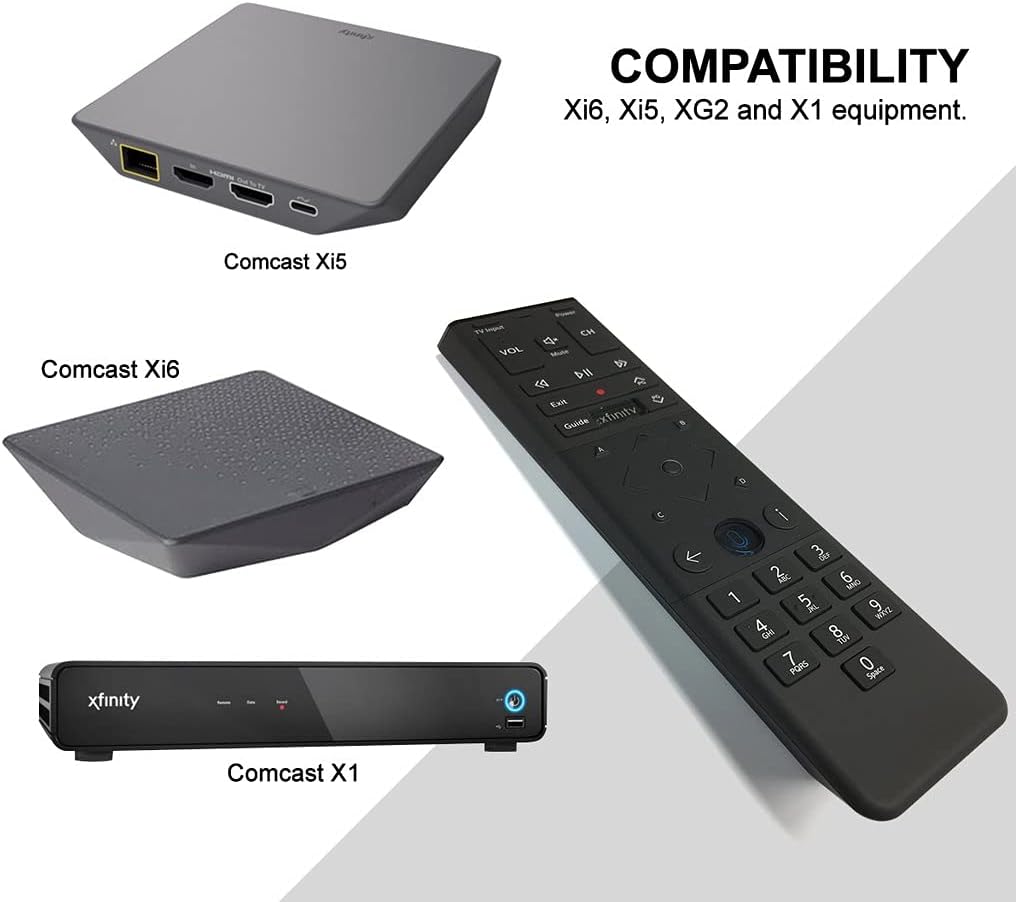
Figure 3: Compatible Xfinity TV Box models.
4. බොත්තම් කාර්යයන්
The XR15 remote features a comprehensive set of buttons for controlling your TV and Xfinity services. Refer to the diagram below for a visual guide.

Figure 4: Xfinity XR15 Remote Button Layout.
| බොත්තම | කාර්යය |
|---|---|
| බලය | Turns the TV and TV Box on or off. |
| රූපවාහිනී ආදානය | Switches to the next available input on your TV. |
| VOL +/- | පරිමාව වැඩි කිරීම හෝ අඩු කිරීම. |
| නිහඬ කරන්න | Turns sound off or on. |
| CH +/- | Selects the next or previous channel. |
| වාදනය / විරාමය | Plays or pauses live TV, Xfinity On Demand, or DVR content. |
| FF (වේගවත් ඉදිරියට) | Fast forwards Xfinity On Demand or DVR content. |
| Rew (Rewind) | Rewinds Xfinity On Demand or DVR content. |
| පිටවෙන්න | Exits on-screen guides; stops and exits Xfinity On Demand and DVR content. |
| Record (red dot) | Records the current program or saves future programs to your DVR. |
| Xfinity | Displays the main menu of the guide, providing access to all guide features. |
| මාර්ගෝපදේශය | Displays TV listings. |
| තොරතුරු (i) | Displays information about programs and notifications. |
| ආපසු | Navigates back in menus or returns to previous screens. |
| අංක යතුරු (0-9) | Used for direct channel entry or predictive text (T9) for content search. |
5. හඬ පාලනය
The voice control feature is a primary benefit of the XR15 remote. It allows you to quickly find content, change channels, and manage your DVR without typing.

Figure 5: Voice Control Button.
5.1. Using Voice Commands
- ඔබා අල්ලාගෙන සිටින්න හඬ පාලනය button (microphone icon) on the remote.
- Speak clearly into the microphone located at the top of the remote.
- ඔබ කතා කර අවසන් වූ පසු බොත්තම මුදා හරින්න.
Exampහඬ විධාන වර්ග:
- "Tune to CNN"
- "Find action movies"
- "Record this show"
- "What's on tonight?"
- "Launch Netflix"
6. පිරිවිතර
| ගුණාංගය | විස්තර |
|---|---|
| නිෂ්පාදන මානයන් | අඟල් 7 x 2 x 1 |
| අයිතමයේ බර | අවුන්ස 3.52 කි |
| ආදර්ශ අංකය | 8541713007 |
| අවශ්ය බැටරි | 2 AAA බැටරි (ඇතුළත්) |
| ගැළපෙන උපාංග | Xfinity X1 TV Boxes (Xi6, Xi5, XG2, X1) |
| වර්ණය | කළු |
| විශේෂ ලක්ෂණය | Consolidated All Power and TV Power functionality |
7. නඩත්තු කිරීම
7.1. බැටරි ප්රතිස්ථාපනය
When the remote's performance declines or the backlight feature becomes dim, it's time to replace the batteries. Follow the battery installation steps in Section 3.1.
7.2 පිරිසිදු කිරීම
To clean your remote, use a soft, dry cloth. Avoid using liquid cleaners or abrasive materials, as these can damage the remote's surface or internal components.
8. සහාය
For further assistance, please refer to the official Xfinity support resources or contact Xfinity customer service. Detailed troubleshooting guides and additional information can be found on the Xfinity webඅඩවිය.


