1. හැඳින්වීම
This manual provides comprehensive instructions for the setup, operation, and maintenance of your Alcatel T-56 Black Corded Landline Phone. Please read this manual carefully to ensure proper use and to maximize the features of your device.

Figure 1: Alcatel T-56 Black Corded Landline Phone

Figure 2: Important Note on Phone Type
වැදගත් සටහන:
- This is a landline instrument that operates on a standard telephone line connection.
- It is not a SIM or WiFi phone.
2. නිෂ්පාදන ලක්ෂණ
The Alcatel T-56 offers a range of features designed for convenience and ease of use:
- Numerical display with Caller ID function.
- Handsfree function for speakerphone calls.
- Four direct memory keys and ten two-touch memory keys for frequently called numbers.
- Call log for incoming and missed calls.
- Line-powered operation, requiring no external power adapter or batteries.
- Adjustable ringer and handsfree volume.
- Wall-mountable design.
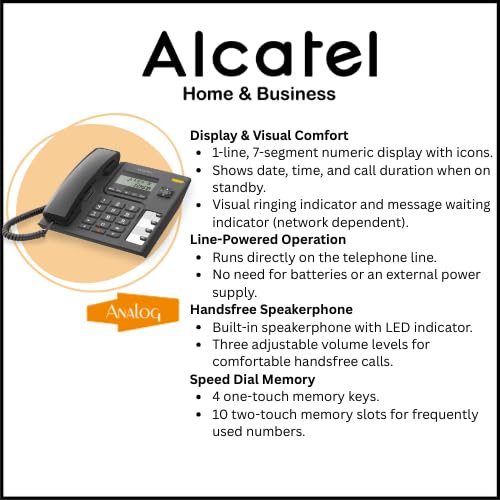
Figure 3: Display, Line-Powered Operation, Handsfree, and Speed Dial Memory
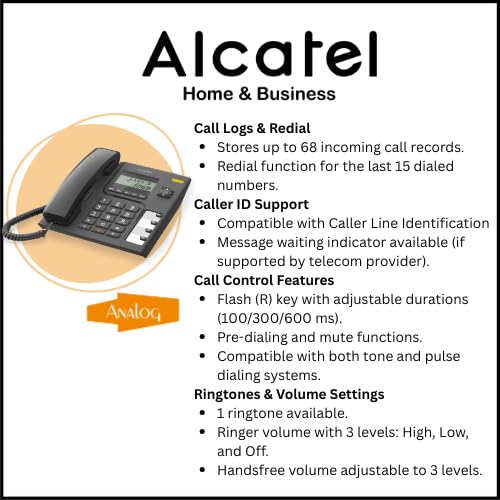
Figure 4: Call Logs, Caller ID, Call Control, and Ringtones & Volume Settings
3. පිහිටුවීම සහ ස්ථාපනය
3.1 දුරකථනය සම්බන්ධ කිරීම
- දුරකථනය ඉවත් කරන්න: ඇසුරුම්කරණයෙන් සියලුම සංරචක ප්රවේශමෙන් ඉවත් කරන්න.
- ජංගම දුරකථනය සම්බන්ධ කරන්න: Plug one end of the coiled cord into the handset and the other end into the handset jack on the side of the phone base.
- රේඛා ලණුව සම්බන්ධ කරන්න: Plug one end of the telephone line cord (RJ11) into the jack labeled 'LINE' on the back of the phone base. Plug the other end into your telephone wall jack.
- සම්බන්ධතාවය තහවුරු කරන්න: Lift the handset. You should hear a dial tone, indicating a successful connection.
3.2 බිත්ති සවි කිරීම (විකල්ප)
The Alcatel T-56 can be wall-mounted for flexible placement. Use the provided wall mount bracket and screws (if included) to secure the phone to a suitable wall surface. Ensure the telephone line cord is long enough to reach the wall jack.
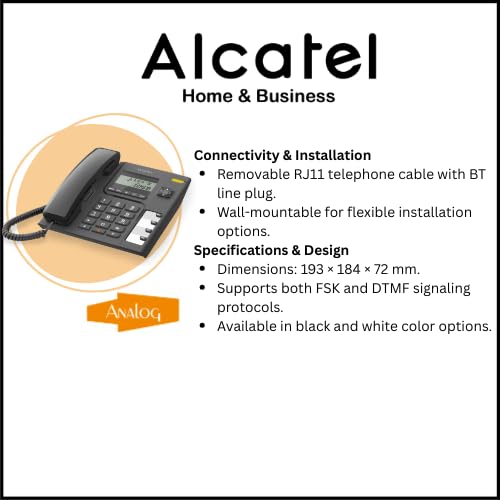
Figure 5: Connectivity and Installation
4. මූලික මෙහෙයුම
4.1 ඇමතුම් ලබා ගැනීම
- ජංගම දුරකථනය ඔසවන්න හෝ ඔබන්න Handsfree බොත්තම.
- ඩයල් ස්වරයකට සවන් දෙන්න.
- යතුරු පුවරුව භාවිතයෙන් අපේක්ෂිත දුරකථන අංකය අමතන්න.
- ඇමතුම අවසන් කිරීමට, ජංගම දුරකථනය ප්රතිස්ථාපනය කරන්න හෝ ඔබන්න Handsfree නැවතත් බොත්තම.
4.2 ඇමතුම් ලැබීම
- දුරකථනය නාද වන විට, ජංගම දුරකථනය ඔසවන්න හෝ ඔබන්න Handsfree පිළිතුරු දීමට බොත්තම.
- ඇමතුම අවසන් කිරීමට, ජංගම දුරකථනය ප්රතිස්ථාපනය කරන්න හෝ ඔබන්න Handsfree බොත්තම.
4.3 Using Handsfree Function
To use the handsfree speakerphone:
- ඇමතුමක් අතරතුර, ඔබන්න Handsfree button to activate the speakerphone. The handset can be placed back on the cradle.
- To switch back to the handset, lift the handset.
- To end a handsfree call, press the Handsfree නැවතත් බොත්තම.
4.4 පරිමාව සකස් කිරීම
- Handsfree Volume: Use the volume control buttons (up/down arrows) during a handsfree call to adjust the speaker volume. There are 3 adjustable levels.
- නාද පරිමාව: The ringer volume can be set to High, Low, or Off. Refer to the phone's settings menu (if available) or a dedicated switch for adjustment.
4.5 නැවත ඇමතීම
අවසන් වරට ඇමතූ අංකය නැවත ඩයල් කිරීමට, ජංගම දුරකථනය ඔසවන්න හෝ ඔබන්න Handsfree, පසුව ඔබන්න නැවත සකසන්න button. The phone stores the last 5 dialed numbers.
4.6 නිශ්ශබ්ද කාර්යය
ඇමතුමක් අතරතුර, ඔබන්න නිහඬ කරන්න ඔබගේ මයික්රෆෝනය තාවකාලිකව අක්රිය කිරීමට බොත්තම ඔබන්න. අනෙක් පාර්ශවයට ඔබව ඇසෙන්නේ නැත, නමුත් ඔබට තවමත් ඔවුන්ට සවන් දිය හැකිය. ඔබන්න නිහඬ කරන්න again to resume speaking.
5. උසස් විශේෂාංග
5.1 Caller ID Display
When an incoming call is received, the caller's number (and name, if available and subscribed to Caller ID service) will be displayed on the LCD screen. The display also shows the date and time in standby mode.
5.2 Storing Speed Dial Numbers
The Alcatel T-56 supports both direct and two-touch memory dialing:
- Direct Memory (M1-M4): These 4 keys allow for one-touch dialing of frequently used numbers. Consult the phone's specific programming instructions to store numbers to these keys.
- Two-Touch Memory: The phone has 10 two-touch memory slots. To use, press a memory key (e.g., M) followed by a digit (0-9) to dial a stored number. Refer to the full manual for programming steps.
5.3 ඇමතුම් ලඝු-සටහන්
The phone stores a log of incoming calls, including missed calls. Use the මෙනුව or arrow buttons to navigate through the call log and view details. The log can store up to 68 incoming call records.
6. නඩත්තු කිරීම
6.1 පිරිසිදු කිරීම
ඔබගේ දුරකථනය පිරිසිදු කිරීමට, මෘදු, d පිරිසිදු කරන්නෙකු භාවිතා කරන්න.amp cloth. Do not use abrasive cleaners or solvents, as these can damage the phone's surface. Avoid spraying liquids directly onto the phone.
6.2 සාමාන්ය රැකවරණය
- දුරකථනය අධික තාපයෙන්, සෘජු හිරු එළියෙන් සහ තෙතමනයෙන් ඈත් කර තබන්න.
- දුරකථනය බිම දැමීමෙන් හෝ දැඩි බලපෑම්වලට ලක් කිරීමෙන් වළකින්න.
- Ensure the telephone line cord is not kinked or damaged.
7. දෝශ නිරාකරණය
If you encounter issues with your Alcatel T-56 phone, refer to the following common problems and solutions:
| ගැටලුව | විය හැකි හේතුව | විසඳුම |
|---|---|---|
| ඩයල් ටෝන් නැත | Phone line not connected properly or service issue. | Check all cable connections. Ensure the telephone line cord is securely plugged into both the phone and the wall jack. Test with another phone if available to rule out line service issues. |
| Poor sound quality (low volume, static) | Handsfree volume too low, faulty line cord, or line interference. | Adjust handsfree volume using the arrow buttons. Replace the telephone line cord. Ensure the phone is not near other electronic devices that may cause interference. |
| අමතන්නාගේ හැඳුනුම්පත නොපෙන්වයි | Caller ID service not subscribed or not active. | ඔබගේ මාර්ගයේ ඇමතුම් හැඳුනුම්පත් සේවාව සක්රිය බව සහතික කර ගැනීමට ඔබගේ දුරකථන සේවා සපයන්නා අමතන්න. |
| දුරකථනය නාද නොවේ | Ringer volume set to 'Off' or 'Low'. | Adjust the ringer volume setting to High or Low. |
| Cannot store speed dial numbers | වැරදි ක්රමලේඛන පියවර අනුගමනය කරන ලදී. | Refer to the detailed programming instructions in the full user manual for storing direct and two-touch memory numbers. |
8. පිරිවිතර
Below are the technical specifications for the Alcatel T-56 Corded Landline Phone:
| විශේෂාංගය | විස්තරය |
|---|---|
| වෙළඳ නාමය | ඇල්කැටෙල් |
| ආකෘතිය | ටී-56 |
| නිෂ්පාදන මානයන් | 19.3 x 18.4 x 7.2 සෙ.මී |
| අයිතමයේ බර | 670 ග්රෑම් |
| සංදර්ශක වර්ගය | LCD (1-line, 7-segment numeric with icons) |
| බලශක්ති ප්රභවය | AC (Line-powered, no batteries required) |
| වාර්තාගත ධාරිතාව | Not applicable (no answering machine) |
| සවිකිරීමේ වර්ගය | බිත්ති සවි කළ හැකි |
| මුල් රට | චීනය |
| දුරකථන වර්ගය | සිරිතයි |
| ඩයලර් වර්ගය | Single Keypad (Tone/Pulse dialing) |
| Handsfree Volume Control | මට්ටම් 3 ක් |
| Ringtone Volume Levels | 3 (High/Low/Off) |
| Direct Access Memory | 4 keys (M1-M4) |
| Two-Touch Memories | යතුරු 10 ක් |
| එන ඇමතුම් ලොගය | වාර්තා 68ක් දක්වා |
| අවසන් අංකය නැවත සකසන්න | අවසාන අංක 5 |
| Flash (R) Key | Yes (Adjustable durations: 100/300/600 ms) |
| පෙර ඩයල් කිරීම | ඔව් |
| නිහඬ යතුර | ඔව් |
9. වගකීම් සහ සහාය
9.1 නිෂ්පාදකයාගේ වගකීම
The Alcatel T-56 typically comes with a manufacturer's warranty. Based on available information, a warranty period of at least six months is indicated. Please refer to the warranty sticker on the product or contact Alcatel customer service for precise warranty terms and conditions.
9.2 Extended Warranty Plans
Optional extended warranty plans may be available from third-party providers. For example, 1-Year and 2-Year Extended Warranty Plans by Onsitego are offered separately. These are not part of the standard manufacturer's warranty.
9.3 පාරිභෝගික සහාය
For technical assistance, troubleshooting beyond this manual, or warranty claims, please contact Alcatel customer support. Visit the official Alcatel website for contact information or refer to the documentation included with your product.


