1. වැදගත් ආරක්ෂක තොරතුරු
Read all instructions carefully before assembling, installing, operating, or maintaining this fan. Failure to follow these instructions may result in electric shock, fire, or serious personal injury.
- විදුලි ආරක්ෂාව: Ensure the fan is connected to a properly grounded 120 Volt AC outlet. Do not operate the fan with a damaged cord or plug. Do not run the power cord under carpeting or cover it with throw rugs, runners, or similar coverings. Arrange the cord away from traffic areas where it will not be tripped over.
- සාමාන්ය මෙහෙයුම: Always place the fan on a stable, level surface to prevent tipping. Keep hands, hair, clothing, and other objects away from the fan blades during operation. Do not insert fingers or foreign objects into the grille.
- පරිසරය: This fan is designed for indoor use. Do not use outdoors or in wet locations. Keep the fan away from water and excessive humidity.
- නඩත්තු: පිරිසිදු කිරීමට හෝ නඩත්තු කිරීමට පෙර සෑම විටම විදුලි පංකාව විදුලි අලෙවිසැලෙන් විසන්ධි කරන්න.
- යෝජනාව 65 අවවාදයයි: මෙම නිෂ්පාදනයේ පිළිකා සහ උපත් ආබාධ හෝ වෙනත් ප්රජනක හානියක් සිදු කිරීමට කැලිෆෝනියා ප්රාන්තයට දන්නා රසායනික ද්රව්ය අඩංගු විය හැකිය.
2. නිෂ්පාදන විශේෂාංග සහ තවත්view
The Master 24-Inch Oscillating Industrial High Velocity Pedestal Fan is designed for powerful air circulation in various indoor environments such as shops, garages, and warehouses. It features durable all-metal construction and OSHA-compliant safety guards.
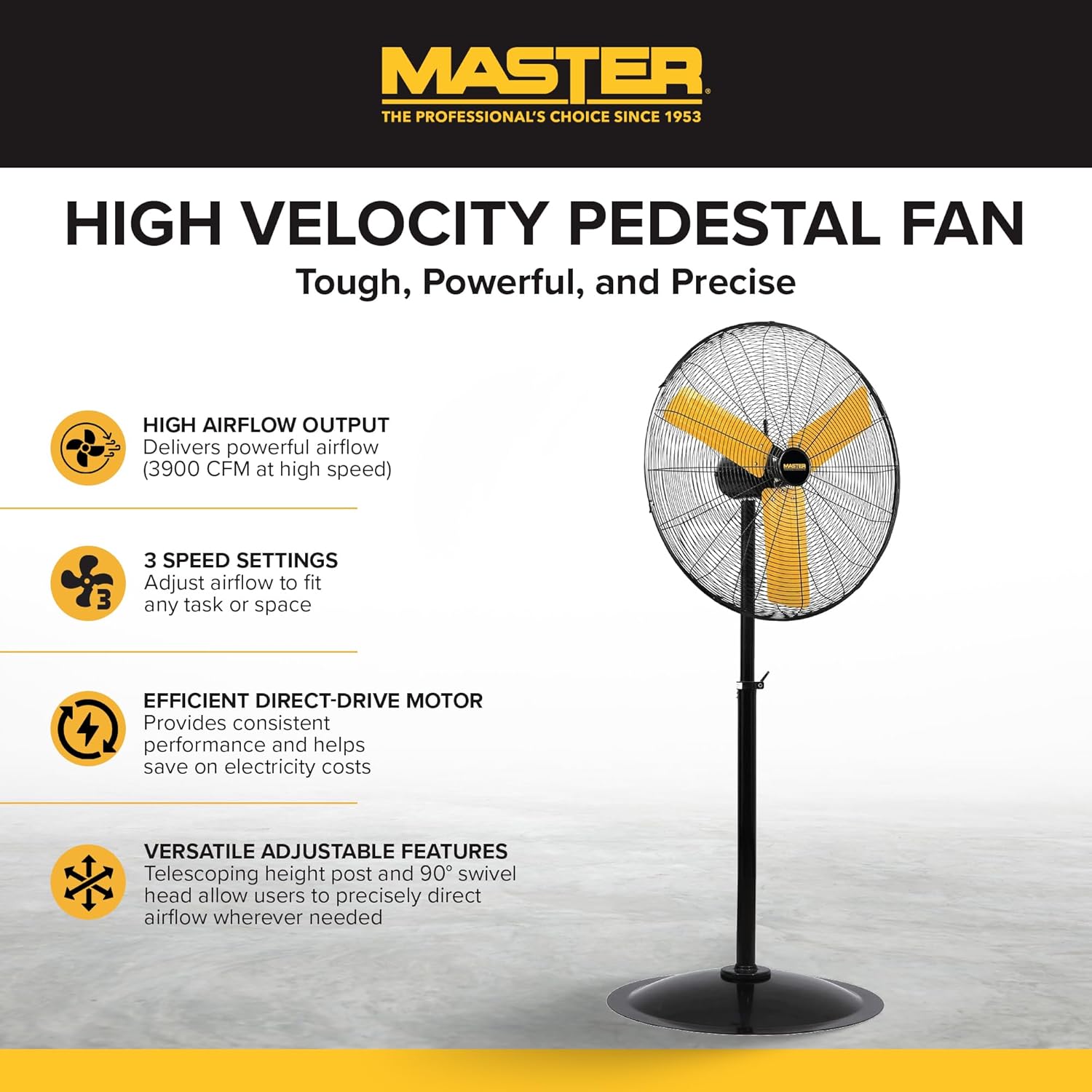
සම්පූර්ණ view of the Master 24-Inch Oscillating Pedestal Fan, showcasing its black metal construction and yellow fan blades.

පැත්තක් view of the Master 24-Inch Oscillating Pedestal Fan, showing its adjustable height post and stable base.
ප්රධාන ලක්ෂණ:
- High Airflow Output: Delivers powerful airflow up to 3900 CFM.
- 3 වේග සැකසුම්: Allows adjustment of airflow to suit various needs.
- Efficient Direct-Drive Motor: Provides consistent performance and helps conserve electricity.
- සම්පූර්ණයෙන්ම වෙනස් කළ හැකි: Features a telescoping adjustable height post for customized positioning.
- දෝලනය: The fan head oscillates to cool a wide area.
- ශක්තිමත් පදනම: A wide, heavy-duty pedestal base prevents the fan from tipping over.
- සම්පූර්ණ ලෝහ ඉදිකිරීම්: කල්පැවැත්ම සහ කල්පැවැත්ම සහතික කරයි.
3. සැකසීම සහ එකලස් කිරීම
Assembly is required for this fan. Follow these steps to ensure proper setup:
- සංරචක ඉවත් කරන්න: ඇසුරුම්කරණයෙන් සියලුම කොටස් ප්රවේශමෙන් ඉවත් කරන්න. ඇසුරුම් ලැයිස්තුවේ ලැයිස්තුගත කර ඇති සියලුම සංරචක තිබේදැයි තහවුරු කර ගන්න.
- පදනම එකලස් කරන්න: Attach the main support pole to the sturdy pedestal base. Ensure it is securely fastened.
- මෝටර් එකලස් කිරීම අමුණන්න: Secure the fan motor assembly to the top of the support pole. This typically involves attaching the motor to a bolt that connects to the pole via a bracket. Ensure all screws and fasteners are tightened.
- Install Grilles and Blades: Mount the fan blades onto the motor shaft, followed by the front and rear safety grilles. Ensure the grilles are properly aligned and secured to prevent accidental contact with the blades.
- උස සකස් කරන්න: Adjust the telescoping height post to your desired operating height. Secure it in place using the provided locking mechanism.
- ස්ථානගත කිරීමේ විදුලි පංකාව: Place the assembled fan on a firm, level surface in the desired location.

A close-up of the fan's wide, heavy-duty round base designed for stability.

A close-up showing the bolt and knob used to adjust the fan head's tilt angle.
4. මෙහෙයුම් උපදෙස්
Once assembled and placed, the fan is ready for operation.
- බල සම්බන්ධතාවය: Plug the fan's power cord into a standard 120 Volt AC electrical outlet.
- වේගය සක්රිය/සකස් කරන්න: Locate the push-button switch, typically on the rear of the motor housing. Rotate the knob to select one of the three available speed settings (1, 2, or 3). Position '0' is off.
- Adjust Oscillation: The fan head is designed to oscillate automatically. To stop oscillation, consult the fan's specific mechanism, which may involve disengaging a drive arm or a dedicated switch.
- ඇලවීමේ කෝණය සකසන්න: Loosen the adjustment knob on the side of the fan head to tilt the fan up or down to direct airflow. Tighten the knob securely once the desired angle is set.
- පාලන ක්රමය: This model may support app control. Refer to the manufacturer's website or additional documentation for details on connecting and using the fan with a compatible application.
- නිවා දමන්න: Rotate the speed control knob to the '0' position to turn off the fan. Unplug the fan from the outlet when not in use for extended periods.

A close-up of the fan's rotary switch, indicating three speed settings (0-1-2-3).

සවිස්තරාත්මක view of the fan's yellow blades and protective metal grille.
5. නඩත්තු කිරීම
නිතිපතා නඩත්තු කිරීම ප්රශස්ත ක්රියාකාරිත්වය සහතික කරන අතර ඔබේ විදුලි පංකාවේ ආයු කාලය දීර්ඝ කරයි.
- පිරිසිදු කිරීම: පිරිසිදු කිරීමට පෙර සෑම විටම විදුලි පංකාව විසන්ධි කරන්න. මෘදු, d භාවිතා කරන්නamp cloth to wipe down the exterior surfaces. For the fan blades and grilles, hand wash with mild soap and water if necessary, ensuring they are completely dry before reassembly and operation. Do not use abrasive cleaners or solvents.
- මෝටර් ලිහිසි කිරීම: විදුලි පංකා මෝටරය ස්ථිරවම ලිහිසි කර ඇති අතර අමතර තෙල් දැමීම අවශ්ය නොවේ.
- ගබඩා: If storing the fan for an extended period, cover it to protect against dust and store in a dry location.
6. දෝශ නිරාකරණය
If you encounter issues with your fan, refer to the following common troubleshooting steps:
- විදුලි පංකාව ක්රියාත්මක නොවේ:
- විදුලි රැහැන ක්රියා කරන 120V අලෙවිසැලකට ආරක්ෂිතව සම්බන්ධ කර ඇති බවට වග බලා ගන්න.
- පරිපථ කඩනය හෝ ෆියුස් පෙට්ටිය පරීක්ෂා කරන්න.
- Verify the speed control knob is set to a speed setting (1, 2, or 3) and not '0' (off).
- අඩු වූ වායු ප්රවාහය:
- Check for any obstructions around the fan grilles.
- Clean any dust or debris from the fan blades and grilles.
- අසාමාන්ය ශබ්දය හෝ කම්පනය:
- විදුලි පංකාව ස්ථාවර, සමතලා මතුපිටක් මත තබා ඇති බවට වග බලා ගන්න.
- Check that all assembly screws and fasteners are tight.
- Inspect fan blades for any damage or imbalance.
- Oscillation Not Working:
- Verify that the oscillation mechanism is engaged (if applicable).
- Check for any obstructions preventing the fan head from moving.
If these steps do not resolve the issue, contact Master customer support for further assistance. Availability of replacement parts may vary; inquire with customer support.
7. පිරිවිතර
| මාදිලියේ නම | MAC-24POSC |
| වෙළඳ නාමය | මාස්ටර් |
| ශෛලිය | 24-Inch Oscillating Pedestal Fan |
| වර්ණය | කළු |
| විදුලි පංකා නිර්මාණය | මහල රසිකයෙක් |
| බලශක්ති ප්රභවය | රැහැන්ගත විදුලි |
| නිෂ්පාදන මානයන් | 7"D x 35"W x 31.5"H |
| විශේෂ ලක්ෂණය | දෝලනය |
| වට්tage | 2.2 KW |
| බ්ලේඩ් ගණන | 3 |
| වායු ප්රවාහ ධාරිතාව | විනාඩියකට ඝන අඩි 3900 කි |
| වෙළුමtage | වෝල්ට් 120 |
| මාරු වර්ගය | තල්ලු බොත්තම |
| අයිතමයේ බර | පවුම් 52.9ක් |
| ගෘහස්ථ / එළිමහන් භාවිතය | ගෘහස්ථ |
| පිරිවිතර මෙට් | OSHA |
| පාලන ක්රමය | App (refer to manufacturer for details) |
| බල මට්ටම් ගණන | 3 |
| එකලස් කිරීම අවශ්ය වේ | ඔව් |
| විෂ්කම්භය | අඟල් 24 |
8. වගකීම් සහ සහාය
වගකීම් තොරතුරු:
This Master 24-Inch Oscillating Industrial High Velocity Pedestal Fan (MAC-24POSC) comes with a වසර 1ක සීමිත වගකීමක්. මෙම වගකීම් සහතිකය සාමාන්ය භාවිතය යටතේ ද්රව්ය හා වැඩ කිරීමේ දෝෂ ආවරණය කරයි. වගකීම් හිමිකම් සඳහා කරුණාකර ඔබේ මිලදී ගැනීමේ සාක්ෂි තබා ගන්න.
පාරිභෝගික සහාය:
For technical assistance, warranty claims, or inquiries regarding replacement parts, please contact Master customer support. Refer to the product packaging or the official Master webනවතම සම්බන්ධතා තොරතුරු සඳහා අඩවිය.


