1. හැඳින්වීම
Thank you for choosing the Sceptre 32-inch Class FHD (1080P) LED TV with Built-in DVD, Model E325BD-FSR. This manual provides essential information for the proper setup, operation, and maintenance of your new television. Please read this manual thoroughly before using the product and retain it for future reference.
2 ආරක්ෂිත තොරතුරු
ආරක්ෂිත ක්රියාකාරිත්වය සහතික කිරීමට සහ හානි වැළැක්වීමට, කරුණාකර පහත ආරක්ෂක පියවරයන් නිරීක්ෂණය කරන්න:
- Read all instructions before operating the TV.
- අනාගත යොමුව සඳහා මෙම අත්පොත තබා ගන්න.
- උපාංගයේ සහ මෙහෙයුම් උපදෙස් වල ඇති සියලුම අනතුරු ඇඟවීම් වලට අවනත වන්න.
- සියලුම උපදෙස් අනුගමනය කරන්න.
- වියළි රෙද්දකින් පමණක් පිරිසිදු කරන්න.
- නිසි වාතාශ්රය සහතික කරන්න. කිසිදු වාතාශ්රය විවරයක් අවහිර නොකරන්න.
- විදුලි රැහැන ඇවිදීමෙන් හෝ ඇණ ගැසීමෙන් ආරක්ෂා කරන්න.
- අකුණු කුණාටු ඇති විට හෝ දිගු කාලයක් භාවිතා නොකළ විට රූපවාහිනිය විසන්ධි කරන්න.
- සියලුම සේවා සුදුසුකම් ලත් සේවා පුද්ගලයින් වෙත යොමු කරන්න.
3. පැකේජ අන්තර්ගතය
කරුණාකර පහත අයිතම සඳහා කොටුව සලකුණු කරන්න:
- Sceptre 32-inch Class FHD (1080P) LED TV with Built-in DVD (Model E325BD-FSR)
- ටීවී ස්ටෑන්ඩ්
- දුරස්ථ පාලකය
- විදුලි රැහැන්
- 6ft Indoor 3-Outlet Extension Cord
- පරිශීලක අත්පොත (මෙම ලේඛනය)
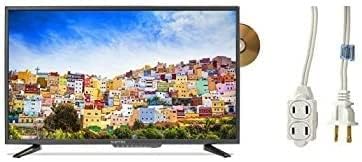
Image: The Sceptre 32-inch Class FHD LED TV with its built-in DVD player visible on the side, accompanied by a 6ft indoor 3-outlet extension cord.
4. පිහිටුවීම
4.1 ස්ථාවර ස්ථාපනය
- සීරීම් වළක්වා ගැනීම සඳහා රූපවාහිනී තිරය මෘදු, පිරිසිදු මතුපිටක් මත ප්රවේශමෙන් තබන්න.
- රූපවාහිනියේ පතුලේ ඇති සවි කරන සිදුරු සමඟ රූපවාහිනී නැවතුම පෙළගස්වන්න.
- සපයා ඇති ඉස්කුරුප්පු භාවිතයෙන් ස්ථාවරය සුරක්ෂිත කරන්න. ඕනෑවට වඩා තද නොකරන්න.
4.2 සම්බන්ධක බලය
Plug the power cord into the TV's power input, then connect the other end to a standard electrical outlet. Use the included 6ft indoor 3-outlet extension cord if additional outlets are needed.
4.3 බාහිර උපාංග සම්බන්ධ කිරීම
Your TV features various input ports for connecting external devices:
- HDMI: For high-definition video and audio from devices like Blu-ray players, game consoles, or cable/satellite boxes.
- Antenna/Cable (RF): ගුවන් විකාශන සඳහා ඇන්ටෙනාවක් සම්බන්ධ කිරීම හෝ කේබල් රූපවාහිනී සම්බන්ධතාවයක් සඳහා.
- USB: USB ගබඩා උපාංගවලින් මාධ්ය නැවත ධාවනය සඳහා.
රූපවාහිනියේ පිටුපස හෝ පැත්තේ ඇති සුදුසු තොටට ඔබේ උපාංග සම්බන්ධ කරන්න.
5. මෙහෙයුම් උපදෙස්
5.1 බලය සක්රිය / අක්රිය
ඔබන්න බලය රූපවාහිනිය සක්රිය හෝ අක්රිය කිරීමට දුරස්ථ පාලකයේ හෝ රූපවාහිනියේම බොත්තම ඔබන්න.
5.2 ආදාන මූලාශ්ර තේරීම
ඔබන්න ආදානය or මූලාශ්රය button on the remote control to cycle through available input sources (e.g., TV, HDMI1, HDMI2, DVD, USB).
5.3 Channel Scan (TV Input)
If using an antenna or cable connection, select the 'TV' input source. Navigate to the TV's menu, find the 'Channel' or 'Setup' section, and initiate an 'Auto Scan' or 'Auto Program' to find available channels.
5.4 Built-in DVD Player Operation
- Ensure the TV is powered on and the input source is set to 'DVD'.
- Gently insert a DVD disc into the disc slot on the side of the TV, label side facing up. The TV will automatically detect the disc and begin playback.
- Use the DVD control buttons on your remote control (Play, Pause, Stop, Fast Forward, Rewind, Skip) to manage playback.
- තැටියක් ඉවත් කිරීමට, ඔබන්න EJECT දුරස්ථ පාලකයේ හෝ රූපවාහිනියේ බොත්තම.
5.5 මෙනු සංචලනය
ඔබන්න මෙනුව button on the remote control to access the TV's settings. Use the arrow buttons to navigate and the ඇතුල් කරන්න or OK විකල්ප තේරීමට බොත්තම. ඔබන්න පිටවීම or මෙනුව මෙනුව වැසීමට නැවතත්.
6. නඩත්තු කිරීම
6.1 තිරය පිරිසිදු කිරීම
මෘදු, වියලි, ලින්ට් රහිත රෙද්දකින් තිරය මෘදු ලෙස පිස දමන්න. මුරණ්ඩු සලකුණු සඳහා, සැහැල්ලුවෙන් dampජලය හෝ විශේෂිත තිර පිරිසිදු කරන්නෙකු සහිත රෙදි කැබැල්ලක් මත තබන්න. කිසි විටෙකත් තිරය මත කෙලින්ම දියර ඉසින්න එපා.
6.2 බාහිර පිරිසිදු කිරීම
Wipe the TV's exterior with a soft, slightly damp cloth. Avoid using harsh chemicals, abrasive cleaners, or solvents, as these can damage the finish.
6.3 ගබඩා කිරීම
If storing the TV for an extended period, unplug it from the power outlet and store it in a cool, dry place, preferably in its original packaging.
7. දෝශ නිරාකරණය
පාරිභෝගික සහාය සම්බන්ධ කර ගැනීමට පෙර, පොදු ගැටළු සඳහා පහත විසඳුම් උත්සාහ කරන්න:
- බලය නැත: Ensure the power cord is securely plugged into both the TV and a working electrical outlet. Check if the outlet has power.
- පින්තූරයක් නැත: Verify the correct input source is selected. Check all cable connections (HDMI, antenna) are secure.
- ශබ්දයක් නැත: Check the volume level and ensure the TV is not muted. Verify audio settings in the menu.
- දුරස්ථ පාලකය ක්රියා නොකරයි: බැටරි මාරු කරන්න. දුරස්ථ පාලකය සහ රූපවාහිනියේ IR සංවේදකය අතර කිසිදු බාධාවක් නොමැති බවට වග බලා ගන්න.
- DVD Playback Issues: Ensure the disc is clean and free of scratches. Verify the disc is inserted correctly. Confirm the input source is set to 'DVD'.
8. පිරිවිතර
| ආකෘතිය | E325BD-FSR |
| තිර ප්රමාණය | අඟල් 31.5 |
| විභේදනය | 1080p (සම්පූර්ණ HD) |
| විශේෂ ලක්ෂණ | Flat Screen, Built-in DVD Player |
| සුසරක තාක්ෂණය | ATSC |
| පාලන ක්රමය | දුරස්ථ |
| තිර මතුපිට | දිලිසෙන |
| Year (Manufacturing) | 2017 |
| සහාය දක්වන අන්තර්ජාල සේවා | Blockbuster |
9. වගකීම් සහ සහාය
Your Sceptre TV is covered by a manufacturer's warranty. For specific warranty details, please refer to the warranty card included with your product or visit the official Sceptre website. For technical assistance, troubleshooting beyond this manual, or warranty claims, please contact Sceptre customer support.


