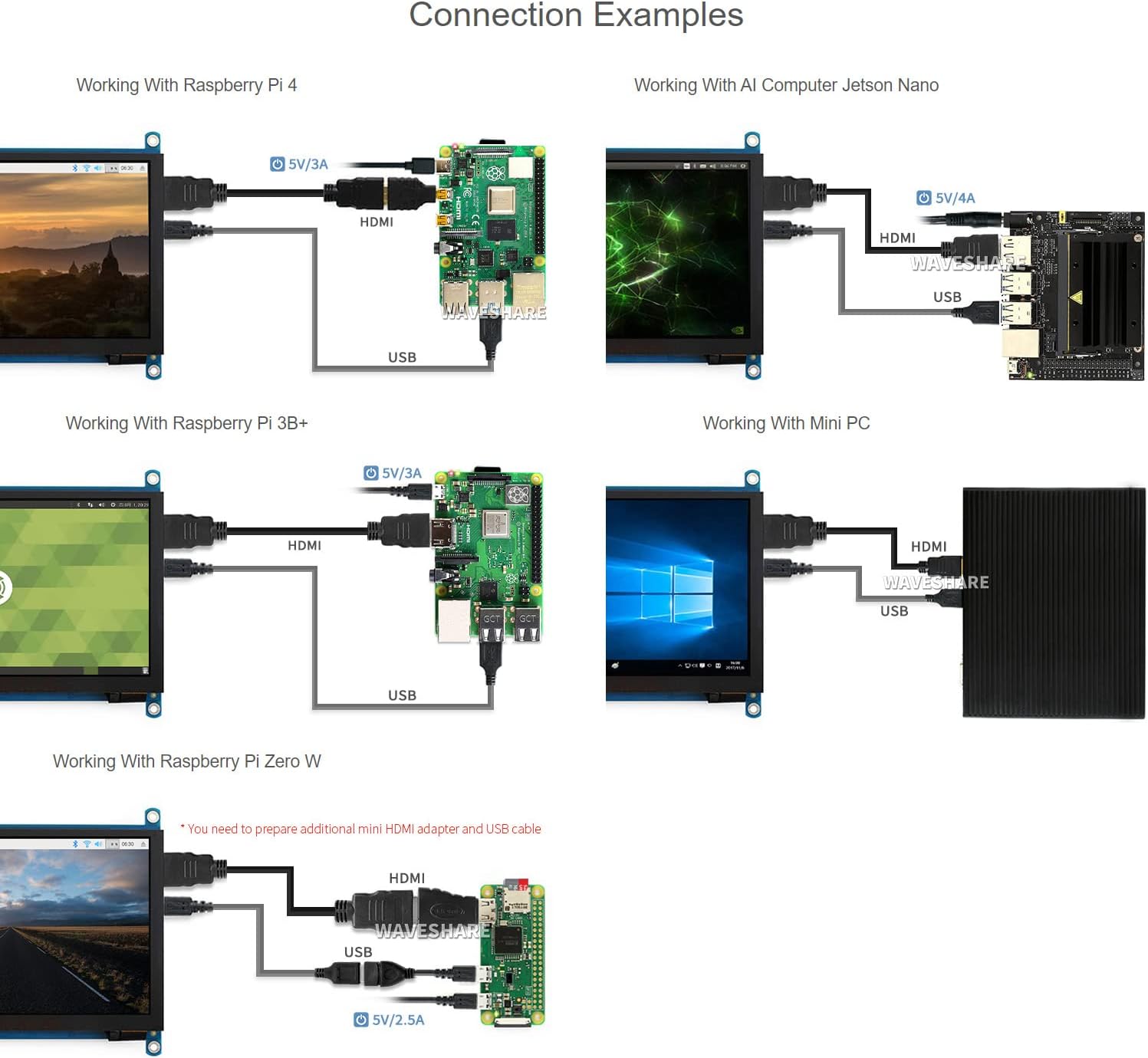
මෙහෙයුම් උපදෙස්
1. බල ගැන්වීම / අක්රිය කිරීම
The display powers on automatically when connected to a powered device via HDMI and USB. To power off, disconnect the power source from the connected device or the display's USB power input.
2. OSD මෙනු සංචාලනය
The display features an On-Screen Display (OSD) menu for various settings. Use the physical buttons on the side of the display to navigate and adjust settings such as brightness, contrast, and power management. Refer to the "Appearance and Dimensions" section for button identification.
3. ස්පර්ශ පාලනය
The display supports capacitive touch input. When connected via USB to a compatible operating system (Raspberry Pi OS, Ubuntu, Kali, Windows), the touch functionality will be recognized automatically without additional drivers. The number of touch points supported depends on the operating system (e.g., 5-point touch on Windows, single-point on Jetson Nano Ubuntu).

Image: Demonstrates the capacitive touch control functionality on the 7-inch HDMI LCD, showing a hand interacting with a web browser interface. Also shows the display connected to a game console, indicating support for gaming display.
4. ශ්රව්ය ප්රතිදානය
Audio can be output through the 3.5mm audio jack or the 4PIN header for external speakers. Ensure your connected device is configured to output audio via HDMI.
පිරිවිතර
| තිර ප්රමාණය | අඟල් 7 |
| විභේදනය | 1024 x 600 (Hardware), up to 1920x1080 (Software) |
| පැනල් වර්ගය | IPS |
| Viewing කෝණය | 170° |
| ස්පර්ශ වර්ගය | ධාරිත්රක |
| ස්පර්ශ ලකුණු | 5-point (Windows), Single-point (Jetson Nano), 5-point (Raspberry Pi OS) |
| අතුරු මුහුණත පෙන්වන්න | HDMI, VGA (requires separate cable) |
| ශ්රව්ය ප්රතිදානය | 3.5mm Jack, 4PIN Header |
| බල ආදානය | 5V DC (USB හරහා) |
| නිෂ්පාදන මානයන් | 7.09 x 5.51 x 1.97 අඟල් (180 x 140 x 50 මි.මී. පමණ) |
| අයිතමයේ බර | අවුන්ස 0.352 (දළ වශයෙන් ග්රෑම් 10) |
උපාංග සහ පද්ධති සහාය
- රාස්ප්බෙරි පයි: Supports Raspberry Pi OS, Ubuntu, Kali, Retropie (driver-free). Supports all versions of Raspberry Pi.
- Jetson Nano: Supports Ubuntu (single-point touch, driver-free).
- පළාත් සභා: Supports Windows 11 / 10 / 8.1 / 8 / 7 (5-point touch, driver-free).
- ක්රීඩා කොන්සෝල: Xbox360, PS4, Switch (display only).
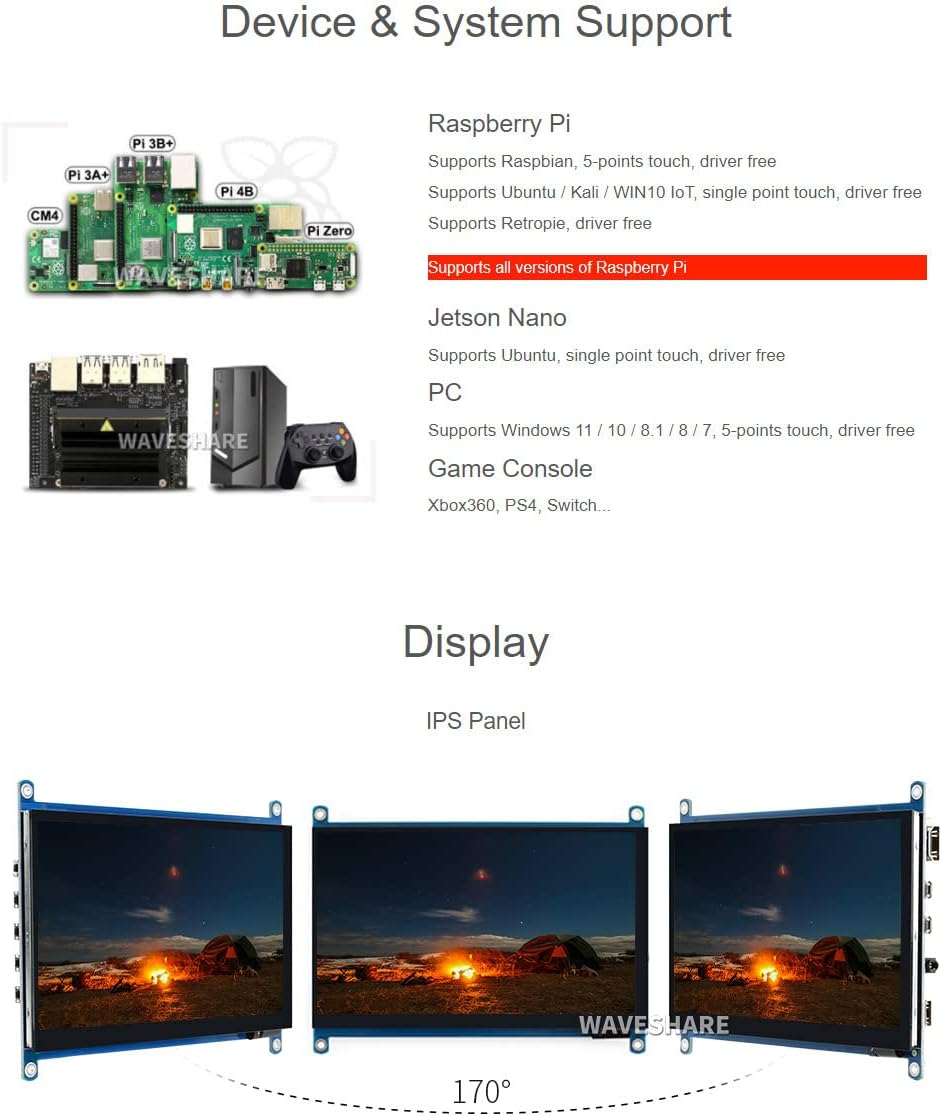
Image: Illustrates various compatible devices including Raspberry Pi models (Pi 3A+, Pi 3B+, Pi 4B, CM4, Pi Zero), Jetson Nano, and a generic PC setup, along with a list of supported operating systems and touch capabilities.
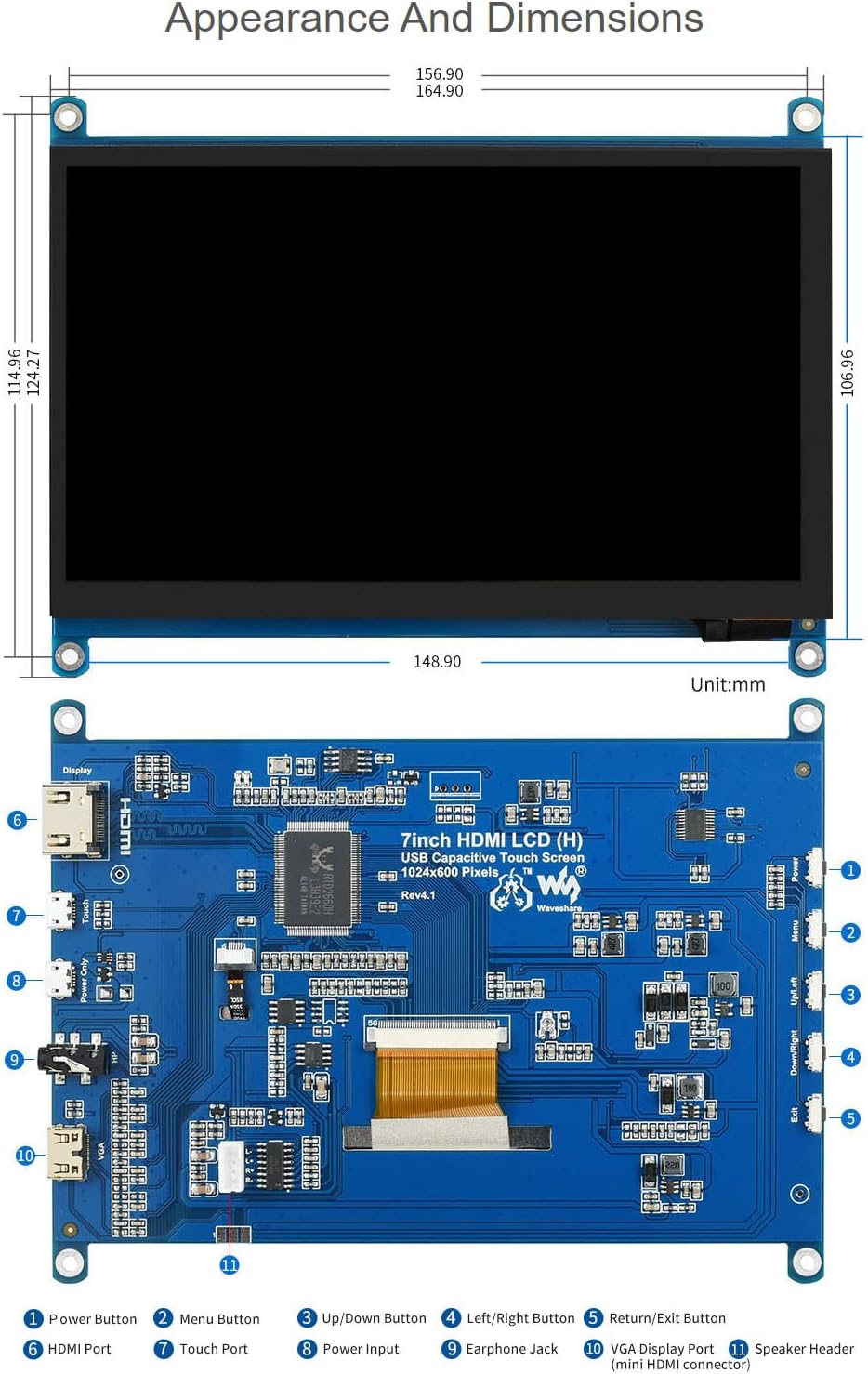
Image: Technical drawing showing the physical dimensions of the 7-inch HDMI LCD in millimeters, along with a detailed diagram identifying various ports and buttons on the display's circuit board, such as HDMI port, touch port, power input, earphone jack, VGA display port, and OSD menu buttons.
වගකීම් සහ සහාය
Waveshare is committed to providing high-quality products and customer service.
- නොමිලේ ආදේශනය: 30 days from purchase date.
- Free Repair: 365 days from purchase date.
- තාක්ෂණ සේවය: ජීවිත කාලය පුරාම තාක්ෂණික සහාය ලබා ගත හැකිය.
For technical assistance or warranty claims, please contact Waveshare customer support through their official channels.

Image: Details Waveshare's commitment to support and service, including rigorous testing, one-to-one technical service, 24-hour response, 30-day free replacement, 365-day free repair, and lifetime technical service.