හැඳින්වීම
The Powertech MP3087 is a versatile 0-32V DC Dual Output Laboratory Power Supply designed for precision applications. It features automatic constant voltage (CV) or constant current (CC) transfer, ensuring stable power delivery. Its dual outputs can operate independently, or be configured in parallel or series to achieve various voltage and current combinations. Each output is equipped with independent digital voltage and current meters, providing clear, backlit readings for accurate monitoring. Coarse and fine controls allow for precise adjustment of voltagඊ සහ වත්මන් සීමාවන්.
ආරක්ෂිත උපදෙස්
Please read and understand all safety instructions before operating the power supply. Failure to do so may result in injury or damage to the equipment.
- Always connect the power supply to a grounded AC outlet.
- ඒකකය තෙත් හෝ තෙතමනය සහිත කාලගුණය තුළ ක්රියාත්මක නොකරන්න.amp කොන්දේසි.
- අධික උනුසුම් වීම වැළැක්වීම සඳහා ඒකකය වටා නිසි වාතාශ්රය සහතික කරන්න. වාතාශ්රය විවරයන් අවහිර නොකරන්න.
- c එක අරින්න එපාasinඋ. ඇතුළත පරිශීලක-සේවා කළ හැකි කොටස් නොමැත. සියලුම සේවා සුදුසුකම් ලත් පුද්ගලයින් වෙත යොමු කරන්න.
- Before making any connections or disconnections, ensure the power supply is turned off and unplugged from the AC mains.
- වෙළුම සත්යාපනය කරන්නtage and current settings before connecting to any circuit or device.
- ප්රතිදාන පර්යන්ත දිගු කාලයක් කෙටි පරිපථයකට ලක් කිරීමෙන් වළකින්න.
නිෂ්පාදනය අවසන්view
ඉදිරිපස පුවරුවේ පාලන සහ දර්ශක

රූපය 1: ඉදිරිපස view of the Powertech MP3087 showing dual displays, control knobs, and output terminals.
The front panel of the MP3087 is intuitively designed for ease of use, featuring two identical sets of controls for each independent output, plus central controls for power and output configuration.
- ඩිජිටල් සංදර්ශක: Two backlit displays show real-time voltage (V) and current (A) for each output.
- VOL-ADJ Knobs: Coarse and fine adjustment for output voltage.
- CUR-ADJ Knobs: Coarse and fine adjustment for output current limit.
- CC/CV Indicators: LEDs indicating Constant Current (CC) or Constant Voltage (CV) මාදිලිය.
- නිමැවුම් පර්යන්ත: Red (+) and Black (-) binding posts for connecting loads. A green (GND) terminal is also provided.
- බල සැපයුම් සුවිචය: Main power ON/OFF switch for the unit.
- PARALLEL Button: Configures both outputs in parallel for increased current output.
- SERIES Button: Configures both outputs in series for increased voltagඊ ප්රතිදානය.
පසුපස පුවරුවේ විශේෂාංග
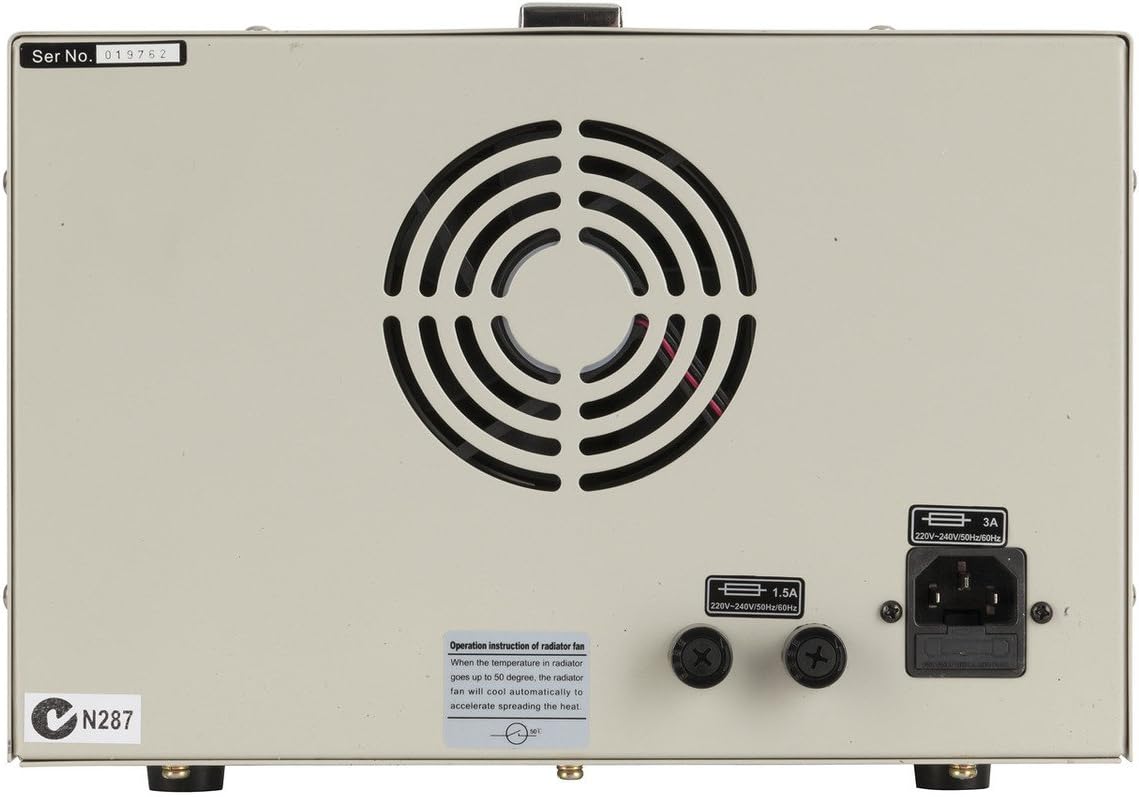
රූපය 2: පසුපස view of the Powertech MP3087 showing the power input, fuse holder, and cooling fan.
The rear panel houses essential connections and cooling components.
- AC බල ආදානය: IEC C14 inlet for connecting the AC power cord.
- ෆියුස් රඳවනය: Contains the main protective fuse.
- සිසිලන විදුලි පංකාව: Automatically activates to dissipate heat and maintain optimal operating temperature.
සැලසුම
- ඇසිරීම: Carefully remove the power supply from its packaging. Inspect for any signs of damage during transit.
- ස්ථානගත කිරීම: Place the unit on a stable, level surface with adequate ventilation space around it (at least 10 cm on all sides, especially the rear). Avoid placing it near heat sources or in direct sunlight.
- බල සම්බන්ධතාවය: Ensure the POWER switch on the front panel is in the OFF position. Connect the supplied AC power cord to the AC Power Input on the rear panel and then to a grounded wall outlet.
- මූලික පරීක්ෂාව: Turn the POWER switch ON. The digital displays should illuminate, showing default voltagඊ සහ වත්මන් කියවීම්.
මෙහෙයුම් උපදෙස්
The Powertech MP3087 offers flexible operation modes to suit various laboratory and testing requirements.
1. Independent Operation
In this mode, each output functions as a separate, isolated power supply.
- Ensure both PARALLEL and SERIES buttons are disengaged (not pressed in).
- බල සැපයුම සක්රිය කරන්න.
- For each output, adjust the VOL-ADJ (coarse and fine) knobs to set the desired output voltage.
- Adjust the CUR-ADJ (coarse and fine) knobs to set the desired current limit. It is recommended to set the current limit slightly above the expected operating current of your load to prevent unintended current limiting.
- Connect your load to the respective output terminals (Red for positive, Black for negative).
- Monitor the displays for actual voltage and current draw. The CC/CV indicator will show the operating mode.
2. Series Operation (Increased Voltage)
To combine the voltage of both outputs, use the series mode. The total output voltage will be the sum of the individual output voltages, while the current limit will be determined by the lower of the two set current limits.
- බල සැපයුම අක්රිය කර ඇති බවට වග බලා ගන්න.
- Press the SERIES button on the front panel.
- Connect the positive (+) terminal of Output 1 to the negative (-) terminal of Output 2 using a short, heavy-gauge wire.
- The combined output will be available from the negative (-) terminal of Output 1 and the positive (+) terminal of Output 2.
- බල සැපයුම සක්රිය කරන්න.
- Adjust the VOL-ADJ and CUR-ADJ knobs for both outputs to achieve the desired total voltage and current limit. Note that the current limit will be the lowest setting of the two outputs.
- Connect your load to the combined output terminals.
3. Parallel Operation (Increased Current)
To combine the current capacity of both outputs, use the parallel mode. The total output current will be the sum of the individual output currents, while the voltage will be determined by the lower of the two set voltages.
- බල සැපයුම අක්රිය කර ඇති බවට වග බලා ගන්න.
- Press the PARALLEL button on the front panel.
- Connect the positive (+) terminal of Output 1 to the positive (+) terminal of Output 2 using a short, heavy-gauge wire.
- Connect the negative (-) terminal of Output 1 to the negative (-) terminal of Output 2 using a short, heavy-gauge wire.
- The combined output will be available from either set of connected terminals.
- බල සැපයුම සක්රිය කරන්න.
- Adjust the VOL-ADJ and CUR-ADJ knobs for both outputs to achieve the desired total current and voltage. Note that the voltage will be the lowest setting of the two outputs.
- Connect your load to the combined output terminals.
නඩත්තු කිරීම
Proper maintenance ensures the longevity and reliable operation of your power supply.
- පිරිසිදු කිරීම: Disconnect the power supply from the AC mains before cleaning. Use a soft, dry cloth to wipe down the exterior. Do not use abrasive cleaners or solvents.
- වාතාශ්රය: Regularly check that the ventilation openings on the rear and sides are free from dust and obstructions. A soft brush or compressed air can be used to gently clear dust.
- ගබඩා: When not in use for extended periods, store the power supply in a cool, dry place, away from direct sunlight and excessive humidity.
- ෆියුස් ආදේශනය: If the unit fails to power on, check the fuse located on the rear panel. Replace only with a fuse of the same type and rating (refer to specifications). Always disconnect from AC mains before replacing the fuse.
දෝෂගවේෂණය
| ගැටලුව | විය හැකි හේතුව | විසඳුම |
|---|---|---|
| ඒකකය බලය සක්රිය නොවේ. | No AC power; Blown fuse; Power switch off. | Check AC power cord connection and wall outlet. Check and replace fuse if necessary. Ensure power switch is ON. |
| ප්රතිදාන වෙළුම නැතtagඉ/ධාරා. | Output terminals not connected; Current limit set too low; Overload protection activated. | Ensure load is properly connected. Increase current limit. Reduce load or check for short circuit in load. |
| ප්රතිදාන වෙළුමtage/current fluctuates. | Unstable AC input; Loose connections; Faulty load. | Check AC power source stability. Secure all connections. Test with a different load. |
| ඒකකය අධික ලෙස රත් වේ. | Blocked ventilation; Excessive load. | Ensure ventilation openings are clear. Reduce load or operate within specified limits. |
පිරිවිතර
| විශේෂාංගය | විස්තර |
|---|---|
| ආකෘතිය | MP3087 |
| ප්රතිදාන වෙළුමtage | 0-32V DC (per channel) |
| ප්රතිදාන ධාරාව | 0-3A (per channel) |
| ප්රතිදාන වර්ගය | Dual, Independent, Series, Parallel |
| ප්රදර්ශනය කරන්න | ඩිජිටල් වෙළුමtage and Current Meters (Backlit) |
| මෙහෙයුම් මාදිලි | ස්ථාවර වෙළුමtage (CV), Constant Current (CC) |
| ආදාන වෙළුමtage | 220-240V AC, 50/60Hz (as per rear panel image) |
| ෆියුස් ශ්රේණිගත කිරීම | 1.5A (as per rear panel image) |
| මානයන් | Approx. 40 x 26 x 18.5 cm (from product title) |
| බර | ආසන්න වශයෙන්. කිලෝ ග්රෑම් 9.97 කි |
| ද්රව්ය | පොලිකාබනේට් (PC) |
වගකීම් සහ සහාය
This Powertech product is covered by a standard manufacturer's warranty. For specific warranty terms, duration, and conditions, please refer to the documentation provided with your purchase or contact Jaycar customer support.
For technical assistance, troubleshooting beyond this manual, or service inquiries, please contact your retailer or the manufacturer's authorized service center. Keep your purchase receipt as proof of purchase for warranty claims.


