1. හැඳින්වීම
This manual provides essential information for the safe and effective operation of the KEYENCE IV-500MA Vision Sensor. The IV-500MA is designed for industrial applications requiring precise object detection and inspection. Please read this manual thoroughly before using the product to ensure correct installation, operation, and maintenance.
2 ආරක්ෂිත තොරතුරු
අවවාදයයි:
- ඕනෑම ස්ථාපනයක්, රැහැන් ඇදීම හෝ නඩත්තුවක් සිදු කිරීමට පෙර සෑම විටම විදුලිය විසන්ධි කරන්න.
- Do not attempt to disassemble, repair, or modify the unit. This may cause damage or malfunction.
- විදුලි කම්පනය වැළැක්වීම සඳහා නිසි බිම් සැකසීම සහතික කරන්න.
- Operate the sensor within its specified environmental conditions (temperature, humidity, vibration).
- නිශ්චිත බල සැපයුම් පරිමාව පමණක් භාවිතා කරන්නtage.
Adherence to these safety guidelines is crucial for preventing injury and equipment damage.
3. නිෂ්පාදන අවසන්view
The KEYENCE IV-500MA is a monochrome vision sensor with standard distance capabilities and automatic focus. It is designed for robust performance in industrial environments.
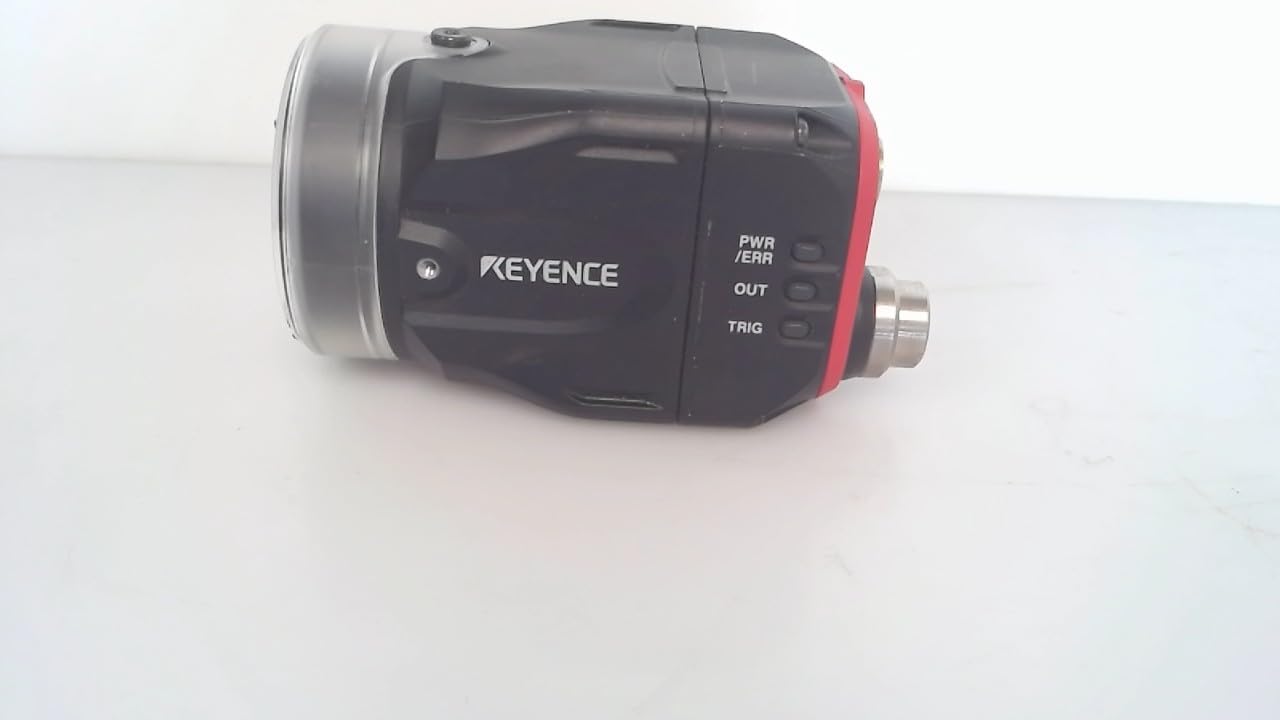
රූපය 3.1: පැත්ත view of the KEYENCE IV-500MA Vision Sensor, showing the lens, main body, and connection ports. The Keyence logo is visible on the side.
ප්රධාන ලක්ෂණ ඇතුළත් වේ:
- Monochrome imaging for high contrast detection.
- Standard distance operation.
- Automatic focus capability.
- Compact and durable design for industrial integration.

රූපය 3.2: පසුපස view of the KEYENCE IV-500MA Vision Sensor, displaying the model number (IV-500MA), serial number, MAC address, and various certification marks. Connection ports are also visible.

රූපය 3.3: සමීප රූපය view of the product label on the KEYENCE IV-500MA, showing detailed information such as the model number, serial number, MAC address, and electrical specifications (24V DC 1.0A max, Class2 output).
4. පිහිටුවීම සහ ස්ථාපනය
Proper installation is critical for the performance and longevity of the IV-500MA sensor.
4.1 සවි කිරීම
The sensor should be securely mounted using appropriate hardware. Ensure the mounting surface is stable and free from excessive vibration. The sensor's compact dimensions (approximately 0.28 x 0.28 x 0.28 inches) allow for flexible integration into various setups.
4.2 රැහැන්
Connect the sensor to a stable 24V DC power supply. Refer to the product's wiring diagram for specific pin assignments. Ensure all connections are secure to prevent intermittent operation or damage.
- බල සැපයුම: 24V DC, 1.0A උපරිම.
- ප්රතිදානය: 24V DC, 50mA.
- Verify correct polarity before applying power.
4.3 මූලික වින්යාසය
After physical installation and wiring, connect the sensor to the appropriate control system or PC for initial configuration. Use the manufacturer's provided software for parameter setup, image acquisition, and inspection program creation. The automatic focus feature simplifies initial setup.
5. මෙහෙයුම් උපදෙස්
The IV-500MA operates by capturing images and processing them to perform various inspection tasks. Operation typically involves:
- බල ගැන්වීම: Apply 24V DC power to the sensor. The power indicator LED should illuminate.
- මෘදුකාංග සම්බන්ධතාවය: Establish communication with the sensor via the dedicated software.
- Image Acquisition: Trigger the sensor to acquire images. This can be done manually through software or via an external trigger signal.
- Program Execution: Run the pre-configured inspection program. The sensor will analyze the acquired image based on the defined parameters.
- Result Output: The sensor provides inspection results (e.g., pass/fail, position data) via its output signals or communication interface.
For detailed programming and advanced operation, refer to the comprehensive software manual provided by Keyence.
6. නඩත්තු කිරීම
Regular maintenance ensures optimal performance and extends the lifespan of your IV-500MA sensor.
6.1 පිරිසිදු කිරීම
- Keep the lens surface clean. Use a soft, lint-free cloth and a non-abrasive lens cleaning solution if necessary.
- Wipe the sensor body with a dry or slightly damp cloth. Avoid using strong solvents or abrasive cleaners.
6.2 පරීක්ෂා කිරීම
- Periodically check all cables and connectors for signs of wear or damage.
- Ensure the mounting remains secure and free from looseness.
- Monitor the sensor's performance for any deviations from expected results.
Always disconnect power before performing any cleaning or inspection procedures.
7. දෝශ නිරාකරණය
This section provides solutions to common issues encountered with the IV-500MA sensor.
| ගැටලුව | විය හැකි හේතුව | විසඳුම |
|---|---|---|
| සංවේදකය ක්රියාත්මක නොවේ. | No power supply; incorrect wiring; faulty cable. | බල සම්බන්ධතාවය සහ පරිමාව පරීක්ෂා කරන්නtage (24V DC). Verify wiring according to the manual. Replace damaged cables. |
| No image acquisition. | Software not connected; incorrect trigger settings; lens cap on. | Ensure software is connected. Check trigger input and settings. Remove lens cap if present. |
| දුර්වල රූපයේ ගුණාත්මකභාවය. | Dirty lens; improper lighting; incorrect focus. | Clean the lens. Adjust lighting conditions. Re-run auto-focus or manually adjust focus if applicable. |
| Inaccurate inspection results. | Incorrect program parameters; object variation; sensor misalignment. | Review and adjust inspection program parameters. Ensure consistent object presentation. Re-align sensor if necessary. |
If the problem persists after attempting these solutions, contact Keyence technical support.
8. පිරිවිතර
Detailed technical specifications for the KEYENCE IV-500MA Vision Sensor:
| පරාමිතිය | වටිනාකම |
|---|---|
| ආදර්ශ අංකය | IV-500MA |
| නිෂ්පාදන මානයන් (L x W x H) | අඟල් 0.28 x 0.28 x 0.28 |
| බර | පවුම් 1 කි |
| ද්රව්ය | Copper (Note: This might refer to internal components or specific parts, not the entire casinඋ.) |
| නිෂ්පාදකයා | KEYENCE |
| පළමු දිනය තිබේ | 11 මැයි 2018 |
| සවිකිරීමේ වර්ගය | Weaver Mount (Note: This might be a generic Amazon category tag, actual mounting may vary.) |
| තත්ත්වය | Used - Good (Note: This refers to the specific unit's condition as listed, not the product's new specifications.) |
9. වගකීම් සහ සහාය
For information regarding product warranty, technical support, and service, please contact Keyence directly through their official website or authorized distributors. Keep your product's model number (IV-500MA) and serial number ready when contacting support.
Official Keyence Webඅඩවිය: www.keyence.com


