හැඳින්වීම
මෙම අත්පොත ඔබගේ DirecTV H25-100 HD ග්රාහකය සැකසීම, ක්රියාත්මක කිරීම සහ නඩත්තු කිරීම සඳහා අත්යවශ්ය තොරතුරු සපයයි. නිසි ක්රියාකාරිත්වය සහතික කිරීමට සහ ඔබේ උපරිම කිරීමට උපාංගය භාවිතා කිරීමට පෙර කරුණාකර එය හොඳින් කියවන්න. viewඅත්දැකීමෙන්.
ප්රධාන ලක්ෂණ
- SWiM (තනි වයර් බහු ස්විච) ජාල සඳහා පමණක් නිර්මාණය කර ඇත.
- අධි-විභේදන (HD) වීඩියෝ ප්රතිදානය.
- සංයුක්ත නිර්මාණය.
- 12V DC බල ආදානය, විවිධ බල සැකසුම් සඳහා සුදුසු වේ.
- බහු ප්රතිදාන විකල්ප: 2x HDMI, 1x සංයුක්ත, 1x සංරචක, 1x දෘශ්ය ශ්රව්ය.
- DVR හැකියාවක් නැත.
පෙට්ටියේ ඇති දේ
- DirecTV H25-100 HD ග්රාහකය
- AC බල ඇඩැප්ටරය

රූපය: ඉහළට view DirecTV H25-100 HD ග්රාහකයේ, පෙන්වන්නasing එහි සංයුක්ත කළු නිර්මාණය.
සැලසුම
අසුරනවා
ග්රාහකය සහ සියලුම උපාංග ඇසුරුම්කරණයෙන් ප්රවේශමෙන් ඉවත් කරන්න. අනාගත ප්රවාහනය හෝ ගබඩා කිරීම සඳහා ඇසුරුම් තබා ගන්න.
සම්බන්ධතා
H25-100 ග්රාහකය ඔබගේ රූපවාහිනියට සහ චන්ද්රිකා කෑමට සම්බන්ධ කිරීම සඳහා විවිධ වරායන් පිරිනමයි. උපාංගය ක්රියාත්මක කිරීමට පෙර සියලුම සම්බන්ධතා ආරක්ෂිත බව සහතික කර ගන්න.
- චන්ද්රිකා ආදානය: ඔබගේ SWiM-සක්රීය චන්ද්රිකා ඩිෂ් එකෙන් කොක්සියල් කේබලය ග්රාහකයේ පිටුපස ඇති 'SAT IN' තොටට සම්බන්ධ කරන්න.
- HDMI නිමැවුම්: අධි-විභේදන වීඩියෝ සහ ශ්රව්ය සඳහා ග්රාහකයේ ඇති 'HDMI' තොටක් ඔබේ රූපවාහිනියේ HDMI ආදානයකට සම්බන්ධ කිරීමට HDMI කේබලයක් භාවිතා කරන්න.
- සංයුක්ත ප්රතිදානය: සම්මත විභේදන වීඩියෝ සඳහා, ග්රාහකයේ 'VIDEO OUT' සහ 'AUDIO OUT' තොටුපළවලින් කහ (වීඩියෝ), සුදු (වම් ශ්රව්ය) සහ රතු (දකුණු ශ්රව්ය) RCA කේබල් ඔබේ රූපවාහිනියේ අනුරූප ආදාන වෙත සම්බන්ධ කරන්න.
- සංරචක ප්රතිදානය: අධි-විභේදන ඇනලොග් වීඩියෝ සඳහා, ග්රාහකයේ 'COMPONENT OUT' port වලින් කොළ (Y), නිල් (Pb) සහ රතු (Pr) සංරචක වීඩියෝ කේබල් ඔබේ රූපවාහිනියට සම්බන්ධ කරන්න. ශ්රව්ය සඳහා සුදු සහ රතු RCA කේබල් සම්බන්ධ කරන්න.
- දෘශ්ය ශ්රව්ය ප්රතිදානය: ඩිජිටල් ශ්රව්ය සඳහා, 'OPTICAL AUDIO' තොටෙන් දෘශ්ය ශ්රව්ය කේබලයක් අනුකූල ශ්රව්ය ග්රාහකයකට හෝ ශබ්ද පද්ධතියකට සම්බන්ධ කරන්න.
- බලය: ඇතුළත් කර ඇති AC බල ඇඩැප්ටරය ග්රාහකයේ 'POWER IN 12V' තොටට සම්බන්ධ කරන්න, ඉන්පසු ඇඩැප්ටරය බිත්ති අලෙවිසැලකට සම්බන්ධ කරන්න.

රූපය: ඉදිරිපස සහ පසුපස viewDirecTV H25-100 HD ග්රාහකයේ, සම්බන්ධතාවය සඳහා සියලුම ආදාන සහ ප්රතිදාන වරායන් ඉස්මතු කරයි.
මුලික බලය සක්රිය
සියලුම සම්බන්ධතා සිදු කළ පසු, ග්රාහකයේ ඉදිරිපස හෝ ඔබේ DirecTV දුරස්ථ පාලකයේ 'POWER' බොත්තම ඔබන්න. භාෂා තේරීම සහ චන්ද්රිකා සංඥා ලබා ගැනීම වැනි මූලික සැකසුම සඳහා තිරයේ ඇති ඕනෑම විමසීමක් අනුගමනය කරන්න.
මෙහෙයුම් උපදෙස්
ඉදිරිපස පැනල් පාලන
H25-100 ග්රාහකයේ ඉදිරිපස පුවරුව ක්රියාත්මක වීම සඳහා මූලික පාලනයන් සපයයි:
- බලය: ග්රාහකය සක්රිය හෝ අක්රිය කරයි.
- මෙනු: සැකසුම් සහ විකල්ප සඳහා ප්රධාන මෙනුවට ප්රවේශ වේ.
- තෝරන්න: මෙනු තුළ තේරීම් තහවුරු කරයි.
- මාර්ගෝපදේශය: වැඩසටහන් මාර්ගෝපදේශය පෙන්වයි.
- RES (විභේදනය): ලබා ගත හැකි වීඩියෝ විභේදන හරහා චක්රීය කරයි.
- සංචාලන ඊතල (ඉහළ/පහළ/වම/දකුණ): මෙනු හරහා සැරිසැරීමට සහ නාලිකා වෙනස් කිරීමට භාවිතා කරයි.
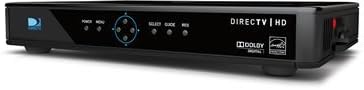
රූපය: පැත්ත view DirecTV H25-100 HD ග්රාහකයේ, බලය, මෙනුව, තේරීම, මාර්ගෝපදේශය සහ විභේදනය සඳහා ඉදිරිපස පුවරුවේ බොත්තම් පැහැදිලිව පෙන්වයි.
මූලික මෙහෙයුම
බලගන්වා වින්යාස කළ පසු, ඔබට නාලිකා සැරිසැරීමට, වැඩසටහන් මාර්ගෝපදේශයට ප්රවේශ වීමට, සැකසුම් සකස් කිරීමට සහ ඔබේ DirecTV සේවාව භුක්ති විඳීමට ඔබේ DirecTV දුරස්ථ පාලකය (මෙම ග්රාහකය සමඟ ඇතුළත් නොවේ) භාවිතා කළ හැකිය.
- නාලිකා වෙනස් කිරීම: CH+/CH- බොත්තම් භාවිතා කරන්න හෝ ඔබේ දුරස්ථ පාලකයේ නාලිකා අංක කෙලින්ම ඇතුළත් කරන්න.
- ප්රවේශ මාර්ගෝපදේශය: 'GUIDE' බොත්තම ඔබන්න view වැඩසටහන් ලැයිස්තුගත කිරීම්.
- මෙනු සංචාලනය: පද්ධති සැකසුම්, මාපිය පාලන සහ අනෙකුත් විශේෂාංග වෙත ප්රවේශ වීමට 'මෙනුව' බොත්තම භාවිතා කරන්න.
නඩත්තු කිරීම
පිරිසිදු කිරීම
ඔබේ ග්රාහකයේ පෙනුම සහ ක්රියාකාරිත්වය පවත්වා ගැනීම සඳහා, වරින් වර එහි බාහිර පිරිසිදු කරන්න. දූවිලි පිස දැමීමට මෘදු, වියළි රෙද්දක් භාවිතා කරන්න. මුරණ්ඩු සලකුණු සඳහා, තරමක් dampරෙදි කැබැල්ල වතුරෙන් සෝදන්න. සැර රසායනික ද්රව්ය, උල්ෙල්ඛ පිරිසිදු කරන්නන් හෝ ද්රාවක භාවිතා නොකරන්න, මන්ද මේවා නිමාවට හානි කළ හැකිය.
මෘදුකාංග යාවත්කාලීන
DirecTV H25-100 ග්රාහකයට චන්ද්රිකාව හරහා ස්වයංක්රීය මෘදුකාංග යාවත්කාලීන කිරීම් ලැබිය හැකිය. කාර්ය සාධනය වැඩි දියුණු කිරීමට සහ නව විශේෂාංග එකතු කිරීමට හැකි වන පරිදි, ග්රාහකය බලයට සහ චන්ද්රිකා ඩිෂ් එකට සම්බන්ධ වී ඇති බවට වග බලා ගන්න.
දෝෂගවේෂණය
ඔබේ DirecTV H25-100 ග්රාහකය සමඟ ගැටලු ඇති වුවහොත්, පොදු ගැටළු සහ ඒවාට විසඳුම් සඳහා පහත වගුව බලන්න.
| ගැටලුව | විය හැකි හේතුව | විසඳුම |
|---|---|---|
| බලය නැත | විදුලි රැහැන ලිහිල් හෝ විසන්ධි වී ඇත; විදුලි අලෙවිසැල ක්රියා නොකරයි. | බල කේබල් සම්බන්ධතාවය පරීක්ෂා කරන්න; වෙනත් අලෙවිසැලක් උත්සාහ කරන්න; බල ඇඩැප්ටරය ක්රියාත්මක වන බවට වග බලා ගන්න. |
| සංඥා නැත / චන්ද්රිකාව සොයමින් | චන්ද්රිකා කේබලය ලිහිල් හෝ විසන්ධි වී ඇත; පිඟන් කෝප්ප පෙළගැස්වීමේ ගැටලුව; අයහපත් කාලගුණය. | 'SAT IN' කේබල් සම්බන්ධතාවය පරීක්ෂා කරන්න; පිඟානට පැහැදිලි දෘෂ්ටි රේඛාවක් සහතික කර ගන්න; කාලගුණය පැහැදිලි වන තුරු රැඳී සිටින්න. |
| පින්තූරයක් නැත / කළු තිරය | වැරදි රූපවාහිනී ආදානය තෝරා ඇත; වීඩියෝ කේබලය ලිහිල් හෝ දෝෂ සහිතයි; ග්රාහකය ක්රියාත්මක කර නැත. | රූපවාහිනියේ නිවැරදි HDMI/AV ආදානය තෝරන්න; වීඩියෝ කේබල් සම්බන්ධතා පරීක්ෂා කරන්න; බල චක්ර ග්රාහකය. |
| ශ්රව්ය නැත | ශ්රව්ය කේබලය ලිහිල් හෝ දෝෂ සහිතයි; රූපවාහිනී/ශ්රව්ය පද්ධතිය නිහඬ කර හෝ ශබ්දය අඩුයි; වැරදි ශ්රව්ය ප්රතිදාන සැකසුම. | ශ්රව්ය කේබල් සම්බන්ධතා පරීක්ෂා කරන්න; රූපවාහිනිය/ශ්රව්ය පද්ධතිය නිශ්ශබ්ද කර ශබ්දය වැඩි කරන්න; ග්රාහකයේ ශ්රව්ය සැකසුම් සත්යාපනය කරන්න. |
පිරිවිතර
DirecTV H25-100 HD ග්රාහකය සඳහා සවිස්තරාත්මක තාක්ෂණික පිරිවිතර:
| විශේෂාංගය | විස්තරය |
|---|---|
| ආකෘතිය | H25-100 |
| වෙළඳ නාමය | DIRECTV |
| වර්ණය | කළු |
| සම්බන්ධතා තාක්ෂණය | HDMI, සංයුක්ත, සංරචක, දෘශ්ය ශ්රව්ය |
| චන්ද්රිකා ආදානය | 1 (SWM පද්ධතිය පමණි) |
| HDMI ප්රතිදාන | 2 |
| සංයුක්ත වීඩියෝ ප්රතිදානය | 1 |
| සංරචක වීඩියෝ ප්රතිදානය | 1 |
| ඔප්ටිකල් ශ්රව්ය ප්රතිදානය | 1 |
| බල ආදානය | 12V DC |
| ASIN | B07DB2YP79 හඳුන්වා දීම |
| පළමු දිනය තිබේ | 7 අගෝස්තු 2018 |
වගකීම් සහ සහාය
නිෂ්පාදන වගකීම්, තාක්ෂණික සහාය හෝ සේවාව පිළිබඳ තොරතුරු සඳහා, කරුණාකර මිලදී ගැනීමේදී DirecTV විසින් සපයන ලද ලියකියවිලි වෙත යොමු වන්න හෝ නිල DirecTV සහාය වෙත පිවිසෙන්න. webවෙබ් අඩවිය. වගකීම් හිමිකම් සඳහා මිලදී ගැනීමේ සාක්ෂියක් ලෙස ඔබේ මිලදී ගැනීමේ රිසිට්පත තබා ගන්න.


