1. ඉවරයිview
The Amazon Basics Electronic Keypad Deadbolt Door Lock offers convenient keyless entry with a touch-control keypad, providing enhanced security for your home. It features customizable security codes, an automatic locking function, and dual operation options including a traditional keyed entry. This deadbolt is designed for standard door preparations.

රූපය: ඉදිරිපස view of the Amazon Basics Electronic Keypad Deadbolt, highlighting features such as programmable user codes, automatic locking, compatibility with left and right-handed doors, and dual electronic/keyed entry options.
2. පැකේජ අන්තර්ගතය
ස්ථාපනය ආරම්භ කිරීමට පෙර, කරුණාකර සියලුම සංරචක පවතින බවට වග බලා ගන්න:
- ඩෙඩ්බෝල්ට් යතුරු පෑඩ් එකලස් කිරීම
- ග්රාහක එකලස් කිරීම
- Deadbolt Latch
- සවිකරන තහඩුව
- සිලින්ඩරය
- වැඩ වර්ජන තහඩුව
- Square Corner Latch
- ඩ්රයිව්-ඉන් ස්ලීව්
- යතුරු 2
- Screw Pack (Deadbolt Chassis Screws x2, Machine Screws x3, Wood Screws x5)

Image: All parts included in the Amazon Basics Electronic Keypad Deadbolt package, including the keypad, interior assembly, latch, strike plate, keys, and various screws.
3. ස්ථාපනය
Follow these steps carefully for proper installation. An official installation video is provided below for visual guidance.
Video: Official Amazon Basics installation guide for the Traditional Electronic Keypad Deadbolt. This video demonstrates the complete installation process from start to finish.
3.1 Door Compatibility and Measurements
This lock is designed to fit standard door preparations. Verify your door's dimensions before installation.
- දොර සිදුරු: Only suitable for 2-1/8 inches (54.1 mm) center hole.
- දොර ඝණකම: 1-3/8 inches to 1-3/4 inches (35.1 mm to 50.8 mm).
- පසුපෙළ: 2-3/8 inches or 2-3/4 inches (60.5 mm or 69.9 mm).
- සිදුරු විෂ්කම්භය: අඟල් 1 (මි.මී. 25.4).

Image: Diagram illustrating door compatibility, showing required dimensions for door holes, thickness, and backset for the deadbolt installation.
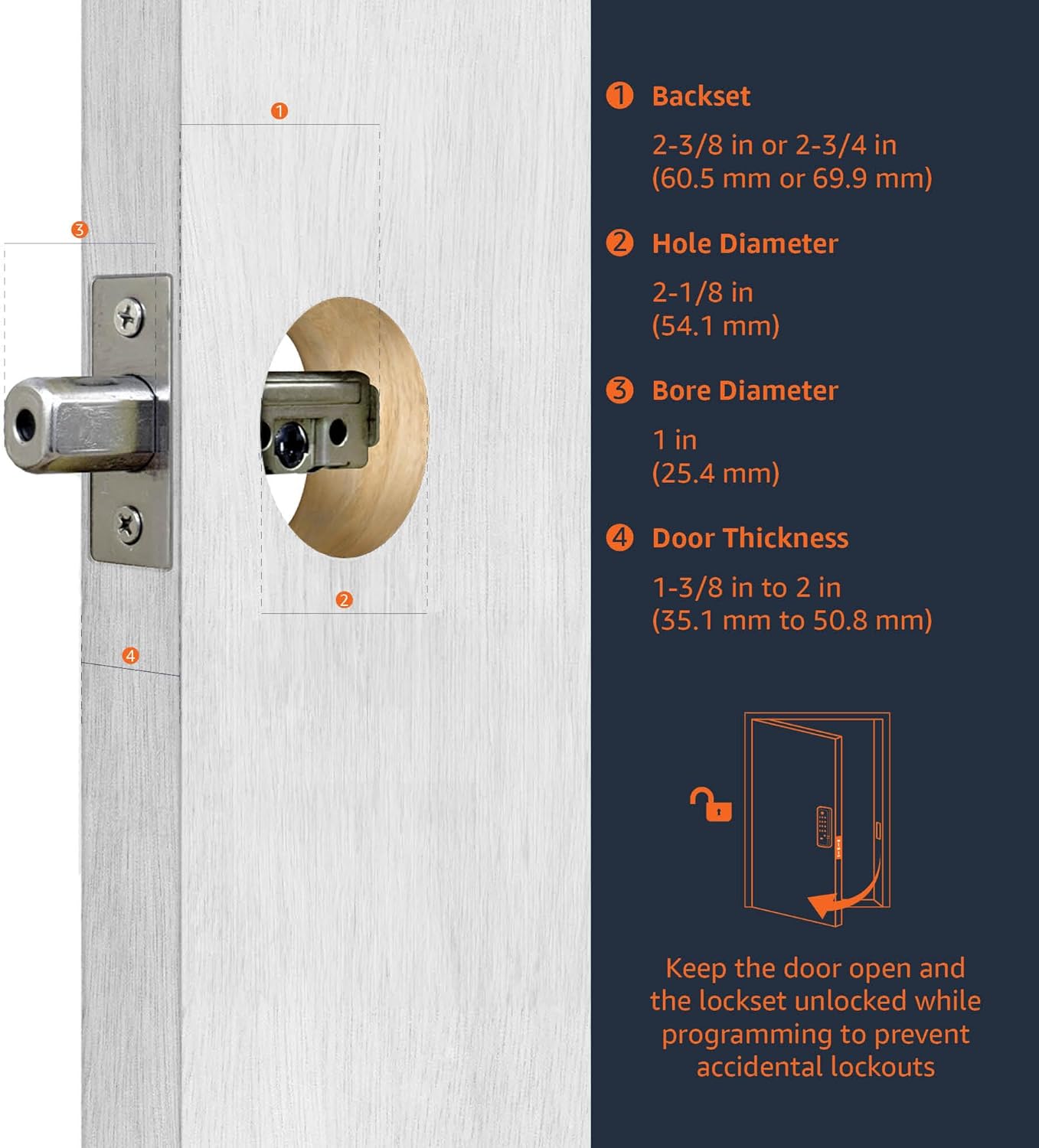
Image: Close-up diagram detailing the backset, hole diameter, bore diameter, and door thickness requirements for installing the deadbolt.
3.2 Latch Installation
Insert the deadbolt latch into the door edge. Ensure it is parallel to the door face. Secure it with the provided wood screws. (Refer to video 0:20-1:00)
3.3 Keypad Assembly Installation
Install the exterior keypad assembly, ensuring the tailpiece passes through the latch. (Refer to video 1:00-1:30)
3.4 Interior Assembly Installation
Attach the interior mounting plate, then connect the inner and outer harness connectors. Secure the interior assembly to the door with screws. (Refer to video 1:30-2:00)
3.5 බැටරි ස්ථාපනය
Insert 4 (AA) 1.5V alkaline batteries into the interior assembly. Alkaline batteries are recommended for stable power supply. Cover the battery lid. (Refer to video 2:00-2:15)
4. Setup & Programming
After installation, program your lock for optimal functionality. The default Programming Code (PC) is 0000.
4.1 Door Handing Identification Process
The lock needs to learn if it's installed on a right-handed or left-handed door. This is crucial for correct operation. (Refer to video 2:15-2:45)
- Enter PC (0000) then press the Lock/Unlock button.
- Press '0' then press the Lock/Unlock button.
- The lock will perform a self-check to identify door handing.
4.2 Change Programming Code (PC)
Change the default PC for security. Programming Codes should be 4-10 digits in length. (Refer to video 2:45-3:15)
- Enter current PC then press the Lock/Unlock button.
- Press '4' then press the Lock/Unlock button.
- Enter new PC then press the Lock/Unlock button.
4.3 Create New User Code (UC)
Up to 6 sets of user codes can be saved. User codes should be 4-10 digits in length. (Refer to video 3:15-3:45)
- Enter PC then press the Lock/Unlock button.
- Press '1' then press the Lock/Unlock button.
- Enter new UC then press the Lock/Unlock button.
4.4 Delete an Existing User Code (UC)
(Refer to video 3:45-4:00)
- Enter PC then press the Lock/Unlock button.
- Press '2' then press the Lock/Unlock button.
- Enter the UC you want to delete then press the Lock/Unlock button.
4.5 Delete All User Codes (UC) at once
Auto-locking and Keypad locking functions will be invalid when User Codes are deleted. The lock can only be operated by key during that time. (Refer to video 4:00-4:15)
- Enter PC then press the Lock/Unlock button.
- Press '3' then press the Lock/Unlock button.
4.6 Toggle Auto-Lock On/Off
The preset delay-time is 30 seconds. (Refer to video 4:15-4:30)
- Enter PC then press the Lock/Unlock button.
- Press '5' then press the Lock/Unlock button.
4.7 Set Auto-Lock Time Delay
10-99 seconds delay-time available. (Refer to video 4:30-4:45)
- Enter PC then press the Lock/Unlock button.
- Press '6' then press the Lock/Unlock button.
- Enter seconds (10-99) then press the Lock/Unlock button.
4.8 Enable / Disable All User Codes
Auto-locking and keypad locking functions will be invalid when user codes are disabled. The lock can only be operated by key during the time. (Refer to video 4:45-5:00)
- Enter PC then press the Lock/Unlock button.
- Press '8' then press the Lock/Unlock button.
4.9 Create a One-Time User Code
User Codes should be 4-10 digits in length. The one-time user code will automatically cancel after it is used one time. (Refer to video 5:00-5:15)
- Enter PC then press the Lock/Unlock button.
- Press '9' then press the Lock/Unlock button.
- Enter One Time Code then press the Lock/Unlock button.
4.10 පෙරනිමි සැකසුම් ප්රතිසාධනය කරන්න
The programming is reset back to the original factory codes once you hear 3 long beeps. New installation or restoring default setting: you must run the door handing identification process first. (Refer to video 5:15-5:30)
- Press the 'R' button for more than 5 seconds.
5. මෙහෙයුම් උපදෙස්
Once installed and programmed, operating your deadbolt is straightforward:
- අගුළු ඇරීමට: Enter your programmed User Code (UC) on the keypad, then press the Lock/Unlock button. The deadbolt will retract.
- අගූලු දැමිමට: Press and hold any button on the keypad for a few seconds, or press the Lock/Unlock button. The deadbolt will extend. If auto-lock is enabled, the deadbolt will automatically extend after the set delay time.
- යතුරු සහිත ඇතුළත් කිරීම: Use the traditional key provided as an alternative entry method.
6. නඩත්තු කිරීම
Regular maintenance ensures the longevity and optimal performance of your deadbolt:
- බැටරි ආදේශනය: Replace all four AA alkaline batteries when the low battery indicator appears or when the lock's operation becomes sluggish. To access the battery compartment, slide off the cover on the interior assembly.
- පිරිසිදු කිරීම: යතුරු පුවරුව සහ බාහිර පෘෂ්ඨයන් මෘදු, d පිරිසිදු කරන්න.amp රෙදි. නිමාව හෝ ඉලෙක්ට්රොනික සංරචක වලට හානි කළ හැකි උල්ෙල්ඛ පිරිසිදු කරන්නන් හෝ ද්රාවක වලින් වළකින්න.
- ලිහිසි තෙල්: Periodically lubricate the deadbolt latch mechanism with a silicone-based lubricant to ensure smooth operation.
7. දෝශ නිරාකරණය
If you encounter issues with your deadbolt, consider the following common solutions:
- අගුල ප්රතිචාර නොදක්වයි: Check the batteries. Ensure they are correctly inserted and have sufficient charge. Replace with new alkaline batteries if necessary.
- වැරදි කේත ඇතුළත් කිරීම: If the lock flashes red or beeps incorrectly, re-enter your user code carefully. Ensure the correct programming code is used for programming functions.
- Deadbolt Not Extending/Retracting: Verify that the door is properly aligned and not binding. Ensure the door handing identification process was completed correctly after installation or factory reset.
- Forgotten Codes: If you forget your user codes, you can delete all user codes (Step 4.5) or perform a factory reset (Step 4.10) and reprogram.
8. පිරිවිතර
| විශේෂාංගය | විස්තර |
|---|---|
| වෙළඳ නාමය | Amazon Basics |
| මාදිලියේ නම | PL14910 |
| විශේෂ ලක්ෂණය | යතුරු රහිත |
| අගුළු වර්ගය | යතුරු පුවරුව |
| අයිතම මානයන් (L x W x H) | අඟල් 9.05 x 6.13 x 2.99 |
| ශෛලිය | සාම්ප්රදායික |
| වර්ණය | මැට් කළු |
| කෑලි ගණන | 1 |
| අවසන් වර්ගය | සැටින් |
| ඇතුළත් සංරචක | Screw pack, latch, strike and keys |
| පාලක වර්ගය | අත් පාලනය |
| අයිතමයේ බර | රාත්තල් 2.07 (කිලෝග්රෑම් 0.94) |
| පාලන ක්රමය | ස්පර්ශ කරන්න |
| UPC | 193598101164 |
| බැටරි අවශ්යද? | Yes (4x AA, not included) |
9. වගකීම් සහ සහාය
For warranty information and customer support, please refer to the documentation included with your product or visit the official Amazon Basics support page. Keep your purchase receipt for warranty claims.


