හැඳින්වීම
The TP-Link TL-PoE4824G is a passive Power over Ethernet (PoE) adapter designed to supply power and transmit data simultaneously to compatible passive PoE devices. This includes devices such as TP-Link's EAP245 3.0, EAP225 3.0, and CPE610. Its design incorporates convenient wall-mounting brackets for easy installation.
ප්රධාන ලක්ෂණ:
- 48V passive PoE support for compatible devices.
- Automatic determination of necessary power requirements.
- Convenient wall-mounting design for flexible placement.
- Gigabit speed support for high-speed data transmission.
- Plug-and-Play functionality, requiring no complex configuration.
- Ethernet connectivity technology.
පැකේජයේ අන්තර්ගතය
ඔබේ පැකේජයේ පහත අයිතම අඩංගු බව තහවුරු කරන්න:
- 48V 24W නිෂ්ක්රීය PoE ඇඩැප්ටරය (TL-PoE4824G)
- විදුලි රැහැන්
- බිත්ති සවිකිරීම් කට්ටල
නිෂ්පාදනය අවසන්view
The TL-PoE4824G PoE Injector features a compact design with essential ports and indicators for easy operation.

රූපය 1: ඉහළ-පහළ view of the TP-Link TL-PoE4824G Passive PoE Injector.
වරාය සහ දර්ශක:
- PoE වරාය: Connects to the passive PoE device to deliver both power and data.
- LAN වරාය: Connects to your network device (e.g., router, switch) for data input.
- බල ආදානය: Connects to the provided power cord for electrical supply.
- LED දර්ශකය: Provides status information (e.g., power, connection activity).
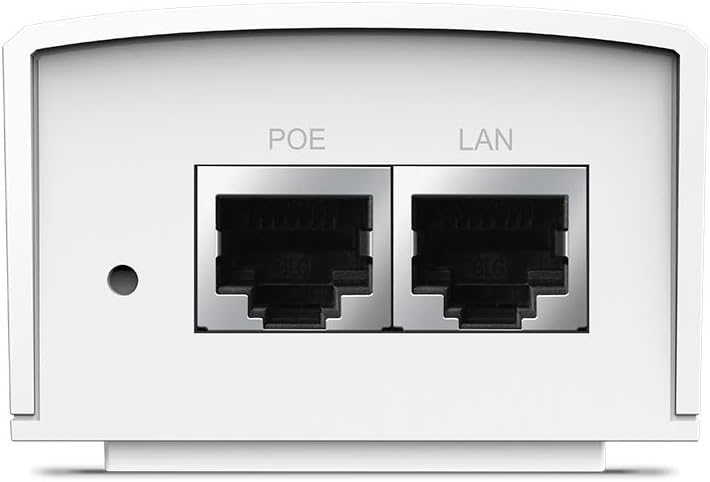
රූපය 2: සමීප රූපය view of the PoE and LAN data ports.

රූපය 3: සමීප රූපය view of the power input port.

රූපය 4: පැත්ත view showing the LED indicator for device status.
සැලසුම
The TL-PoE4824G is designed for simple plug-and-play installation. Follow these steps to set up your PoE injector:
- බලයට සම්බන්ධ කරන්න: Plug the provided power cord into the power input port of the TL-PoE4824G and then into a standard electrical outlet.
- ජාලයට සම්බන්ධ වන්න: ඔබගේ ජාල උපාංගයෙන් (උදා: රවුටරය, ස්විචය) ඊතර්නෙට් කේබලයක් සම්බන්ධ කරන්න LAN port on the TL-PoE4824G.
- PoE උපාංගයට සම්බන්ධ වන්න: තවත් ඊතර්නෙට් කේබලයක් සම්බන්ධ කරන්න පෝඊ port on the TL-PoE4824G to your passive PoE-compatible device (e.g., access point, IP camera).
- සම්බන්ධතාවය තහවුරු කරන්න: Check the LED indicator on the TL-PoE4824G. A solid light typically indicates a successful power and data connection.

Figure 5: Connection diagram for the TL-PoE4824G, illustrating data and power flow to a passive PoE device.
බිත්ති සවි කිරීම:
The TL-PoE4824G includes wall-mounting kits for secure installation. Refer to the diagram below for the mounting process:

Figure 6: Wall-mounting steps for the TL-PoE4824G using the provided brackets.
ක්රියාත්මක වෙනවා
Once properly connected, the TL-PoE4824G operates automatically. It provides 48V DC passive PoE to the connected device, eliminating the need for a separate power adapter for the PoE device. Data transmission occurs at Gigabit speeds through the Ethernet connection.
The injector is designed to auto-determine the necessary power requirements for the connected passive PoE device, ensuring efficient and safe operation.
නඩත්තු කිරීම
- පිරිසිදු කිරීම: උපාංගය පිරිසිදු කිරීම සඳහා මෘදු වියළි රෙද්දක් භාවිතා කරන්න. දියර හෝ එයරෙසෝල් පිරිසිදු කරන්නන් භාවිතා නොකරන්න.
- ස්ථානගත කිරීම: උපාංගය සෘජු හිරු එළිය, තාප ප්රභවයන් සහ තෙතමනයෙන් ඈත්ව හොඳින් වාතාශ්රය ඇති ප්රදේශයක තබා ඇති බවට සහතික වන්න.
- කේබල් කළමනාකරණය: Keep all cables neatly organized to prevent damage and ensure proper airflow.
- ස්ථිරාංග යාවත්කාලීන කිරීම්: වරින් වර TP-Link නිලධාරියා පරීක්ෂා කරන්න webප්රශස්ත කාර්ය සාධනය සහ ආරක්ෂාව සහතික කිරීම සඳහා පවතින ඕනෑම ස්ථිරාංග යාවත්කාලීන කිරීම් සඳහා අඩවිය.
දෝෂගවේෂණය
බලය නැත/LED දර්ශකය අක්රියයි:
- Ensure the power cord is securely connected to both the injector and a working electrical outlet.
- විදුලිය සපයන බව තහවුරු කර ගැනීම සඳහා වෙනත් උපාංගයකින් විදුලි අලෙවිසැල පරීක්ෂා කරන්න.
දත්ත සම්බන්ධතාවයක් නැත:
- Verify that the Ethernet cables are securely connected to the LAN port (from your network) and the PoE port (to your device).
- Ensure the connected passive PoE device is functioning correctly and is compatible with 48V passive PoE.
- Check the status of your network device (router/switch) to ensure it is providing an active network connection.
- Try using different Ethernet cables to rule out cable defects.
උපාංගයට බලය නොලැබේ:
- Confirm that your end device is a passive PoE device and supports 48V DC input. This injector is not compatible with 802.3af/at active PoE standards.
- Ensure the cable length does not exceed 100 meters (325 feet) for optimal power and data delivery.
පිරිවිතර
| ආකෘතිය | TL-PoE4824G හඳුන්වා දීම |
| වෙළඳ නාමය | TP-Link |
| PoE ප්රමිතිය | 48V DC Passive PoE |
| දත්ත හුවමාරු අනුපාතය | 1000 Mbps (Gigabit Ethernet) |
| සම්බන්ධතා තාක්ෂණය | ඊතර්නෙට් |
| වරායන් | 1x LAN (Data In), 1x PoE (Data & Power Out) |
| උපරිම කේබල් දිග | මීටර් 100 (අඩි 325) දක්වා |
| මානයන් (LxWxH) | අඟල් 4.33 x 2.24 x 1.41 |
| බර | අවුන්ස 5.6 කි |
වගකීම් සහ සහාය
වගකීම් තොරතුරු, තාක්ෂණික සහාය සහ නිෂ්පාදන ලියාපදිංචිය සඳහා, කරුණාකර නිල TP-Link වෙත පිවිසෙන්න. webවෙබ් අඩවියට හෝ ඔවුන්ගේ පාරිභෝගික සේවය අමතන්න. වගකීම් හිමිකම් සඳහා ඔබේ මිලදී ගැනීමේ රිසිට්පත තබා ගන්න.
- TP-Link සහාය Webඅඩවිය: www.tp-link.com/us/support/
- අමතන්න: TP-Link වෙත යොමු වන්න webකලාපීය සම්බන්ධතා තොරතුරු සඳහා අඩවිය.


