1. හැඳින්වීම
Thank you for choosing the Cecotec Ready Warm 6670 Cristal Electric Radiator. This modern and elegant crystal convector is designed to provide efficient and rapid heating for your living spaces. Featuring an adjustable thermostat, timer function, and Wi-Fi connectivity, it offers convenient control and optimized energy consumption. This manual provides essential information for safe operation, installation, maintenance, and troubleshooting.
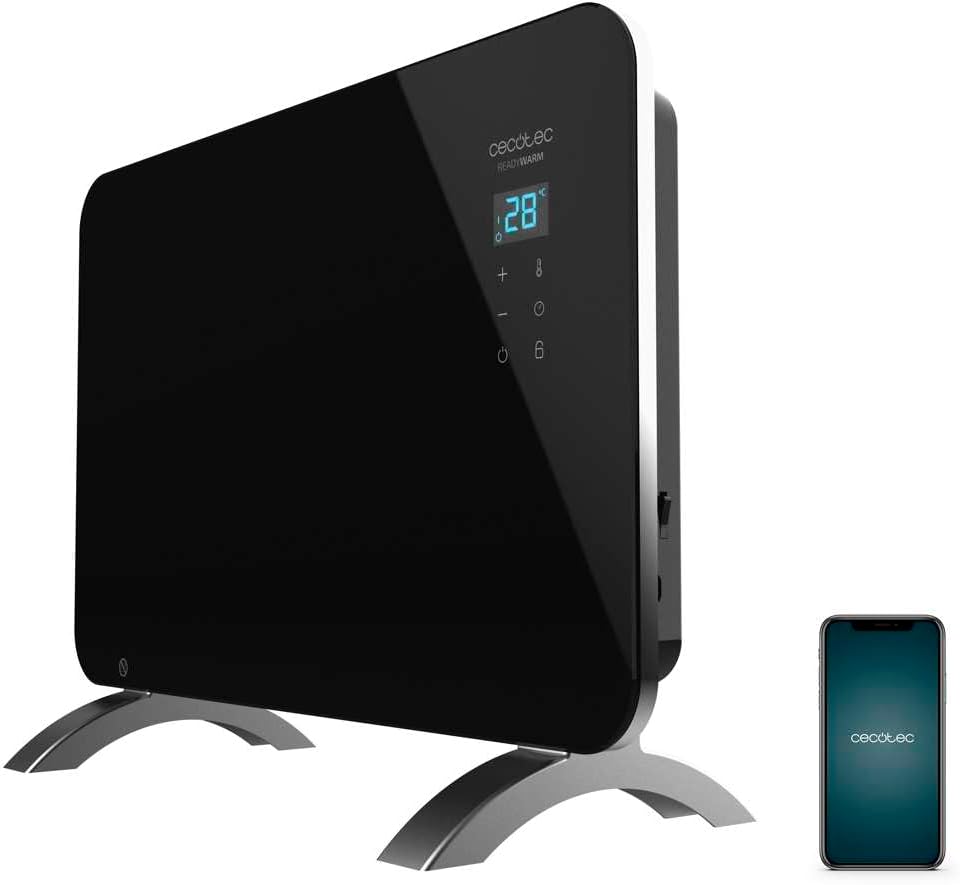
Figure 1: The Cecotec Ready Warm 6670 Cristal Electric Radiator, showcasing its sleek black design and digital display, alongside a smartphone indicating its Wi-Fi control capability.
2. වැදගත් ආරක්ෂක උපදෙස්
උපකරණය භාවිතා කිරීමට පෙර කරුණාකර සියලු උපදෙස් හොඳින් කියවා අනාගත යොමුව සඳහා ඒවා තබා ගන්න. මෙම උපදෙස් අනුගමනය කිරීමට අපොහොසත් වීමෙන් විදුලි කම්පනය, ගින්න හෝ බරපතල තුවාල සිදුවිය හැක.
- පරිමාව සහතික කරන්නtagශ්රේණිගත කිරීමේ ලේබලයේ දක්වා ඇති e ඔබේ ප්රධාන වෙළුමට ගැලපේtage උපකරණය සම්බන්ධ කිරීමට පෙර.
- මෙම උපකරණය ජලය අසල හෝ ජලයෙන් යට භාවිතා නොකරන්න.amp environments, such as bathrooms, due to its IP24 splash protection rating.
- Always place the radiator on a stable, flat surface. Ensure adequate clearance from walls and furniture for proper ventilation.
- රේඩියේටරය ආවරණය නොකරන්න, මෙය අධික උනුසුම් වීමට සහ ගිනි උවදුරුවලට හේතු විය හැක.
- Keep children and pets away from the appliance during operation, as surfaces can become very hot.
- Unplug the appliance from the power outlet when not in use, before cleaning, or before moving it.
- Do not operate the appliance with a damaged cord or plug, or if it has malfunctioned or been dropped.
- Repairs should only be performed by qualified personnel. Improper repairs can be dangerous.
- මෙම උපකරණය ගෘහස්ථ භාවිතය සඳහා පමණක් නිර්මාණය කර ඇත.
3. නිෂ්පාදන සංරචක
Familiarize yourself with the main parts of your Cecotec Ready Warm 6670 Cristal Electric Radiator:
- Main Heating Unit (Glass Panel)
- ඩිජිටල් සංදර්ශක පැනලය
- Control Buttons (+, -, Power, Mode, Timer)
- විදුලි රැහැන් සහ ප්ලග්
- Detachable Pedestal Feet (for freestanding use)
- Wall Mounting Brackets (optional, not included in this model description but common for panel heaters)

රූපය 2: සවිස්තරාත්මක view of the radiator's digital display and control buttons, showing temperature, mode, and timer indicators.
4. පිහිටුවීම සහ ස්ථාපනය
Your radiator can be used as a freestanding unit with the included pedestal feet.
4.1. Attaching the Pedestal Feet
- Carefully unpack the radiator and all components.
- Place the radiator on a soft, flat surface to prevent scratching the glass panel.
- Align the pedestal feet with the mounting holes at the bottom of the radiator.
- Secure the feet using the provided screws. Ensure they are firmly attached.
- Once the feet are attached, carefully place the radiator upright in your desired location. Ensure it is on a stable, level surface and away from flammable materials.

Figure 3: The radiator positioned in a room, demonstrating its freestanding setup with the pedestal feet.
5. මෙහෙයුම් උපදෙස්
5.1. මූලික මෙහෙයුම
- රේඩියේටරය සුදුසු බල සැපයුමකට සම්බන්ධ කරන්න.
- ඔබන්න බලය බොත්තම (සංකේතය: සිරස් රේඛාවක් සහිත කවය) on the control panel to turn the unit on. The digital display will illuminate.
- භාවිතා කරන්න + සහ - buttons to adjust the desired temperature. The display will show the set temperature.
- ඔබන්න මාදිලිය බොත්තම (සංකේතය: උෂ්ණත්වමානය) to cycle through heating modes (e.g., Eco, Max).
- To turn off the radiator, press the බලය නැවතත් බොත්තම.
5.2. Wi-Fi Connectivity and App Control
The Cecotec Ready Warm 6670 Cristal can be controlled via your smartphone using the Tuya Smart APP.
- Download the "Tuya Smart" app from your smartphone's app store (available for iOS and Android).
- ඔබගේ Tuya Smart ගිණුමට ලියාපදිංචි වන්න හෝ ලොග් වන්න.
- ඔබගේ ස්මාර්ට් ජංගම දුරකථනය 2.4 GHz Wi-Fi ජාලයකට සම්බන්ධ කර ඇති බවට සහතික වන්න.
- On the radiator, press and hold the Wifi button (if available, or a combination of buttons as per app instructions) to enter pairing mode. The Wi-Fi indicator on the display will blink.
- In the Tuya Smart app, tap "+" to add a device. Select "Heater" or "Radiator" from the device list.
- Follow the on-screen instructions in the app to connect the radiator to your Wi-Fi network. This typically involves confirming the Wi-Fi indicator is blinking and entering your Wi-Fi password.
- Once connected, you can control the radiator's power, temperature, mode, and timer settings directly from the app.

Figure 4: A user interacting with a smartphone, illustrating the convenience of controlling the radiator remotely via the Tuya Smart application.
5.3. ටයිමර් කාර්යය
The timer allows you to set a specific duration for the radiator to operate.
- ඔබන්න ටයිමර් බොත්තම (සංකේතය: ඔරලෝසුව) on the control panel or in the app.
- භාවිතා කරන්න + සහ - buttons to set the desired operating time in hours.
- The radiator will automatically turn off after the set time has elapsed.
6. නඩත්තු කිරීම සහ පිරිසිදු කිරීම
Regular cleaning ensures optimal performance and extends the lifespan of your radiator.
- සෑම විටම රේඩියේටරය විදුලිබල අලෙවිසැලෙන් විසන්ධි කර පිරිසිදු කිරීමට පෙර එය සම්පූර්ණයෙන්ම සිසිල් වීමට ඉඩ දෙන්න.
- මෘදු, d සමග බාහිර පෘෂ්ඨයන් පිස දමන්නamp රෙදි. උල්ෙල්ඛ පිරිසිදු කරන්නන්, ද්රාවක හෝ රළු රසායනික ද්රව්ය භාවිතා නොකරන්න, මන්ද මේවා නිමාවට හානි කළ හැකිය.
- රේඩියේටරය ජලයේ හෝ වෙනත් ද්රවයක ගිල්වන්න එපා.
- පාලක පැනලයට හෝ විදුලි උපාංගවලට ජලය ඇතුළු නොවන බවට වග බලා ගන්න.
- For storage, clean the unit and store it in a cool, dry place, preferably in its original packaging.
7. දෝශ නිරාකරණය
ඔබේ රේඩියේටරය සමඟ ගැටළු ඇති වුවහොත්, පහත සඳහන් පොදු ගැටළු සහ විසඳුම් වෙත යොමු වන්න:
| ගැටලුව | විය හැකි හේතුව | විසඳුම |
|---|---|---|
| රේඩියේටරය ක්රියාත්මක නොවේ. | Not plugged in; power outlet faulty; power button not pressed; overheat protection activated. | Check power connection; try a different outlet; press power button; unplug and let cool for 30 minutes before restarting. |
| තාප ප්රතිදානය නැත. | Temperature setting too low; mode not set correctly. | Increase desired temperature; ensure correct heating mode (e.g., Max) is selected. |
| Wi-Fi සම්බන්ධතාවය අසාර්ථකයි. | Incorrect Wi-Fi password; router too far; 5 GHz network used; pairing mode not active. | Verify password; move radiator closer to router; ensure 2.4 GHz network is used; re-enter pairing mode on radiator. |
| අනපේක්ෂිත ලෙස රේඩියේටරය නිවා දමයි. | Timer function active; overheat protection activated. | Check timer settings; ensure radiator is not covered and has adequate ventilation. |
8. තාක්ෂණික පිරිවිතර
| විශේෂාංගය | විස්තර |
|---|---|
| වෙළඳ නාමය | Cecotec |
| ආදර්ශ අංකය | ලොකු-V1704474 (05350) |
| වර්ණය | කළු |
| බලය | 1000 ඩබ්ලිව් |
| වෙළුමtage | වෝල්ට් 220 |
| ද්රව්ය | Aluminum (Heating element), Glass (Panel) |
| උනුසුම් ක්රමය | සංවහනය |
| විශේෂ ලක්ෂණය | Adjustable Thermostat, Wi-Fi Connectivity, Timer, Overheat Protection, IP24 Splash Protection |
| මානයන් (L x W x H) | 47 x 13 x 64 cm (Product); 60 x 24 x 46 cm (Product, alternative) |
| අයිතමයේ බර | කිලෝ ග්රෑම් 5.1 යි |
| ශබ්ද මට්ටම | 44 dB |
| නිර්දේශිත භාවිතය | Indoor (Home) |
9. වගකීම් සහ සහාය
Cecotec products are manufactured to high-quality standards. This product comes with a standard manufacturer's warranty covering defects in materials and workmanship from the date of purchase. Please refer to the warranty card included with your product for specific terms and conditions.
For technical support, troubleshooting assistance, or warranty claims, please contact Cecotec customer service through their official website or the contact information provided in your product packaging. When contacting support, please have your model number (big-V1704474) and purchase date ready.
අමතර කොටස් ලබා ගැනීමේ හැකියාව: අවුරුදු 10 යි.


