Jabra Evolve 20 MS Stereo Headset Instruction Manual
Model: Evolve 20 (GSA4999-823-109)
1. හැඳින්වීම
The Jabra Evolve 20 MS Stereo Headset is a professional wired headset designed for clear communication and music listening. It features a noise-canceling microphone to reduce background distractions and an intuitive control unit for easy call management. This manual provides essential information for setting up, operating, and maintaining your headset.
2. පැකේජ අන්තර්ගතය
කරුණාකර පහත අයිතම සඳහා පැකේජය පරීක්ෂා කරන්න:
- Jabra Evolve 20 MS Stereo Headset with integrated control unit
3. නිෂ්පාදන අවසන්view
3.1 හෙඩ්සෙට් සංරචක
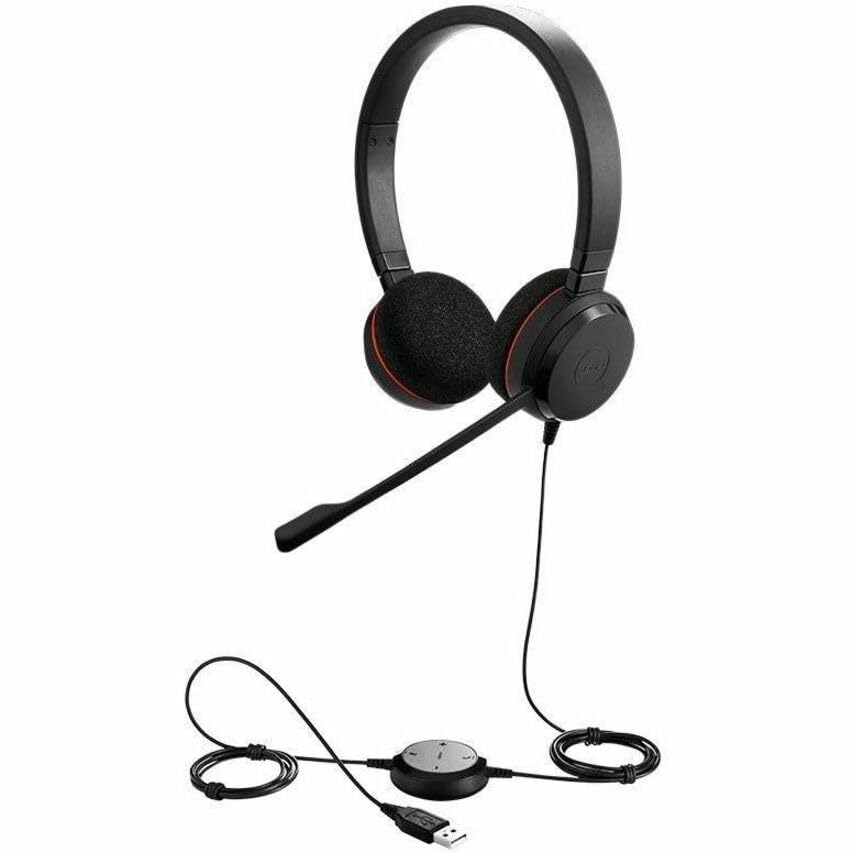
The Jabra Evolve 20 MS Stereo Headset features an adjustable headband, foam ear cushions for comfort, and a flexible microphone boom arm that can be positioned for optimal voice pickup.
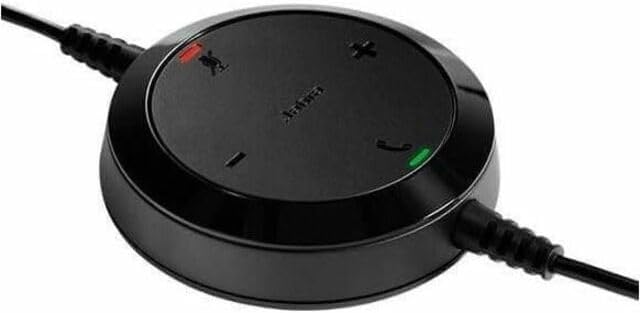
The inline control unit provides easy access to essential call management functions, including volume adjustment, microphone mute, and answer/end call buttons.
4. පිහිටුවීම
4.1 ඔබේ පරිගණකයට සම්බන්ධ වීම
- Locate an available USB port on your computer (desktop or laptop).
- Plug the USB connector of the Jabra Evolve 20 headset into the USB port.
- ඔබේ පරිගණකය අවශ්ය ධාවක ස්වයංක්රීයව හඳුනාගෙන ස්ථාපනය කළ යුතුය. මෙයට මිනිත්තු කිහිපයක් ගත විය හැකිය.
- Once installed, the headset will be ready for use. You may need to select the Jabra Evolve 20 as your default audio device (microphone and speaker) in your operating system's sound settings or your communication software (e.g., Microsoft Teams, Skype for Business).
5. මෙහෙයුම් උපදෙස්
5.1 හෙඩ්සෙට් එක පැළඳීම
- ඔබේ හිසට සුවපහසු සහ ආරක්ෂිත ගැළපීමක් සහතික කිරීම සඳහා හිස් පටිය සකසන්න.
- Position the microphone boom arm so that the microphone is approximately 2-3 cm (1 inch) from your mouth.
5.2 Using the Control Unit
- පරිමාව වැඩි කරන්න (+): සවන්දීමේ ශබ්දය වැඩි කිරීමට ඔබන්න.
- ශබ්දය අඩු කිරීම (-): සවන් දෙන ශබ්දය අඩු කිරීමට ඔබන්න.
- මයික්රෆෝනය නිශ්ශබ්ද කරන්න: Press the microphone icon button to mute or unmute your microphone during a call. An indicator light on the control unit may show the mute status.
- පිළිතුර/අවසන් ඇමතුම: Press the phone icon button to answer an incoming call or end an active call.
6. නඩත්තු කිරීම
නිසි නඩත්තුව ඔබේ හෙඩ්සෙට් එකේ ආයු කාලය සහ ක්රියාකාරිත්වය සහතික කරයි.
- පිරිසිදු කිරීම: Gently wipe the headset and control unit with a soft, dry cloth. For ear cushions, use a slightly damp cloth if necessary, but avoid excessive moisture. Do not use harsh chemicals or abrasive cleaners.
- ගබඩා: භාවිතයේ නොමැති විට, හෙඩ්සෙට් එක අධික උෂ්ණත්වයන්ගෙන් සහ සෘජු හිරු එළියෙන් ඈත්ව පිරිසිදු, වියළි ස්ථානයක ගබඩා කරන්න. කේබලය පැටලීමෙන් වළකින්න.
- කේබල් රැකවරණය: Do not pull on the cable to disconnect the headset. Always grasp the USB connector.
7. දෝශ නිරාකරණය
If you encounter issues with your Jabra Evolve 20 headset, refer to the table below for common problems and solutions.
| ගැටලුව | විසඳුම |
|---|---|
| හෙඩ්සෙට් එකෙන් ශබ්දයක් නැහැ |
|
| මයික්රෆෝනය ක්රියා නොකරයි |
|
| ඇමතුම් පාලන බොත්තම් ප්රතිචාර නොදක්වයි |
|
8. පිරිවිතර
Key technical specifications for the Jabra Evolve 20 MS Stereo Headset:
| විශේෂාංගය | විස්තරය |
|---|---|
| මාදිලියේ නම | පරිණාමය 20 |
| සම්බන්ධතා තාක්ෂණය | වයර් (USB) |
| ශබ්ද පාලනය | Active Noise Cancellation, Passive Noise Cancellation |
| මයික්රෆෝනය | ශබ්දය-අවලංගු කිරීම |
| කන් ස්ථානගත කිරීම | කනට උඩින් |
| ආකෘති සාධකය | කණ මත |
| Material (Ear Cushions) | ෆෝම් |
| අයිතමයේ බර | අවුන්ස 4.6 (රාත්තල් 0.29) |
| නිෂ්පාදන මානයන් | අඟල් 8 x 7 x 1.5 |
| ගැළපෙන උපාංග | Desktops, Laptops, Softphones, Web Clients, Desk Phones |
| පාලක වර්ගය | Answer/End, Mute, Volume |
9. වගකීම් සහ සහාය
For detailed warranty information, please refer to the warranty card included with your product or visit the official Jabra webවෙබ් අඩවිය. වගකීම් නියමයන් සහ කොන්දේසි කලාපය සහ සිල්ලර වෙළෙන්දා අනුව වෙනස් විය හැකිය.
For technical support, product registration, or to access additional resources, please visit the official Jabra support webවෙබ් අඩවියට හෝ ඔවුන්ගේ පාරිභෝගික සේවයට සෘජුවම සම්බන්ධ වන්න. වගකීම් හිමිකම් සඳහා ඔබේ මිලදී ගැනීමේ සාක්ෂි තබා ගන්න.