1. හැඳින්වීම
Thank you for choosing the MIATONE BOOMBOX Bluetooth Speaker. This portable and waterproof wireless speaker is designed to deliver high-quality audio for various environments, from indoor relaxation to outdoor adventures. Please read this manual carefully before using the product to ensure proper operation and to maximize its lifespan.

අධි-විභේදන ශ්රව්ය: Experience crisp highs, rich mids, and deep bass with advanced DSP-enhanced sound technology.
2 ආරක්ෂිත තොරතුරු
- Do not expose the speaker to extreme temperatures (heat or cold) or high humidity.
- කථිකයා ප්රබල බලපෑම්වලට වැටීමෙන් හෝ යටත් කිරීමෙන් වළකින්න.
- Do not disassemble, repair, or modify the speaker yourself. Refer to qualified service personnel.
- එහි චුම්භක ක්ෂේත්රය ඒවායේ ක්රියාකාරිත්වයට බාධා කළ හැකි බැවින්, කථිකයා වෛද්ය උපකරණවලින් ඈත් කර තබන්න.
- Ensure the charging port cover is securely closed when using the speaker near water to maintain its waterproof rating.
- සපයා ඇති ආරෝපණ කේබලය හෝ සහතික කළ සමාන ආරෝපණ කේබලයක් පමණක් භාවිතා කරන්න.
- Do not listen at excessively high volumes for prolonged periods to prevent hearing damage.
3. පැකේජ අන්තර්ගතය
කරුණාකර පහත අයිතම සඳහා පැකේජය පරීක්ෂා කරන්න:
- MIATONE BOOMBOX Bluetooth Speaker
- Micro USB Charging Cable
- සහායක ආදාන කේබලය
- පරිශීලක මාර්ගෝපදේශය
4. නිෂ්පාදන අවසන්view
Familiarize yourself with the various parts and controls of your MIATONE BOOMBOX speaker.
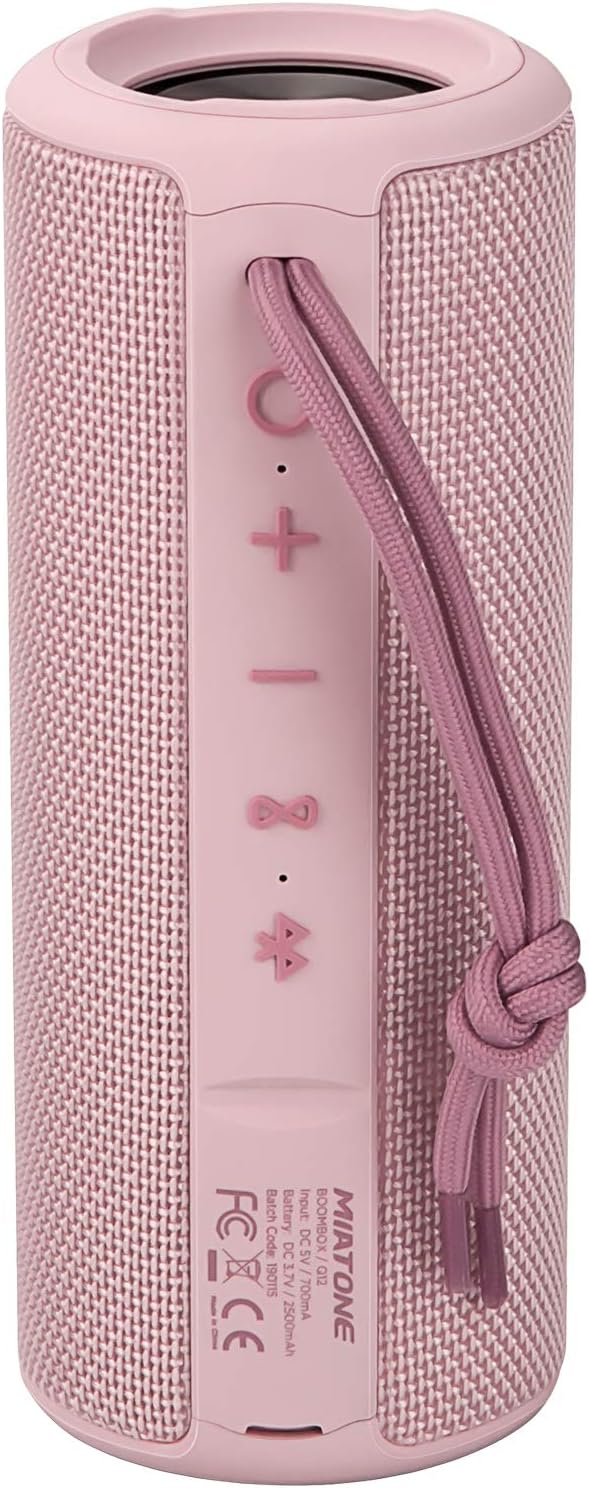
ඉදිරිපස View: Shows the speaker grille and the MIATONE logo.

පසුපස View: Displays the control buttons (+, -, Play/Pause, Bluetooth, TWS) and the charging/AUX ports under a protective flap.

Reinforced Silicone End Caps: The speaker features durable silicone bumpers on both ends to absorb impact and prevent slipping.
බොත්තම් කාර්යයන්:
| බොත්තම | කාර්යය |
|---|---|
| + | Short press: Volume Up; Long press: Next Track |
| - | Short press: Volume Down; Long press: Previous Track |
| වාදනය / විරාමය | Short press: Play/Pause; Short press (incoming call): Answer/End Call; Long press (incoming call): Reject Call |
| බ්ලූටූත් නිරූපකය | Long press: Disconnect current Bluetooth device and enter pairing mode |
| TWS Icon | Short press: Initiate TWS pairing (True Wireless Stereo) |
| බල බොත්තම | දිගු ඔබන්න: බලය සක්රිය / අක්රිය කරන්න |
5. පිහිටුවීම
5.1 කථිකයා ආරෝපණය කිරීම
- Open the protective flap on the back of the speaker to reveal the charging port.
- Connect the Micro USB charging cable to the speaker's charging port and the other end to a USB power adapter (not included) or a computer's USB port.
- LED දර්ශකය ආරෝපණ තත්ත්වය පෙන්වනු ඇත (උදා: ආරෝපණය කිරීම සඳහා රතු, සම්පූර්ණයෙන්ම ආරෝපණය වූ විට අක්රිය).
- A full charge takes approximately 12 hours. Ensure the protective flap is sealed after charging.
5.2 බල ගැන්වීම සක්රිය / අක්රිය කිරීම
- බල ගැන්වීම: Long press the Power button until you hear a power-on prompt.
- විදුලිය විසන්ධි කිරීම: Long press the Power button until you hear a power-off prompt.
5.3 බ්ලූටූත් යුගල කිරීම
- Ensure the speaker is powered on and in Bluetooth pairing mode (indicated by a flashing blue LED). If not, long press the Bluetooth icon button.
- ඔබගේ උපාංගයේ (ස්මාර්ට් ජංගම දුරකථනය, ටැබ්ලටය, පරිගණකය) බ්ලූටූත් සක්රීය කරන්න.
- ඒ සඳහා සොයන්න "BOOMBOX" in your device's Bluetooth list.
- Select "BOOMBOX" to connect. You will hear a confirmation sound once paired.
- පරාසය තුළ තිබේ නම්, ස්පීකරය ක්රියාත්මක වූ විට අවසන් යුගල කළ උපාංගයට ස්වයංක්රීයව නැවත සම්බන්ධ වේ.

වැඩිදියුණු කළ බ්ලූටූත් 5.3: Provides faster and more stable wireless connections.
5.4 TWS (සත්ය රැහැන් රහිත ස්ටීරියෝ) යුගලනය
TWS allows you to pair two MIATONE BOOMBOX speakers together for a true stereo sound experience.
- Ensure both BOOMBOX speakers are powered on and not connected to any Bluetooth device.
- On one speaker (this will be the primary speaker), short press the TWS icon button. It will enter TWS pairing mode.
- The two speakers will automatically connect to each other. You will hear a confirmation sound once TWS pairing is successful.
- Once TWS paired, connect your device to the primary speaker via Bluetooth as described in section 5.3.
- To disconnect TWS, short press the TWS icon button on either speaker.
6. මෙහෙයුම් උපදෙස්
6.1 සංගීත වාදනය
- වාදනය/විරාමය: Play/Pause බොත්තම කෙටි ඔබන්න.
- පරිමාව: කෙටි ඔබන්න + බොත්තම.
- ශබ්දය පහළට: කෙටි ඔබන්න - බොත්තම.
- ඊළඟ ධාවන පථය: දිගු ඔබන්න + බොත්තම.
- පෙර ධාවන පථය: දිගු ඔබන්න - බොත්තම.
6.2 හෑන්ඩ්ස්-ෆ්රී ඇමතුම්
- පිළිතුරු ඇමතුම: එන ඇමතුමක් නාද වන විට Play/Pause බොත්තම කෙටියෙන් ඔබන්න.
- ඇමතුම අවසන් කරන්න: ඇමතුමක් අතරතුර Play/Pause බොත්තම කෙටියෙන් ඔබන්න.
- ඇමතුම ප්රතික්ෂේප කරන්න: එන ඇමතුමක් නාද වන විට Play/Pause බොත්තම දිගු වේලාවක් ඔබන්න.
6.3 Auxiliary Input (AUX Mode)
You can connect non-Bluetooth devices to the speaker using the provided 3.5mm auxiliary cable.
- Open the protective flap on the back of the speaker.
- Connect one end of the 3.5mm AUX cable to the speaker's AUX port and the other end to your audio device's headphone jack.
- ස්පීකරය ස්වයංක්රීයව AUX මාදිලියට මාරු වේ.
- ඔබගේ සම්බන්ධිත උපාංගයෙන් නැවත ධාවනය සහ ශබ්දය පාලනය කරන්න.
- Ensure the protective flap is sealed after use to maintain water resistance.
7. නඩත්තු කිරීම
7.1 පිරිසිදු කිරීම
- ශබ්ද විකාශන යන්ත්රය මෘදු ලෙස පිස දමන්න, ඩීamp රෙදි.
- උල්ෙල්ඛ පිරිසිදු කරන්නන්, මධ්යසාර හෝ රසායනික ද්රාවක භාවිතා නොකරන්න.
- Ensure the speaker is completely dry before charging or storing.
7.2 ගබඩා කිරීම
- සෘජු හිරු එළියෙන් සහ අධික උෂ්ණත්වයන්ගෙන් ඈත්ව සිසිල් වියළි ස්ථානයක ස්පීකරය ගබඩා කරන්න.
- If storing for a long period, charge the battery to about 50% every few months to preserve battery life.
7.3 ජල ආරක්ෂිත සත්කාර (IPX6)
The MIATONE BOOMBOX is IPX6 waterproof, meaning it can withstand powerful water jets. It is not designed for submersion.
- Always ensure the charging port and AUX port protective flap is securely closed before exposing the speaker to water.
- If the speaker gets wet, wipe it dry with a clean cloth before opening the port flap or charging.
- Do not charge the speaker if the ports are wet.

IPX6 Waterproof Speaker: Designed to float and withstand water splashes, making it ideal for poolside or beach use.
8. දෝශ නිරාකරණය
| ගැටලුව | විය හැකි හේතුව | විසඳුම |
|---|---|---|
| ස්පීකරය ක්රියාත්මක නොවේ. | බැටරිය අඩුයි හෝ මැරිලා. | ස්පීකරය සම්පූර්ණයෙන්ම ආරෝපණය කරන්න. |
| බ්ලූටූත් උපාංගය සමඟ යුගල කළ නොහැක. | Speaker is not in pairing mode; device's Bluetooth is off; speaker is already connected to another device; device list needs refresh. | Ensure speaker is in pairing mode (flashing blue LED). Turn device's Bluetooth off and on. Disconnect from other devices. Forget "BOOMBOX" on your device and re-scan. |
| ශබ්දයක් නැත හෝ අඩු පරිමාවක් නැත. | Volume too low on speaker or device; incorrect input mode; speaker not connected. | Increase volume on both speaker and device. Ensure correct input mode (Bluetooth/AUX). Re-establish Bluetooth connection. |
| ශබ්ද විකෘතිය. | ශබ්දය ඉතා වැඩියි; බැටරිය අඩුයි; බාධාව. | Reduce volume. Charge the speaker. Move speaker closer to the device or away from other electronic devices. |
| TWS යුගලනය අසාර්ථක විය. | Speakers are too far apart; one speaker is already connected to a device. | TWS යුගලනය ආරම්භ කිරීමට පෙර ස්පීකර් දෙකම එකිනෙකට සමීප බවත් කිසිදු බ්ලූටූත් උපාංගයකට සම්බන්ධ වී නොමැති බවත් සහතික කර ගන්න. |
9. පිරිවිතර
| විශේෂාංගය | විස්තර |
|---|---|
| මාදිලියේ නම | BOOMBOX (Q12) |
| සම්බන්ධතා තාක්ෂණය | බ්ලූටූත් 5.3, USB, AUX |
| ස්පීකර් වර්ගය | Portable Speaker, Bluetooth Speaker |
| උපරිම නිමැවුම් බලය | වොට් 20 |
| සංඛ්යාත ප්රතිචාරය | 20 KHz |
| බැටරි ආයු කාලය | පැය 17 දක්වා (50% පරිමාවකින්) |
| ආරෝපණ කාලය | පැය 12 යි |
| ජල ආරක්ෂිත ශ්රේණිගත කිරීම | IPX6 |
| බ්ලූටූත් පරාසය | අඩි 100 (මීටර් 30.5) දක්වා |
| මානයන් (L x W x H) | 7.11 x 7.11 x 18.54 cm (2.8 x 2.8 x 7.3 අඟල්) |
| බර | ග්රෑම් 421.84 (රාත්තල් 0.93) |
| ද්රව්ය | ඇලුමිනියම් |
| ගැළපෙන උපාංග | පුද්ගලික පරිගණකය, ලැප්ටොප්, ටැබ්ලටය, ස්මාර්ට්ෆෝන් |

දිගුකාලීන ක්රීඩා කාලය: Enjoy up to 17 hours of playback at 50% volume.
10. වගකීම් සහ සහාය
MIATONE products are designed and manufactured to the highest quality standards. For information regarding warranty coverage, technical support, or service inquiries, please refer to the contact information provided on the product packaging or visit the official MIATONE webඅඩවිය.
වගකීම් හිමිකම් සඳහා කරුණාකර ඔබගේ මිලදී ගැනීමේ සාක්ෂි තබා ගන්න.


