හැඳින්වීම
ස්තූතියි, උදව් කළාටasing the AmazonBasics Vertical Ergonomic 2.4G Wireless Optical Mouse. This manual provides essential information for setting up, operating, and maintaining your new mouse. Please read these instructions carefully before use and retain them for future reference.

Image: The AmazonBasics Vertical Ergonomic Wireless Optical Mouse positioned on a white desk alongside a laptop, demonstrating a typical usage scenario.
පැකේජයේ අන්තර්ගතය
කරුණාකර පහත අයිතම සඳහා පැකේජය පරීක්ෂා කරන්න:
- AmazonBasics Vertical Ergonomic 2.4G Wireless Optical Mouse
- USB ලබන්නා
සටහන: බැටරි ඇතුළත් නොවන අතර වෙන වෙනම මිලදී ගත යුතුය.
විශේෂාංග
- කාර්යක්ෂම සිරස් නිර්මාණය: Promotes a natural hand and wrist posture, reducing strain.
- 2.4G රැහැන් රහිත සම්බන්ධතාවය: Provides a reliable connection for use with PCs and laptops.
- දෘශ්ය ලුහුබැඳීම: Ensures precise and smooth cursor control.
- සකස් කළ හැකි DPI: Allows customization of cursor sensitivity for different tasks.
- බහු බොත්තම්: Includes left/right click, scroll wheel, DPI button, and forward/back buttons for enhanced productivity.
- බැටරි බලයෙන්: Operates on AAA batteries for portability.

රූපය: පැත්තක් view of the AmazonBasics Vertical Ergonomic Wireless Optical Mouse, highlighting its contoured shape, thumb rest, and the forward/back buttons along with the DPI button.
සැලසුම
1. බැටරි ස්ථාපනය කරන්න
- මූසිකයේ යටි පැත්තේ බැටරි මැදිරිය සොයා ගන්න.
- බැටරි මැදිරි කවරය මෘදු ලෙස ලිස්සා විවෘත කරන්න.
- නිවැරදි ධ්රැවීයතාව (+/-) සහතික කරමින් AAA බැටරි දෙකක් ඇතුළු කරන්න.
- බැටරි මැදිරි කවරය ආරක්ෂිතව ස්ථානයට ක්ලික් කරන තුරු එය ප්රතිස්ථාපනය කරන්න.
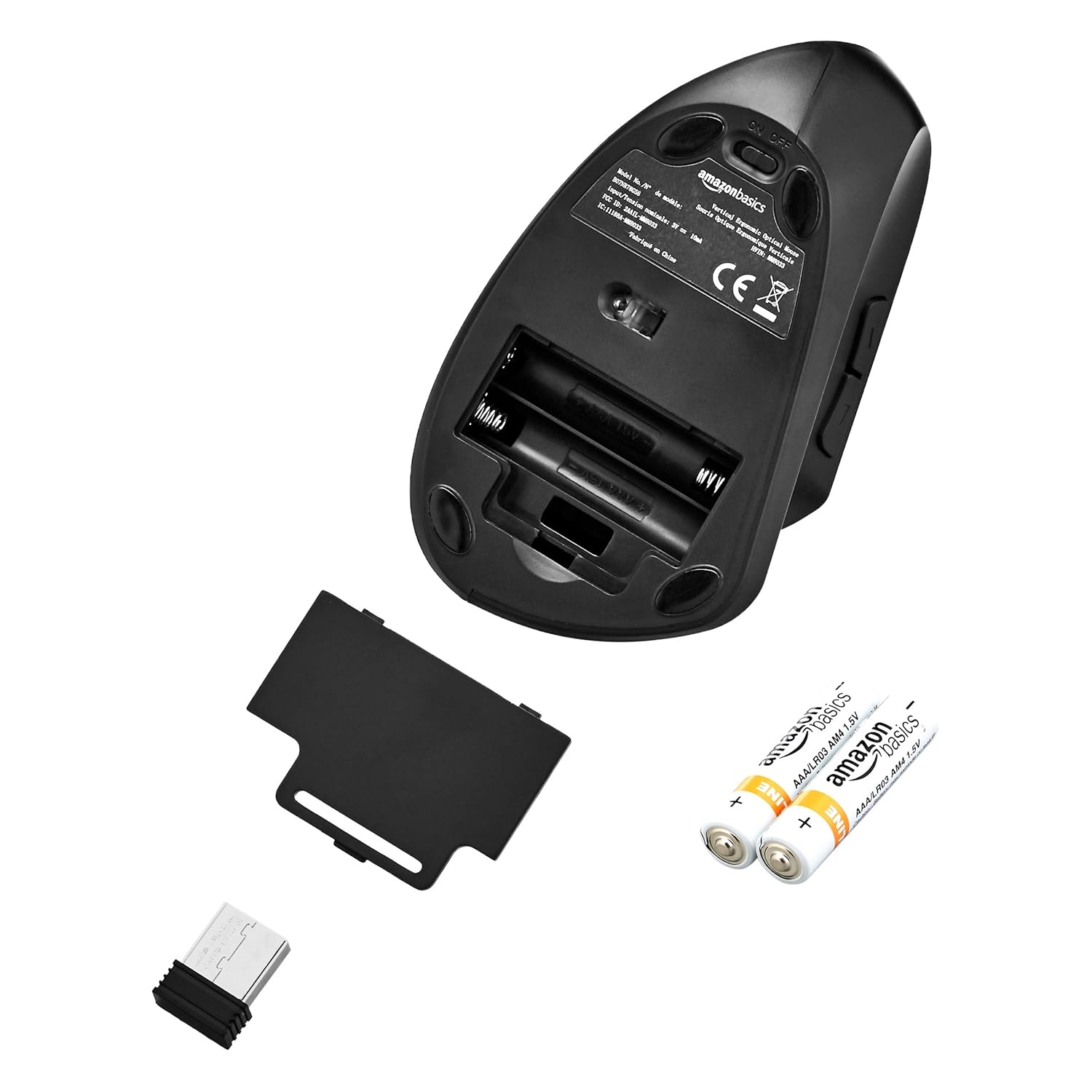
Image: The underside of the mouse with the battery compartment cover removed, showing the slots for two AAA batteries and the storage slot for the USB receiver.
2. USB ග්රාහකය සම්බන්ධ කරන්න
- Remove the USB receiver from its storage slot within the battery compartment.
- USB ග්රාහකය ඔබේ පරිගණකයේ (පරිගණකය හෝ ලැප්ටොප්) තිබෙන USB පෝට් එකකට සම්බන්ධ කරන්න.
- ඔබේ පරිගණකය අවශ්ය ධාවක ස්වයංක්රීයව හඳුනාගෙන ස්ථාපනය කළ යුතුය. මෙයට මිනිත්තු කිහිපයක් ගත විය හැකිය.
3. මූසිකය ක්රියාත්මක කරන්න
- Locate the ON/OFF switch on the underside of the mouse.
- Slide the switch to the "ON" position.
- මූසිකය දැන් භාවිතයට සූදානම්.

Image: The bottom of the AmazonBasics Vertical Ergonomic Wireless Optical Mouse, displaying the ON/OFF switch, the optical sensor, and the product label with model information.
මෙහෙයුම් උපදෙස්
මූලික කාර්යයන්
- වම් ක්ලික් කරන්න: ප්රාථමික තේරීම සහ සක්රිය කිරීම.
- දකුණු ක්ලික් කරන්න: සන්දර්භීය මෙනු විවෘත කරයි.
- අනුචලන රෝදය: ලේඛන අනුචලනය කරයි සහ web pages vertically. Can also be pressed for middle-click functionality.

රූපය: ඉහළ-පහළ view of the AmazonBasics Vertical Ergonomic Wireless Optical Mouse, clearly showing the left and right click buttons separated by the scroll wheel.
උසස් කාර්යයන්
- DPI බොත්තම: Located near the top of the mouse. Press this button to cycle through different DPI (Dots Per Inch) settings, adjusting cursor sensitivity. This allows you to switch between faster and slower cursor speeds as needed.
- ඉදිරියට/පසුපසට බොත්තම්: Located on the side of the mouse, accessible by your thumb. These buttons typically function as 'Forward' and 'Back' in web බ්රව්සර් සහ file ගවේෂකයන්.
නඩත්තු කිරීම
පිරිසිදු කිරීම
මූසිකය පිරිසිදු කිරීමට මෘදු වියළි රෙද්දක් භාවිතා කරන්න. මුරණ්ඩු අපිරිසිදුකම සඳහා, තරමක් dampරෙදි කැබැල්ල වතුරෙන් හෝ මෘදු පිරිසිදු කිරීමේ ද්රාවණයකින් පිස දමන්න. රළු රසායනික ද්රව්ය හෝ උල්ෙල්ඛ ද්රව්ය භාවිතා කිරීමෙන් වළකින්න, මන්ද මේවා මූසිකයේ මතුපිටට හානි කළ හැකිය.
බැටරි ප්රතිස්ථාපනය
When the mouse's performance degrades or it stops responding, it may be time to replace the batteries. Follow the steps in the "Install Batteries" section under Setup to replace the two AAA batteries.
දෝෂගවේෂණය
- මූසිකය ප්රතිචාර නොදක්වයි:
- Ensure the mouse is switched to the "ON" position.
- බැටරි නිවැරදිව ස්ථාපනය කර ඇති අතර ප්රමාණවත් ආරෝපණයක් තිබේදැයි පරීක්ෂා කරන්න. අවශ්ය නම් ප්රතිස්ථාපනය කරන්න.
- USB ග්රාහකය ඔබේ පරිගණකයේ ක්රියාකාරී USB පෝට් එකකට ආරක්ෂිතව සම්බන්ධ කර ඇති බවට වග බලා ගන්න. වෙනත් USB පෝට් එකක් උත්සාහ කරන්න.
- ඔබේ පරිගණකය නැවත ආරම්භ කරන්න.
- අක්රමවත් කර්සර චලනය:
- මෘදු, වියළි රෙද්දකින් මූසිකයේ යටි පැත්තේ ඇති දෘශ්ය සංවේදකය පිරිසිදු කරන්න.
- සුදුසු මතුපිටක් මත මූසිකය භාවිතා කරන බවට වග බලා ගන්න. ඉහළ පරාවර්තක හෝ විනිවිද පෙනෙන මතුපිට ලුහුබැඳීමට බලපෑ හැකිය. මූසික පෑඩයක් නිර්දේශ කෙරේ.
- වෙනත් රැහැන් රහිත උපාංගවලින් බාධා කිරීම් සඳහා පරීක්ෂා කරන්න.
- සම්බන්ධතා ගැටළු:
- මූසිකය USB ග්රාහකයට සමීප කරන්න.
- Avoid placing the receiver near large metal objects or other electronic devices that might cause interference.
පිරිවිතර
| ආදර්ශ අංකය | එම්එම්-8033 |
| සම්බන්ධතා තාක්ෂණය | 2.4G රැහැන් රහිත |
| චලනය හඳුනාගැනීම | ඔප්ටිකල් |
| බොත්තම් ගණන | 5 (වම, දකුණ, අනුචලන රෝදය, DPI, ඉදිරියට, පසුපසට) |
| බලශක්ති ප්රභවය | 2 x AAA බැටරි (ඇතුළත් කර නැත) |
| සාමාන්ය බැටරි ආයු කාලය | මාස 12 දක්වා |
| අනුකූල මෙහෙයුම් පද්ධති | ලිනක්ස්, වින්ඩෝස් 7, වින්ඩෝස් එක්ස්පී (සහ නවතම අනුවාද) |
| Compatible Hardware Platforms | ලැප්ටොප්, පීසී |
| නිෂ්පාදන මානයන් (LxWxH) | 15.32 x 7.8 x 8.92 cm (6.03 x 3.07 x 3.51 අඟල්) |
| අයිතමයේ බර | 122 ග්රෑම් |
වගකීම් සහ සහාය
For warranty information or technical support, please refer to the AmazonBasics product page or contact Amazon customer service directly. Keep your purchase receipt for warranty claims.


