හැඳින්වීම
This manual provides instructions for the safe and effective use of your T&G TG504 Portable Bluetooth Speaker. Please read it thoroughly before use and retain it for future reference. This speaker is designed for portable audio playback with wireless Bluetooth connectivity and water resistance.
නිෂ්පාදනය අවසන්view
The T&G TG504 is a cylindrical, portable Bluetooth speaker featuring a robust design and a built-in microphone for hands-free calling. It offers high-definition sound with bass boost and multiple connectivity options.
ප්රධාන ලක්ෂණ:
- Portable and Cylindrical Design
- Water Resistant Construction
- Built-in Microphone for Calls
- බ්ලූටූත් රැහැන් රහිත සම්බන්ධතාවය
- AUX and USB Port for versatile playback
- Bass Boost and High Definition Sound
- Battery Powered for on-the-go use
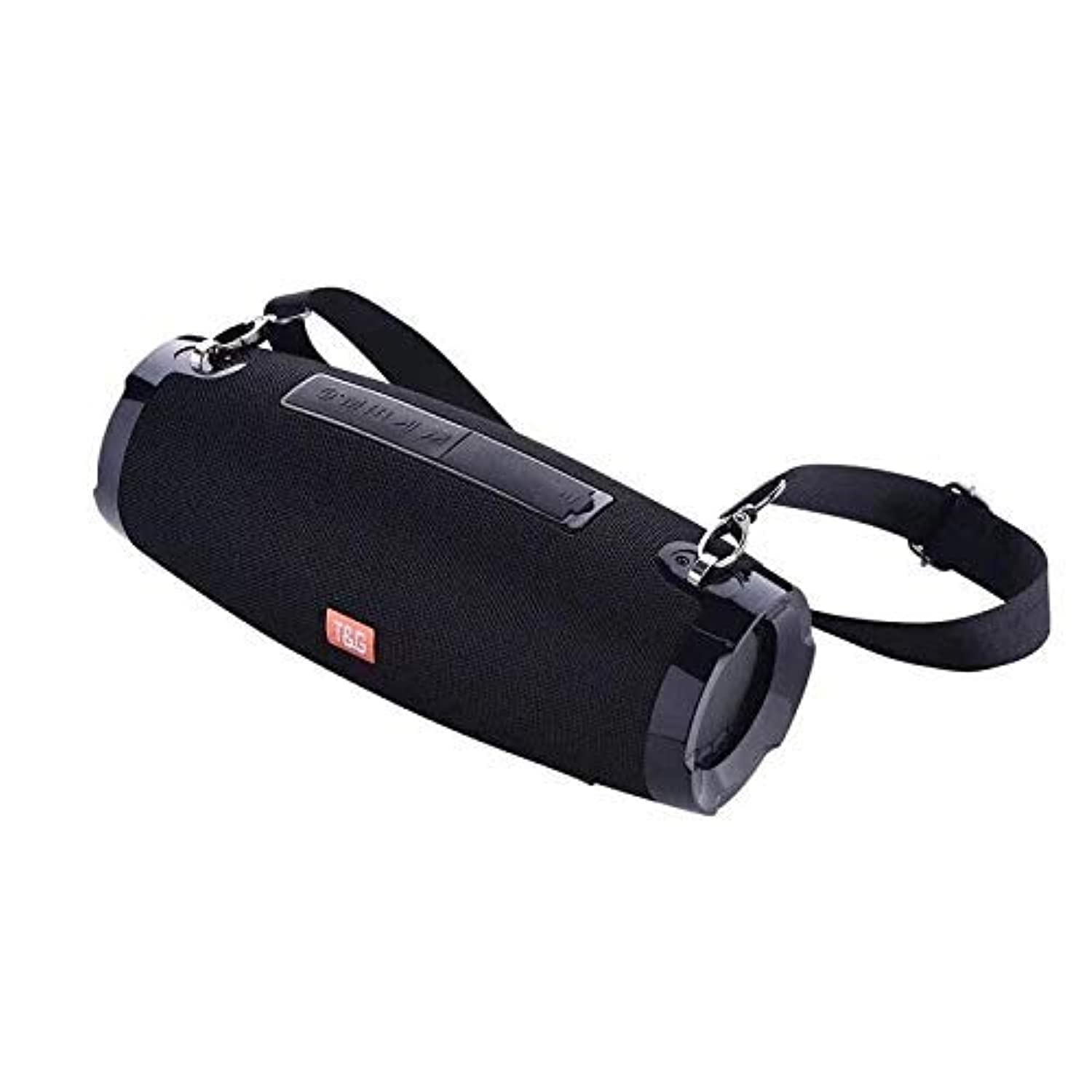
This image shows the T&G TG504 Portable Bluetooth Speaker. It features a black cylindrical design with a mesh grille covering the speaker. The T&G brand logo is visible in orange on the front. The speaker has attachment points on the sides, suggesting portability.
පැකේජයේ අන්තර්ගතය
- T&G TG504 Portable Bluetooth Speaker
- AUX කේබල්
- USB ආරෝපණ කේබලය
- පරිශීලක අත්පොත
පාලන සහ දර්ශක
Familiarize yourself with the speaker's controls and ports for optimal operation.
- බල බොත්තම: ස්පීකරය සක්රිය හෝ අක්රිය කිරීමට ඔබා අල්ලාගෙන සිටින්න.
- වාදනය/විරාම බොත්තම: ශ්රව්ය වාදනය කිරීමට හෝ විරාම කිරීමට ඔබන්න.
- පරිමාව වැඩි කරන්න (+): ශබ්දය වැඩි කිරීමට ඔබන්න. ඊළඟ ධාවන පථයට යාමට අල්ලාගෙන සිටින්න.
- ශබ්දය අඩු කිරීම (-): Press to decrease volume. Hold to go to the previous track.
- මාදිලි බොත්තම (M): Press to switch between Bluetooth, AUX, and USB modes.
- ඇමතුම් බොත්තම: Press to answer or end a phone call. Hold to reject a call.
- AUX වරාය: ශ්රව්ය උපාංග වෙත රැහැන්ගත සම්බන්ධතාවය සඳහා.
- USB Port: For playing music from a USB drive or charging other devices (if supported).
- ආරෝපණ වරාය: USB ආරෝපණ කේබලය සම්බන්ධ කිරීම සඳහා.
- LED දර්ශකය: බල තත්ත්වය, ආරෝපණ තත්ත්වය සහ බ්ලූටූත් යුගල කිරීමේ තත්ත්වය පෙන්වයි.
සැලසුම
1. කථානායකවරයාට චෝදනා කිරීම
- USB ආරෝපණ කේබලයේ කුඩා කෙළවර ස්පීකරයේ ආරෝපණ තොටට සම්බන්ධ කරන්න.
- USB ආරෝපණ කේබලයේ විශාල කෙළවර USB බල ඇඩැප්ටරයකට (ඇතුළත් කර නැත) හෝ පරිගණකයේ USB පෝට් එකකට සම්බන්ධ කරන්න.
- LED දර්ශකය ආරෝපණ තත්ත්වය පෙන්වනු ඇත (උදා: ආරෝපණය වන විට රතු, සම්පූර්ණයෙන්ම ආරෝපණය වූ විට අක්රිය).
- පළමු භාවිතයට පෙර සම්පූර්ණ ආරෝපණය සඳහා ආසන්න වශයෙන් පැය 3-4 ක් ඉඩ දෙන්න.
2. බල ගැන්වීම / අක්රිය කිරීම
- To power on, press and hold the Power button until the LED indicator lights up and you hear an audible prompt.
- To power off, press and hold the Power button again until the LED indicator turns off and you hear an audible prompt.
3. බ්ලූටූත් යුගලනය
- Ensure the speaker is powered on and in Bluetooth pairing mode (LED indicator will typically flash blue). If not, press the Mode button to switch to Bluetooth mode.
- ඔබගේ ජංගම උපාංගයේ (ස්මාර්ට්ෆෝන්, ටැබ්ලටය, ලැප්ටොප්) බ්ලූටූත් සක්රීය කරන්න.
- ඒ සඳහා සොයන්න available Bluetooth devices. The speaker will appear as "TG504" or similar.
- Select "TG504" to connect. Once paired, the LED indicator will turn solid blue, and you will hear a confirmation sound.
- The speaker will automatically reconnect to the last paired device when powered on, if the device is within range and Bluetooth is enabled.
4. AUX හරහා සම්බන්ධ වීම
- Connect one end of the provided AUX cable to the speaker's AUX port.
- Connect the other end of the AUX cable to the headphone jack of your audio device.
- ස්පීකරය ස්වයංක්රීයව AUX මාදිලියට මාරු වනු ඇත, නැතහොත් AUX තේරීමට ඔබට Mode බොත්තම ඔබන්න අවශ්ය විය හැකිය.
මෙහෙයුම් උපදෙස්
සංගීතය වාදනය කිරීම
- බ්ලූටූත් ප්රකාරය: Once paired, start playing music on your connected device. Audio will stream through the speaker.
- AUX ප්රකාරය: Start playing music on your connected audio device.
- USB ප්රකාරය: MP3 සමඟ USB ෆ්ලෑෂ් ධාවකය ඇතුල් කරන්න files into the USB port. The speaker will automatically detect and play music. Press the Mode button to switch to USB mode if needed.
- Use the Play/Pause button on the speaker or your device to control playback.
පරිමාව සකස් කිරීම
- ශබ්දය වැඩි කිරීමට ශබ්දය වැඩි කිරීමේ (+) බොත්තම ඔබන්න.
- ශබ්දය අඩු කිරීමට ශබ්දය අඩු කිරීමේ (-) බොත්තම ඔබන්න.
- Volume can also be adjusted from your connected device.
Handling Calls (Bluetooth Mode)
- පිළිතුරු ඇමතුම: When a call comes in, press the Call button once to answer.
- ඇමතුම අවසන් කරන්න: During a call, press the Call button once to end the call.
- ඇමතුම ප්රතික්ෂේප කරන්න: When a call comes in, press and hold the Call button to reject it.
- අවසාන අංකය නැවත අමතන්න: In standby mode, double-press the Call button to redial the last number.
හඬ පාලනය
The speaker supports voice control. Depending on your connected device, you may be able to activate your device's voice assistant (e.g., Siri, Google Assistant) by pressing and holding the Play/Pause button (or a dedicated voice button if available) for a few seconds.
නඩත්තු කිරීම
පිරිසිදු කිරීම
- මෘදු වියළි රෙද්දකින් ස්පීකරය පිස දමන්න.
- උල්ෙල්ඛ පිරිසිදු කරන්නන්, මධ්යසාර හෝ රසායනික ද්රාවක භාවිතා නොකරන්න.
ගබඩා කිරීම
- සෘජු හිරු එළියෙන් සහ අධික උෂ්ණත්වයන්ගෙන් ඈත්ව සිසිල් වියළි ස්ථානයක ස්පීකරය ගබඩා කරන්න.
- දිගු කාලයක් ගබඩා කරන්නේ නම්, එහි ආයු කාලය පවත්වා ගැනීම සඳහා බැටරිය වරින් වර ආරෝපණය කරන්න.
ජල ප්රතිරෝධක සත්කාරය
- ස්පීකරය ජලයට නිරාවරණය කිරීමට පෙර සියලුම වරාය ආවරණ ආරක්ෂිතව වසා ඇති බවට වග බලා ගන්න.
- Do not submerge the speaker in water. Water resistance protects against splashes and light rain, not full immersion.
- After exposure to water, wipe the speaker dry before charging or opening port covers.
දෝෂගවේෂණය
ඔබේ කථිකයා සමඟ ගැටළු ඇති වුවහොත්, පොදු ගැටළු සහ විසඳුම් සඳහා පහත වගුව බලන්න.
| ගැටලුව | විය හැකි හේතුව | විසඳුම |
|---|---|---|
| ස්පීකරය ක්රියාත්මක නොවේ | බැටරිය අඩුයි; බල බොත්තම නිවැරදිව ඔබා නැත. | Charge the speaker; Press and hold the Power button for 3-5 seconds. |
| බ්ලූටූත් හරහා යුගල කළ නොහැක. | Speaker not in pairing mode; Device Bluetooth off; Speaker too far from device | Ensure speaker LED is flashing blue; Turn on Bluetooth on your device; Move speaker closer to device (within 10 meters). |
| ශබ්දයක් නැත | ශබ්දය ඉතා අඩුයි; වැරදි ප්රකාරය තෝරා ඇත; උපාංගය ශ්රව්ය වාදනය නොකරයි. | Increase speaker and device volume; Press Mode button to select correct input; Ensure audio is playing on your device. |
| ශබ්දය විකෘති කිරීම | ශබ්දය ඉතා වැඩියි; බැටරිය අඩුයි; බාධාව | Reduce volume; Charge the speaker; Move away from other wireless devices. |
| මයික්රෆෝනය ක්රියා නොකරයි | Not in call mode; Microphone blocked | Ensure you are on a call; Check for obstructions around the microphone. |
පිරිවිතර
| මාදිලියේ නම | TG504 |
| වෙළඳ නාමය | T&G |
| වර්ණය | කළු |
| හැඩය | සිලින්ඩරාකාර |
| අයිතමයේ බර | 735 grams (approx. 1 kg / 2.2 pounds) |
| උපරිම කථික ප්රතිදාන බලය | වොට් 10 යි |
| සම්බන්ධතා තාක්ෂණය | Bluetooth, Auxiliary (AUX) |
| රැහැන් රහිත සන්නිවේදන තාක්ෂණය | බ්ලූටූත් |
| වතුර කාන්දු නොවන | ඔව් |
| බලශක්ති ප්රභවය | බැටරි බලයෙන් |
| පාලන ක්රමය | හඬ |
| ශ්රව්ය ප්රතිදාන ප්රකාරය | වටකරගන්න |
| සවිකිරීමේ වර්ගය | ටැබ්ලටය |
| ගැළපෙන උපාංග | ටැබ්ලට්, ලැප්ටොප්, ස්මාර්ට්ෆෝන් |
| විශේෂ ලක්ෂණ | Bass Boost, High Definition Sound, Water Resistant, USB Port |
| ඇතුළත් සංරචක | AUX කේබලය |
ආරක්ෂිත තොරතුරු
- කථිකයා අධික උෂ්ණත්වයන්ට, සෘජු හිරු එළියට හෝ අධික ආර්ද්රතාවයට නිරාවරණය නොකරන්න.
- කථිකයා ප්රබල බලපෑම්වලට වැටීමෙන් හෝ යටත් කිරීමෙන් වළකින්න.
- ළමයින් සහ සුරතල් සතුන්ගෙන් ස්පීකරය ඈත් කර තබන්න.
- ස්පීකරය ඔබම විසුරුවා හැරීමට, අලුත්වැඩියා කිරීමට හෝ වෙනස් කිරීමට උත්සාහ නොකරන්න. මෙය වගකීම් සහතිකය අවලංගු කරන අතර හානි හෝ තුවාල ඇති කළ හැකිය.
- Use only the specified charging cable and a compatible power adapter.
- Do not use the speaker near water sources if port covers are not securely closed.
- අධික ශබ්ද මට්ටම්වලදී දිගුකාලීනව සවන් දීමෙන් ශ්රවණාබාධ ඇති විය හැක.
වගකීම් සහ සහාය
Specific warranty details are not provided in the product information. For warranty claims or technical support, please refer to the retailer or manufacturer's official website where you purchased the product. Keep your proof of purchase for any warranty-related inquiries.


