1. හැඳින්වීම
This manual provides comprehensive instructions for the setup, operation, and maintenance of your Xprinter XP-360B Thermal Label Barcode Printer. Please read this manual thoroughly before using the printer to ensure proper functionality and to prevent damage.
The XP-360B is a high-speed thermal label printer designed for various applications, including barcode printing, shipping labels, and receipt printing. It supports label widths from 20mm to 80mm and offers a maximum print speed of 200mm per second.

Figure 1.1: Xprinter XP-360B Thermal Label Barcode Printer. This image shows the printer from a front-right angle, with labels being fed out of the front slot.
2 ආරක්ෂිත තොරතුරු
To ensure safe operation and prolong the life of your printer, please observe the following safety precautions:
- මුද්රණ යන්ත්රය ජලයට හෝ අධික ආර්ද්රතාවයට නිරාවරණය නොකරන්න.
- මුද්රණ යන්ත්රය සෘජු හිරු එළියේ හෝ තාප ප්රභවයන් අසල තැබීමෙන් වළකින්න.
- මුද්රණ යන්ත්රය සමඟ සපයා ඇති බල ඇඩැප්ටරය පමණක් භාවිතා කරන්න.
- මුද්රණ යන්ත්රය ඔබම විසුරුවා හැරීමට හෝ අලුත්වැඩියා කිරීමට උත්සාහ නොකරන්න. සුදුසුකම් ලත් සේවා නිලධාරීන් වෙත යොමු වන්න.
- මුද්රණ යන්ත්රය දූවිලි හා සුන්බුන් වලින් ඈත් කරන්න.
- Ensure the printer is placed on a stable, flat surface.
- පිරිසිදු කිරීමට පෙර හෝ දීර්ඝ කාලයක් භාවිතයේ නොමැති විට මුද්රණ යන්ත්රය බල සැපයුමෙන් විසන්ධි කරන්න.
3. පැකේජ අන්තර්ගතය
සියලුම අයිතම පැකේජයේ ඇති බව තහවුරු කරගන්න:
- Xprinter XP-360B Thermal Label Barcode Printer
- බල ඇඩැප්ටරය
- USB කේබලය
- පරිශීලක අත්පොත (මෙම ලේඛනය)
- ධාවක සංයුක්ත තැටිය (හෝ ධාවක බාගත කිරීමට සබැඳිය)
4. නිෂ්පාදන අවසන්view
4.1. ඉදිරිපස View

රූපය 4.1: ඉදිරිපස view of the XP-360B printer, showing the label output slot and control buttons.
- ලේබල් ප්රතිදාන කොටස: Where printed labels exit the printer.
- පාලන බොත්තම්:
- බලය: බල දර්ශකය.
- දෝෂය: Error indicator.
- විරාමය: මුද්රණය විරාම කරයි හෝ නැවත ආරම්භ කරයි.
- ආහාර: Feeds a blank label.
4.2. පැත්ත View
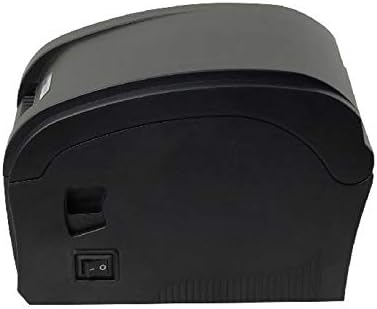
රූපය 4.2: පැත්ත view of the XP-360B printer, highlighting the power switch.
- බල සැපයුම් සුවිචය: මුද්රණ යන්ත්රය ක්රියාත්මක හෝ අක්රිය කරයි.
4.3. අභ්යන්තර View (Cover Open)

රූපය 4.3: අභ්යන්තර view of the XP-360B printer with the top cover open, showing the label roll compartment and print head assembly.
- මුද්රණ ශීර්ෂ එකලස් කිරීම: Contains the thermal print head.
- ලේබල් රෝල් මැදිරිය: Area for loading the label roll.
- Adjustable Paper Guides: Guides to align the label roll.
5. පිහිටුවීම
5.1. ඇසුරුම් ඉවත් කිරීම සහ ස්ථානගත කිරීම
- මුද්රණ යන්ත්රය සහ සියලුම උපාංග ඇසුරුම්කරණයෙන් ප්රවේශමෙන් ඉවත් කරන්න.
- ප්රමාණවත් වාතාශ්රයක් සහිත ස්ථාවර, පැතලි මතුපිටක් මත මුද්රණ යන්ත්රය තබන්න.
- Ensure there is enough space around the printer for proper operation and maintenance.
5.2. මුද්රණ යන්ත්රය සම්බන්ධ කිරීම
- බල ඇඩැප්ටරය මුද්රණ යන්ත්රයේ බල ආදාන තොටට සම්බන්ධ කරන්න.
- බල ඇඩැප්ටරය සුදුසු විදුලි අලෙවිසැලකට සම්බන්ධ කරන්න.
- USB කේබලයේ එක් කෙළවරක් මුද්රණ යන්ත්රයේ USB පෝට් එකට සම්බන්ධ කරන්න.
- USB කේබලයේ අනෙක් කෙළවර ඔබේ පරිගණකයේ තිබෙන USB පෝට් එකකට සම්බන්ධ කරන්න.
5.3. ලේබල් පූරණය කිරීම
- මුද්රණ යන්ත්රය ක්රියා විරහිත කර ඇති බවට සහතික වන්න.
- මුද්රණ යන්ත්රයේ ඉහළ කවරය විවෘත කරන්න.
- Place the label roll into the label compartment, ensuring the labels feed from the bottom of the roll towards the front of the printer.
- Adjust the movable paper guides to fit the width of your label roll snugly, without being too tight.
- Pull a few labels out past the print head and through the label output slot.
- ඉහළ කවරය නිසි තැනට වැටෙන තුරු තදින් වසා දමන්න.

Figure 5.1: Loading a roll of thermal labels into the XP-360B printer's internal compartment.
5.4. ධාවක ස්ථාපනය
Before using the printer, you must install the appropriate drivers on your computer. Drivers are typically provided on a CD or can be downloaded from the manufacturer's official webඅඩවිය.
- Insert the driver CD into your computer's CD-ROM drive, or navigate to the official Xprinter support website to download the XP-360B drivers.
- ධාවක ස්ථාපනය සම්පූර්ණ කිරීම සඳහා තිරයේ ඇති උපදෙස් අනුගමනය කරන්න.
- ස්ථාපනය කිරීමෙන් පසු, ඔබේ පරිගණකය නැවත ආරම්භ කිරීම රෙකමදාරු කරනු ලැබේ.
6. මෙහෙයුම් උපදෙස්
6.1. බල ගැන්වීම / අක්රිය කිරීම
- To turn on the printer, flip the power switch located on the side of the printer to the 'ON' position. The POWER indicator light will illuminate.
- To turn off the printer, flip the power switch to the 'OFF' position.
6.2. මූලික මුද්රණය
- මුද්රණ යන්ත්රය ඔබේ පරිගණකයට සම්බන්ධ කර ක්රියාත්මක කර ඇති බවට වග බලා ගන්න.
- Open the document or application from which you wish to print labels (e.g., label design software, shipping platform).
- Go to the print settings (File > මුද්රණය කරන්න).
- ඔබේ මුද්රණ යන්ත්රය ලෙස "Xprinter XP-360B" තෝරන්න.
- Adjust the paper size and orientation settings to match your labels (e.g., 4x6 inch, portrait/landscape).
- Click "Print". The printer will automatically detect the label gaps and print accordingly.
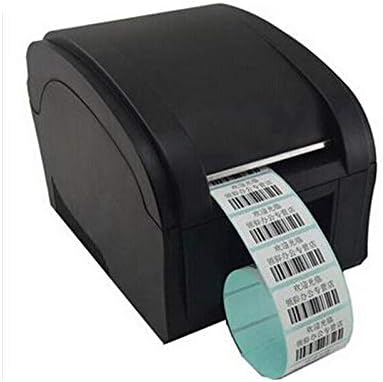
Figure 6.1: The XP-360B printer in operation, feeding out a continuous roll of printed labels.
6.3. Using Control Buttons
- සංග්රහ බොත්තම: Press this button once to feed a single blank label. This is useful for testing label alignment or advancing to the next label.
- විරාම බොත්තම: Press this button to temporarily pause a print job. Press it again to resume printing.
7. නඩත්තු කිරීම
නිතිපතා නඩත්තු කිරීම ප්රශස්ත ක්රියාකාරිත්වය සහතික කරන අතර ඔබේ මුද්රණ යන්ත්රයේ ආයු කාලය දීර්ඝ කරයි.
7.1. මුද්රණ ශීර්ෂය පිරිසිදු කිරීම
The print head should be cleaned regularly, especially if print quality degrades or after printing a large volume of labels.
- මුද්රණ යන්ත්රය ක්රියා විරහිත කර විදුලිබල අලෙවිසැලෙන් එය විසන්ධි කරන්න.
- මුද්රණ යන්ත්රයේ ඉහළ කවරය විවෘත කරන්න.
- මුද්රණ යන්ත්රය මෑතකදී භාවිතා කර ඇත්නම්, මුද්රණ ශීර්ෂය සිසිල් වන තෙක් මිනිත්තු කිහිපයක් රැඳී සිටින්න.
- Gently wipe the thermal print head surface with an alcohol swab or a lint-free cloth lightly dampඅයිසොප්රොපයිල් මධ්යසාර සමඟ එකතු කර ඇත.
- කවරය වසා මුද්රණ යන්ත්රය ක්රියාත්මක කිරීමට පෙර මුද්රණ ශීර්ෂය සම්පූර්ණයෙන්ම වියළීමට ඉඩ දෙන්න.
7.2. ප්ලේටන් රෝලරය පිරිසිදු කිරීම
The platen roller helps feed the labels smoothly. Clean it if you notice feeding issues.
- Follow steps 1-3 from "Cleaning the Print Head".
- Rotate the platen roller manually and wipe its surface with an alcohol swab or a lint-free cloth lightly dampඅයිසොප්රොපයිල් මධ්යසාර සමඟ එකතු කර ඇත.
- Allow it to dry completely before closing the cover.
8. දෝශ නිරාකරණය
මෙම කොටස ඔබේ XP-360B මුද්රණ යන්ත්රය සමඟ ඔබට මුහුණ දීමට සිදුවිය හැකි පොදු ගැටළු ආමන්ත්රණය කරයි.
| ගැටලුව | විය හැකි හේතුව | විසඳුම |
|---|---|---|
| මුද්රණ යන්ත්රය ක්රියාත්මක නොවේ | Power cable loose; Power outlet faulty; Printer fault | Check power cable connection; Try a different outlet; Contact support if problem persists. |
| No printing / Printer offline | USB cable loose; Driver not installed; Printer offline in OS | Check USB connection; Install drivers; Check printer status in computer settings. |
| දුර්වල මුද්රණ ගුණාත්මකභාවය / මැකී ගිය මුද්රණ | Dirty print head; Low quality labels; Incorrect print density settings | Clean the print head (see Section 7.1); Use high-quality thermal labels; Adjust print density in driver settings. |
| ලේබල් නිවැරදිව පෝෂණය නොවේ | Labels loaded incorrectly; Paper guides not adjusted; Dirty platen roller | Re-load labels correctly; Adjust paper guides; Clean platen roller (see Section 7.2). |
| ERROR light is on | Paper jam; Cover open; Print head overheating | Clear any paper jams; Ensure cover is closed properly; Turn off printer and let it cool down. |
9. පිරිවිතර
| විශේෂාංගය | විස්තරය |
|---|---|
| ආකෘතිය | එක්ස්පී-360බී |
| මුද්රණ ක්රමය | සෘජු තාප |
| අතුරු මුහුණත | USB |
| මුද්රණ වේගය | 200mm / තත්පර දක්වා |
| Max Paper Width | 80mm (adjustable from 20mm) |
| කඩදාසි පෝෂක මාදිලිය | ස්වයංක්රීය |
| ජාල මුද්රණය | රැහැන්ගත |
| ද්විත්ව මුද්රණය | නැත |
| මානයන් | 25 x 22 x 21 සෙ.මී |
| බර | කිලෝ ග්රෑම් 2 කි |
10. වගකීම් සහ සහාය
Xprinter products are designed for reliability and performance. For specific warranty terms and conditions, please refer to the warranty card included with your product or visit the official Xprinter webඅඩවිය.
If you encounter any issues that cannot be resolved using the troubleshooting guide, or if you require technical assistance, please contact Xprinter customer support through their official webවෙබ් අඩවිය හෝ ඔබේ නිෂ්පාදන ලියකියවිලිවල සපයා ඇති සම්බන්ධතා තොරතුරු.
Please have your model number (XP-360B) and purchase information ready when contacting support.


