හැඳින්වීම
The Listen Technologies LW-100P-02-01 Listen Everywhere 2 Channel Server is designed to provide an affordable and reliable assistive listening solution. It supports up to 1000 users and utilizes your existing Wi-Fi network to stream audio directly to users via a free mobile application. This server is ideal for meeting ADA & IBC assistive listening requirements and offers cloud-based management for easy updates and customization.
ප්රධාන ලක්ෂණ
- Supports up to 1000 users simultaneously.
- Provides 2 mono audio channels.
- Features low-latency audio streaming.
- Integrates with existing wireless networks (Wi-Fi).
- Compatible with iOS and Android devices via a dedicated app.
- Cloud-based management for remote administration and customization.
සැකසුම් මාර්ගෝපදේශය
This section provides instructions for the initial setup of your Listen Everywhere server.
1. ඇසිරීම සහ පරීක්ෂා කිරීම
Carefully remove all components from the packaging. Inspect the server and accessories for any signs of damage. If any damage is found, contact your vendor immediately.
2. භෞතික සම්බන්ධතා
Connect the necessary cables to the rear panel of the LW-100P-02-01 server.
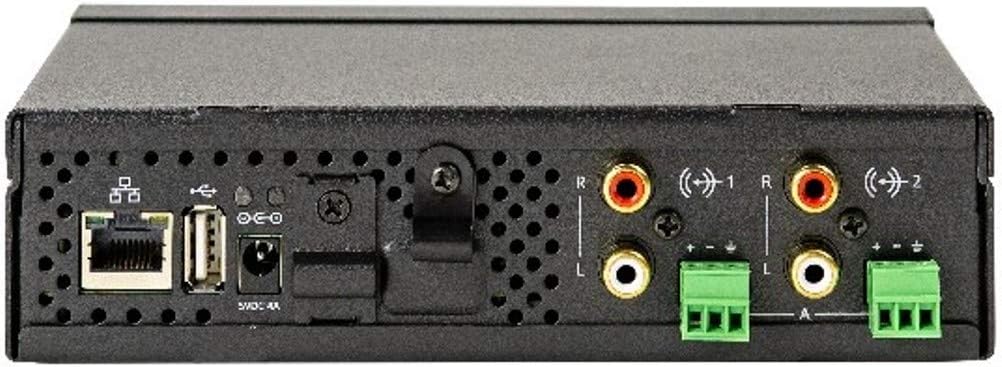
රූපය 1: පසුපස පැනල් සම්බන්ධතා. This image displays the rear panel of the LW-100P-02-01 server, highlighting its connectivity options. From left to right, you can see the Ethernet port (RJ45), a USB Type-A 2.0 port, the 5V DC power input, two sets of RCA audio inputs (Left and Right), and two sets of terminal block connectors for analog audio inputs.
- බලය: Connect the provided 5V DC power adapter to the power input jack on the rear panel.
- ජාලය: Connect an Ethernet cable from your network router or switch to the RJ45 Ethernet port. Ensure your network supports 100 BaseT or 1000 BaseT (gigabit) and has Wi-Fi (802.11n or better with WMM enabled) for client device connectivity.
- ශ්රව්ය යෙදවුම්: Connect your audio sources (e.g., mixer, sound system) to the RCA (Left/Right) or terminal block audio inputs. The server supports two mono channels.
- USB: The USB Type-A 2.0 port is available for future use or specific configurations as per manufacturer instructions.
3. ජාල වින්යාසය
The server is designed to integrate with your existing Wi-Fi network. It supports DHCP for automatic IP address assignment, or you can configure a static or reserved IP address if required by your network setup. Ensure your Wireless Access Points (WAPs) operate on 2.4 GHz & 5 GHz frequencies and have WMM (Wi-Fi Multimedia) enabled for optimal performance.
මෙහෙයුම
Operating the Listen Everywhere server primarily involves managing it through its cloud-based interface and client interaction via the mobile app.
1. බලගැන්වීම
Once all connections are made, press the power button on the front panel to turn on the device. The power indicator LED will illuminate.
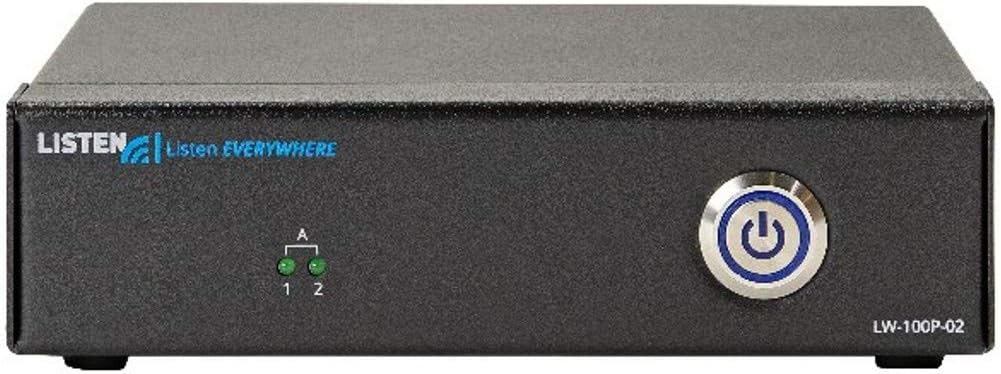
රූපය 2: ඉදිරිපස පුවරුව ඉහළටview. This image shows the front panel of the LW-100P-02-01 server. On the left, the 'LISTEN EVERYWHERE' logo is visible. In the center, there are two small green LED indicators labeled '1' and '2' for the audio channels. On the right, a prominent circular power button with an illuminated blue ring is present.
2. Cloud-Based Management
Access the Listen Everywhere cloud platform via a web browser to manage your server. From here, you can:
- Monitor server status and connected users.
- Configure audio channels and input levels.
- Customize the in-app experience with welcome messages, videos, and banners.
- Apply firmware updates.
3. Client App Usage
Users download the free Listen Everywhere app from the iOS App Store or Google Play Store. Once installed, they connect to your facility's Wi-Fi network and launch the app to select and listen to the available audio channels.
නඩත්තු කිරීම
The Listen Everywhere server is designed for reliable operation with minimal maintenance. Follow these guidelines to ensure longevity:
- පිරිසිදු කිරීම: Use a soft, dry cloth to clean the exterior of the unit. Do not use liquid cleaners or aerosols, as they may damage the components.
- වාතාශ්රය: Ensure the server is placed in a location with adequate airflow to prevent overheating. Do not block ventilation openings.
- පරිසරය: Operate the server within its specified temperature and humidity ranges. Avoid exposure to extreme temperatures, direct sunlight, or moisture.
- ස්ථිරාංග යාවත්කාලීන කිරීම්: Regularly check the cloud management platform for available firmware updates to ensure optimal performance and access to new features.
දෝෂගවේෂණය
If you encounter issues with your Listen Everywhere server, try the following basic troubleshooting steps:
- බලය නැත: Ensure the power adapter is securely connected to the server and a working power outlet. Check if the power button LED is illuminated.
- ශ්රව්ය නැත: Verify that audio sources are properly connected to the server's inputs. Check the audio input levels in the cloud management platform. Ensure client devices are connected to the correct Wi-Fi network and the app is functioning.
- ජාල සම්බන්ධතා ගැටළු: Confirm the Ethernet cable is securely connected. Check your router/switch status. Ensure your network is providing DHCP or that the server's static IP is correctly configured. Verify WAP functionality and WMM enablement.
- යෙදුම් සම්බන්ධතා ගැටළු: Ensure the client device is connected to the same Wi-Fi network as the server. Restart the app or the client device.
- දුර්වල ශ්රව්ය ගුණාත්මකභාවය: Check the bandwidth usage on your network. Approximately 140 kbps per user is required. Ensure your WAPs are not overloaded and are 802.11n or better.
For persistent issues, refer to the detailed troubleshooting guides available on the Listen Technologies support webඅඩවියට හෝ තාක්ෂණික සහාය අමතන්න.
තාක්ෂණික පිරිවිතර
| විශේෂාංගය | පිරිවිතර |
|---|---|
| මාදිලියේ නම | LW 100P 2 |
| ශ්රව්ය යෙදවුම් | Two (2) Female RCA (Right, Left), -14 dBu nominal, -2 dBu max, 15k ohm impedance; Analog Terminal Block Connectors |
| ඊතර්නෙට් | RJ45: 100 BaseT or 1000 BaseT (gigabit) |
| USB | A 2.0 වර්ගය (ගැහැණු) |
| IP ලිපින වින්යාසය | DHCP, ස්ථිතික, වෙන් කර ඇත |
| ප්රමුඛත්වය | QoS/ToS |
| උපරිම පරිශීලකයන් | 1000 (සේවාදායකයකට) |
| උපරිම නාලිකා | 2 මොනෝ |
| WAP සහාය | 802.11n හෝ වඩා හොඳ w/WMM සක්රීය කර ඇත |
| සහාය දක්වන WAP සංඛ්යාත | 2.4 GHz සහ 5 GHz |
| කලාප පළල භාවිතය | ආසන්න වශයෙන්. එක් පරිශීලකයෙකුට 140 kbps |
| යෙදුම් සහාය | iOS/Android |
| වලාකුළු සේවාව | ඔව් |
| නියාමන | FCC, CE, RoHS |
| මානයන් (HxWxD) | 45 x 170 x 100 මි.මී. (1.77" x 6.69" x 3.94") |
| බර | 0.59 kg (රාත්තල් 1.3) |
| සම්බන්ධතා තාක්ෂණය | Ethernet, RCA, USB, Wi-Fi |
| ශ්රව්ය ප්රතිදාන ප්රකාරය | මොනෝ |
| සවිකිරීමේ වර්ගය | tabletop Mount |
වගකීම් තොරතුරු
The Listen Everywhere LW-100P-02-01 server comes with a Limited Warranty. Please refer to the official Listen Technologies website or your purchase documentation for specific terms, conditions, and duration of the warranty.
සහාය
For technical support, product registration, or additional resources, please visit the official Listen Technologies support webවෙබ් අඩවිය. සහාය සඳහා ඔබට ඔවුන්ගේ පාරිභෝගික සේවාව සෘජුවම සම්බන්ධ කර ගත හැකිය.


