හැඳින්වීම
The roborock S6 Robot Vacuum is a versatile robotic cleaning device designed to efficiently vacuum and mop your home. Featuring adaptive routing, multi-floor mapping, and selective room cleaning, it offers a comprehensive and convenient cleaning solution. Its super strong suction ensures deep cleaning, while its extra-long battery life allows for extensive coverage. The roborock S6 also works seamlessly with Alexa for voice control.
ප්රධාන ලක්ෂණ ඇතුළත් වේ:
- Astonishingly efficient: Using adaptive routing with edge optimized cleaning, S6 gives you comprehensive room cleaning fast.
- බහු-මහල් සිතියම්කරණය: Save multiple maps, along with No-go Zones for each level, all recognized automatically by the robot.
- Convenient Selective Room Cleaning: Choose which rooms to be clean, and schedule cleaning for specific rooms.
- Powerful clean and Easy mopping: Intense suction, cleans deep into carpets and cracks in the floor. Get your floors gleaming with a quick mop.
- Quiet and convenient: With a cleaning volume of just 67db (equivalent to a typical conversation) in Balanced mode, you can clean any time day or night without disruption.
සැකසුම් මාර්ගෝපදේශය
Before first use, ensure your roborock S6 is properly set up and charged. Follow these steps:
- රොබෝව ඉවත් කරන්න: Carefully remove the robot vacuum and all accessories from the packaging.
- ආරෝපණ තටාකය තබන්න: Position the charging dock against a wall on a hard, level surface. Ensure there is at least 0.5 meters (1.6 feet) of clear space on both sides and 1.5 meters (4.9 feet) in front of the dock. Connect the power cable to the dock and plug it into a power outlet.
- රොබෝව ආරෝපණය කරන්න: Place the robot onto the charging dock. The power indicator light will turn on, indicating that the robot is charging. For first-time use, fully charge the robot before operation.
- යෙදුම බාගන්න: ඒ සඳහා සොයන්න "Roborock" in your mobile app store (App Store or Google Play) and download the official app.
- Wi-Fi වෙත සම්බන්ධ වන්න: Open the Roborock app and follow the on-screen instructions to connect your robot vacuum to your home Wi-Fi network. This will enable smart features like multi-floor mapping and selective room cleaning.

Figure 1: Roborock S6 Robot Vacuum and Charging Dock.

Figure 2: The Roborock S6 supports multi-floor mapping, allowing it to recognize and clean different levels of your home.

Figure 3: Utilize the app for convenient selective room cleaning, scheduling specific areas for the robot to clean.
මෙහෙයුම් උපදෙස්
The roborock S6 is designed for intelligent and efficient cleaning. Here's how to operate it:
- පිරිසිදු කිරීම ආරම්භ කරන්න: Press the power button on the robot or use the "Clean" button in the Roborock app to start a cleaning cycle. The robot will automatically map your home and plan the most efficient cleaning path.
- Adaptive Routing: The S6 uses advanced algorithms to determine the fastest and most comprehensive cleaning route for each room, ensuring no spots are missed.
- බලගතු චූෂණ: Experience intense suction that effectively cleans deep into carpets and removes debris from cracks in hard floors.
- Mopping කාර්යය: Attach the mopping cloth and fill the water tank to enable the mopping feature. The robot will then vacuum and mop simultaneously, leaving your floors gleaming.
- නිහඬ මෙහෙයුම: In Balanced mode, the S6 operates at a low noise level of 67db, allowing for discreet cleaning day or night without disturbance.

Figure 4: The robot utilizes adaptive routing to calculate the fastest and most efficient cleaning path for each room.
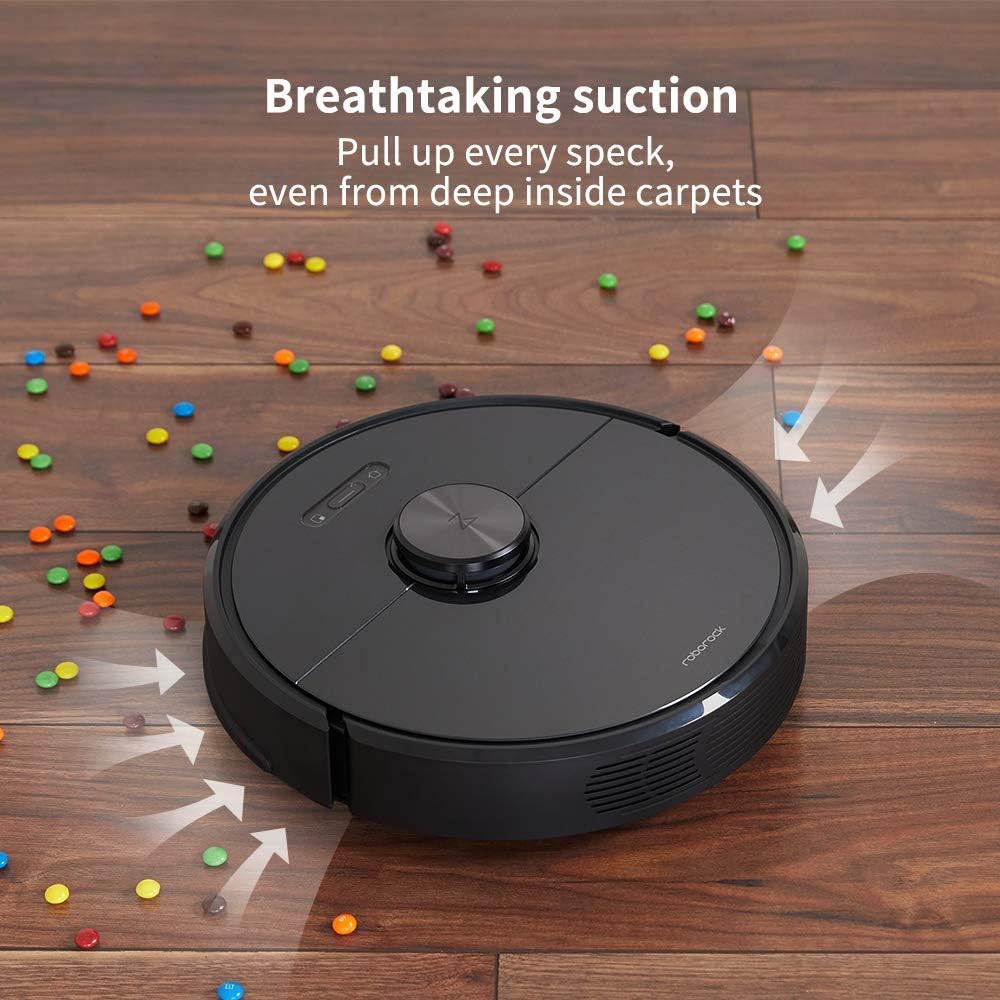
Figure 5: The powerful suction of the Roborock S6 effectively pulls up every speck of dirt, even from deep within carpets.

Figure 6: The Roborock S6 operates quietly, allowing you to clean any time of day or night without disruption.
නඩත්තු කිරීම
Regular maintenance ensures optimal performance and extends the lifespan of your roborock S6. Perform these tasks regularly:
- කුණු කූඩය හිස් කරන්න: Empty the 460ml dustbin after each cleaning cycle or when full. To access, lift the top cover of the robot.
- පෙරහන පිරිසිදු කරන්න: The filter should be washed periodically. Remove it from the dustbin and rinse under running water. Allow it to air dry completely before reinserting.
- ප්රධාන බුරුසුව පිරිසිදු කරන්න: Regularly check the main brush for tangled hair or debris. Use the provided cleaning tool to cut and remove any entangled material.
- පැති බුරුසුව පිරිසිදු කරන්න: Inspect the side brush for debris and ensure it spins freely. Remove any tangled hair or foreign objects.
- පිරිසිදු සංවේදක: Wipe the cliff sensors, wall sensors, and charging contacts with a soft, dry cloth to ensure proper operation.
- Clean the Mopping Cloth: After each mopping session, remove and wash the mopping cloth. It can be hand-washed or machine-washed on a gentle cycle.
Figure 7: Lift the top cover to access the dustbin for emptying and filter cleaning.
දෝෂගවේෂණය
If you encounter issues with your roborock S6, refer to the following common troubleshooting tips:
| ගැටලුව | විය හැකි හේතුව | විසඳුම |
|---|---|---|
| රොබෝවරයා ක්රියාත්මක නොවේ | බැටරිය අඩු හෝ ආරෝපණය වී නැත. | Place the robot on the charging dock and ensure it is charging. |
| රොබෝව හිරවෙලා හෝ නැතිවෙලා | Obstacles in path or complex environment. | Clear obstacles. Use the app to define No-Go Zones or Virtual Walls. |
| දුර්වල පිරිසිදු කිරීමේ කාර්ය සාධනය | Full dustbin, dirty filter, or tangled brushes. | Empty dustbin, clean/replace filter, clean main and side brushes. |
| රොබෝව Wi-Fi වෙත සම්බන්ධ නොවේ | වැරදි Wi-Fi මුරපදය, 5GHz ජාලය හෝ දුර්වල සංඥාවක්. | Ensure correct 2.4GHz Wi-Fi password. Move robot closer to router. |
For more detailed troubleshooting or persistent issues, please refer to the official user manual or contact roborock customer support.
පිරිවිතර
| විශේෂාංගය | විස්තර |
|---|---|
| වෙළඳ නාමය | රොබෝරොක් |
| මාදිලියේ නම | roborock S6 |
| විශේෂ ලක්ෂණය | තෝරාගත් කාමර පිරිසිදු කිරීම |
| වර්ණය | කළු |
| නිෂ්පාදන මානයන් | 14"අඟල් x 14"අඟල් x 4"උ |
| ඇතුළත් සංරචක | බැටරි |
| පෙරහන් වර්ගය | රෙදි |
| බැටරි ආයු කාලය | 180 විනාඩි |
| බලශක්ති ප්රභවය | බැටරි බලයෙන් |
| බැටරි ඇතුළත් වේ | ඔව් |
| පාලන ක්රමය | හඬ |
| ගැළපෙන උපාංග | Amazon Echo |
| ආකෘති සාධකය | රොබෝ තාක්ෂණය |
| ගෝලීය වෙළඳ හඳුනාගැනීමේ අංකය | 00606015769835 |
| UPC | 606015769835 |
| අයිතමයේ බර | රාත්තල් 3.15 කි |
| නිෂ්පාදකයා | රොබොරොක් |
| ASIN | B07RLRWWPJ |
| අයිතම ආකෘති අංකය | roborock S6 |
| බැටරි | ලිතියම් පොලිමර් බැටරි 1ක් අවශ්යයි. (ඇතුළත්) |
| පාරිභෝගිකයාviews | තරු 4.4 න් 5 (ශ්රේණිගත කිරීම් 2,170) |
| භාවිතය සඳහා නිශ්චිත උපදෙස් | කාපට් |
| පරිමාව | 3.15 දියර අවුන්ස |
| බැටරි අවශ්යයි | ඔව් |
වගකීම් සහ සහාය
For warranty information, technical support, or service inquiries, please refer to the official roborock webඅඩවිය හෝ විස්තීර්ණ පරිශීලක අත්පොත (PDF) ඔබේ නිෂ්පාදනය සමඟ සපයා ඇත.
ඔබට ද නැරඹිය හැකිය ඇමේසන් හි රොබෝරොක් වෙළඳසැල අමතර නිෂ්පාදන තොරතුරු සහ සහාය සම්පත් සඳහා.


