හැඳින්වීම
This manual provides instructions for the safe and efficient use of your KMC Smart Tap 4-Outlet Wi-Fi Smart Plug. Please read this guide thoroughly before operation and retain it for future reference.
නිෂ්පාදනය අවසන්view
ප්රධාන ලක්ෂණ
- 4-Outlet Design: One "always on" outlet and three individually controllable outlets.
- Wi-Fi සම්බන්ධතාවය: Requires a 2.4GHz Wi-Fi network.
- දුරස්ථ පාලක: Manage devices via the KMC Smart app.
- හඬ පාලනය: Amazon Alexa සහ Google Home සමඟ අනුකූල වේ.
- කාලසටහන්ගත කිරීම සහ ටයිමර්: Automate power on/off for connected devices.
- බලශක්ති අධීක්ෂණය: තත්ය කාලීන සහ ඓතිහාසික බලශක්ති පරිභෝජනය නිරීක්ෂණය කරන්න.
- ආරක්ෂාව: ETL Certified, built-in thermal sensor.
පැකේජයේ අන්තර්ගතය
- KMC Smart Tap 4-Outlet Wi-Fi Smart Plug
- උපදෙස් අත්පොත
නිෂ්පාදන රූප සටහන

ඉදිරිපස view of the KMC Smart Tap, showing the four outlets, the main power button, and Wi-Fi indicator.
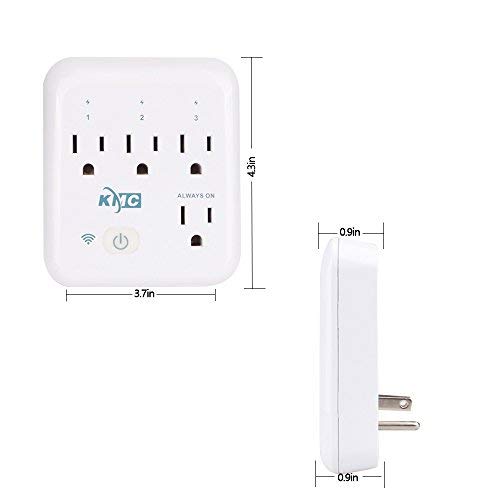
Diagram illustrating the dimensions of the KMC Smart Tap (3.7 inches width, 4.3 inches height, 0.9 inches depth).
සැකසුම් මාර්ගෝපදේශය
ස්ථාපනය
Plug the KMC Smart Tap into a standard 110V wall outlet. Ensure it is securely seated.
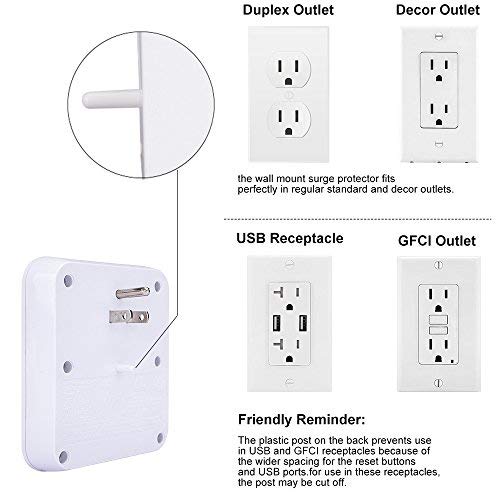
Image showing the KMC Smart Tap plugged into a duplex outlet, with a note about its compatibility and a reminder that the plastic post on the back prevents use in USB and GFCI receptacles due to wider spacing.
App Download and Account Creation
Download the "KMC Smart" or "Smart Life" app from your smartphone's app store (iOS or Android).
නව ගිණුමක් සඳහා ලියාපදිංචි වන්න හෝ ඔබට දැනටමත් එකක් තිබේ නම් ලොග් වන්න.
උපාංග යුගල කිරීම
- Ensure your smartphone is connected to a 2.4GHz Wi-Fi network. The KMC Smart Tap requires a 2.4GHz network for initial setup and operation.
- නව උපාංගයක් එක් කිරීමට යෙදුම විවෘත කර තිරයේ ඇති උපදෙස් අනුගමනය කරන්න.
- The device's Wi-Fi indicator light will blink during pairing.
- Once successfully paired, the indicator light will become solid.
මෙහෙයුම
අතින් පාලනය
The main power button on the front of the KMC Smart Tap can be pressed to manually toggle power for all three individually controlled outlets simultaneously. The "Always On" outlet remains powered.
යෙදුම හරහා දුරස්ථ පාලකය
Open the KMC Smart app on your smartphone.
Select the KMC Smart Tap device.
You can individually control the three switchable outlets (labeled 1, 2, 3) and monitor the "Always On" outlet status from anywhere with an internet connection.
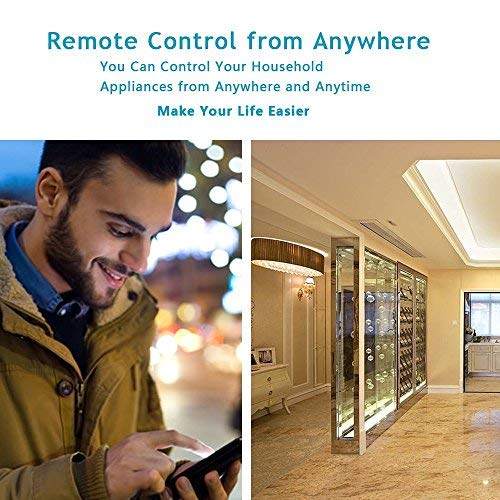
A person using a smartphone to remotely control household appliances, demonstrating the remote control feature of the smart plug.
හඬ පාලනය
The KMC Smart Tap is compatible with Amazon Alexa and Google Home.
To enable voice control, link your KMC Smart account within the Alexa or Google Home app.
For Amazon Alexa, you can name each individual outlet (1, 2, 3) to control them independently using voice commands (e.g., "Alexa, turn on Outlet 1").
For Google Home, overall control of the device is supported.
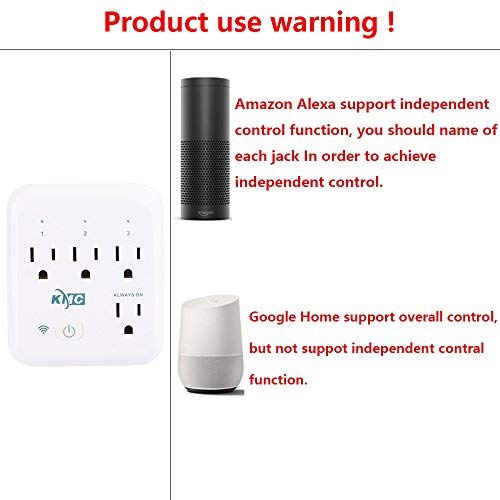
Image showing the KMC Smart Tap alongside Amazon Alexa and Google Home devices, indicating compatibility and control methods.
කාලසටහන්ගත කිරීම සහ කාල ගණක
Within the KMC Smart app, navigate to the device settings to set schedules and timers for your connected appliances.
You can program specific times for outlets to turn on or off automatically, enhancing convenience and energy efficiency.

An image depicting a child sleeping peacefully, illustrating how scheduling features can be used to manage device operation for routines, such as ensuring a restful environment.
බලශක්ති අධීක්ෂණය
The KMC Smart app provides real-time and historical energy consumption data for devices connected to the Smart Tap.
Access the "Electricity Statistics" section in the app to view current usage (Current, Power, Voltage) and historical data (daily, monthly, yearly kWh).
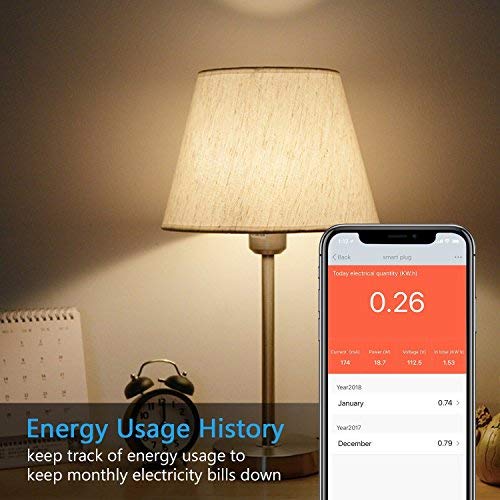
A smartphone screen displaying "Energy Usage History" with current electrical quantity (0.26 kWh) and monthly breakdowns for previous years, next to a lamp.
නඩත්තු කිරීම
පිරිසිදු කිරීම
- Disconnect the smart plug from the power outlet before cleaning.
- Use a dry, soft cloth to wipe the surface. Do not use liquid or aerosol cleaners.
ආරක්ෂිත පූර්වාරක්ෂාවන්
- උපාංගය විසුරුවා හැරීම හෝ වෙනස් කිරීම නොකරන්න.
- Avoid exposing the device to water or humid environments.
- Do not exceed the maximum load of 15A, 1875W.
- The built-in thermal sensor will automatically turn off overheating appliances.
දෝෂගවේෂණය
Device Not Connecting to Wi-Fi
- ඔබගේ Wi-Fi ජාලය 2.4GHz බව සහතික කර ගන්න. 5GHz ජාල සඳහා සහය නොදක්වයි.
- ඔබගේ Wi-Fi මුරපදය නිවැරදි දැයි පරීක්ෂා කරන්න.
- ස්මාර්ට් ප්ලග් එක ඔබේ Wi-Fi රවුටරයට සමීප කරන්න.
- Reset the smart plug by holding the power button for 5-10 seconds until the Wi-Fi indicator blinks rapidly, then attempt pairing again.
දුරස්ථ පාලකය ක්රියා නොකරයි
- ඔබගේ ස්මාර්ට් ජංගම දුරකථනයට සක්රිය අන්තර්ජාල සම්බන්ධතාවයක් ඇති බව තහවුරු කරන්න.
- Ensure the smart plug is connected to your home Wi-Fi network (solid Wi-Fi indicator light).
- යෙදුම් යාවත්කාලීන කිරීම් සඳහා පරීක්ෂා කරන්න.
හඬ පාලන ගැටළු
- Confirm that your KMC Smart account is correctly linked in the Alexa or Google Home app.
- Ensure the device names in the smart home app match your voice commands.
- ඔබගේ හඬ සහායක උපාංගයේ අන්තර්ජාල සම්බන්ධතාවය පරීක්ෂා කරන්න.
පිරිවිතර
| විශේෂාංගය | වටිනාකම |
|---|---|
| පොලු ගණන | 2 |
| වයර් ගණන | 2 |
| ප්ලග් ආකෘතිය | A වර්ගය |
| පිරිවිතර මෙට් | ETL |
| Ampකෝපය | 15 Amps |
| UPC | 743267670332 |
| නිෂ්පාදකයා | KT-KMC |
| පැකේජ මානයන් | අඟල් 8.58 x 4.84 x 2.24 |
| අයිතමයේ බර | අවුන්ස 14.9 කි |
| ASIN | B07SWZ2N4J |
| පළමු දිනය තිබේ | 10 ජූනි 2019 |
| වෙළඳ නාමය | කේ.එම්.සී |
| වර්ණය | සුදු |
| වෙළුමtage | වෝල්ට් 110 |
| ද්රව්ය | ඇක්රිලෝනයිට්රයිල් බියුඩඩීන් ස්ටයිරීන් (ABS) |
| සම්බන්ධක වර්ගය | ප්ලග් ඉන් |
වගකීම් සහ සහාය
වගකීම් තොරතුරු
The KMC Smart Tap includes a 30-day money-back guarantee and lifetime support.
පාරිභෝගික සහාය
For technical assistance or warranty claims, please refer to the contact information provided on the KMC official website or within the KMC Smart app.


