1. හැඳින්වීම
The AIYIMA DAC-A2 is a versatile Digital-to-Analog Converter (DAC) and headphone amplifier designed to enhance your audio experience. It features multiple digital input options and provides both RCA line-out and a 3.5mm headphone output, along with adjustable bass and treble controls for personalized sound. This manual provides detailed instructions for setup, operation, and maintenance of your DAC-A2.

Figure 1: AIYIMA DAC-A2 Headphone Ampජීවිතාරක්ෂක ඩීඒසී
2 ප්රධාන ලක්ෂණ
- ඒකාබද්ධ DAC සහ හෙඩ්ෆෝන් Amplifier: Built-in Hi-Fi headphone amplifier chip capable of driving 16ohm to 200ohm headphones.
- Advanced Chipset: Utilizes SA9023+CS8416+97220+NE5532 for optimal audio performance.
- Multiple Digital Inputs: Supports PC-USB, Optical, and Coaxial S/PDIF inputs, compatible with most home audio systems, PCs, and Macs.
- Versatile Outputs: Features RCA line-out for connecting to powered speakers or external amplifiers, and a 3.5mm headphone output.
- High-Resolution Audio: PC-USB input supports up to 24Bit/96KHz; Optical/Coaxial inputs support up to 24Bit/192kHz.
- Tone Controls: Independent bass and treble controls to customize your audio output.
- Compact and Portable: DC 5V power input allows for a portable and professional desktop audio device.

Figure 2: Internal Chipset and Features Overview
3. පැකේජ අන්තර්ගතය
කරුණාකර පහත අයිතම සඳහා පැකේජය පරීක්ෂා කරන්න:
- AIYIMA DAC-A2 Unit
- USB කේබලය (වර්ගය A සිට B වර්ගය දක්වා)
- Optical Cable (Toslink)
- DC 5V Power Cable (USB-C for power)
- පරිශීලක අත්පොත
4 පාලන සහ අතුරුමුහුණත්

රූපය 3: ඉදිරිපස සහ පසුපස පුවරු පිරිසැලසුම
4.1 ඉදිරිපස පුවරුව
- ආදාන ස්විචය: Toggle between USB, Optical (OPT), and Coaxial (COA) inputs.
- 3.5mm හෙඩ්ෆෝන් ප්රතිදානය: ඔබේ හෙඩ්ෆෝන් මෙහි සම්බන්ධ කරන්න.
- බාස් පාලන බොත්තම: Adjust the low-frequency response.
- ට්රෙබල් පාලන බොත්තම: Adjust the high-frequency response.
- ශබ්ද පාලක බොත්තම: Adjust the overall output volume. This knob also acts as the power switch (push to turn on/off) and has a power indicator light.
4.2 පසුපස පුවරුව
- DC 5V බල ආදානය: Connect the provided DC 5V power cable.
- RCA ශ්රව්ය ප්රතිදානය (L/R): Connect to powered speakers or an external ampජීවිතාරක්ෂකයා.
- Coaxial Input (COA): Connect a coaxial digital audio source.
- Optical Input (OPT): Connect an optical digital audio source.
- PC-USB ආදානය: Connect to your computer for USB audio.
5. සැකසුම සහ සම්බන්ධතා
Follow these steps to connect your AIYIMA DAC-A2 to your audio system:
- බල සම්බන්ධතාවය: Connect the provided DC 5V power cable to the "DC 5V" input on the rear panel of the DAC-A2. Connect the other end to a suitable 5V power source (e.g., a USB wall adapter, not included). Ensure the power indicator light on the front panel illuminates when the volume knob is pressed to turn on.
- ආදාන මූලාශ්ර සම්බන්ධතාවය: Choose one of the following input methods:
- PC-USB: Connect the provided USB cable from your computer's USB port to the "PC-USB" input on the DAC-A2.
- ඔප්ටිකල්: Connect an optical cable from your audio source (e.g., TV, game console) to the "OPTICAL" input.
- සමකාලීන: Connect a coaxial cable from your audio source to the "COAXIAL" input.
- ප්රතිදාන සම්බන්ධතාවය: Choose one of the following output methods:
- ආර්සීඒ ප්රතිදානය: Connect RCA cables from the "AUDIO OUT" (L/R) ports on the DAC-A2 to your powered speakers or an external ampලයිෆයර් ආදානය.
- 3.5mm හෙඩ්ෆෝන් ප්රතිදානය: Plug your headphones into the 3.5mm jack on the front panel. Note: The headphone output takes priority. If headphones are connected, sound will be routed to them and not the RCA outputs.
- ආදානය තෝරන්න: Use the input switch on the front panel to select the desired audio source (USB, OPT, or COA).
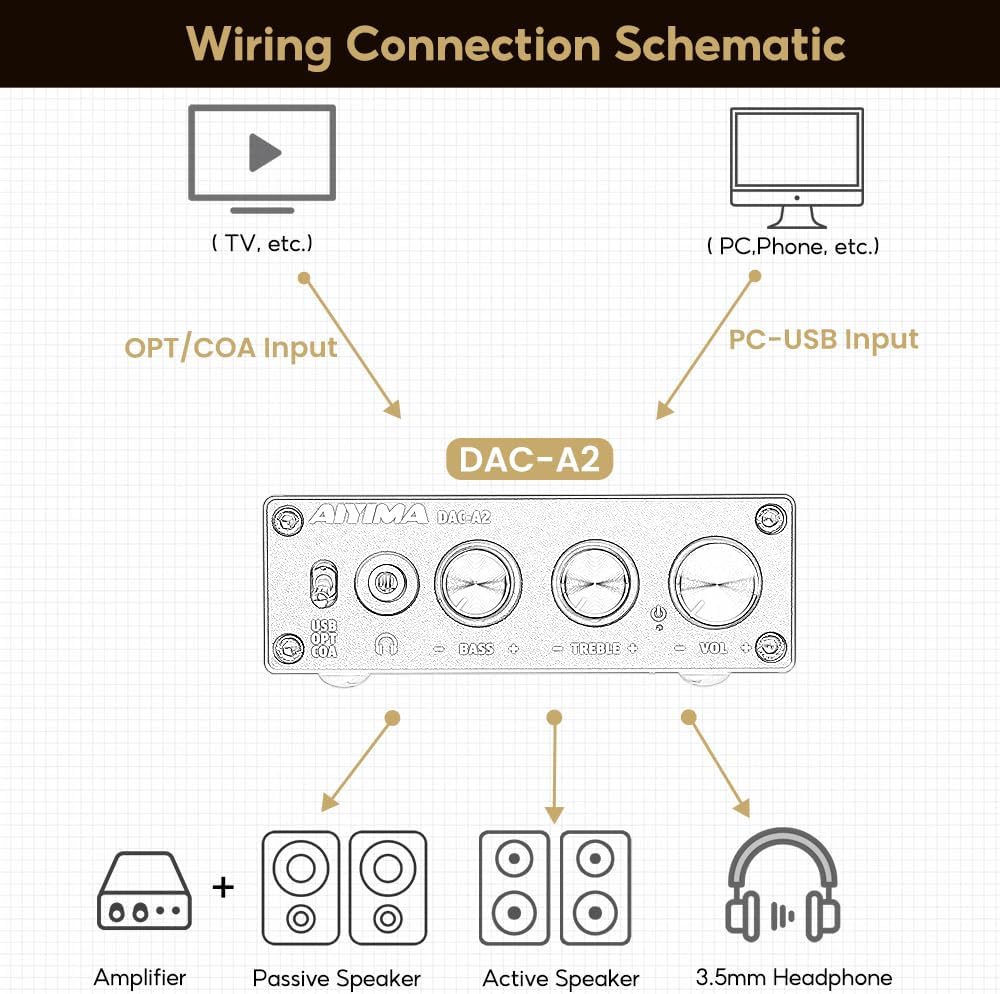
රූපය 4: සම්බන්ධතා රූප සටහන
Video 1: Demonstrates connecting the AIYIMA DAC-A2 to a laptop and an amplifier, showing the audio output to speakers and headphones. It illustrates switching between PC-USB input and adjusting volume, bass, and treble controls.
6. මෙහෙයුම් උපදෙස්
- බලය සක්රිය / අක්රිය: Press the Volume Control Knob to turn the unit on or off. The power indicator light will illuminate when on.
- ආදාන තේරීම: Use the Input Switch (USB/OPT/COA) on the front panel to select your active audio source.
- ශබ්ද ගැලපුම: Rotate the Volume Control Knob clockwise to increase volume and counter-clockwise to decrease it.
- බාස් ගැලපීම: Rotate the Bass Control Knob to increase or decrease the bass frequencies according to your preference.
- ත්රිත්ව ගැලපුම: Rotate the Treble Control Knob to increase or decrease the treble frequencies according to your preference.

Figure 5: Adjustable Bass and Treble Controls
Video 2: Shows the AIYIMA DAC-A2 in a desktop setup, demonstrating the connection of headphones and the adjustment of volume, bass, and treble controls for an enhanced audio experience.
7. පිරිවිතර

රූපය 6: නිෂ්පාදන මානයන්
| විශේෂාංගය | පිරිවිතර |
|---|---|
| වෙළඳ නාමය | අයිමිමා |
| ආදර්ශ අංකය | DAC-A2 |
| චිප්සෙට් | SA9023+CS8416+97220+NE5532 |
| PC-USB ආදාන Sampලිං අනුපාතය | 24Bit/96KHz |
| ඔප්ටිකල්/කොක්සියල් ආදානය Sampලිං අනුපාතය | 24Bit/192kHz |
| හෙඩ්ෆෝන් සම්බාධන පරාසය | 16ohm to 200ohm |
| උපරිම සැපයුම් වෙළුමtage | වෝල්ට් 5 |
| අවම සැපයුම් පරිමාවtage | 5 Volts (DC) |
| අතුරු මුහුණත වර්ගය | Coaxial, USB, Optical |
| නාලිකා ගණන | 1 |
| නිෂ්පාදන මානයන් (L x W) | 3.86"L x 2.89"W (approx. 98mm x 73mm) |
| අයිතමයේ බර | අවුන්ස 14.8 (දළ වශයෙන් ග්රෑම් 420) |
8. දෝශ නිරාකරණය
If you encounter issues with your DAC-A2, please refer to the following common problems and solutions:
- ශබ්ද ප්රතිදානය නැත:
- Ensure the DAC-A2 is powered on and the power indicator is lit.
- Verify that the correct input source (USB, OPT, COA) is selected using the front panel switch.
- Check all cable connections (input and output) are secure.
- If using headphones, ensure they are fully plugged into the 3.5mm jack. Remember the headphone output has priority over RCA.
- Adjust the volume knob on the DAC-A2 and ensure your connected speakers/amplifier also have their volume turned up.
- For PC-USB input, check your computer's sound settings to ensure the DAC-A2 is selected as the default playback device.
- විකෘති හෝ දුර්වල ශබ්ද තත්ත්වය:
- සියලුම කේබල් නිසි ලෙස සම්බන්ධ වී ඇති අතර හානි නොවන බවට වග බලා ගන්න.
- ගුණාත්මක ගැටළු සඳහා ශ්රව්ය මූලාශ්රය පරීක්ෂා කරන්න.
- Adjust the Bass and Treble controls to see if they are set to extreme levels causing distortion.
- Ensure the power supply is stable and providing sufficient 5V power. An unstable power supply can cause noise.
- අතරමැදි ශබ්දය:
- ලිහිල් කේබල් සම්බන්ධතා සඳහා පරීක්ෂා කරන්න.
- Ensure the power supply is consistent.
- If using PC-USB, try a different USB port on your computer or a different USB cable.
9. නඩත්තු කිරීම
- පිරිසිදු කිරීම: ඒකකයේ බාහිර පිරිසිදු කිරීම සඳහා මෘදු වියළි රෙද්දක් භාවිතා කරන්න. දියර පිරිසිදු කරන්නන් හෝ ද්රාවක භාවිතා නොකරන්න.
- ගබඩා: සෘජු හිරු එළියෙන් සහ අධික උෂ්ණත්වයන්ගෙන් ඈත්ව සිසිල් වියළි ස්ථානයක ඒකකය ගබඩා කරන්න.
- හැසිරවීම: ඒකකය බිම හෙළීමෙන් හෝ දැඩි බලපෑම්වලට ලක් කිරීමෙන් වළකින්න.
- වාතාශ්රය: අධික උනුසුම් වීම වැළැක්වීම සඳහා ඒකකය වටා ප්රමාණවත් වාතාශ්රයක් සහතික කරන්න.
10. වගකීම් සහ සහාය
AIYIMA products are designed for reliability and performance. For warranty information, technical support, or service inquiries, please refer to the contact information provided with your purchase or visit the official AIYIMA webවෙබ් අඩවිය. වගකීම් හිමිකම් සඳහා කරුණාකර ඔබේ මිලදී ගැනීමේ සාක්ෂි තබා ගන්න.
11. වැදගත් ආරක්ෂක තොරතුරු
- Do not expose this unit to rain, moisture, or extreme temperatures.
- c එක අරින්න එපාasinඋ. ඇතුළත පරිශීලක-සේවා කළ හැකි කොටස් නොමැත. සියලුම සේවා සුදුසුකම් ලත් පුද්ගලයින් වෙත යොමු කරන්න.
- Use only the specified power supply (DC 5V).
- ඒකකය තාප ප්රභවයන් අසල හෝ සෘජු හිරු එළියේ තැබීමෙන් වළකින්න.
- දරුවන්ට ළඟා විය නොහැකි ලෙස තබා ගන්න.


