1. හැඳින්වීම
Thank you for choosing the Soundmaster Eliteline IR300SI Internet DAB+ FM Radio. This device offers a wide range of audio entertainment options, including Internet Radio, DAB+ digital radio, FM radio, Bluetooth connectivity, and USB playback. It also features Amazon Alexa compatibility for voice control and can be managed via the UNDOK app. This manual provides essential information for setting up, operating, and maintaining your radio.
2 ආරක්ෂිත තොරතුරු
- භාවිතයට පෙර සියලුම උපදෙස් හොඳින් කියවා අනාගත යොමුව සඳහා තබා ගන්න.
- උපාංගය වර්ෂාව, තෙතමනය හෝ අධික උෂ්ණත්වයන්ට නිරාවරණය නොකරන්න.
- නිසි වාතාශ්රය සහතික කරන්න; කිසිදු වාතාශ්රය විවරයක් අවහිර නොකරන්න.
- ඒකකය සමඟ සපයා ඇති බල ඇඩැප්ටරය පමණක් භාවිතා කරන්න.
- ඒකකය ඔබම විවෘත කිරීමට හෝ අලුත්වැඩියා කිරීමට උත්සාහ නොකරන්න. සියලුම සේවා සුදුසුකම් ලත් පුද්ගලයින් වෙත යොමු කරන්න.
- උපාංගය ශක්තිමත් චුම්බක ක්ෂේත්ර වලින් ඈත් කරන්න.
3. පැකේජ අන්තර්ගතය
කරුණාකර සියලුම අයිතම තිබේදැයි පරීක්ෂා කරන්න:
- Soundmaster Eliteline IR300SI Internet DAB+ FM Radio
- බල ඇඩැප්ටරය
- දුරස්ථ පාලකය
- පරිශීලක අත්පොත (මෙම ලේඛනය)
- Installation material (e.g., antenna, if separate)
4. නිෂ්පාදන අවසන්view
Familiarize yourself with the various parts and controls of your Soundmaster IR300SI radio.

රූපය 4.1: ඉදිරිපස කෝණය view of the Soundmaster IR300SI radio, showing the display, speakers, and control buttons.
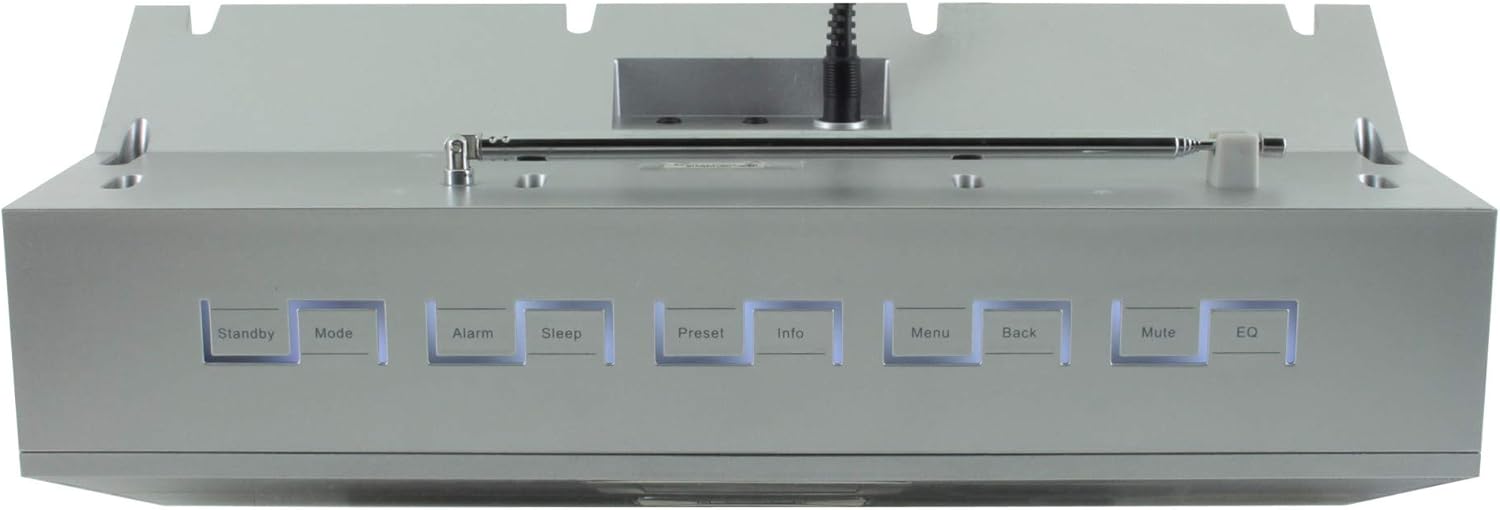
රූපය 4.2: ඉහළ view of the Soundmaster IR300SI radio, highlighting the control buttons: Standby, Mode, Alarm, Sleep, Preset, Info, Menu, Back, Mute, and EQ.
ඉදිරිපස පුවරුව
- 2.4" / 6 cm TFT Color Display: Shows station information, menus, and time.
- කථිකයන්: ස්ටීරියෝ ශබ්ද ප්රතිදානය.
- පාලන ඩයල්/බොත්තම්: සංචාලනය සහ තේරීම සඳහා.
ඉහළ පැනල් පාලනය
- සුදානමින් සිටීම: බලය සක්රිය / අක්රිය.
- මාදිලිය: Switch between Internet Radio, DAB+, FM, Bluetooth, USB, AUX.
- අනතුරු ඇඟවීම: අනතුරු ඇඟවීම් සකසා කළමනාකරණය කරන්න.
- නින්ද: Activate sleep timer.
- පෙර සැකසුම: Access and save favorite stations.
- තොරතුරු: Display additional information about the current broadcast.
- මෙනුව: Access system settings and options.
- ආපසු: පෙර මෙනුව වෙත ආපසු යන්න.
- නිශ්ශබ්ද කරන්න: ශ්රව්ය නිහඬ කරන්න/නිහඬ කරන්න.
- EQ: සමකරන පෙරසිටුවීම් තෝරන්න.
Rear/Side Panel Connections
- බල ආදානය: සැපයූ බල ඇඩැප්ටරය සම්බන්ධ කරන්න.
- දුරේක්ෂ ඇන්ටනාව: For DAB+ and FM reception.
- USB Port: For MP3 playback from USB storage devices.
- 3.5mm Aux-In Port: Connect external audio sources.
- හෙඩ්ෆෝන් ජැක්: පුද්ගලික සවන්දීම සඳහා.
5. පිහිටුවීම
5.1 බල සම්බන්ධතාවය
- Connect the power adapter to the DC input on the rear of the radio.
- බල ඇඩැප්ටරය බිත්ති අලෙවිසැලකට සම්බන්ධ කරන්න.
- ඔබන්න සුදානමින් සිටීම button on the top panel or remote control to turn on the radio.
5.2 ඇන්ටෙනා සැකසුම
ප්රශස්ත DAB+ සහ FM රේඩියෝ පිළිගැනීම සඳහා දුරේක්ෂ ඇන්ටනාව සම්පූර්ණයෙන්ම දිගු කරන්න.
5.3 Initial Wi-Fi Network Setup
Upon first power-on, the radio will guide you through the initial setup wizard:
- Select your preferred language using the control dial and confirm.
- රේඩියෝව පවතින Wi-Fi ජාල සඳහා ස්කෑන් කරනු ඇත.
- ලැයිස්තුවෙන් ඔබේ ජාලය තෝරන්න.
- Enter your Wi-Fi password using the on-screen keyboard and control dial. Confirm to connect.
- Once connected, the radio will display the main menu.
6. මෙහෙයුම් උපදෙස්
භාවිතා කරන්න මාදිලිය button to switch between different audio sources.
6.1 අන්තර්ජාල ගුවන් විදුලිය
- ඔබන්න මාදිලිය to select "Internet Radio".
- Navigate through categories (e.g., Location, Genre, Popular) using the control dial.
- Select a station to begin playback.
- නැවතුම්පළක් පෙරසිටුවක් ලෙස සුරැකීමට, ඔබා අල්ලාගෙන සිටින්න පෙරසිටුවයි button, then select a preset number.
6.2 DAB+ රේඩියෝව
- ඔබන්න මාදිලිය to select "DAB+ Radio".
- රේඩියෝව ස්වයංක්රීයව පවතින DAB+ මධ්යස්ථාන සඳහා පරිලෝකනය කරයි.
- Use the control dial to browse and select stations.
- ඔබන්න පෙරසිටුවයි to save a station.
6.3 FM රේඩියෝව
- ඔබන්න මාදිලිය to select "FM Radio".
- The radio will automatically scan for available FM stations.
- Use the control dial to browse and select stations.
- ඔබන්න පෙරසිටුවයි to save a station.
6.4 බ්ලූටූත් සම්බන්ධතාවය
- ඔබන්න මාදිලිය to select "Bluetooth". The radio will enter pairing mode.
- ඔබගේ ජංගම උපාංගයේ (ස්මාර්ට්ෆෝන්, ටැබ්ලටය), බ්ලූටූත් සක්රීය කර පවතින උපාංග සොයන්න.
- Select "Soundmaster IR300SI" from the list to pair.
- Once connected, you can stream audio from your device to the radio.
6.5 USB නැවත ධාවනය
- Insert a USB storage device (formatted as FAT32) containing MP3 fileUSB පෝට් එකට s.
- ඔබන්න මාදිලිය to select "USB".
- Navigate through folders and select tracks using the control dial.
6.6 AUX ආදානය
- Connect an external audio device (e.g., MP3 player) to the 3.5mm Aux-In port using an audio cable (not supplied).
- ඔබන්න මාදිලිය to select "AUX".
- ඔබගේ බාහිර උපාංගයෙන් පසුධාවනය පාලනය කරන්න.
6.7 Alarms and Sleep Timer
- අනතුරු ඇඟවීම්: ඔබන්න අනතුරු ඇඟවීම button to set up to two alarms. Configure time, source (buzzer, radio), and frequency (daily, weekdays, weekends).
- නින්ද ටයිමර්: ඔබන්න නිදාගන්න button to set a countdown timer (e.g., 15, 30, 60 minutes) after which the radio will automatically turn off.
6.8 සමකරනය (EQ)
ඔබන්න EQ button to cycle through pre-programmed sound settings (e.g., Normal, Jazz, Rock, Classical, Pop, News) to optimize audio output for different content.
6.9 Amazon Alexa and UNDOK App Control
- ඇමසන් ඇලෙක්සා: The radio is compatible with Amazon Alexa. Follow the instructions in the Alexa app to link your Soundmaster IR300SI for voice control functionalities.
- UNDOK App: Download the UNDOK app from your mobile device's app store. Ensure your mobile device and the radio are on the same Wi-Fi network. The app allows you to control the radio, browse stations, and manage settings remotely.
7. නඩත්තු කිරීම
7.1 පිරිසිදු කිරීම
- පිරිසිදු කිරීමට පෙර සෑම විටම විදුලිබල පද්ධතියෙන් රේඩියෝව විසන්ධි කරන්න.
- බාහිර පෘෂ්ඨයන් පිස දැමීමට මෘදු වියළි රෙද්දක් භාවිතා කරන්න.
- උල්ෙල්ඛ පිරිසිදු කරන්නන්, ඉටි හෝ ද්රාවක භාවිතා නොකරන්න, මන්ද ඒවා නිමාවට හානි කළ හැකිය.
7.2 ගබඩා කිරීම
If you plan to store the radio for an extended period, unplug it from the power source and store it in a cool, dry place, away from direct sunlight and extreme temperatures.
8. දෝශ නිරාකරණය
ඔබට ගැටළු ඇති වුවහොත්, පහත පොදු ගැටළු සහ විසඳුම් වෙත යොමු වන්න:
| ගැටලුව | විය හැකි හේතුව | විසඳුම |
|---|---|---|
| බලය නැත | බල ඇඩැප්ටරය සම්බන්ධ වී නැත හෝ දෝෂ සහිත අලෙවිසැලක්. | බල සම්බන්ධතා පරීක්ෂා කරන්න. වෙනත් අලෙවිසැලක් උත්සාහ කරන්න. |
| ශබ්දයක් නැත | Volume too low, muted, or incorrect source selected. | ශබ්දය වැඩි කරන්න. ඔබන්න නිහඬ කරන්න. Ensure correct mode (Internet Radio, DAB+, etc.) is selected. |
| Wi-Fi වෙත සම්බන්ධ විය නොහැක | වැරදි මුරපදය, දුර්වල සංඥා හෝ රවුටරයේ ගැටලුවක්. | Verify password. Move radio closer to router. Restart router. |
| දුර්වල DAB+/FM පිළිගැනීමක් | ඇන්ටෙනාව දිගු නොවීම හෝ දුර්වල සංඥා ප්රදේශයක්. | Fully extend the telescopic antenna. Reposition the radio. |
| බ්ලූටූත් යුගල කිරීම අසාර්ථකයි | Radio not in pairing mode, or device too far. | Ensure radio is in Bluetooth mode. Move devices closer. Restart Bluetooth on both devices. |
9. පිරිවිතර
| විශේෂාංගය | පිරිවිතර |
|---|---|
| මාදිලියේ නම | IR300SI |
| වෙළඳ නාමය | සවුන්ඩ්මාස්ටර් |
| සම්බන්ධතා තාක්ෂණය | බ්ලූටූත්, USB, Wi-Fi |
| විශේෂ ලක්ෂණ | Integrated Clock, Internet Radio, DAB+, FM, Bluetooth, USB MP3 Playback, AUX-In, Headphone Jack, 2 Alarms with Weekend Function, Sleep Timer, Equalizer, Amazon Alexa Compatible, UNDOK App Control, Network Music Player (DLNA) |
| ශ්රව්ය ප්රතිදාන ප්රකාරය | ස්ටීරියෝ |
| උපරිම කථික ප්රතිදාන බලය | 2 x 10 වොට් RMS |
| ප්රදර්ශනය කරන්න | 2.4" / 6 cm TFT Color Display |
| පාලන ක්රමය | Remote Control, UNDOK App, On-device Buttons |
| බලශක්ති ප්රභවය | AC Powered (100 Volts input) |
| නිෂ්පාදන මානයන් (L x W x H) | 17 x 18 x 15 සෙ.මී |
| අයිතමයේ බර | කිලෝ ග්රෑම් 2.3 යි |
| වර්ණය | රිදී |
| ගැළපෙන උපාංග | Personal Computer, Television, Tablet, Smartphone, Laptop |
| සවිකිරීමේ වර්ගය | ටැබ්ලටය |
10. වගකීම් සහ සහාය
The Soundmaster Eliteline IR300SI comes with a spare parts availability period of 1 year from the date of purchase. For technical support, warranty claims, or further assistance, please contact your retailer or the Soundmaster customer service department. Refer to the contact information provided with your purchase documentation.


