1. හැඳින්වීම
The SKYRC D400 Ultimate Duo is a high-performance, dual-channel AC/DC balance charger designed for charging various battery types, including LiPo, LiHV, LiFe, LiIon, NiMH, NiCd, and Pb batteries. It features two independent circuits, allowing simultaneous charging of two different battery types. The charger supports power distribution in both AC and DC modes to optimize charging efficiency and reduce charging time. Additionally, Channel 2 can function as a DC power supply, providing up to 150 watts for external DC devices.
2. පැකේජ අන්තර්ගතය
පහත ලැයිස්තුගත කර ඇති සියලුම අයිතම ඔබේ පැකේජයට ඇතුළත් කර ඇති බව තහවුරු කරගන්න:
- SKYRC D400 Charger Unit
- AC විදුලි රැහැන
- Cable XH Adaptor
- Banana connectors with XT60 connector Charging Cable
- Additional Charging Cable
- උපදෙස් අත්පොත

Image: The SKYRC D400 charger with its AC power cord, XH adaptor, banana connectors with XT60 charging cable, and instruction manual.
3. නිෂ්පාදන අවසන්view
The SKYRC D400 features a robust design with clear labeling for all ports and controls. Understanding the layout is crucial for safe and efficient operation.
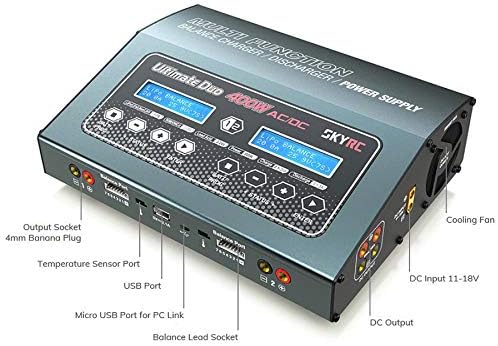
රූපය: ඉහළ-පහළ view of the SKYRC D400 charger highlighting the output sockets (4mm Banana Plug), Temperature Sensor Port, USB Port, Micro USB Port for PC Link, Balance Lead Socket, and Cooling Fan.
ප්රධාන සංරචක ඇතුළත් වේ:
- Output Sockets (4mm Banana Plug): For connecting main battery leads.
- උෂ්ණත්ව සංවේදක තොට: For connecting an optional temperature sensor to monitor battery temperature during charging.
- USB Port: For firmware updates or charging USB-powered devices.
- Micro USB Port for PC Link: For connecting to a computer for advanced settings and data logging.
- Balance Lead Socket: For connecting battery balance leads to ensure even cell voltagආරෝපණය කිරීමේදී ඊ.
- සිසිලන විදුලි පංකාව: ක්රියාත්මක වන අතරතුර තාපය විසුරුවා හැරීම සඳහා ස්වයංක්රීයව ක්රියාත්මක වේ.
- DC ආදානය (11-18V): For connecting to an external DC power source.
- DC ප්රතිදානය: Channel 2 can provide up to 150W DC power for external devices.

රූපය: පැත්ත view of the SKYRC D400 charger, clearly showing the DC Input (11-18V), DC Output, and Smart Fan with a "DO NOT COVER!" warning.
4. පිහිටුවීම
4.1 බල සම්බන්ධතාවය
The D400 charger can be powered by either AC (Alternating Current) or DC (Direct Current) sources.
- AC බලය: Connect the provided AC power cord to the AC input port on the charger and then to a standard 100-240V AC mains outlet.
- DC බලය: Connect an external DC power source (11-18V) to the DC input port on the charger. Ensure the polarity is correct.
4.2 බැටරි සම්බන්ධතාවය
Before connecting any battery, ensure the charger is powered on and the correct battery type and charging parameters are selected on the display.
- Connect the main charging cable (e.g., banana connectors with XT60) to the appropriate output socket (CHA or CHB) on the charger.
- Connect the main charging cable to your battery.
- Connect the battery's balance lead to the corresponding balance lead socket on the charger. This is crucial for balanced charging of multi-cell batteries.
- Repeat for the second channel if charging two batteries simultaneously.
5. මෙහෙයුම් උපදෙස්
5.1 Basic Charging Process
After connecting the battery, the charger will typically detect the battery type or prompt you to select it. Follow the on-screen instructions to set the charging parameters.
- Navigate through the menu using the control buttons to select the desired charging mode (e.g., Charge, Balance Charge, Fast Charge, Storage, Discharge).
- Select the battery type (e.g., LiPo, NiMH) and the number of cells (e.g., 1S-7S for LiPo).
- Set the desired charging current (Amps). Refer to your battery's specifications for recommended charging rates.
- Confirm the settings and start the charging process. The charger will display real-time charging information.
5.2 Dual-Channel Operation
The D400 features two independent charging channels (CHA and CHB), allowing you to charge two different batteries simultaneously with different settings.
- Connect the first battery to CHA and configure its settings.
- Connect the second battery to CHB and configure its settings independently.
- Start charging for both channels.
5.3 බලය බෙදා හැරීම
The charger supports intelligent power distribution. For example, if the total power is 400W, Channel 1 can draw 300W while Channel 2 draws 100W. Note that the maximum power for Channel 2 is 200W, while Channel 1 can reach 400W. This feature optimizes charging speed when using both channels.
5.4 DC Power Supply Function
Channel 2 of the D400 can act as a DC power supply, providing a maximum of 150 watts DC power. This allows you to power various DC devices directly from the charger.
- Ensure no battery is connected to Channel 2 for charging.
- Select the DC Power Supply mode for Channel 2 from the menu.
- අපේක්ෂිත ප්රතිදාන පරිමාව සකසන්නtage (6-15V DC adjustable).
- Connect your DC device to the DC Output port on Channel 2.
5.5 App Remote Control and Monitoring
The charger may support remote control and monitoring via a dedicated mobile application (e.g., ISDT Link or similar). This allows you to view charging status, adjust parameters, and end charging processes remotely.
Video: Demonstrates the ISDT BattAir Plugin & K4 Charger, showing how to connect a battery, automatically adjust charging parameters, set voltage parameters via a mobile app, and remotely monitor and end the charging process. While this video features a different charger model (K4), the app functionality for remote control and monitoring is similar to what might be available for the D400.
6. නඩත්තු කිරීම
- චාජරය පිරිසිදුව හා දූවිලි හා සුන්බුන් වලින් තොරව තබා ගන්න. පිරිසිදු කිරීම සඳහා මෘදු වියළි රෙද්දක් භාවිතා කරන්න.
- Ensure proper ventilation around the charger. Do not block the cooling fan or air vents.
- චාජරය සෘජු හිරු එළිය සහ අධික උෂ්ණත්වයන්ගෙන් ඈත්ව සිසිල් වියළි ස්ථානයක ගබඩා කරන්න.
- Regularly inspect cables and connectors for any signs of wear or damage. Replace damaged components immediately.
7. දෝශ නිරාකරණය
- චාජරය ක්රියාත්මක නොවේ: Check the AC power cord connection or DC input source. Ensure the power outlet is functional.
- Battery not detected: Verify that the main charging leads and balance leads are securely connected to both the charger and the battery. Ensure the battery type and cell count are correctly selected.
- Charging error message: Consult the charger's display for specific error codes or messages. Refer to the full manual (if available) for detailed explanations and solutions. Common issues include incorrect battery settings, damaged battery, or connection problems.
- අධික උනුසුම් වීම: Ensure the charger has adequate ventilation and the cooling fan is not obstructed. Reduce the charging current if necessary.
8. පිරිවිතර
| විශේෂාංගය | පිරිවිතර |
|---|---|
| වෙළඳ නාමය | Skyrc |
| ආදර්ශ අංකය | SKY100123 |
| ආදාන වෙළුමtage | AC 100-240V / DC 11-18V |
| Charge Circuit Power | AC Mode: CH1/CH2: 50-200W (Power Distribution), DC Mode: CH1/CH2: 200W (Power Distribution) |
| Discharge Circuit Power | 10W |
| ආරෝපණ ධාරා පරාසය | 0.1-20A |
| විසර්ජන ධාරා පරාසය | 0.1-5A |
| ශේෂ ධාරාව | Max 500mA/cell |
| LiPo/LiFe/LiIon/LiHV Cell Count | 1-7S |
| NiMH/NiCd Cell Count | 1-18S |
| Pb Battery Voltage | 2-24V |
| DC Power Supply Output | 6-15V / 150W (Channel 2) |
| අයිතමයේ බර | කිලෝග්රෑම් 0.3 (අවුන්ස 10.6) |
9. වගකීම් සහ සහාය
For warranty information, technical support, or service inquiries, please contact SKYRC directly or refer to the official product webවෙබ් අඩවිය. ඕනෑම වගකීම් හිමිකම් පෑමක් සඳහා මිලදී ගැනීමේ සාක්ෂියක් ලෙස ඔබේ මිලදී ගැනීමේ රිසිට්පත තබා ගන්න.


