හැඳින්වීම
This manual provides detailed instructions for the safe and efficient operation, maintenance, and troubleshooting of your Roborock S6 Pure Robot Vacuum and Mop. Please read this manual thoroughly before using the product and retain it for future reference.
වැදගත් ආරක්ෂක තොරතුරු
ගින්න, විදුලි කම්පනය සහ තුවාල ඇතිවීමේ අවදානම අවම කිරීම සඳහා විදුලි උපකරණ භාවිතා කරන විට සෑම විටම මූලික ආරක්ෂක පියවරයන් අනුගමනය කරන්න.
- රොබෝ රික්තය එළිමහනේ හෝ තෙත් මතුපිට භාවිතා නොකරන්න.
- දරුවන්ට රොබෝ රික්තය ක්රියාත්මක කිරීමට ඉඩ නොදෙන්න.
- Ensure the charging dock is placed on a level surface against a wall.
- Remove any loose cables, small objects, or fragile items from the floor before operation.
- Do not use the robot vacuum to pick up large debris, sharp objects, or liquids.
- Only use the original charging dock and power adapter provided by Roborock.
නිෂ්පාදන සංරචක
Familiarize yourself with the main components of your Roborock S6 Pure.

රූපය: ඉහළට view of the Roborock S6 Pure Robot Vacuum, showing the LiDAR sensor tower, power button, and spot cleaning button.
- LiDAR Navigation System: නිරවද්ය සිතියම්ගත කිරීම සහ සංචාලනය සඳහා.
- ප්රධාන බුරුසුව: කාපට් සහ ඝන බිම් ගැඹුරු පිරිසිදු කිරීම සඳහා.
- පැති බුරුසු: දාරවලින් සහ කොන් වලින් සුන්බුන් අතුගා දමයි.
- Dustbin: අපිරිසිදු හා සුන්බුන් එකතු කරයි.
- Water Tank & Mop Cloth: For mopping functions.
- ආරෝපණ තටාකය: For automatic recharging.
- බල බොත්තම: To turn on/off and start/pause cleaning.
- ස්ථාන පිරිසිදු කිරීමේ බොත්තම: For targeted cleaning of small areas.
සැකසුම් මාර්ගෝපදේශය
1. ඇසුරුම් ඉවත් කිරීම සහ ස්ථානගත කිරීම
- Carefully remove the robot vacuum and all accessories from the packaging.
- Choose a suitable location for the charging dock. It should be placed against a wall, on a hard, level surface, with at least 0.5 meters (1.6 feet) clear space on both sides and 1.5 meters (4.9 feet) in front.
- Connect the power adapter to the charging dock and plug it into a wall outlet. Ensure the cable is neatly tucked away to prevent entanglement.
2. මූලික අයකිරීම
Place the robot vacuum onto the charging dock. Ensure the charging contacts on the robot align with those on the dock. The power indicator light on the robot will illuminate, indicating it is charging. Fully charge the robot before first use (approximately 3-5 hours).
3. යෙදුම් ස්ථාපනය සහ සම්බන්ධතාවය
For full functionality, download the Roborock app on your smartphone.
- Scan the QR code in the quick start guide or search for "Roborock" in your app store.
- යෙදුම විවෘත කර ගිණුමක් සාදන්න.
- Follow the in-app instructions to add your S6 Pure robot vacuum. This typically involves connecting to the robot's Wi-Fi hotspot and then connecting the robot to your home Wi-Fi network.

Image: The Roborock S6 Pure robot vacuum next to a smartphone displaying the Roborock app interface, demonstrating advanced app control capabilities.
මෙහෙයුම් උපදෙස්
1. පිරිසිදු කිරීමක් ආරම්භ කිරීම
- රොබෝ බොත්තම් හරහා: Press the Power button once to start a full clean. Press it again to pause. Press and hold to turn off.
- රොබොරොක් යෙදුම හරහා: Open the app, select your S6 Pure, and tap "Clean" to start. You can also select specific rooms or zones to clean.

Image: The Roborock S6 Pure robot vacuum cleaning a specific area, illustrating its selective room cleaning feature based on a mapped layout.
2. පිරිසිදු කිරීමේ කාර්යය
The S6 Pure can vacuum and mop simultaneously. To use the mopping function:
- වතුර ටැංකිය පිරිසිදු ජලයෙන් පුරවන්න.
- මොප් රෙදි වතුර ටැංකියට අමුණන්න.
- Slide the water tank assembly into the back of the robot until it clicks into place.
- Start a cleaning cycle. The robot will automatically switch to mopping mode on hard floors.
3. සිතියම්ගත කිරීම සහ සංචාලනය
The S6 Pure uses Precision LiDAR Navigation to create an accurate map of your home. This map is used for efficient cleaning paths, multi-floor mapping, and setting no-go zones.

Image: A visual representation of the Roborock S6 Pure utilizing LiDAR navigation to map a room, showing distance measurements and effective home-mapping.

Image: An illustration depicting a multi-story house with the Roborock S6 Pure, showing how it can map and store layouts for different floors.
4. Voice Control (Alexa)
The Roborock S6 Pure is compatible with Amazon Alexa. To enable voice control:
- Ensure your Roborock S6 Pure is connected to the Roborock app and your home Wi-Fi.
- Amazon Alexa යෙදුම විවෘත කරන්න.
- Go to "Skills & Games" and search for "Roborock".
- Enable the Roborock skill and link your Roborock account.
- You can now use commands like: "Alexa, ask Roborock to start cleaning." or "Alexa, ask Roborock to go home."
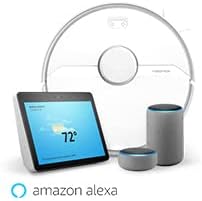
Image: The Roborock S6 Pure robot vacuum shown alongside Amazon Echo devices, illustrating its compatibility with Amazon Alexa for voice control.
නඩත්තු කිරීම
නිතිපතා නඩත්තු කිරීම ප්රශස්ත ක්රියාකාරිත්වය සහතික කරන අතර ඔබේ රොබෝ රික්තකයේ ආයු කාලය දීර්ඝ කරයි.
1. ඩස්ට්බින් සහ ෆිල්ටරය
- හිස් කුණු බඳුන: After each cleaning cycle, open the top cover, remove the dustbin, and empty its contents.
- පිරිසිදු පෙරහන: Tap the filter to remove dust. The filter can also be rinsed with water; ensure it is completely dry before reinserting. Clean at least once a week, or more frequently if used often.
2. ප්රධාන බුරුසුව සහ පැති බුරුසුව
- ප්රධාන බුරුසුව: Remove the main brush cover and the brush itself. Use the cleaning tool provided to cut and remove any tangled hair or debris. Clean weekly.
- පැති බුරුසු: Check for tangled hair or debris. If necessary, remove the screw holding the side brush and clean it. Replace if damaged. Clean monthly.
3. Wheels and Sensors
- රෝද: Wipe the drive wheels and omnidirectional wheel with a dry cloth to remove dust and hair. Clean monthly.
- සංවේදක: Gently wipe all sensors (cliff sensors, wall sensor, charging contacts) with a soft, dry cloth. Clean monthly.
4. Mop Cloth and Water Tank
- මොප් රෙදි: Remove the mop cloth after each use and wash it thoroughly. It can be hand-washed or machine-washed.
- ජල ටැංකිය: Empty any remaining water from the tank after each use. Rinse the tank if necessary.
දෝෂගවේෂණය
පොදු ගැටළු සහ ඒවායේ විසඳුම් සඳහා මෙම කොටස බලන්න.
| ගැටලුව | විය හැකි හේතුව | විසඳුම |
|---|---|---|
| රොබෝවරයා සක්රිය නොවේ. | බැටරිය අඩු හෝ ආරෝපණය වී නැත. | රොබෝව ආරෝපණ තටාකය මත තබා එය සම්පූර්ණයෙන්ම ආරෝපණය වී ඇති බවට වග බලා ගන්න. |
| Robot cannot return to charging dock. | Charging dock is blocked or out of range. | Ensure the charging dock has clear space around it. Move the dock to a more central location if needed. |
| Cleaning performance is poor. | කුණු බඳුන පිරී ඇත, බුරුසු පැටලී ඇත, නැතහොත් පෙරහන අවහිර වී ඇත. | Empty the dustbin, clean the main brush and side brush, and clean or replace the filter. |
| රොබෝවරයා නිතරම හිරවෙනවා. | Obstacles, loose cables, or dark surfaces. | Clear the cleaning area of obstacles. Use no-go zones in the app for problematic areas. |
| යෙදුම් සම්බන්ධතා ගැටළු. | Incorrect Wi-Fi password, router issues, or robot offline. | Ensure correct Wi-Fi password. Restart your router and the robot. Re-pair the robot with the app if necessary. |
පිරිවිතර
| විශේෂාංගය | විස්තර |
|---|---|
| මාදිලියේ නම | S6Pure |
| වෙළඳ නාමය | රොබෝරොක් |
| නිෂ්පාදන මානයන් | 14"අඟල් x 14"අඟල් x 4"උ |
| අයිතමයේ බර | රාත්තල් 15.17 කි |
| බැටරි ආයු කාලය | මිනිත්තු 180 දක්වා |
| පෙරහන් වර්ගය | රෙදි |
| පාලන ක්රමය | හඬ, යෙදුම |
| ගැළපෙන උපාංග | Amazon Echo |
| බලශක්ති ප්රභවය | බැටරි බලයෙන් |
| වෙළුමtage | වෝල්ට් 220 |
| UPC | 606015769620 |
වගකීම් සහ සහාය
වගකීම් තොරතුරු සහ තාක්ෂණික සහාය සඳහා, කරුණාකර නිල Roborock වෙත යොමු වන්න. webවෙබ් අඩවියට හෝ ඔවුන්ගේ පාරිභෝගික සේවයට සෘජුවම සම්බන්ධ වන්න. වගකීම් හිමිකම් සඳහා මිලදී ගැනීමේ සාක්ෂියක් ලෙස ඔබේ මිලදී ගැනීමේ රිසිට්පත තබා ගන්න.
සබැඳි සම්පත්: www.roborock.com
පරිශීලක අත්පොත (PDF): PDF අත්පොත බාගන්න


