1. හැඳින්වීම
The TechniSat TECHNIRADIO RDR is a portable digital and FM radio designed for on-the-go listening. It features DAB+ digital radio reception for clear, noise-free audio, as well as traditional FM radio with RDS. The device supports MP3 playback from USB storage devices and includes an AUX-IN interface for connecting external audio sources. Its compact design, replaceable battery, and integrated LED torch make it a versatile companion for various environments.
2. පෙට්ටියේ ඇති දේ
- TechniSat TECHNIRADIO RDR Portable Radio
- Mini USB Charging Cable
- Rechargeable Lithium-Ion Battery (3.7 V / 800 mAh)
- උපදෙස් අත්පොත
3. නිෂ්පාදන ලක්ෂණ
- DAB+ ඩිජිටල් රේඩියෝව: Enjoy a wide range of digital radio programs with robust, noise-free reception.
- FM Radio with RDS: Tune into traditional FM stations and receive broadcast information via RDS.
- LCD සංදර්ශකය: A two-line LCD provides information about the current radio program and settings.
- Favorite Memory: Store up to 20 DAB+ and 20 FM stations for quick access.
- Direct Dial Buttons: Four freely assignable buttons for instant access to preferred stations.
- USB ප්ලේබැක්: MP3 සංගීතය වාදනය කරන්න files directly from a connected USB data carrier.
- AUX-IN Interface: Connect external audio sources like smartphones or MP3 players.
- හෙඩ්ෆෝන් ජැක්: පුද්ගලික සවන්දීම සඳහා.
- Integrated LED Torch: අඳුරු පරිසරයක දීප්තිය සපයයි.
- Changeable and Rechargeable Battery: Offers up to 10 hours of portable music enjoyment.
- සංයුක්ත සහ අතේ ගෙන යා හැකි නිර්මාණය: Easy to carry with dimensions of 12.7 cm x 2.3 cm x 5.8 cm and a weight of 124g.
4. පාලන සහ සම්බන්ධතා
ඉදිරිපස පැනල් පාලන

රූපය: ඉදිරිපස view of the TechniSat TECHNIRADIO RDR. This image displays the LCD screen, the speaker grille on the left, and the control buttons on the right. Buttons include navigation arrows (<, OK, >), numbered direct dial buttons (1-4), and function buttons (MOD, M, I, LED).
- LCD සංදර්ශකය: ස්ථාන තොරතුරු, වේලාව සහ මෙනු විකල්ප පෙන්වයි.
- කථානායක: ශ්රව්ය ප්රතිදානය.
- < / > Buttons: Navigate menus, change stations, or adjust settings.
- හරි බොත්තම: තේරීම් තහවුරු කරන්න.
- 1-4 බොත්තම්: Direct access to preset favorite stations.
- MOD (Mode) Button: Switch between DAB+, FM, USB, and AUX modes.
- M (Menu/Memory) Button: Access menu options or save/recall presets.
- I (Info) Button: Display additional information (e.g., RDS data).
- LED බොත්තම: Activate/deactivate the LED torch.
Side and Rear Connections

රූපය: කෝණික view of the TechniSat TECHNIRADIO RDR, highlighting the side panel. This image shows the USB port, AUX-in jack, and headphone jack. The wrist strap attachment point is also visible.
- USB Port (Type-A): For connecting USB storage devices to play MP3 files.
- AUX-IN ජැක් (මි.මී. 3.5): බාහිර ශ්රව්ය උපකරණ සම්බන්ධ කරන්න.
- හෙඩ්ෆෝන් ජැක් (මි.මී. 3.5): පුද්ගලික ශ්රව්ය ශ්රවණය සඳහා.
- Mini-USB Port (DC 5V): අභ්යන්තර බැටරිය ආරෝපණය කිරීම සඳහා.
- බැටරි මැදිරිය: Located on the rear, for the replaceable Li-ion battery.
5. පිහිටුවීම
5.1. බැටරි ස්ථාපනය සහ ආරෝපණය කිරීම
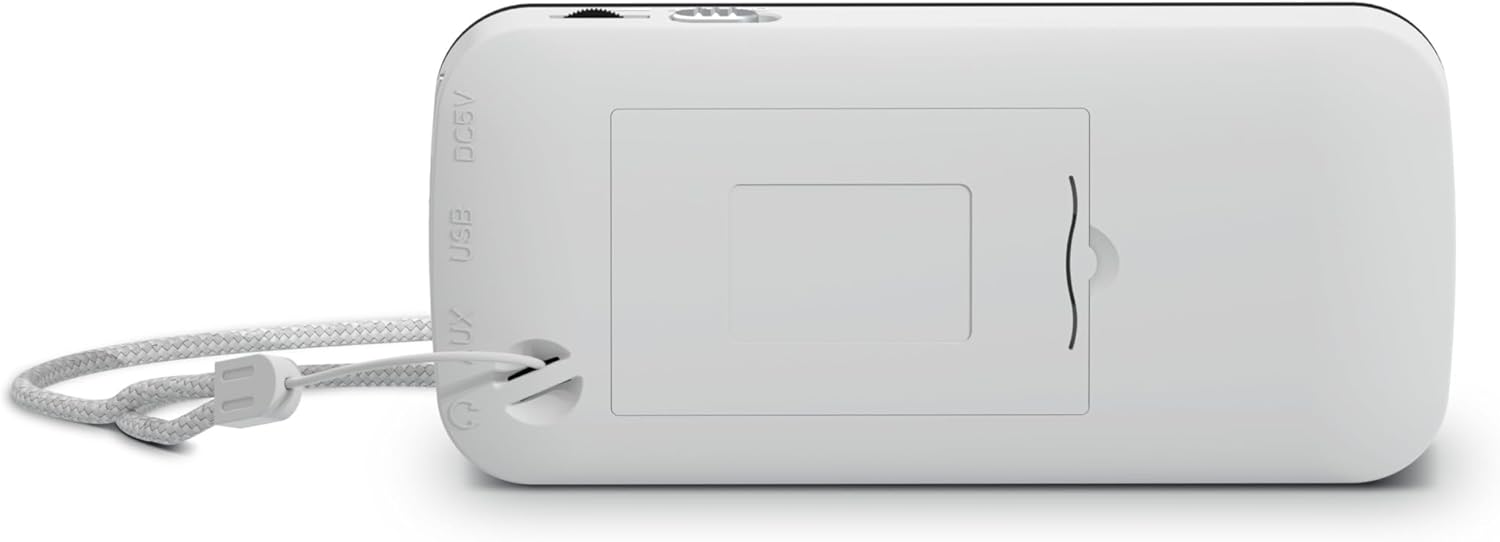
රූපය: පසුපස view of the TechniSat TECHNIRADIO RDR. This image shows the battery compartment cover, which can be opened to insert or replace the rechargeable Lithium-Ion battery. The DC 5V and USB labels are also visible on the side.
- උපාංගයේ පිටුපස බැටරි මැදිරිය සොයා ගන්න.
- බැටරි මැදිරි කවරය විවෘත කරන්න.
- Insert the provided Lithium-Ion battery, ensuring correct polarity.
- බැටරි මැදිරි කවරය ආරක්ෂිතව වසා දමන්න.
- Connect the mini USB charging cable to the mini-USB port on the side of the radio and to a suitable USB power adapter (not included) or a computer USB port.
- සංදර්ශකයේ ඇති බැටරි දර්ශකය ආරෝපණ තත්ත්වය පෙන්වනු ඇත. සම්පූර්ණ ආරෝපණයක් සාමාන්යයෙන් පැය කිහිපයක් ගතවේ.
5.2. මූලික බලය සක්රිය කිරීම
- After charging, disconnect the USB cable.
- Press and hold the power button (usually integrated with the MOD button or a dedicated button, refer to specific button layout if available) to turn on the radio.
- Upon first use, the radio may automatically initiate a DAB+ scan.
6. මෙහෙයුම් උපදෙස්
6.1. මාදිලිය තෝරා ගැනීම
ඔබන්න MOD button repeatedly to cycle through available modes: DAB+, FM, USB, and AUX.
6.2. DAB+ රේඩියෝ ක්රියාකාරිත්වය
- භාවිතා කර DAB+ මාදිලියට මාරු වන්න MOD බොත්තම.
- If it's the first time or if stations need to be updated, perform a full scan:
- ඔබන්න M (මෙනුව) බොත්තම.
- භාවිතා කරන්න </> "සම්පූර්ණ ස්කෑන්" වෙත සංචාලනය කිරීමට බොත්තම් ඔබන්න OK.
- The radio will scan for available DAB+ stations and store them.
- To select a station, use the </> buttons to browse the station list. Press OK තහවුරු කිරීමට.
- ප්රියතම ස්ථානයක් සුරැකීමට:
- අවශ්ය ස්ථානයට සුසර කරන්න.
- ඔබා අල්ලාගෙන සිටින්න M button until "Preset Store" appears.
- භාවිතා කරන්න </> පෙර සැකසූ අංකයක් (1-20) තෝරා ඔබන්න OK.
- To recall a favorite station, briefly press the M බොත්තම, භාවිතා කරන්න </> to select the preset, and press OK. Alternatively, use the direct dial buttons 1-4 if assigned.
- ඔබන්න I (Info) button to cycle through different information displays (e.g., program type, signal strength).
6.3. FM රේඩියෝ මෙහෙයුම
- භාවිතා කර FM මාදිලියට මාරු වන්න MOD බොත්තම.
- To auto-scan for stations:
- ඔබා අල්ලාගෙන සිටින්න < or > button to automatically search for the next available station.
- අතින් සුසර කිරීමට, කෙටියෙන් ඔබන්න < or > button to adjust the frequency step by step.
- To save a favorite station, follow the same procedure as DAB+ (press and hold M, select preset, OK).
- To recall a favorite station, briefly press M, select preset, OK, or use direct dial buttons 1-4.
- The radio supports RDS (Radio Data System), which displays station name and other information. Press the I (Info) button to cycle through available RDS data.
6.4. USB MP3 Playback
- Insert a USB storage device (e.g., USB stick) containing MP3 files into the USB Type-A port.
- භාවිතා කර USB මාදිලියට මාරු වන්න MOD බොත්තම.
- The radio will automatically detect and start playing MP3 files.
- භාවිතා කරන්න </> ධාවන පථ මඟ හැරීමට බොත්තම්.
- ද OK button may function as Play/Pause.
6.5. AUX-IN භාවිතය
- Connect an external audio device (e.g., smartphone, MP3 player) to the AUX-IN jack using a 3.5mm audio cable (not included).
- භාවිතා කර AUX මාදිලියට මාරු වන්න MOD බොත්තම.
- ඔබගේ සම්බන්ධිත බාහිර උපාංගයෙන් සෘජුවම නැවත ධාවනය සහ ශබ්දය පාලනය කරන්න.
6.6. LED Torch Function
ඔබන්න LED button to turn the integrated LED torch on or off.
7. බැටරි තොරතුරු
- The TECHNIRADIO RDR uses a replaceable 3.7V / 800 mAh Lithium-Ion battery.
- A fully charged battery provides up to 10 hours of operation, depending on usage and volume level.
- Charge the battery using the supplied mini USB cable connected to a 5V USB power source.
- To prolong battery life, avoid fully discharging the battery frequently and store the device with a partial charge if not used for extended periods.
- If the battery needs replacement, use only genuine TechniSat replacement batteries or compatible alternatives with the same specifications.
8. නඩත්තු කිරීම
- පිරිසිදු කිරීම: Use a soft, dry cloth to clean the radio's exterior. Do not use abrasive cleaners, waxes, or solvents.
- ගබඩා: සෘජු හිරු එළියෙන් සහ අධික උෂ්ණත්වයන්ගෙන් ඈත්ව සිසිල් වියළි ස්ථානයක රේඩියෝව ගබඩා කරන්න.
- ජල නිරාවරණය: මෙම උපාංගය ජල ආරක්ෂිත නොවේ. ජලයට නිරාවරණය වීමෙන් හෝ අධික ආර්ද්රතාවයෙන් වළකින්න.
- බැටරි සත්කාර: Refer to Section 7 for battery maintenance guidelines.
9. දෝශ නිරාකරණය
| ගැටලුව | විය හැකි හේතුව / විසඳුම |
|---|---|
| බලයක් නැත / උපාංගය ක්රියාත්මක නොවේ. |
|
| No DAB+ stations found. |
|
| Poor FM reception / Static. |
|
| USB නැවත ධාවනය ක්රියා නොකරයි. |
|
| AUX-IN වෙතින් ශබ්දයක් නැත. |
|
10. පිරිවිතර
ජෙනරාල්
- මාදිලියේ නම: TECHNIRADIO RDR
- ආදර්ශ අංකය: 0001/3922
- වෙළඳ නාමය: TechniSat
- වර්ණය: සුදු
- සංදර්ශක වර්ගය: LCD (Two-line)
ශ්රව්ය උපකරණ
- RMS බලය: වොට් 1
- Speaker Output Channel Quantity: 1 (මොනෝ)
- Headphone Connectivity: 3.5 mm ජැක්
සුසරකය
- සුසරක තාක්ෂණය: ඩීඒබී+ / එෆ්එම්
- රේඩියෝ සංගීත කණ්ඩායම් සහය දක්වයි: DAB+, UKW (FM)
- විශේෂාංග: RDS (Radio Data System) for FM, Favourite Memory (20 DAB+/20 FM)
සම්බන්ධතාවය
- USB සම්බන්ධතාවය: Yes (USB Type-A for MP3 playback, Mini-USB for charging)
- AUX ආදානය: Yes (3.5 mm Jack)
- සම්පූර්ණ USB පෝට්: 1 (Type-A for media, Mini-USB for power)
බලය
- බලශක්ති ප්රභවය: බැටරි බලයෙන්
- බැටරි වර්ගය: Lithium Ion (3.7 V / 800 mAh)
- බැටරි ඇතුළත්: ඔව්
- නැවත ආරෝපණය කළ හැකි බැටරි: ඔව්
- මෙහෙයුම් කාලය: පැය 10ක් දක්වා (ආසන්න වශයෙන්)
භෞතික
- නිෂ්පාදන මානයන් (W x D x H): 12.7 cm x 2.3 cm x 5.8 cm
- අයිතමයේ බර: ග්රෑම් 124 යි
- විශේෂ ලක්ෂණ: LED පන්දම
11. වගකීම් සහ සහාය
For warranty information and technical support, please refer to the warranty card included with your product or visit the official TechniSat webවෙබ් අඩවිය. ඕනෑම වගකීම් හිමිකම් සඳහා ඔබේ මිලදී ගැනීමේ සාක්ෂි තබා ගන්න.


