හැඳින්වීම
This manual provides detailed instructions for the setup, operation, maintenance, and troubleshooting of your DPVR KNEWKEY RYMEK Typewriter Style Mechanical Keyboard. This keyboard offers both wired and wireless connectivity, multi-device pairing, and a distinctive retro design with dynamic LED backlighting.
පැකේජයේ අන්තර්ගතය
- DPVR KNEWKEY RYMEK Mechanical Keyboard
- USB ආරෝපණ කේබලය
- උපදෙස් අත්පොත (මෙම ලේඛනය)
සැලසුම
1. යතුරු පුවරුව ආරෝපණය කිරීම
Before initial use, fully charge the keyboard. Connect the provided USB charging cable to one of the two Micro-USB charging ports on the keyboard and to a power source (e.g., computer USB port or USB wall adapter). The keyboard features a built-in 1200mAh Lithium battery. A full charge provides approximately one week of usage, or 8 hours with full backlighting enabled.

රූපය: සමීප රූපය view of the keyboard's indicator lights and function keys, highlighting the charging port area.
2. රැහැන්ගත සම්බන්ධතාවය (USB)
To use the keyboard in wired mode, connect the USB charging cable from the keyboard to an available USB port on your computer. The keyboard will automatically be recognized by your operating system.
3. Wireless Bluetooth Connection
The RYMEK keyboard supports pairing with up to three devices simultaneously and switching between them. Follow these steps to pair a device:
- යතුරුපුවරුව සක්රීය කර ඇති බව සහතික කර ගන්න.
- ඔබා අල්ලාගෙන සිටින්න Fn key along with one of the Bluetooth channel keys (BT1, BT2, හෝ BT3) අනුරූප දර්ශක ආලෝකය වේගයෙන් දැල්වෙන තුරු තත්පර 3-5ක්. මෙයින් ඇඟවෙන්නේ යතුරුපුවරුව යුගල කිරීමේ මාදිලියේ ඇති බවයි.
- On your device (smartphone, tablet, or computer), navigate to its Bluetooth settings.
- ඒ සඳහා සොයන්න available devices and select "RYMEK Keyboard" (or similar) from the list.
- Once connected, the indicator light for the selected Bluetooth channel will stop flashing and remain solid.
යුගල කළ උපාංග අතර මාරු වීමට, සරලව ඔබන්න Fn key along with the desired Bluetooth channel key (BT1, BT2, හෝ BT3) once. The keyboard will connect to the previously paired device on that channel.
4. Integrated Tablet Stand
The keyboard features an integrated stand designed to hold tablets and smartphones, providing an ergonomic setup for typing. Simply place your device into the stand slot.

රූපය: කෝණික view of the DPVR KNEWKEY RYMEK keyboard, highlighting its retro design and the integrated tablet stand.
මෙහෙයුම් උපදෙස්
1. බලය සක්රිය / අක්රිය කරන්න
Locate the power switch on the keyboard to turn it on or off. Ensure the keyboard is on for both wired and wireless operation.
2. පසුතල පාලනය
The keyboard features dynamic LED backlighting with RGB support. Use the dedicated backlight control keys or key combinations (often involving the Fn key) to adjust brightness, change lighting patterns, or turn the backlight on/off. Refer to the keycap legends for specific functions.

රූපය: සමීප රූපය view of the backlit mechanical keys, demonstrating the blue LED illumination.
3. ප්රධාන කාර්යයන්
The keyboard features 83 keys, including standard alphanumeric keys, function keys, and special keys. The scroll knob typically controls volume or backlight intensity, depending on the active mode. The mechanical blue switches provide a tactile and audible typing experience.
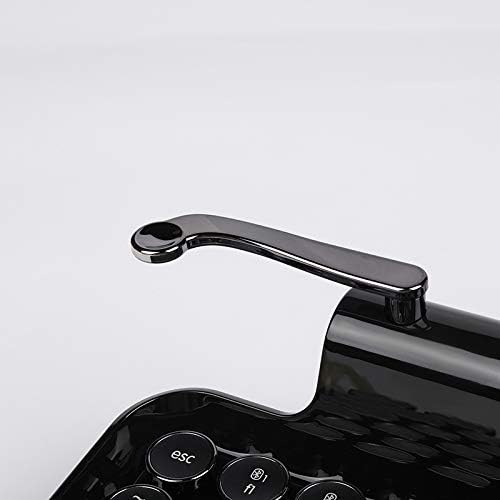
Image: Close-up of the versatile scroll knob on the keyboard.
4. ගැළපුම
The keyboard is compatible with Windows, macOS, iOS, and Android operating systems. Ensure your device's Bluetooth is enabled and properly configured for connection.
නඩත්තු කිරීම
1 පිරිසිදු කිරීම
To clean the keyboard, use a soft, dry, lint-free cloth. For stubborn dirt, a slightly damp cloth with mild soap can be used, ensuring no liquid enters the keyboard. Avoid abrasive cleaners or solvents. The main body is made of ABS (Piano Lacquer) and keycaps are PC & ABS.
2. බැටරි රැකවරණය
To prolong battery life, avoid fully discharging the keyboard frequently. If storing the keyboard for an extended period, charge it to approximately 50% before storage and recharge every few months.
දෝෂගවේෂණය
- යතුරුපුවරුව බ්ලූටූත් හරහා සම්බන්ධ නොවේ: Ensure the keyboard is in pairing mode (indicator light flashing). Check your device's Bluetooth settings to ensure it's enabled and searching for devices. Try forgetting the device on your system and re-pairing.
- ප්රතිචාර නොදක්වන යතුරු: Check if the keyboard is powered on and properly connected (wired or wireless). If wireless, ensure the battery is charged. Try restarting the keyboard and your connected device.
- පසුබිම් ආලෝකය ක්රියා නොකරයි: Ensure the backlight is enabled and brightness is adjusted using the dedicated keys. Check battery level, as low battery might disable backlighting.
- බැටරි ආරෝපණය නොවේ: Verify the USB cable is securely connected to both the keyboard and the power source. Try a different USB port or cable.
- Tablet stand stability: While designed for tablets and smartphones, very large or heavy devices may affect stability. Ensure the device is centered.
පිරිවිතර
| වෙළඳ නාමය | DPVR |
| ආකෘතිය | රයිමෙක් |
| සම්බන්ධතාවය | Bluetooth (Wireless), USB (Wired) |
| ගැළපෙන උපාංග | ස්මාර්ට්ෆෝන්, ටැබ්ලට්, පරිගණක |
| මෙහෙයුම් පද්ධති සහාය | Windows, macOS, iOS, Android |
| යතුරු ගණන | යතුරු 83 |
| මාරු වර්ගය | නිල් යාන්ත්රික ස්විච |
| පසුතල ආලෝකය | Dynamic LED, RGB Support |
| බැටරි වර්ගය | ලිතියම් 1200mAh |
| බැටරි ආයු කාලය (රැහැන් රහිත) | Approx. 1 Week (standard use), 8 Hours (full light on) |
| ආරෝපණ වරායන් | Two Micro-USB |
| ද්රව්ය | Main Body: ABS (Piano Lacquer); Keycaps: PC & ABS |
| මානයන් (L x W x H) | 14.17" x 7.48" x 2.76" (36cm x 19cm x 7cm පමණ) |
| බර | 1.52 kg (ආසන්න වශයෙන්) |
වගකීම් සහතිකය
This product comes with a manufacturer's 1-year warranty from the date of purchase. Please retain your proof of purchase for warranty claims. The warranty covers manufacturing defects but does not cover damage caused by misuse, accidents, or unauthorized modifications.
සහාය
For further assistance, technical support, or warranty inquiries, please contact the manufacturer or your retailer. Refer to the product packaging or the manufacturer's official webසම්බන්ධතා තොරතුරු සඳහා අඩවිය.


