හැඳින්වීම
This instruction manual provides detailed information on the installation, operation, and maintenance of your Blaupunkt DENVER 212 DAB BT car radio. Please read this manual thoroughly before using the device to ensure proper functionality and to prevent damage. Keep this manual for future reference.

Image: Blaupunkt DENVER 212 DAB BT product banner.
ආරක්ෂිත තොරතුරු
- Ensure proper installation by a qualified professional to avoid electrical hazards or damage to your vehicle.
- රිය පැදවීමෙන් ඔබව අවධානය වෙනතකට යොමු කරන ආකාරයෙන් උපාංගය ක්රියාත්මක නොකරන්න. සෑම විටම මාර්ග ආරක්ෂාවට ප්රමුඛත්වය දෙන්න.
- ඒකකය අධික උෂ්ණත්වයන්ට, සෘජු හිරු එළියට හෝ තෙතමනයට නිරාවරණය වීමෙන් වළකින්න.
- Use only approved accessories and parts.
- Disconnect the vehicle's battery before installation to prevent short circuits.
පැකේජයේ අන්තර්ගතය
සියලුම අයිතම පැකේජයේ ඇති බව තහවුරු කරගන්න:
- Blaupunkt DENVER 212 DAB BT Car Radio Unit
- සවිකරන රාමුව
- Wiring Harness (ISO connector)
- DAB+ Antenna (if included with specific models)
- බාහිර මයික්රොෆෝනය
- Disassembly Keys
- පරිශීලක අත්පොත (මෙම ලේඛනය)
නිෂ්පාදනය අවසන්view
The Blaupunkt DENVER 212 DAB BT is a 1-DIN car radio featuring DAB+ digital radio, Bluetooth hands-free calling, and media streaming. It offers a robust design and short installation depth for versatile vehicle compatibility.

Image: Front panel of the Blaupunkt DENVER 212 DAB BT, showing display, control knobs, and buttons.
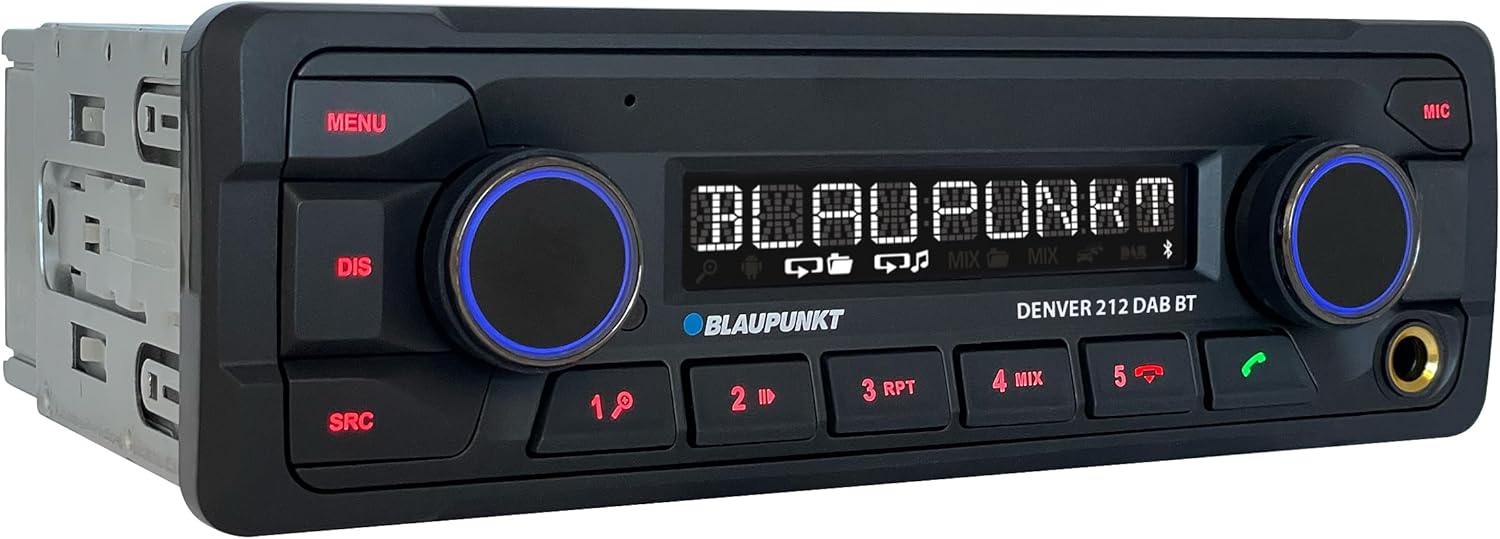
රූපය: කෝණික view of the Blaupunkt DENVER 212 DAB BT, highlighting its compact design.
ඉදිරිපස පැනල් පාලන:
- මෙනු බොත්තම: පද්ධති සැකසුම් සහ විකල්ප වෙත ප්රවේශ වේ.
- DIS Button: වෙනස්කම් තොරතුරු පෙන්වයි.
- SRC Button: Selects audio source (Radio, DAB, Bluetooth, USB, AUX).
- වෙළුම් බොත්තම (වමේ): Adjusts audio volume. Press to mute/unmute.
- Selection Knob (Right): මෙනු සංචාලනය කර විකල්ප තෝරා ගනී.
- පෙර සැකසූ බොත්තම් (1-6): Store and recall radio stations, control media playback.
- Call Buttons (Green/Red): Answer/end Bluetooth calls.
- USB Port: මාධ්ය නැවත ධාවනය සඳහා USB ගබඩා උපාංග සම්බන්ධ කරන්න.
- AUX Input (3.5mm Jack): Connect external audio sources.
සැකසුම සහ ස්ථාපනය
ස්ථාපන පියවර:
- සකස් කිරීම: ඔබේ වාහනයේ බැටරියේ ඍණ අග්රය විසන්ධි කරන්න.
- සවි කිරීම: Insert the supplied mounting frame into the vehicle's 1-DIN opening. Bend the tabs to secure it.
- රැහැන් ඇදීම: Connect the wiring harness according to the diagram below. Ensure all connections are secure.
- ඇන්ටෙනා සම්බන්ධතාවය: Connect the FM antenna and the DAB+ antenna (if applicable) to the corresponding inputs on the rear of the radio.
- මයික්රොෆෝන සම්බන්ධතාවය: Connect the external microphone to the designated input for optimal hands-free call quality.
- Insert Unit: Slide the radio unit into the mounting frame until it clicks into place.
- අවසාන පරීක්ෂාව: Reconnect the vehicle's battery and test the unit.
රැහැන් සටහන (සාමාන්ය):
| වයර් වර්ණය | කාර්යය |
|---|---|
| කහ | නියත 12V (බැටරි) |
| රතු | මාරු කළ 12V (දැල්වීම) |
| කළු | බිම |
| නිල් | බල ඇන්ටෙනාව / Ampලයිෆයර් දුරස්ථ |
| තැඹිලි/සුදු | ආලෝකකරණය |
| Speaker Wires (e.g., White, Grey, Green, Purple pairs) | Connect to vehicle speakers (Front Left, Front Right, Rear Left, Rear Right) |
| සුක්කානම් රෝද පාලන ආදානය | Connect to vehicle's steering wheel control interface (if applicable) |
Note: Specific wire colors may vary. Always refer to your vehicle's wiring diagram and the radio's included diagram for precise connections.

Image: The Blaupunkt DENVER 212 DAB BT car radio seamlessly integrated into a vehicle's dashboard.
මෙහෙයුම් උපදෙස්
1. මූලික කාර්යයන්:
- බලය සක්රිය / අක්රිය: Press the volume knob (left) briefly to turn the unit on. Press and hold to turn off.
- ශබ්ද පාලනය: Rotate the volume knob (left) to adjust the sound level.
- මූලාශ්ර තේරීම: ඔබන්න SRC button repeatedly to cycle through available audio sources (FM, DAB, Bluetooth Audio, USB, AUX).
- මෙනු සංචාලනය: ඔබන්න මෙනුව button to enter the main menu. Use the right knob to navigate and select options.
2. Radio (FM/DAB+):
- Selecting Radio Mode: ඔබන්න SRC until FM or DAB is selected.
- ස්වයංක්රීය සුසර කිරීම: In FM/DAB mode, press and hold the right knob or seek buttons (if available) to automatically search for stations.
- අත්පොත සුසර කිරීම: Briefly press the right knob or seek buttons to fine-tune frequencies.
- පෙරසිටර ගබඩා කිරීම: Tune to a desired station, then press and hold one of the numeric preset buttons (1-6) until you hear a confirmation beep.
- පෙරසිටුව සිහිපත් කිරීම: Briefly press a numeric preset button (1-6) to recall a stored station.
3. බ්ලූටූත් ක්රියාකාරිත්වය:
- උපාංගයක් යුගල කිරීම:
- ඔබගේ ජංගම උපාංගයේ බ්ලූටූත් සබල කර ඇති බව සහතික කර ගන්න.
- Select "Bluetooth" as the source on the car radio. The display will show "PAIRING".
- On your mobile device, search for Bluetooth devices and select "BLAUPUNKT DENVER".
- Confirm the pairing on both devices if prompted.
- හෑන්ඩ්ස්-ෆ්රී ඇමතීම:
- ඇමතුමකට පිළිතුරු දීම: හරිත ඇමතුම් බොත්තම ඔබන්න.
- ඇමතුමක් අවසන් කිරීම: Press the red call button.
- ඇමතුමක් ගැනීම: Dial from your phone; audio will transfer to the car radio.
- බ්ලූටූත් ශ්රව්ය ප්රවාහය: Once paired, select "Bluetooth Audio" as the source. Play music from your mobile device, and it will stream through the car radio. Use the preset buttons (e.g., 4 for MIX, 5 for RPT) for playback control (play/pause, skip tracks).
4. USB and AUX Input:
- USB ප්ලේබැක්: Insert a USB storage device into the front USB port. The unit will automatically switch to USB mode and begin playback.
- AUX ආදානය: Connect an external audio device (e.g., MP3 player) to the 3.5mm AUX input jack using an audio cable. Select "AUX" as the source.
5. Sound Settings (Equalizer):
- ඔබන්න මෙනුව button, then navigate to "AUDIO" or "EQ" settings.
- Adjust bass, treble, balance, and fader settings to your preference.
- Pre-set equalizer modes (e.g., Pop, Rock, Classic) may be available.
වීඩියෝ: ඉවරයිview of the Blaupunkt DENVER 212 DAB BT car radio's features and basic operation.
නඩත්තු කිරීම
- පිරිසිදු කිරීම: Use a soft, dry cloth to clean the unit's front panel. Do not use abrasive cleaners or solvents.
- USB Port: USB පෝට් එක දූවිලි හා සුන්බුන් වලින් තොරව තබා ගන්න.
- ස්ථිරාංග යාවත්කාලීන කිරීම්: Check the official Blaupunkt webඔබේ ආකෘතිය සඳහා පවතින ඕනෑම ස්ථිරාංග යාවත්කාලීන සඳහා වරින් වර වෙබ් අඩවියට පිවිසෙන්න.
දෝෂගවේෂණය
| ගැටලුව | විය හැකි හේතුව | විසඳුම |
|---|---|---|
| බලය නැත | Blown fuse; incorrect wiring (constant/switched 12V); loose connection. | Check vehicle fuses and the radio's fuse. Verify wiring connections, especially constant and ignition power. Ensure the unit is properly seated. |
| ශබ්දයක් නැත | ශබ්දය ඉතා අඩුයි; නිහඬ කිරීම සක්රිය කර ඇත; වැරදි ස්පීකර් රැහැන් ඇදීම; ampලිෆයර් ගැටළු. | ශබ්දය වැඩි කරන්න. නිශ්ශබ්ද කිරීම සක්රියදැයි පරීක්ෂා කරන්න. ස්පීකර් සම්බන්ධතා සත්යාපනය කරන්න. බාහිර එකක් නම් amplifier භාවිතා කරන විට, එහි බලය සහ සම්බන්ධතා පරීක්ෂා කරන්න. |
| Poor radio reception (FM/DAB) | ඇන්ටනාව සම්බන්ධ කර නැත; හානි වූ ඇන්ටනාව; දුර්වල සංඥා ප්රදේශය. | Ensure antenna is securely connected. Check antenna for damage. Consider a stronger antenna or signal booster if in a weak signal area. For DAB+, ensure the DAB antenna is correctly installed and positioned. |
| බ්ලූටූත් සම්බන්ධතා ගැටළු | Device not in pairing mode; incorrect wiring (ignition+ and constant+); interference. | Ensure both devices are in pairing mode. Delete previous pairings and try again. Verify that the constant 12V and switched 12V wires are correctly connected to the radio, as improper wiring can affect Bluetooth stability. Move away from other Bluetooth devices. |
| USB හඳුනාගෙන නොමැත | සහාය නොදක්වයි file format; USB drive not formatted correctly; damaged USB drive. | ශ්රව්ය උපකරණ සහතික කරන්න files are in supported formats (e.g., MP3, WMA). Format the USB drive to FAT32. Try a different USB drive. |
පිරිවිතර
| විශේෂාංගය | විස්තර |
|---|---|
| වෙළඳ නාමය | BLAUPUNKT |
| ආදර්ශ අංකය | Denver 212 DAB BT |
| වර්ණය | කළු |
| සම්බන්ධතා තාක්ෂණය | බ්ලූටූත්, USB |
| සම්බන්ධක වර්ගය | 3.5 මි.මී. ජැක්, USB |
| විශේෂ ලක්ෂණ | DAB, RDS, Equalizer, Bluetooth Hands-free |
| ගැළපෙන උපාංග | ස්මාර්ට් ජංගම දුරකථනය |
| සම්පූර්ණ USB පෝට් | 1 |
| ශ්රව්ය ප්රතිදාන ප්රකාරය | ස්ටීරියෝ |
| සරවුන්ඩ් සවුන්ඩ් චැනල් වින්යාසය | 4.0 |
| නිෂ්පාදන මානයන් | 12D x 17.8W x 5.2H සෙන්ටිමීටර |
| නිෂ්පාදකයා | Blaupunkt |
| අමතර කොටස් ලබා ගැනීමේ හැකියාව | 1 වසර |
වගකීම් සහ සහාය
This Blaupunkt product comes with a manufacturer's warranty. For specific warranty terms and conditions, please refer to the warranty card included with your product or visit the official Blaupunkt website. For technical support, troubleshooting assistance, or spare parts inquiries, please contact Blaupunkt customer service through their official channels.
Spare parts are generally available for 1 year from the date of purchase.
Official Blaupunkt Webඅඩවිය: www.blaupunkt.com


