1. හැඳින්වීම
ස්තූතියි, උදව් කළාටasing the TWS i17 Dual Earbuds. This manual provides essential information for setting up, operating, and maintaining your new wireless earbuds. Please read this manual thoroughly before use to ensure optimal performance and longevity of your device.
2 ආරක්ෂිත තොරතුරු
To prevent damage to your earbuds or injury to yourself or others, please observe the following precautions:
- ඉයර්බඩ් හෝ ආරෝපණ පෙට්ටිය අධික උෂ්ණත්වයන්ට, ආර්ද්රතාවයට හෝ ද්රවවලට නිරාවරණය නොකරන්න.
- උපාංගය බිම දැමීම, බලපෑම් කිරීම හෝ විසුරුවා හැරීමෙන් වළකින්න.
- Do not use abrasive cleaners or solvents. Clean with a soft, dry cloth.
- ශ්රවණ හානිය වළක්වා ගැනීම සඳහා මධ්යස්ථ ශබ්ද මට්ටම්වලින් සවන් දෙන්න.
- දරුවන්ට ළඟා විය නොහැකි ලෙස තබා ගන්න.
- This product is not water resistant. Avoid exposure to water or excessive moisture.
3. පැකේජ අන්තර්ගතය
ඔබගේ පැකේජයේ සියලුම අයිතම ඇති බව තහවුරු කරගන්න:
- TWS i17 Dual Earbuds (Left and Right)
- අයකිරීමේ නඩුව
- USB ආරෝපණ කේබලය
- පරිශීලක අත්පොත

Image: The TWS i17 Dual Earbuds, with one earbud partially removed from its charging case, showcasing සිනිඳු කළු නිර්මාණය.
4. පිහිටුවීම
4.1 ඉයර්බඩ් සහ කේස් ආරෝපණය කිරීම
පළමු භාවිතයට පෙර, ඉයර්බඩ් සහ ආරෝපණ පෙට්ටිය සම්පූර්ණයෙන්ම ආරෝපණය කරන්න.
- ඉයර්බඩ් දෙකම ආරෝපණ පෙට්ටියට දමන්න. ඒවා නිසි ලෙස සවි කර ඇති බවට වග බලා ගන්න.
- Connect the USB charging cable to the charging port on the bottom of the case and the other end to a USB power source (e.g., computer, wall adapter).
- The indicator light on the case will show charging status. It will turn off or change color when fully charged.
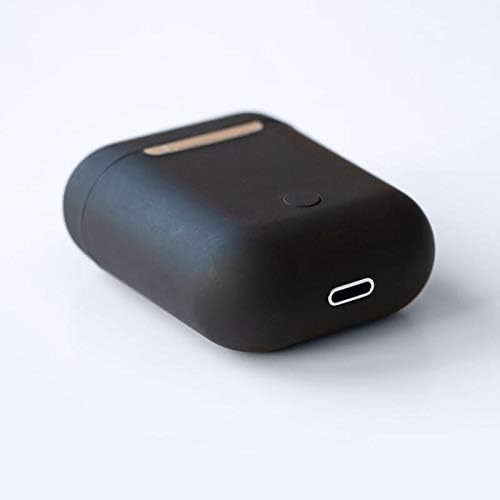
රූපය: සමීප ඡායාරූපයක් view of the bottom of the TWS i17 charging case, highlighting the USB charging port and a small button.
4.2 ඔබගේ උපාංගය සමඟ යුගල කිරීම
The i17 earbuds use Bluetooth for wireless connection.
- ඉයර්බඩ් ආරෝපණය කර ඇති බව සහතික කර ගන්න.
- ආරෝපණ පෙට්ටිය විවෘත කරන්න. ඉයර්බඩ් ස්වයංක්රීයව යුගල කිරීමේ ප්රකාරයට ඇතුළු වනු ඇත (දර්ශක ලයිට් දැල්වෙනු ඇත).
- On your mobile phone or Bluetooth-enabled device, go to Bluetooth settings and turn Bluetooth on.
- ඒ සඳහා සොයන්න available devices. Select "i17" from the list.
- Once connected, the indicator lights on the earbuds will stop flashing. You are now ready to use your earbuds.

Image: The TWS i17 Dual Earbuds resting inside their open charging case, ready for pairing or use.
5. මෙහෙයුම් උපදෙස්
5.1 බලය සක්රිය / අක්රිය
- බල ගැන්වීම: ආරෝපණ පෙට්ටියෙන් ඉයර්බඩ් එළියට ගන්න. ඒවා ස්වයංක්රීයව ක්රියාත්මක වී අවසන් වරට යුගල කළ උපාංගයට සම්බන්ධ වේ.
- විදුලිය විසන්ධි කිරීම: ඉයර්බඩ් නැවත ආරෝපණ පෙට්ටියට දමන්න. ඒවා ස්වයංක්රීයව ක්රියා විරහිත වී ආරෝපණය වීමට පටන් ගනී.
5.2 සංගීත වාදනය
- වාදනය/විරාමය: ඉයර්බඩ් එකක් වරක් තට්ටු කරන්න.
- ඊළඟ ධාවන පථය: දකුණු ඉයර්බඩය දෙවරක් තට්ටු කරන්න.
- පෙර ධාවන පථය: වම් ඉයර්බඩය දෙවරක් තට්ටු කරන්න.
5.3 ඇමතුම් කළමනාකරණය
- පිළිතුර/අවසන් ඇමතුම: ඉයර්බඩ් එකක් වරක් තට්ටු කරන්න.
- ඇමතුම ප්රතික්ෂේප කරන්න: ඉයර්බඩ් එකක් තත්පර 2ක් ඔබාගෙන සිටින්න.
5.4 හ oice සහකාර
- හඬ සහායක (සිරි/ගූගල් සහායක) සක්රිය කරන්න: ඉයර්බඩ් එකකින් තුන් වරක් තට්ටු කරන්න.
6. නඩත්තු කිරීම
Proper maintenance ensures the longevity of your earbuds:
- පිරිසිදු කිරීම: Use a soft, dry, lint-free cloth to clean the earbuds and charging case. Do not use liquids or sprays.
- ගබඩා: භාවිතයේ නොමැති විට, ඉයර්බඩ් ආරක්ෂා කර ගැනීමට සහ ආරෝපණය කර තබා ගැනීමට ඒවායේ ආරෝපණ ආවරණයේ ගබඩා කරන්න. සිසිල්, වියළි ස්ථානයක ගබඩා කරන්න.
- බැටරි සත්කාර: To prolong battery life, avoid fully discharging the earbuds frequently. Charge them regularly.

Image: The TWS i17 Dual Earbuds securely stored within their closed charging case, ready for transport or charging.
7. දෝශ නිරාකරණය
| ගැටලුව | විය හැකි හේතුව | විසඳුම |
|---|---|---|
| ඉයර්බඩ් යුගල නොවේ | Low battery; Out of range; Not in pairing mode; Bluetooth off on device. | Charge earbuds; Move closer to device; Ensure case is open for pairing; Turn on Bluetooth on device. |
| එක් ඉයර්බඩ් එකක් පමණක් ක්රියා කරයි | One earbud not charged; Earbuds not properly synced. | Ensure both earbuds are charged; Place both earbuds back in case, close, then reopen to re-sync. |
| ශබ්දයක් නැත | Volume too low; Not connected; Media paused. | Increase volume on device; Reconnect earbuds; Check media playback status. |
| ආරෝපණ නඩුව ආරෝපණය නොවේ | Faulty cable/adapter; Loose connection. | Try a different USB cable or power adapter; Ensure cable is securely plugged in. |
8. පිරිවිතර
| විශේෂාංගය | විස්තර |
|---|---|
| ආදර්ශ අංකය | i17 |
| වෙළඳ නාමය | TWS |
| සම්බන්ධතා තාක්ෂණය | රැහැන් රහිත (බ්ලූටූත්) |
| Headphones Form Factor | In-ear |
| මයික්රෆෝනය ඇතුළත් | ඔව් |
| ශබ්දය අවලංගු කිරීම | නැත |
| සමග අනුකූල වේ | ජංගම දුරකථන |
| වර්ණය | කළු |
| ද්රව්ය | ප්ලාස්ටික් |
| කේබල් විශේෂාංගය | Cable-free |
| ජල ප්රතිරෝධක මට්ටම | ජලයට ඔරොත්තු නොදෙන |
| නැව්ගත කිරීමේ මානයන් | 12.6 x 8.8 x 3.6 සෙ.මී |
| බර | ග්රෑම් 96 කි |
| පළමු ලබා ගත හැකි දිනය | 15 ජනවාරි 2020 |
9. වගකීම් සහ සහාය
For warranty information and customer support, please refer to the contact details provided on the product packaging or the official TWS webවෙබ් අඩවිය. වගකීම් හිමිකම් සඳහා ඔබේ මිලදී ගැනීමේ සාක්ෂි තබා ගන්න.
For further assistance, please contact TWS customer service.