1. ඉවරයිview
The Belkin BoostCharge USB-C to USB-C Fast Charging Cable is designed for efficient power delivery and data transfer between compatible USB-C devices. This 6.6ft (2M) cable supports fast charging up to 60W and data transfer speeds up to 480 Mbps, ensuring reliable performance for a wide range of electronics.
2. නිෂ්පාදන ලක්ෂණ
- විශ්ව අනුකූලතාව: Connects with a broad range of USB-C devices, including iPhone 17/16 Series, Samsung Galaxy S25/S24, Google Pixel 9, Nintendo Switch 2, iPad Pro, MacBook Pro, and more. Supports Apple Carplay and Android Auto.
- වේගවත් ආරෝපණය: Delivers up to 60W Power Delivery, enabling fast charging of compatible USB-C smartphones from 0-50% in approximately 35 minutes when paired with an 18W or higher USB-C PD charger (not included).
- උසස් කල්පැවැත්ම: Engineered with a durable braided material, tested to withstand over 8,000 bends and 10,000 plugs, offering enhanced longevity compared to standard cables.
- දත්ත හුවමාරුව: Supports data transfer speeds up to 480 Mbps (USB 2.0 standard) for syncing music, photos, and other data.
- USB-IF සහතික කර ඇත: Ensures adherence to strict electrical, mechanical, and environmental standards for a safe and reliable user experience.
Image: Illustration of 60W fast charging capability.
Image: USB-IF certification for 60W power delivery.
Image: Durability testing results for bends and plugs.
3. පැකේජ අන්තර්ගතය
පැකේජයට ඇතුළත් වන්නේ:
- 1 x Belkin USB-C to USB-C Cable (2M/6.6ft)
4. පිහිටුවීම
To set up your Belkin BoostCharge USB-C to USB-C cable:
- Ensure your charging adapter and device are compatible with USB-C and support the desired power delivery (e.g., 60W for fast charging).
- Connect one end of the Belkin USB-C cable to the USB-C port on your power adapter.
- Connect the other end of the Belkin USB-C cable to the USB-C port on your device (e.g., smartphone, tablet, laptop).
- බල ඇඩැප්ටරය බිත්ති අලෙවිසැලකට සම්බන්ධ කරන්න.

Image: A Belkin USB-C to USB-C cable connected to a device.
5. මෙහෙයුම් උපදෙස්
5.1 ඔබගේ උපාංගය ආරෝපණය කිරීම
Once connected as described in the Setup section, your device should begin charging automatically. The cable supports fast charging for devices that are compatible with USB Power Delivery (PD) and are paired with an appropriate power adapter.
5.2 දත්ත හුවමාරුව
To transfer data between two USB-C compatible devices (e.g., a smartphone and a laptop):
- Connect one end of the Belkin USB-C cable to the USB-C port on the source device.
- Connect the other end of the Belkin USB-C cable to the USB-C port on the destination device.
- Follow the on-screen prompts on your devices to initiate data transfer. The cable supports USB 2.0 data transfer speeds up to 480 Mbps.
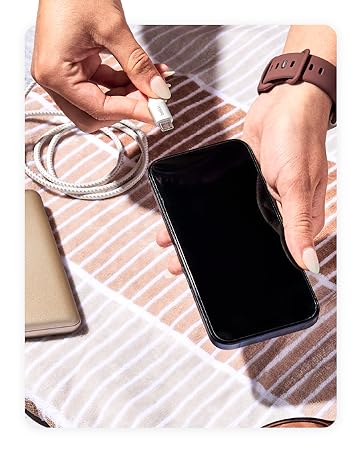
Image: Wide compatibility with various USB-C devices.
6. නඩත්තු කිරීම
To ensure the longevity and optimal performance of your Belkin BoostCharge USB-C to USB-C cable:
- ගබඩා: සෘජු හිරු එළියෙන් සහ අධික උෂ්ණත්වයන්ගෙන් ඈත්ව සිසිල් වියළි ස්ථානයක කේබලය ගබඩා කරන්න. අභ්යන්තර හානිය වළක්වා ගැනීම සඳහා තියුණු කෝණවලින් කේබලය තදින් දඟර කිරීමෙන් හෝ නැමීමෙන් වළකින්න.
- පිරිසිදු කිරීම: කේබලය සහ සම්බන්ධක මෘදු ලෙස පිස දැමීමට මෘදු වියළි රෙද්දක් භාවිතා කරන්න. දියර පිරිසිදු කරන්නන් හෝ උල්ෙල්ඛ ද්රව්ය භාවිතා නොකරන්න.
- හැසිරවීම: Always grasp the connector head when plugging or unplugging the cable, rather than pulling on the cable itself.
- පරීක්ෂාව: සම්බන්ධක ගෙවී යාම, දිරා යාම හෝ හානි වීමේ සලකුණු සඳහා කේබලය වරින් වර පරීක්ෂා කරන්න. කිසියම් හානියක් නිරීක්ෂණය කළහොත් භාවිතය නවත්වන්න.
7. දෝශ නිරාකරණය
7.1 උපාංගය ආරෝපණය නොවේ
- සම්බන්ධතා පරීක්ෂා කරන්න: Ensure both ends of the cable are securely plugged into the device and the power adapter.
- බලශක්ති ප්රභවය: Verify that the power adapter is plugged into a working wall outlet. Try a different outlet if necessary.
- ඇඩැප්ටර අනුකූලතාව: Confirm that your power adapter provides sufficient wattage for your device and supports USB Power Delivery (PD) for fast charging.
- කේබල් තත්ත්වය: Inspect the cable for any visible damage. A damaged cable may not function correctly.
- උපාංග ගැටලුව: Test the cable with another compatible device or try a different cable with your device to isolate the problem.
7.2 මන්දගාමී ආරෝපණ වේගය
- බල ඇඩැප්ටරය: Ensure you are using an 18W or higher USB-C PD charger for optimal fast charging speeds.
- උපාංග සහාය: Confirm that your device supports fast charging via USB-C PD.
- පසුබිම් යෙදුම්: ඔබගේ උපාංගයේ පසුබිමේ ධාවනය වන ඕනෑම බල-දැඩි යෙදුම් වසා දමන්න.
- කේබල් දිග: While this cable is 2M, longer cables can sometimes result in slightly slower charging. Ensure the cable is not excessively long for your needs.
7.3 දත්ත හුවමාරු ගැටළු
- සම්බන්ධතාවය: Re-seat both ends of the cable to ensure a stable connection.
- උපාංග සැකසුම්: Check your device's settings to ensure data transfer is enabled (e.g., USB preferences on Android devices).
- රියදුරු ගැටළු: Ensure necessary drivers are installed on your computer for the connected device.
8. පිරිවිතර
| විශේෂාංගය | විස්තරය |
|---|---|
| මාදිලියේ නම | BoostCharge USB-C to USB-C Cable |
| ආදර්ශ අංකය | CAB003bt2M |
| කේබල් දිග | මීටර් 2 (අඩි 6.6) |
| සම්බන්ධක වර්ගය | USB වර්ගය C (පිරිමි සිට පිරිමි දක්වා) |
| බල සැපයුම | 60W දක්වා |
| දත්ත හුවමාරු වේගය | 480 Mbps දක්වා (USB 2.0) |
| කල්පැවැත්ම | Tested to 8,000+ bends, 10,000+ plugs |
| සහතික කිරීම | USB-IF සහතික කර ඇත |
| වර්ණය | කළු |
| ද්රව්ය | Durable braided material |
| නිෂ්පාදන මානයන් | අඟල් 1 x 4 x 5.21 |
| අයිතමයේ බර | කිලෝග්රෑම් 0.07 (අවුන්ස 2.39) |

Image: Internal engineering for safety and performance.
9. වගකීම් සහ සහාය
බෙල්කින් සපයයි අවුරුදු 2ක ආවරණය for this BoostCharge USB-C to USB-C cable. For technical support, warranty claims, or further assistance, please visit the official Belkin support webවෙබ් අඩවිය හෝ ඔවුන්ගේ පාරිභෝගික සේවාව අමතන්න.

Image: Belkin 2-Year Coverage and quality assurance.
10. නිල නිෂ්පාදන වීඩියෝව
Video: Belkin Brand Overview. මෙම වීඩියෝව සාමාන්ය විස්තරයක් සපයයිview of the Belkin brand and its commitment to quality and innovation.


