නිෂ්පාදනය අවසන්view
The Hawk EC Lapel Microphone by Earphone Connection is designed for professional communication, offering a concealable and lightweight solution. It features the Easy-Connect System for secure radio connection and includes a clear acoustic audio tube with a Fin Ultra Ambi ear tip for enhanced comfort and ambient sound awareness.
This lapel headset mic is specifically engineered for compatibility with various Motorola walkie-talkie models, ensuring clear and reliable audio transmission in demanding environments.
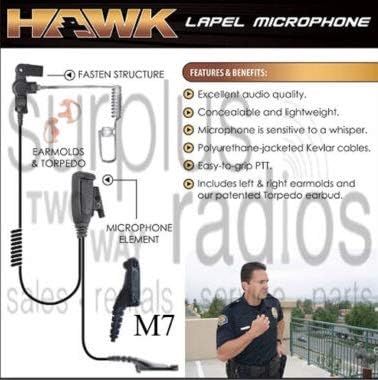
රූපය 1: Components and features of the Hawk EC Lapel Microphone. This diagram illustrates the fasten structure, earmolds & torpedo, microphone element, and highlights key benefits such as excellent audio quality, concealability, whisper-sensitive microphone, Kevlar cables, and easy-to-grip PTT.

රූපය 2: සවිස්තරාත්මක view of the Hawk EC Lapel Microphone, showing the acoustic tube, lapel microphone unit, and radio connector. This image provides a clear visual of the product's physical design.
ප්රධාන ලක්ෂණ
- Concealable and Lightweight: Designed for discreet and comfortable wear during extended periods.
- Sensitive Microphone: Capable of picking up even a whisper, ensuring clear communication in various environments.
- Excellent Audio Quality: Provides clear and crisp audio transmission and reception.
- වැඩිදියුණු කළ සුවපහසුව: Includes the Fin Ultra Ambi ear tip, which fits both left and right ears and allows for ambient sound awareness.
- කල් පවතින ඉදිකිරීම්: Features polyurethane-jacketed Kevlar cables for increased longevity and resistance to wear and tear.
- Easy-Connect System: Two guide arrows on the strain relief cable connector and EC Easy-Connect adapter ensure immediate and secure radio connection, reducing wear.
ගැළපුම
The EP1334-M7 Hawk EC Lapel Microphone is compatible with the following Motorola walkie-talkie models:
- Motorola APX6000
- Motorola APX6000XE
- Motorola APX7000
- Motorola APX7000XE
- Motorola APX8000
- Motorola XPR6300
- Motorola XPR6350
- Motorola XPR6500
- Motorola XPR6550
- Motorola XPR7550
සැකසුම් උපදෙස්
- සම්බන්ධක හඳුනා ගන්න: Locate the Easy-Connect System on your Hawk EC Lapel Microphone and the corresponding EC Easy-Connect adapter on your Motorola radio. Note the two guide arrows on both parts.
- Align and Connect: Align the guide arrows on the microphone's connector with the arrows on the radio's adapter. Gently push the microphone connector into the radio's adapter until it clicks securely into place. Do not force the connection.
- මයික්රෆෝනයේ පිහිටීම: Clip the lapel microphone unit to your clothing, ideally near your collar or lapel, ensuring it is positioned to capture your voice clearly and is easily accessible for the Push-To-Talk (PTT) button.
- Insert Earpiece: Insert the Fin Ultra Ambi ear tip into your ear. This ear tip can be worn in either the left or right ear. Adjust for comfort and secure fit.
- කේබල් කළමනාකරණය: Route the cable discreetly under your clothing to prevent snagging and maintain a professional appearance.
මෙහෙයුම් උපදෙස්
- රේඩියෝව ක්රියාත්මක කරන්න: Ensure your Motorola radio is powered on and properly configured for communication.
- Transmit (PTT): To transmit, press and hold the Push-To-Talk (PTT) button located on the lapel microphone unit. Speak clearly into the microphone. Release the PTT button when you have finished speaking.
- Receive Audio: Audio from the radio will be heard through the acoustic tube earpiece. Adjust the radio's volume control for comfortable listening.
- පරීක්ෂා කිරීම: Before critical use, perform a communication test with another radio user to ensure proper functionality and audio clarity.
නඩත්තු කිරීම
- පිරිසිදු කිරීම: Regularly wipe the microphone unit, PTT button, and cables with a soft, damp රෙදි. දරුණු රසායනික ද්රව්ය හෝ උල්ෙල්ඛ පිරිසිදු කරන්නන් භාවිතා නොකරන්න.
- Earpiece Hygiene: Clean the Fin Ultra Ambi ear tip and acoustic tube regularly with mild soap and water. Ensure they are completely dry before reassembly and use. Replace ear tips periodically for optimal hygiene and performance.
- කේබල් රැකවරණය: Avoid sharp bends, kinks, or excessive pulling on the cables to prevent internal damage. Store the unit neatly when not in use.
- ගබඩා: Store the lapel microphone in a cool, dry place away from direct sunlight and extreme temperatures.
දෝෂගවේෂණය
| ගැටලුව | විය හැකි හේතුව | විසඳුම |
|---|---|---|
| No audio from earpiece. |
|
|
| Transmit audio is unclear or weak. |
|
|
| අතරමැදි සම්බන්ධතාවය. |
|
|
පිරිවිතර
- ආකෘතිය: EP1334-M7
- වෙළඳ නාමය: ඉයර්ෆෝන් සම්බන්ධතාවය
- වර්ගය: Lapel Headset Microphone
- වර්ණය: කළු
- සම්බන්ධක වර්ගය: Male-to-Female (Easy-Connect System)
- කේබල් ද්රව්ය: Polyurethane-jacketed Kevlar
- කරාබු: Fin Ultra Ambi (medium, clear acoustic tube)
- ගැළපුම: Motorola APX6000, APX6000XE, APX7000, APX7000XE, APX8000, XPR6300, XPR6350, XPR6500, XPR6550, XPR7550 series radios.
වගකීම් තොරතුරු
The Hawk EC Lapel Microphone comes with a වසරක ආදේශන වගකීමක් මිලදී ගත් දින සිට. මෙම වගකීම් සහතිකය සාමාන්ය භාවිතය යටතේ ද්රව්ය හා වැඩ කිරීමේ දෝෂ ආවරණය කරයි. අනිසි භාවිතය, හදිසි අනතුරු, අනවසර වෙනස් කිරීම් හෝ බාහිර හේතූන් නිසා සිදුවන හානිය එය ආවරණය නොකරයි.
For warranty claims, please retain your proof of purchase and contact customer support.
සහාය
For further assistance, technical support, or to inquire about replacement parts, please visit the official Earphone Connection webවෙබ් අඩවිය හෝ ඔවුන්ගේ පාරිභෝගික සේවා දෙපාර්තමේන්තුව අමතන්න.
සබැඳි සම්පත්: www.earphoneconnection.com
Please have your product model (EP1334-M7) and purchase details ready when contacting support.