1. නිෂ්පාදන අවසන්view
The Billboard BB425 Gaming Headset is designed for an immersive audio experience across various gaming platforms. It features a boom microphone for clear communication, enhanced bass for rich sound, and convenient in-line controls for volume adjustment and instant muting. The headset is lightweight and adjustable, ensuring a comfortable fit during extended use, and comes with a durable fabric cord.
- බූම් මයික්රෆෝනය: පැහැදිලි හඬ සන්නිවේදනය සඳහා.
- වැඩිදියුණු කළ බාස්: Delivers a rich audio experience.
- In-line Control: Easily adjust volume and mute the microphone.
- සකස් කළ හැකි නිර්මාණය: Lightweight and comfortable for prolonged gaming sessions.
- Durable Fabric Cord: Designed for longevity.
2. සැකසුම් උපදෙස්
Follow these steps to connect your Billboard BB425 Gaming Headset to your device.
- සම්බන්ධක හඳුනා ගන්න: The headset features a single 3.5mm TRRS jack for combined audio and microphone functionality. An included Y-splitter cable separates this into two 3.5mm TRS jacks: one for audio output (typically green) and one for microphone input (typically pink).
- For Devices with a Single 3.5mm Port (e.g., most laptops, gaming controllers, smartphones):
- Plug the headset's single 3.5mm TRRS jack directly into your device's combined audio/microphone port.
- For Devices with Separate Audio and Microphone Ports (e.g., most desktop PCs):
- Connect the headset's single 3.5mm TRRS jack into the female end of the Y-splitter cable.
- Plug the audio output jack (often green) of the Y-splitter into your device's audio output port.
- Plug the microphone input jack (often pink) of the Y-splitter into your device's microphone input port.
- ගැළපුම සීරුමාරු කරන්න: Place the headset over your ears and adjust the headband for a comfortable and secure fit. Position the boom microphone near your mouth for optimal voice pickup.
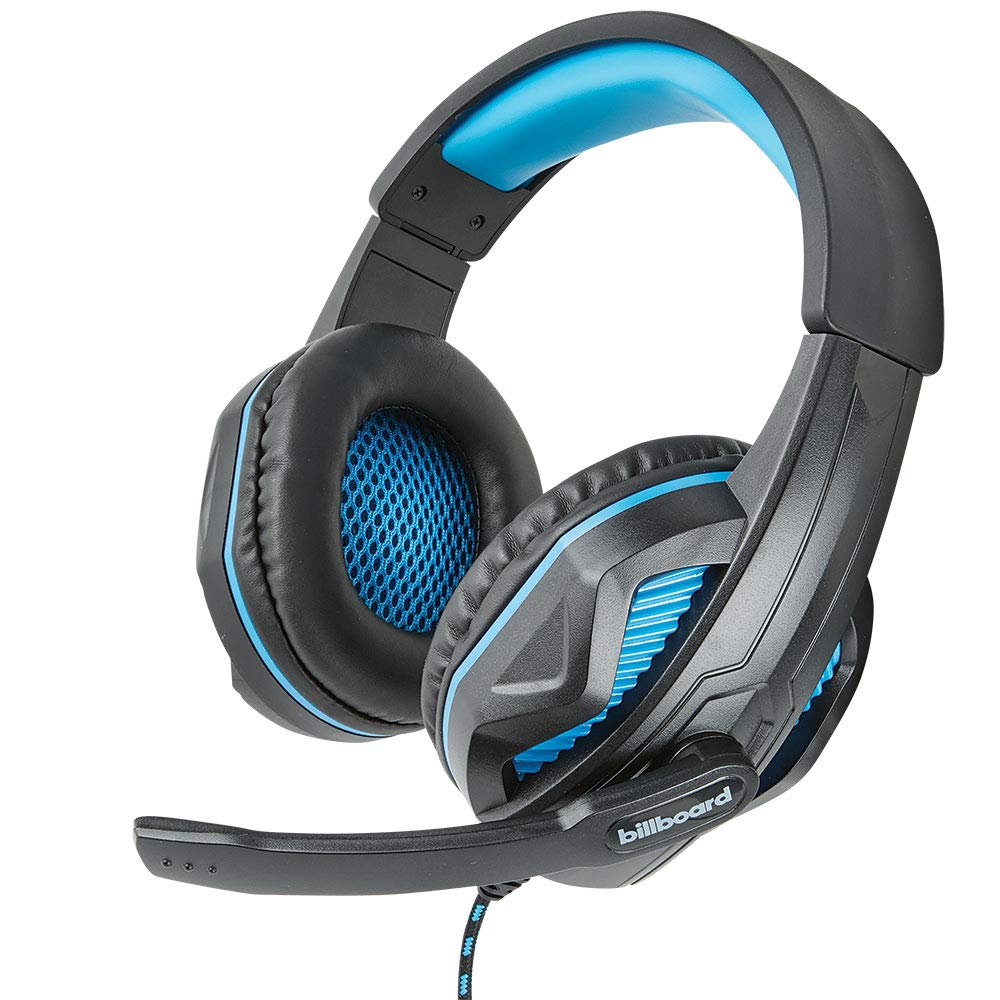
Image: The Billboard BB425 Gaming Headset's braided cable, in-line control unit, and the included Y-splitter cable with two 3.5mm TRS jacks for separate audio and microphone connections.
3. මෙහෙයුම් උපදෙස්
The in-line control unit provides easy access to essential audio functions.
- ශබ්ද පාලනය: Use the scroll wheel on the in-line control unit to adjust the audio volume. Scroll up to increase volume and down to decrease it.
- මයික්රෆෝනය නිශ්ශබ්ද කරන්න: The in-line control unit features a switch to mute or unmute the microphone. Slide the switch to the "OFF" position to mute your microphone, and to the "ON" position to enable it.
- Boom Microphone Adjustment: The flexible boom microphone can be positioned closer or further from your mouth to optimize voice clarity.
4. නඩත්තුව සහ රැකවරණය
නිසි සැලකිල්ල ඔබේ හෙඩ්සෙට් එකේ ආයු කාලය දීර්ඝ කරයි.
- පිරිසිදු කිරීම: හෙඩ්සෙට් එක පිස දැමීමට මෘදු, වියළි රෙද්දක් භාවිතා කරන්න. කන් කුෂන් සඳහා, තරමක් damp මෘදු සබන් සහිත රෙදි භාවිතා කළ හැකි නමුත්, භාවිතයට පෙර ඒවා සම්පූර්ණයෙන්ම වියළී ඇති බවට වග බලා ගන්න. සැර රසායනික ද්රව්ය හෝ උල්ෙල්ඛ පිරිසිදු කරන්නන් භාවිතා නොකරන්න.
- ගබඩා: හෙඩ්සෙට් එක අධික උෂ්ණත්වයන්ගෙන් සහ සෘජු හිරු එළියෙන් ඈත්ව පිරිසිදු, වියළි ස්ථානයක ගබඩා කරන්න. කේබලය පැටලීමෙන් වළකින්න.
- හැසිරවීම: Do not pull on the cable to disconnect the headset. Always grasp the plug firmly. Avoid dropping or subjecting the headset to strong impacts.
5. දෝශ නිරාකරණය
If you encounter issues with your Billboard BB425 Gaming Headset, refer to the following common solutions.
- ශබ්දයක් හෝ අඩු හඬක් නැත:
- Ensure the headset's 3.5mm jack(s) are fully inserted into the correct port(s) on your device.
- Check the in-line volume control wheel and adjust it to an audible level.
- Verify your device's audio output settings. Ensure the headset is selected as the default playback device.
- උපාංගයට විශේෂිත ගැටළුවක් බැහැර කිරීම සඳහා හෙඩ්සෙට් එක වෙනත් උපාංගයකින් පරීක්ෂා කරන්න.
- මයික්රෆෝනය ක්රියා නොකරයි:
- Ensure the microphone mute switch on the in-line control unit is in the "ON" position.
- If using the Y-splitter, ensure the microphone jack (typically pink) is correctly plugged into your device's microphone input port.
- Check your device's microphone input settings. Ensure the headset microphone is selected as the default recording device and that its input volume is not muted or set too low.
- වෙනත් යෙදුමක් හෝ උපාංගයක් සමඟ මයික්රෆෝනය පරීක්ෂා කරන්න.
- Static or Distorted Audio:
- සියලුම සම්බන්ධතා ආරක්ෂිත බවත් දූවිලි හෝ සුන්බුන් වලින් තොර බවත් සහතික කර ගන්න.
- Try connecting the headset to a different audio port or device to check if the issue persists.
- Avoid placing the cable near strong electromagnetic interference sources.
6. පිරිවිතර
| විශේෂාංගය | විස්තර |
|---|---|
| මාදිලියේ නම | BB425 |
| වෙළඳ නාමය | දැන්වීම් පුවරුව |
| සම්බන්ධතා තාක්ෂණය | රැහැන්ගත |
| හෙඩ්ෆෝන් ජැක් | 3.5 mm ජැක් |
| කන් ස්ථානගත කිරීම | කනට උඩින් |
| ආකෘති සාධකය | කණ මත |
| ගැළපෙන උපාංග | Gaming Consoles, Desktops, Laptops, Telephones |
| විශේෂ ලක්ෂණ | Enhanced bass |
| පාලන වර්ගය | In-line control (Volume, Mute) |
| කේබල් විශේෂාංගය | Retractable, Durable Fabric Cord |
| ද්රව්ය | ප්ලාස්ටික් |
| වර්ණය | කළු |
| නිෂ්පාදන මානයන් | 25.15 x 22.86 x 8.89 සෙ.මී |
| අයිතමයේ බර | 386 ග්රෑම් |
| අවශ්ය බැටරි | නැත |
7. වගකීම් තොරතුරු
This product is covered by a manufacturer's warranty. For specific details regarding warranty coverage, duration, and terms, please refer to the warranty card included with your product or visit the official Billboard webවෙබ් අඩවිය. ඕනෑම වගකීම් හිමිකම් පෑමක් සඳහා මිලදී ගැනීමේ සාක්ෂියක් ලෙස ඔබේ මිලදී ගැනීමේ රිසිට්පත තබා ගන්න.
8. පාරිභෝගික සහාය
If you require further assistance or have questions not addressed in this manual, please contact Billboard customer support. Contact information can typically be found on the product packaging or the official Billboard webඅඩවිය.
නිෂ්පාදකයා: ESI නඩු සහ උපාංග


