1. හැඳින්වීම
This manual provides essential information for setting up, operating, maintaining, and troubleshooting your HP Slim Desktop S01-aF0011. This compact desktop computer is designed for everyday computing tasks, featuring an AMD Athlon Silver 3050U processor, 4GB of RAM, a 256GB Solid State Drive (SSD), and running on Windows 11. Please read this manual thoroughly to ensure proper use and longevity of your device.

රූපය: ඉදිරිපස view of the HP Slim Desktop S01-aF0011.
2. පෙට්ටියේ ඇති දේ
Verify that all items are present in the packaging before proceeding with the setup.
- HP Slim Desktop S01-aF0011
- USB කළු රැහැන් සහිත යතුරු පුවරුව සහ මූසික සංයෝජනය
- 65 W ස්මාර්ට් ඒසී බල ඇඩැප්ටරය

Image: The HP Slim Desktop S01-aF0011 and its included accessories.
3. පිහිටුවීම
3.1 ඇසිරීම
Carefully remove the desktop computer and all accessories from the packaging. Place the desktop on a stable, flat surface with adequate ventilation.
3.2 සම්බන්ධක පර්යන්ත
Connect your keyboard, mouse, and monitor to the appropriate ports on the desktop.
- යතුරුපුවරුව සහ මූසිකය: Plug the USB connectors of the wired keyboard and mouse into any available USB ports on the front or back of the desktop.
- නිරීක්ෂණය: Connect your monitor to one of the video output ports (HDMI, DisplayPort, or DVI) on the back of the desktop using a compatible cable. Ensure the monitor is also connected to a power source.
- බල ඇඩැප්ටරය: Connect the 65W Smart AC power adapter to the power input port on the back of the desktop, then plug the other end into a wall outlet.
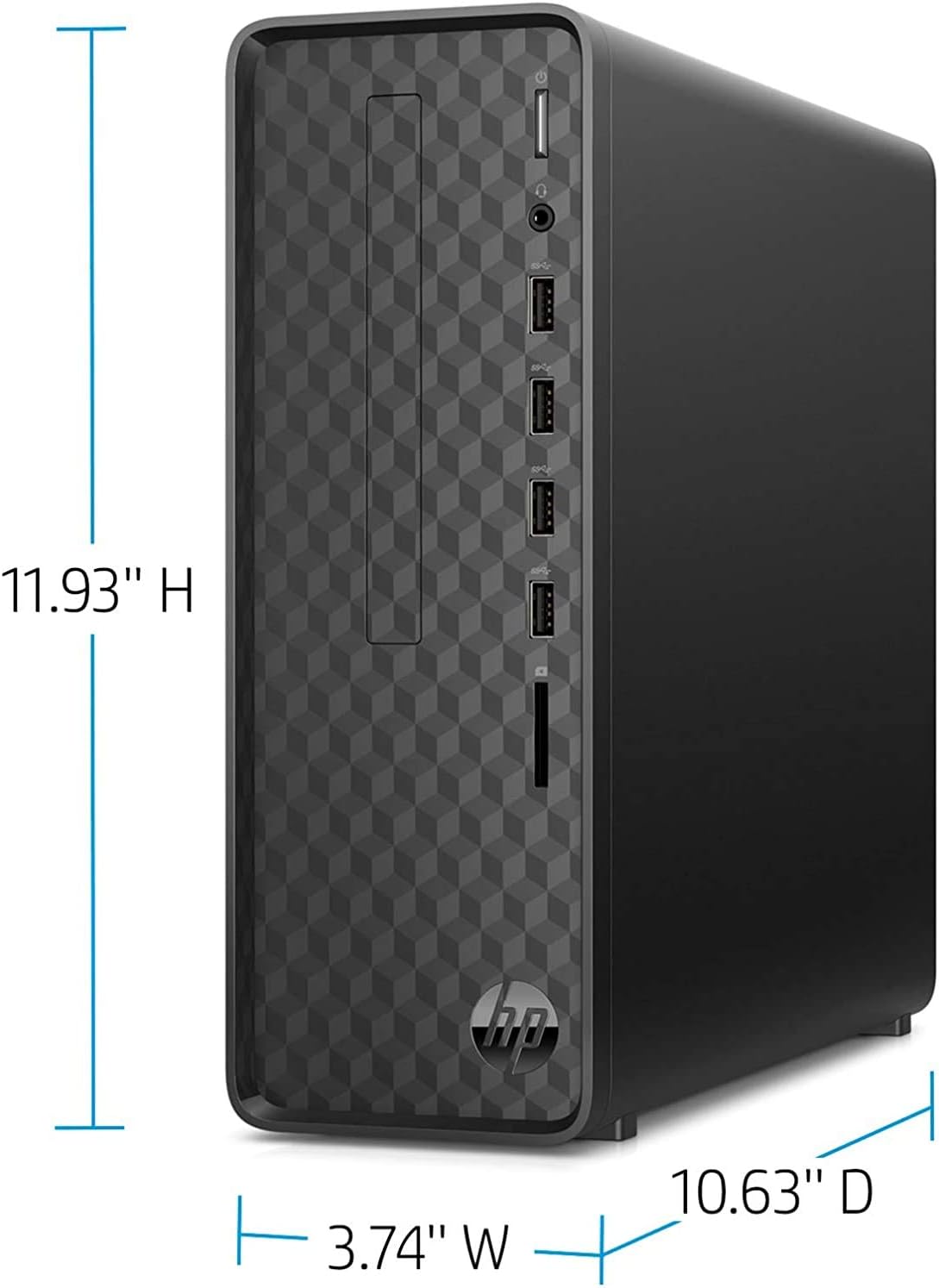
රූපය: ඉදිරිපස සහ පැත්ත view of the HP Slim Desktop, highlighting port locations and dimensions.
3.3 බල ගැන්වීම
Press the power button located on the front of the desktop. The system will boot up, and you will be guided through the initial Windows 11 setup process.

Image: Close-up of the HP Slim Desktop's front panel, showing the power button and various front ports.
4. මෙහෙයුම් උපදෙස්
4.1 මූලික Windows 11 සැකසුම
Upon first boot, follow the on-screen instructions to complete the Windows 11 setup. This includes selecting your region, connecting to a network, creating a user account, and configuring privacy settings.
4.2 මූලික භාවිතය
Once Windows 11 is set up, you can begin using your desktop. Navigate the operating system using the mouse and keyboard. Open applications from the Start menu or desktop shortcuts.
4.3 අන්තර්ජාලයට සම්බන්ධ වීම
- රැහැන්ගත සම්බන්ධතාවය (ඊතර්නෙට්): Connect an Ethernet cable from your router or modem to the Ethernet port on the back of the desktop.
- රැහැන් රහිත සම්බන්ධතාවය (Wi-Fi): During Windows 11 setup or via the Network & Internet settings, select your Wi-Fi network and enter the password. The desktop supports 802.11ac wireless standards.
4.4 USB පෝට් සහ දෘශ්ය ධාවකය භාවිතා කිරීම
- USB Ports: The desktop features multiple USB 2.0 ports for connecting external devices such as printers, external hard drives, or USB flash drives.
- දෘශ්ය ධාවකය: The integrated BD-R optical drive allows you to read and write Blu-ray discs, DVDs, and CDs. Insert the disc into the drive slot on the front panel.
5. නඩත්තු කිරීම
5.1 පිරිසිදු කිරීම
Regularly clean the exterior of the desktop with a soft, dry, lint-free cloth. For stubborn marks, slightly dampen the cloth with water. Avoid using harsh chemicals or abrasive cleaners. Ensure ventilation openings are free from dust buildup.
5.2 මෘදුකාංග යාවත්කාලීන
Keep your operating system and drivers updated. Windows 11 automatically checks for updates, but you can manually check via සැකසීම් > වින්ඩෝස් යාවත්කාලීන කිරීම. Driver updates for components like graphics or network adapters can be found on the HP support webඅඩවිය.
5.3 දත්ත උපස්ථය
ඔබේ වැදගත්කම නිතිපතා උපස්ථ කරන්න files to an external hard drive, USB flash drive, or cloud storage service to prevent data loss.
6. දෝශ නිරාකරණය
This section addresses common issues you might encounter with your HP Slim Desktop S01-aF0011.
- බලය නැත:
විසඳුම: Ensure the power adapter is securely connected to both the desktop and a working wall outlet. Try a different outlet if necessary. - මොනිටරයේ සංදර්ශකය නොමැත:
විසඳුම: Check that the monitor is powered on and the video cable is securely connected to both the desktop and the monitor. Ensure the correct input source is selected on your monitor. - මන්දගාමී කාර්ය සාධනය:
විසඳුම: Close unnecessary applications. Check for and install any pending Windows updates. Ensure your storage drive (SSD) has sufficient free space. - අන්තර්ජාල සම්බන්ධතා ගැටළු:
විසඳුම: For wired connections, check the Ethernet cable. For Wi-Fi, ensure you are connected to the correct network and have entered the password correctly. Restart your router/modem and the desktop. - Peripheral Not Responding (Keyboard/Mouse):
විසඳුම: Try plugging the peripheral into a different USB port. Ensure the peripheral is clean and free from obstructions.
7. පිරිවිතර
| විශේෂාංගය | විස්තර |
|---|---|
| ආදර්ශ අංකය | S01-aF0011 |
| මෙහෙයුම් පද්ධතිය | වින්ඩෝස් 11 |
| ප්රොසෙසරය | AMD Athlon Silver 3050U (2.3 GHz) |
| RAM | 4 GB DDR4 (2400 MHz) |
| ගබඩා කිරීම | 256 GB SSD |
| ග්රැෆික් කොප්රොසෙසරය | AMD Radeon (Integrated, 4 GB RAM) |
| ඔප්ටිකල් ඩ්රයිව් වර්ගය | බීඩී-ආර් |
| රැහැන් රහිත සම්බන්ධතාව | 802.11ac, බ්ලූටූත් |
| USB 2.0 Ports | 6 |
| උපරිම තිර විභේදනය | 3840x2160 |
| අයිතමයේ බර | රාත්තල් 6.66 කි |
| නිෂ්පාදන මානයන් (LxWxH) | අඟල් 11.93 x 10.63 x 3.74 |
| වර්ණය | ජෙට් කළු |
8. වගකීම් සහ සහාය
For warranty information, technical support, or service inquiries, please refer to the documentation included with your product or visit the official HP support website. You can typically find support resources, driver downloads, and contact options at support.hp.com.